
win32_runner 0.2.5  win32_runner: ^0.2.5 copied to clipboard
 halildurmus.dev
A Dart runner for Flutter Windows apps — no C++ compiler required.





A Dart runner for Flutter Windows apps — no C++ compiler required.
package:win32_runner is an experimental package that replaces the default
C++ runner generated by flutter create with a pure Dart alternative, letting
you build and run Flutter Windows apps without a C++ toolchain installed.
⚠️ Experimental: This package is a proof-of-concept and is not suitable for production use. Plugin support is not yet implemented.
🚀 Getting Started #
The example subdirectory contains a ready-to-use sample. Follow the steps below to run an existing Flutter app on Windows using the Dart runner.
1. Clone the repository
C:\src> git clone https://github.com/halildurmus/win32.git
C:\src> cd packages/win32_runner
2. Install dependencies
C:\src\win32\packages\win32_runner> dart pub get
3. Create a sample Flutter app
C:\src\win32\packages\win32_runner> cd example
C:\src\win32\packages\win32_runner\example> flutter create simpleapp
C:\src\win32\packages\win32_runner\example> cd simpleapp
4. Compile the Dart runner
C:\src\win32\packages\win32_runner\example\simpleapp> dart build cli -t ..\win32_runner.dart -o build
5. Compile Flutter code and assets
C:\src\win32\packages\win32_runner\example\simpleapp> flutter assemble -dTargetPlatform=windows-x64 --output=build -dBuildMode=release release_bundle_windows-x64_assets
6. Run your Flutter app
C:\src\win32\packages\win32_runner\example\simpleapp> .\build\bundle\bin\win32_runner.exe
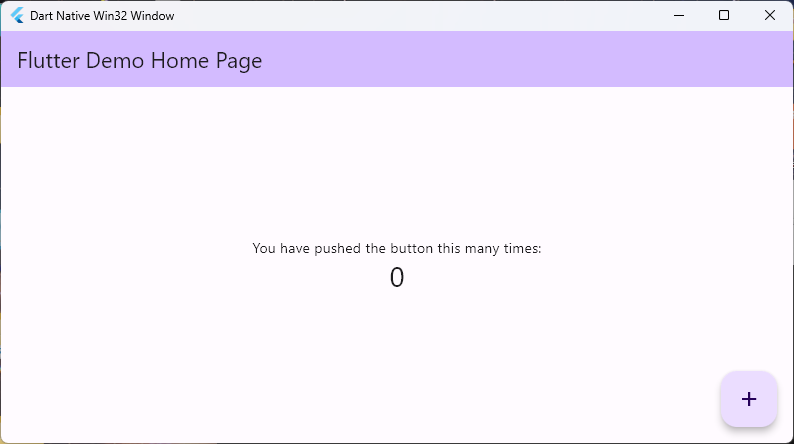
You should now see your Flutter app running via the Dart runner:
📝 Documentation #
Full API reference is available here:
Additional usage examples are located in the example directory.
🐞 Features and Bugs #
If you encounter bugs or need additional functionality, please file an issue.
Metadata
Publisher
Weekly Downloads
Metadata
A Dart runner for Flutter Windows apps — no C++ compiler required.
Repository (GitHub)
View/report issues
Contributing
Topics
Documentation
Funding
Consider supporting this project:
github.com
License
 BSD-3-Clause (license)
Dependencies
args, ffi, path, win32, win32_registry

