
zcode_embed_ime 0.0.1  zcode_embed_ime: ^0.0.1 copied to clipboard
 satsrag.dev
Zcode 52 standard Mongol embed IME. Soft/Hard layout and Suggestion words.
Zcode 52 standard Mongolian embed IME.
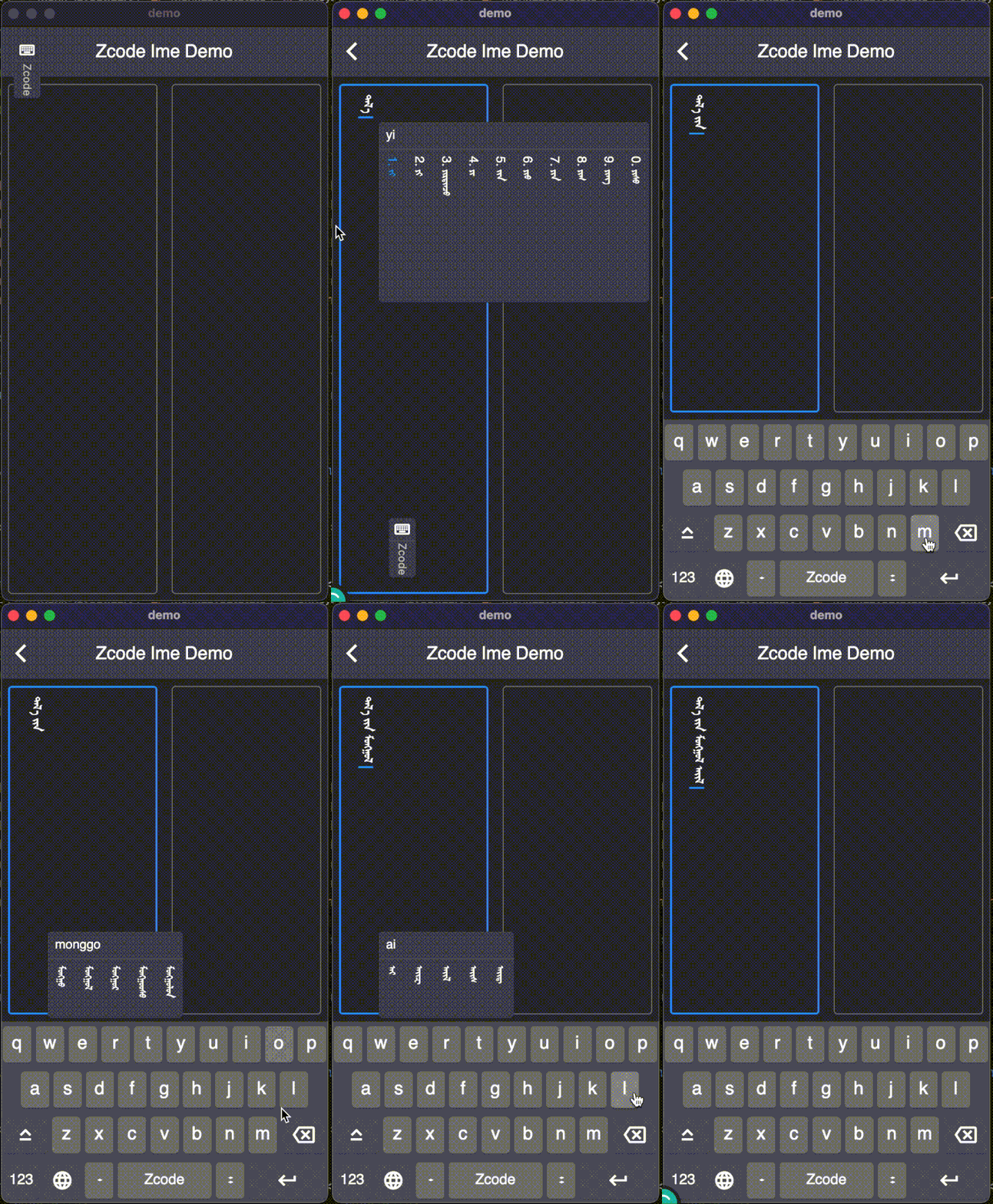
Features #
-
Embed into the Flutter app, support all platform.
-
On mobile, use a soft keyboard by default.
-
On mobile, the soft keyboard auto show or hide when one MongolTextField or TextField gets or loses focus.
-
On the Desktop, use a hard keyboard by default.
-
support database
-
support
MongolTextFieldandTextField.
Getting started #
Although the mongol library is optional, I recommend adding it. It contains
MongolTextField,MongolText, and other vertical Mongol components. For convenience, in this guide, I did not import themongollibray. If you want to use themongollibrary, import the themongollibrary following the official guide and replaceTextFieldused in this guide withMongolTextField.
1. Add needed library
dependencies:
  zcode_embed_ime: ^0.0.1
Run Flutter pub get.
2. Add Zcode 52 Mongol Font
If you using the
mongollibrary, skip this step. However, please ensure that you are using aZcode 52 fontin your project.
-
Get a Zcode font
-
Add the font to your project
Basically you just need to create an fonts folder for it and then declare the font in pubspec.yaml like this:
flutter: fonts: - family: ZcodeQagan fonts: - asset: fonts/z52tsagaantig.ttf -
Set the default Mongol font for your app
In your
main.dartfile, set thefontFamilyfor the app theme.MaterialApp( theme: ThemeData(fontFamily: 'ZcodeQagan'), // ... );Now you won't have to manually set the font for every text widget. If you want to use a different font for some widgets, though, you can still set the fontFamily as you normally would inside TextStyle.
3. Use zcode_embed_ime
-
Import library
import 'package:zcode_embed_ime/zcode_embed_ime.dart'; -
Add
EmbedKeyboard@override Widget build() { return Scaffold( body: Column(children: [ const Expanded(child: TextField()), EmbedKeyboard( layoutBuilders: const [ ZcodeLayout.create, EnglishLayout.create, ], ), ]), ); }After completing this step, the library is imported at the lowest cost. You run you project and see what's going on.
However, after this step, there is no supporting the thesaurus database. Some words cannot be typed without supporting the thesaurus database. In the next version, I will fix this issue so that it can type all the words without relying on the thesaurus database. Thesaurus database should only be auxiliary.
Database Supporting #
The thesaurus database did not combine into this library.
In the demo, used the sqlite3 to load the thesaurus database. Other developers may be using another library of SQLite. Such as sqflite, and so on.
These libraries, especially sqlite3 and sqflite, maybe conflict with each other when used in the same project. So we need to import it ourselves.
This guide omits the importing SQLite library. You can reference the demo or official guide if you want to use the sqlite3 library. Please go to the official guide if you using another library like sqflite.
1. Get the zcode thesaurus #
2. Add thesaurus to project #
Basically you just need to create an db folder for it and then declare the font in pubspec.yaml like this:
flutter:
  assets:
    - db/z52words03.db
Run flutter pub get
3. Add Sqlite libray and query suggestion words #
After adding the Sqlite Library, you will write the SQL to query suggestion words:
select word from [table] where latin like ['latin%'] order by wlen limit 15'
Arguments:
-
table: input latin's first letter,
latin.substring(0, 1) -
'latin%': inputed latin
4. Expends the ZcodeLayoutTextConverter #
Then extends the ZcodeLayoutTextConverter and overrides the appendLayoutText and backspaceLayoutText methods.
class DBZcodeLayoutConvertor extends ZcodeLayoutTextConverter {
  @override
  void appendLayoutText(String text) {
    super.appendLayoutText(text);
    _updateSuggestion();
  }

  @override
  void backspaceLayoutText(bool clear) {
    super.backspaceLayoutText(clear);
    _updateSuggestion();
  }

  void _updateSuggestion() {
    if (layoutText.isEmpty) return;
    LinkedHashSet<String> suggestions = LinkedHashSet.from(suggestionWords);
    var latin = layoutText.replaceAll('c', 'C');
    latin = layoutText.replaceAll('q', 'c');
    suggestions.addAll(db.dbSuggestion(latin));
    suggestionWords.clear();
    suggestionWords.addAll(suggestions);
  }
}
db.dbSuggestion(latin) is query suggestion words using a SQLite libray.
5. Add DBZcodeLayoutConvertor to the EmbedKeyboard #
Widget build() {
   return Scaffold(
      body: Column(children: [
         const Expanded(child: TextField()),
         EmbedKeyboard(
            layoutBuilders: [
               (i) => ZcodeLayout(i, converter: DBZcodeLayoutConvertor()),
               EnglishLayout.create
            ],
         ),
      ]),
   );
}
Statement #
The Zcode thesaurus, inputting logic, and font are copied from Zmongol's zmongol2021 library. The copyright belongs to Zmongol.
The Inputting logic has a tiny problem. Some words cannot be typed without using the thesaurus database. I will try to fix this. If someone finds cannot input some words or has any other problem with this library, please feel free to open an issue or PR.
Metadata
Publisher
Weekly Downloads
Metadata
Zcode 52 standard Mongol embed IME. Soft/Hard layout and Suggestion words.
Repository (GitHub)
View/report issues
License
 unknown (license)

