
video_trimmer 6.0.0  video_trimmer: ^6.0.0 copied to clipboard
 souvikbiswas.com
Trim videos in Flutter on Android, iOS, macOS, and the web, with a customizable trim viewer, playback controls, and video or GIF output.
6.0.0 #
The biggest update since the native rewrite. It adds macOS and web support,
fixes the crashes and dead-UI reports that new integrations hit first, moves
thumbnails and trimming into the package's own native code, reworks scrolling
and playback, and adds line handles, minVideoLength, and restoring a saved
selection. See the README's "Migrating to 6.0.0" section when upgrading.
BREAKING CHANGES
Trimmer.loadVideotakes the video's path (videoPath) instead of adart:ioFile, so the same code runs on the web: replaceloadVideo(videoFile: file)withloadVideo(videoPath: file.path). On the web, pass a blob: URL, such as a picker'sXFile.path.Trimmer.currentVideoFileis nowcurrentVideoPath.- The viewer widgets no longer dispose the
VideoPlayerControlleror theTrimmer. TheTrimmerowns the controller, andTrimmer.dispose()releases it. CallTrimmer.dispose()from theStatethat created the instance. (#250) - video_trimmer is now a Flutter plugin with its own native code for
thumbnails and trimming: AVFoundation on iOS and macOS, Media3 Transformer
on Android, and Mediabunny on the web.
get_thumbnail_videoandflutter_native_video_trimmerare no longer dependencies. Runflutter clean(andpod installon iOS and macOS) if a build picks up stale plugin registrations. - The Android
minSdkis 24, the minimumvideo_player_androidalready requires. - A trimmed video's extension matches the container actually written:
always
.mp4on Android, and.mp4on iOS and macOS except for.movand.m4vsources, which keep theirs. It used to copy the source's extension, so a.webmor.mkvsource on Android produced MP4 data under that name. onChangePlaybackStatefires only when playback starts or stops, not on every position update. (#236)Trimmer.loadVideothrows aFileSystemExceptionon native platforms when the file does not exist, instead of silently doing nothing.- Default output file names changed from
<name>_trimmed:<localized date>.<ext>to<name>_trimmed_<yyyyMMdd_HHmmss>.<ext>. (#203, #214) DurationStyleno longer truncates the largest unit it is asked for:FORMAT_MM_SSrenders 1h30m15s as90:15rather than30:15, andFORMAT_SSrenders 90s as90rather than30.StorageDiris now a realenum. Existing call sites (StorageDir.temporaryDirectory,.values,.index,toString()) behave as before, but it can no longer be subclassed.ViewerType.scrollableon a video too short to scroll now reports a Flutter error and falls back to the fixed viewer, rather than throwing a bareStringfrom a stream listener.- The trim handles are drawn as lines instead of dots by default. Pass
TrimEditorProperties(handleStyle: TrimHandleStyle.circle)to keep the previous look.
New
- Web support. Thumbnails are drawn from a
<video>element, and trimming runs in the browser with Mediabunny (MPL-2.0) on WebCodecs, producing MP4.onSavereceives a blob: URL, and GIF output works too. Mediabunny is embedded in the web plugin only, so apps on other platforms don't carry it. No part of the package's shared code importsdart:ioany more. Trimming needs a browser with WebCodecs: current Chrome, Edge and Safari, and Firefox 130 or later. - macOS support. The iOS plugin code now lives in
darwin/and is shared with macOS (sharedDarwinSource), so thumbnails and trimming use the same AVFoundation code on both. JPEG encoding moved from UIKit to ImageIO for that. The example app runs on macOS too. - Line drag handles.
TrimEditorProperties.handleStylepicksTrimHandleStyle.line(the new default) orTrimHandleStyle.circle, andhandleHeightsets a line's height in pixels or as a percentage of the trim area:TrimHandleHeight.pixels(24)orTrimHandleHeight.percent(50)(the default).circleSizeandcircleSizeOnDragset the line's width, so it still grows while it is dragged. TrimViewer.minVideoLengthsets the shortest selection allowed. The handles stop rather than close in past it, and a saved range shorter than it grows to fit. Set it equal tomaxVideoLengthfor a fixed-length selection that can only be moved. (#188, #269)TrimViewertakesinitialStartValue/initialEndValue(milliseconds, the same valuesonChangeStart/onChangeEndreport) to open on a saved selection. Both viewers honor them; the scrollable viewer scrolls the range into view, and the preview starts on its first frame. Either can be given alone, soinitialEndValuealso sets a shorter default selection thanmaxVideoLength. (#73, #274, #209)- Smoother scrolling: the scrollable viewer's auto-scroll advances once per frame instead of hopping on a 300 ms timer, its trigger zone is touch-sized rather than 2% of the strip width, and the thumbnail strip can be dragged directly with a fling on release. (#187, #263)
- Drag start picks the nearest handle within
sideTapSizeinstead of slicing the frame into zones, so grabs near either end no longer move both handles. (#234) - New
TrimAreaPropertiesoptions:allowManualScroll,autoScrollEdgeZone,maxAutoScrollVelocity, andautoScrollStartDelay. (#199) - Looping works inside the trim range. With
videoPlayerController.setLooping(true), playback wraps from the trim end back to the trim start instead of pausing, including when the range ends at the end of the video and the player loops on its own. (#237) Playback stops or wraps at the trim end within a frame, instead of overshooting it by up to one of the player's position reports, and a wrap at the end of the video no longer flashes the video's first frame. - The scrubber follows the player's real position and playback speed instead of running its own clock, so it no longer drifts after repeated pauses and stays correct at 0.5x–2x. (#137, #212, #218)
- Swift Package Manager support on iOS and macOS. With
flutter_native_video_trimmergone, no dependency of the package lacks it, so builds no longer warn. - Trimming writes straight to the destination instead of exporting to the cache and copying the result. Android uses Media3's trim optimization, which copies the samples it can instead of re-encoding them.
Fixes
- Apps that also depend on
video_thumbnailno longer crash at launch on iOS withDuplicate plugin key: VideoThumbnailPlugin. Theget_thumbnail_videodependency, and itslibwebppod, are gone. (#271, #266, #275) TrimViewerandVideoViewerrendered nothing forever when the video finished initializing before they mounted — theawait loadVideo()thensetStatepattern, conditional builds, and hot reload. They now check theTrimmer's state directly. (#215)- Omitting
onChangeStart,onChangeEnd, oronChangePlaybackStatethrewNull check operator used on a null value. (#268) - Callbacks that seek or play from
onChangePlaybackStateno longer re-enter until the stack overflows. (#236) - On Android, disposing a
Trimmer(for example by leaving the page) while its video was still loading made that load hang forever and could stall the next one. A controller is now released only after itsinitialize()settles. Trimmer.dispose()whileloadVideowas still running left a live, initialized player behind, and two overlappingloadVideocalls both emittedinitializedand leaked the loser's player. Now the newest call wins, a disposedTrimmerignoresloadVideo, and superseded loads release everything they created.saveTrimmedVideocallsonSave(null)when the native trimmer produces no file, instead of throwing a null-check error.saveTrimmedVideodereferenced a null directory whenStorageDir.externalStorageDirectorywas used off Android, and when the storage value did not match its string-based switch. It now throws a clearUnsupportedError. (#225)- The scrollable viewer could not select the last part of a clip: with a 30 s clip and a 10 s max, the selection stopped 0.6–0.8 s before the end, depending on screen width. The scroll range now covers exactly what the visible area doesn't. (#192, #223, #207)
- Fast drags in both viewers stop exactly on the strip's edge, the
maxVideoLengthcap, or the other handle, instead of up to one pointer delta short. Diagonal drags no longer shift the handles vertically. pathis accepted from 1.9.0. Flutter SDKs that pinpath1.9.0 throughflutter_test, such as 3.22, could not resolve the package at all.- The supported range is now declared: Flutter 3.22 or later (Dart 3.4), which the dependencies already required. It is verified by analyzing, unit-testing, and building the example for the web on Flutter 3.22.3.
videoPlaybackControlstarts from the trim start when the playhead is before it, not only after the end.- Both viewers invoked consumer callbacks from
dispose(), which runs inside a locked build scope, so any consumer callingsetStatethere crashed on teardown. - Neither viewer removed its video-player listener, so
dispose()'spause()notified it synchronously and crashed the same way. - Default output names no longer truncate source file names containing dots:
my.holiday.clip.mp4kept onlymy. VideoViewer'spaddingargument was accepted and then ignored.TrimAreaProperties.edgeBlur()declaredstartIcon,endIcon, andblurEdgesas untyped parameters and never forwarded them, so custom icons were silently discarded.- The decorative edge chevrons hit-tested as opaque and swallowed drags right where users reach to scroll.
Trimmer.loadVideoleaked the previousVideoPlayerControlleron every reload, and the viewers' scrubber animation controllers and stream subscriptions were never disposed.
Other changes
- Dependency ranges start where Flutter 3.22 can resolve them
(
video_player2.9.5,image4.5.4,path1.9.0) and allow the latest releases.flutter_lints6 is used for development. intl,transparent_image, andflutter_native_video_trimmerare no longer dependencies.intlwas only used to format output file names, and its version is pinned by the Flutter SDK throughflutter_localizations, so everyintlrelease risked a version conflict for apps that localize. Dropping it resolves those conflicts for good. (#261)transparent_imagesupplied one placeholder image, now part of the package.- Export
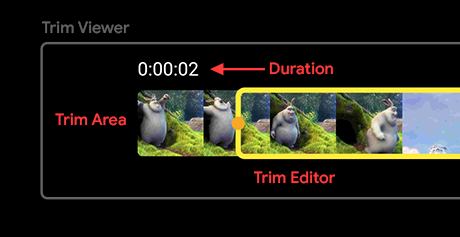
FixedTrimViewerandScrollableTrimViewerso they can be used and tested directly. - README rewritten for 6.0.0: up-to-date usage, a migration guide, a full example that compiles against the current API, a new demo that also renders on pub.dev, a new cover, and a labeled TrimViewer diagram.
- The example is now a customization playground covering every option, with loop and speed controls, per-file selection restore, a bundled sample clip, no iOS swipe-back on the trimmer page (it stole drags on the start handle), macOS and web runners, and the Flutter 3.47 Android template (Gradle 9.3, AGP 9.1, Kotlin 2.4).
- Unit tests for the pure logic (drag clamping, initial ranges, playhead, naming, durations, the native trim channel), an integration suite of 27 tests that drives the example app on iOS, Android, and macOS, and a web suite that generates thumbnails and trims to MP4 and GIF in Chrome.
5.0.0 #
Got rid of the flutter_ffmpeg package and now uses a native video trimmer (Android and iOS)! 🎉
Why the change?
- The most important reason is that the
flutter_ffmpegpackage has been discontinued by the author. Learn more about it here. - The native video trimmer is more efficient and faster. And even provides better performance with low memory usage.
BREAKING CHANGES
- Remove
ffmpegCommandandcustomVideoFormatproperties. As those were specific toflutter_ffmpegpackage. FileFormatno longer exists. A new enum is introduced calledOutputTypeto choose between GIF and video output file.outputFormatno longer exists. By default the output has the same format as the original video.
Other changes
- New property
qualityGIFto specify the quality of the GIF. - Update dependencies.
- Update example project.
- Update README.
4.0.2 #
- Use
withValuesinstead ofwithOpacityas it's deprecated.
4.0.1 #
- Update readme.
4.0.0 #
- Fix thumbnail loading issue while using certain video formats.
- Upgrade dependencies and remove
video_thumbnailpackage (uses FFmpeg which is more reliable and efficient). - Fix an issue with the video trimmer length being incorrectly calculated breaking the UI.
3.0.1 #
- Updates readme.
3.0.0 #
- NOTE: Separates the LTS version into a branched package version. By default, it will use the latest "Full" version of FFmpeg. To install the "LTS" version use the "x.x.x-LTS" version of the package.
- Updates minimum Flutter version to 3.0.
- Updates plugin versions.
2.1.0 #
- Update plugin versions.
2.0.1 #
- Add new property for specifying
DurationStyle.
2.0.0 #
- BREAKING CHANGE: Overhaul of the entire video trimmer implementation.
- Two types of
TrimViewerare available:FixedTrimViewer&ScrollableTrimViewer. By default it's set toautoso that it switches between these two based on the total video length and the maximum trim duration allowed. - Rename
TrimEditortoTrimViewer. Check out this diagram for better understanding of the keywords/terms. - Separate the properties of into two types,
TrimEditorProperties&TrimAreaProperties. Helps in identifying where the properties belong to easily. - Fix some bugs related to wrong trimmer length while initialization.
- Two types of
- Add more customization options.
- Improve the documentation.
- Update the example project.
- Bug Fix: Use
circleSizeOnDragonly on the selected holder.
1.2.0 #
- Update plugin versions.
1.1.3 #
- Changing
pathversion to1.8.0(latest is1.8.1) because it creates a conflict withflutter_testas it uses the older version.
1.1.2 #
- Update plugin versions.
1.1.1 #
- Format file (to pass static analysis).
1.1.0 #
- Update ffmpeg_kit_flutter to 4.5.1-LTS.
- Update other plugin versions.
- Update Readme.
1.0.0 #
- BREAKING CHANGE: Migrate to FFmpegKit for Flutter.
saveTrimmedVideo()method is not async now, you'll need to use the callbackonSave: (outputPath) {}to get the trimmed video output path. - Add playback timestamp in the
showDuration. - Simply configuration.
- Update the plugin versions.
- Update Docs.
0.6.0 #
- Update the plugin versions.
- Using flutter_lints.
0.5.4 #
- Update Docs.
0.5.3 #
- Add
borderWidthandscrubberWidthproperties underTrimEditorwidget. - Fix padding and border decoration of
VideoViewer. - Update the plugin versions.
0.5.2 #
- Fix iOS error while loading thumbnails in
TrimEditor. - Remove an unused dependency.
- Update packages.
0.5.1 #
- Update the example in Readme.
- Update the plugin versions.
0.5.0 #
- Global refactoring, example is now a standalone screen.
- Fixed the staggering issue when dragging the frame.
- The whole frame can now be dragged in addition to the sides.
- Updated packages.
- Updated the example.
0.4.0 #
- Migrate to null safety.
- Fix video thumbnail loading issues.
- Bump up all dependencies.
- Upgrade example.
0.3.5 #
- Update example app (small bug fixes).
- Update to latest plugin versions.
0.3.4 #
- Fixed the issue with video getting struck for a few initial frames during playback.
0.3.3 #
- Updated plugin versions.
0.3.2 #
- Minor changes.
0.3.1 #
- Improve the file structure of the package.
- Now, you just have to import one file for using the package.
0.3.0 #
- Update the plugin versions.
- Update example app (now includes how to retrieve the trimmed video).
- Update Readme.
- Fixes some memory leak issues.
0.2.7 #
- Add a new property called
maxVideoLengthfor specifying the max length of the output video. - Update Docs.
0.2.6 #
-
Add a new property called
fittoTrimEditorwidget which will let you specify the image fit type of each thumbnail image. -
Add a new property to
saveTrimmedVideo()method calledapplyVideoEncodingwhich will let you specify whether to re-encode the trimmed video.NOTE: Applying this will take significantly greater amount of time to process the output video.
-
Improve Docs.
0.2.5 #
- Update Docs.
- Reverted the FFmpeg trimmed video start & end position to milliseconds (earlier it was changed to seconds in
v0.2.4to fix video freezing, but after testing it was found that the issue still persists).
0.2.4 #
- Fix output video freezing during start and end.
- Update the example app to use LTS version of FFmpeg (for wider device support).
- Update Readme.
0.2.3 #
- Fix issue with path returned.
0.2.2 #
- Change implementation of the
saveTrimmedVideo()method. saveTrimmedVideo()now returns the output video path.- Update Docs.
0.2.1 #
- Fix over-scrolling && scroll-over issue.
0.2.0 #
- BREAKING CHANGE:
loadVideo()method implementation changed. Now, you can pass the video file to the method. - Fix issue related to animation controller improperly disposing.
- Update Docs.
0.1.5 #
- Fix for paths having white spaces.
0.1.4 #
- Smoothen the scrubber animation.
0.1.3 #
- Code improvements.
- Update Readme.
0.1.2 #
- Changed
StorageDirformat naming. - Update documentation.
0.1.1 #
- Correct documentation.
0.1.0 #
- Initial Open Source release.
Metadata
Documentation
Publisher
Weekly Downloads
Metadata
Trim videos in Flutter on Android, iOS, macOS, and the web, with a customizable trim viewer, playback controls, and video or GIF output.
Repository (GitHub)
View/report issues
Topics
#video #trimmer #video-editing #media
License
 MIT (license)
Dependencies
flutter, flutter_web_plugins, image, path, path_provider, video_player, web
More
Packages that depend on video_trimmer
Packages that implement video_trimmer