
s_client 1.0.0  s_client: ^1.0.0 copied to clipboard
Safe-by-default HTTP client with dual backend support (http/dio), never throws exceptions, returns result tuples, supports interceptors, retry logic, and type-safe JSON parsing.
s_client #
A powerful HTTP client package for Flutter supporting both http and dio backends with advanced features like interceptors, caching, retry logic, and more.
Features #
- Safe by Default: All requests internally wrapped in try-catch blocks - no unhandled exceptions, guaranteed safe execution
- Dual Backend Support: Switch between lightweight
httpor feature-richdiopackages - Unified API: Every method returns a result tuple AND supports optional callbacks
- Type-Safe JSON Parsing: Built-in support for JSON deserialization with
getJson,getJsonList,postJson - Customizable Status Codes: Define what constitutes success vs error responses
- Interceptors: Built-in logging, authentication, and caching interceptors
- Retry Logic: Automatic retries with exponential backoff
- Request Cancellation: Cancel individual requests or all pending requests
- File Operations: Upload and download files with progress callbacks
Demo #
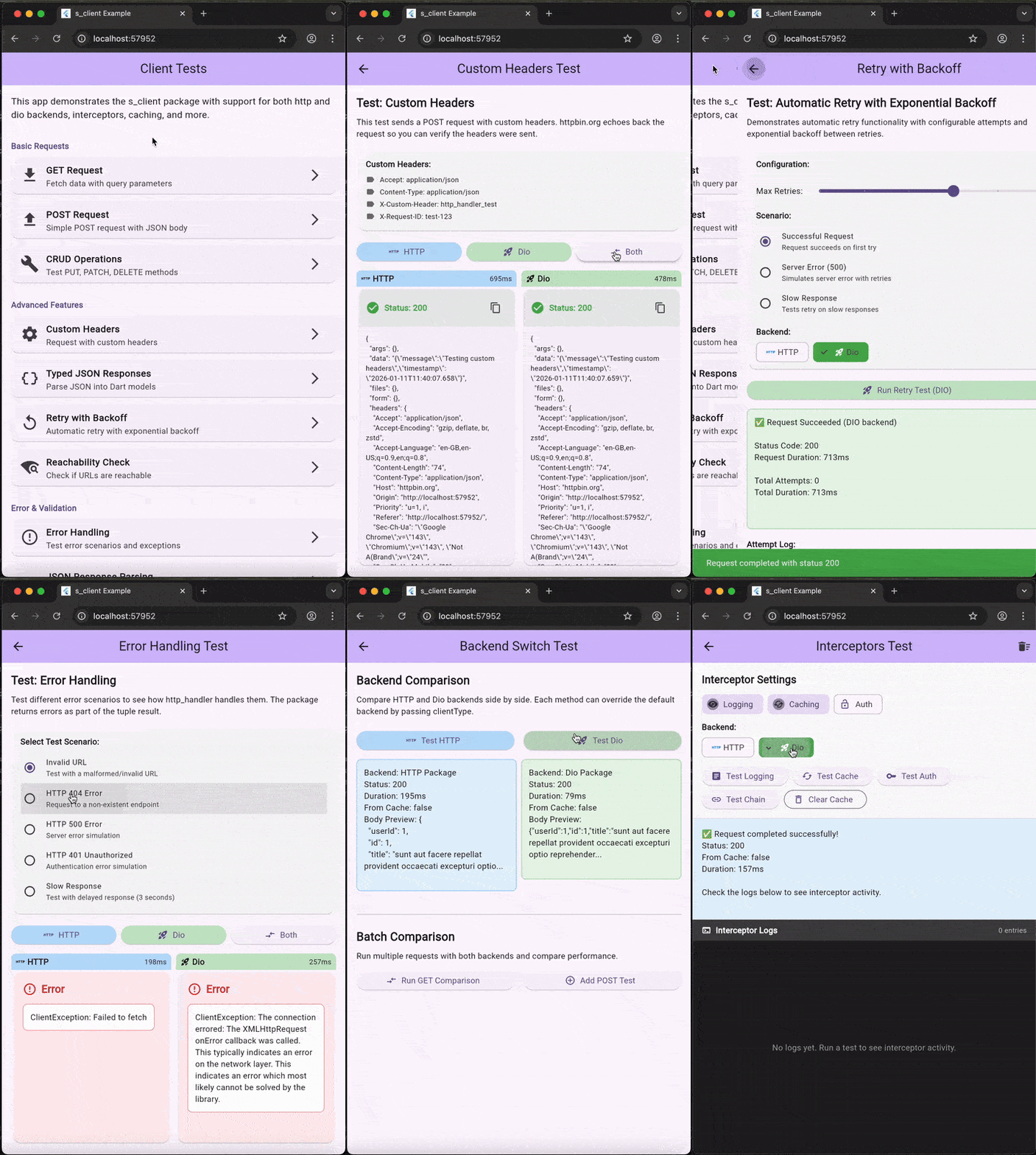
The example app demonstrates all features including:
- GET/POST/PUT/PATCH/DELETE/HEAD requests with HTTP and Dio backends
- Typed JSON parsing with
getJsonandgetJsonList - Interceptors (logging, caching, authentication)
- Retry logic with exponential backoff
- Error handling scenarios
- Reachability checking
- Form submission with validation
- Side-by-side comparison of HTTP vs Dio backends
Installation #
Add to your pubspec.yaml:
dependencies:
  s_client: ^1.0.0
Quick Start #
Import #
import 'package:s_client/s_client.dart';
Tuple-Based API (Functional Style) #
// Returns (ClientResponse?, ClientException?) tuple
// All requests are internally wrapped in try-catch - NEVER throws!
final (response, error) = await SClient.instance.get(
  url: 'https://api.example.com/users',
);

if (error != null) {
  print('Error: ${error.message}');
} else {
  print('Success: ${response!.body}');
}
Why This Is Safe #
Unlike raw HTTP clients, s_client never throws exceptions. Every request is wrapped in internal try-catch blocks:
// ❌ Raw http/dio - can crash your app
try {
  final response = await http.get(Uri.parse(url));
  // Handle response...
} catch (e) {
  // You MUST remember to catch!
}

// ✅ s_client - always safe, never crashes
final (response, error) = await SClient.instance.get(url: url);
if (error != null) {
  // Handle error gracefully
}
// No try-catch needed - the package handles it for you!
With Optional Callbacks #
// Same method, with optional callbacks - returns tuple AND invokes callbacks
await SClient.instance.get(
  url: 'https://api.example.com/users',
  onSuccess: (response) {
    print('Success: ${response.body}');
  },
  onError: (error) {
    print('Error: ${error.message}');
  },
  onStatus: {
    401: (code, response) => refreshToken(),
    429: (code, response) => handleRateLimit(),
  },
);
Best of Both Worlds #
// Use callbacks for UI updates AND inspect the result for logging/analytics
final (response, error) = await SClient.instance.get(
  url: 'https://api.example.com/users',
  onSuccess: (response) => updateUI(response),
  onError: (error) => showSnackbar(error.message),
);

// Can still use the result for additional processing
if (response != null) {
  analytics.logSuccess(response.statusCode);
}
Using Data from Both Callback AND Tuple Result #
The callback receives the exact same object as the tuple result, so you can use the data in both places:
// Capture data from callback
String? extractedUsername;
ClientResponse? callbackResponse;

// Make request - use data in BOTH places
final (response, error) = await SClient.instance.get(
  url: 'https://api.example.com/user/123',
  onSuccess: (resp) {
    // Extract and use data in the callback
    callbackResponse = resp;
    final userData = jsonDecode(resp.body);
    extractedUsername = userData['username'];

    print('Callback: User is $extractedUsername');
    _updateUserCache(userData);  // Side effect
  },
);

// ALSO use the same data from the tuple result
if (response != null) {
  final userData = jsonDecode(response.body);
  final email = userData['email'];

  print('Tuple: Email is $email');
  print('Username from callback was: $extractedUsername');

  // Both response objects are identical!
  assert(identical(response, callbackResponse));  // true
}
Key Benefits:
- Callbacks fire before the method returns, so side effects happen immediately
- The tuple result gives you structured error handling and flow control
- Both receive the same response object, so you can access data from either
- Use callbacks for: logging, analytics, UI updates, caching
- Use tuple for: business logic, error handling, data processing
Typed JSON Parsing #
class User {
  final String name;
  final int age;

  User.fromJson(Map<String, dynamic> json)
      : name = json['name'],
        age = json['age'];
}

// GET with automatic JSON parsing
await SClient.instance.getJson<User>(
  url: 'https://api.example.com/user/1',
  fromJson: User.fromJson,
  onSuccess: (user, response) {
    print('Hello ${user.name}, age ${user.age}');
  },
  onError: (error) {
    print('Error: ${error.message}');
  },
);

// GET list of objects
await SClient.instance.getJsonList<User>(
  url: 'https://api.example.com/users',
  fromJson: User.fromJson,
  onSuccess: (users, response) {
    print('Got ${users.length} users');
  },
  onError: (error) {
    print('Error: ${error.message}');
  },
);
Configuration #
Global Configuration #
SClient.configure(
  const ClientConfig(
    clientType: ClientType.dio, // or ClientType.http
    baseUrl: 'https://api.example.com',
    connectTimeout: Duration(seconds: 30),
    receiveTimeout: Duration(seconds: 30),
    defaultHeaders: {
      'Accept': 'application/json',
      'Content-Type': 'application/json',
    },
  ),
);
Retry Logic #
SClient.configure(
  const ClientConfig(
    maxRetries: 3,
    retryDelay: Duration(seconds: 1),
    exponentialBackoff: true,
    retryStatusCodes: {408, 429, 500, 502, 503, 504},
  ),
);
Custom Success/Error Codes #
SClient.configure(
  const ClientConfig(
    successCodes: {200, 201, 204},
    errorCodes: {400, 401, 403, 404, 500},
  ),
);
Interceptors #
Logging Interceptor #
SClient.configure(
  ClientConfig(
    interceptors: [
      LoggingInterceptor(
        logRequest: true,
        logResponse: true,
        logRequestHeaders: true,
        logResponseHeaders: true,
        logRequestBody: true,
        logResponseBody: true,
        maxBodyLength: 1000,
        prettyPrintJson: true,
      ),
    ],
  ),
);
Or simply enable logging:
SClient.configure(
  const ClientConfig(
    enableLogging: true, // Adds LoggingInterceptor automatically
  ),
);
Authentication Interceptor #
// Bearer Token
SClient.configure(
  ClientConfig(
    interceptors: [
      AuthInterceptor(
        authType: AuthType.bearer,
        tokenProvider: () => 'your-token-here',
      ),
    ],
  ),
);

// API Key
SClient.configure(
  ClientConfig(
    interceptors: [
      AuthInterceptor(
        authType: AuthType.apiKey,
        apiKeyHeaderName: 'X-API-Key',
        tokenProvider: () => 'your-api-key',
      ),
    ],
  ),
);

// Basic Auth
SClient.configure(
  ClientConfig(
    interceptors: [
      AuthInterceptor(
        authType: AuthType.basic,
        username: 'user',
        password: 'pass',
      ),
    ],
  ),
);
Cache Interceptor #
SClient.configure(
  ClientConfig(
    interceptors: [
      CacheInterceptor(
        defaultMaxAge: Duration(minutes: 5),
        maxEntries: 100,
        cacheOnlySuccess: true,
      ),
    ],
  ),
);
Custom Interceptor #
class CustomInterceptor extends ClientInterceptor {
  @override
  Future<ClientRequest?> onRequest(ClientRequest request) async {
    // Modify request
    final headers = Map<String, String>.from(request.headers);
    headers['X-Custom-Header'] = 'value';
    return request.copyWith(headers: headers);
  }

  @override
  Future<ClientResponse> onResponse(
    ClientRequest request,
    ClientResponse response,
  ) async {
    // Process response
    return response;
  }

  @override
  Future<bool> onError(
    ClientRequest request,
    Object error,
    int attemptCount,
  ) async {
    // Return true to retry, false to propagate error
    return false;
  }
}
HTTP Methods #
All methods return a result tuple AND support optional callbacks:
GET #
// Tuple only
final (response, error) = await SClient.instance.get(url: '/users');

// With callbacks (still returns tuple)
final (response, error) = await SClient.instance.get(
  url: '/users',
  onSuccess: (response) => print(response.body),
  onError: (error) => print(error.message),
);
POST #
final (response, error) = await SClient.instance.post(
  url: '/users',
  body: {'name': 'John', 'age': 30},
  onSuccess: (response) => print('Created: ${response.body}'),
  onError: (error) => print('Error: ${error.message}'),
);
PUT, PATCH, DELETE, HEAD #
All follow the same unified pattern.
File Operations #
Download #
final (bytes, error) = await SClient.instance.download(
  url: 'https://example.com/file.pdf',
  onSuccess: (bytes) => saveFile(bytes),
  onError: (error) => print('Download failed: ${error.message}'),
  onProgress: (current, total) {
    print('Progress: ${(current / total * 100).toStringAsFixed(1)}%');
  },
);
Upload #
final (response, error) = await SClient.instance.uploadFile(
  url: '/upload',
  filePath: '/path/to/file.pdf',
  fileField: 'file',
  onSuccess: (response) => print('Uploaded'),
  onError: (error) => print('Upload failed'),
  onProgress: (current, total) {
    print('Progress: ${(current / total * 100).toStringAsFixed(1)}%');
  },
);
Request Cancellation #
// Cancel a specific request
await SClient.instance.get(
  url: '/users',
  cancelKey: 'users-request',
);
SClient.instance.cancel('users-request');

// Cancel all pending requests
SClient.instance.cancelAll();
Error Handling #
ClientException Types #
enum ClientErrorType {
  connectionTimeout,
  sendTimeout,
  receiveTimeout,
  cancelled,
  badResponse,
  connectionError,
  badCertificate,
  unknown,
}
Handling Errors #
final (response, error) = await SClient.instance.get(url: '/users');

if (error != null) {
  if (error.isTimeout) {
    print('Request timed out');
  } else if (error.isConnectionError) {
    print('No internet connection');
  } else if (error.isCancelled) {
    print('Request was cancelled');
  } else {
    print('Error: ${error.message}');
  }
}
Backend Switching #
// Use lightweight http package
SClient.configure(const ClientConfig(clientType: ClientType.http));

// Use feature-rich dio package
SClient.configure(const ClientConfig(clientType: ClientType.dio));
Testing #
The package includes comprehensive test coverage:
flutter test
License #
MIT License
Contributing #
Contributions are welcome! Please feel free to submit a Pull Request.
Metadata
Publisher
unverified uploader
Weekly Downloads
Metadata
Safe-by-default HTTP client with dual backend support (http/dio), never throws exceptions, returns result tuples, supports interceptors, retry logic, and type-safe JSON parsing.
Repository (GitHub)
View/report issues
License
 unknown (license)

