
percent_indicator_plus 4.3.0  percent_indicator_plus: ^4.3.0 copied to clipboard
Flutter 升级 3.35.7 之后,对 percent_indicator 插件的升级(After Flutter upgrade 3.35.7, the upgrade of percent_indicator plugins.)。
Percent Indicator Plus #
技术支持邮箱(1539841933@qq.com)。 #

Circular, Linear and Multi-segment linear percent indicators


Features #
- Circle percent indicator
- Linear percent indicator
- Multi-segment linear indicator
- Toggle animation
- Custom duration of the animation
- Progress based on a percentage value
- Progress and background color
- Custom size
- Left , right or center child for Linear percent indicator
- Top, bottom or center child for Circular percent indicator
- Progress Color using gradients
Getting started #
You should ensure that you add the router as a dependency in your flutter project.
dependencies:
  percent_indicator_plus: ^4.2.5
You should then run flutter packages upgrade or update your packages in IntelliJ.
Example Project #
There is a example project in the example folder. Check it out. Otherwise, keep reading to get up and running.
Usage #
Need to include the import the package to the dart file where it will be used, use the below command,
import 'package:percent_indicator_plus/percent_indicator_plus.dart';
Circular percent indicator
Basic Widget
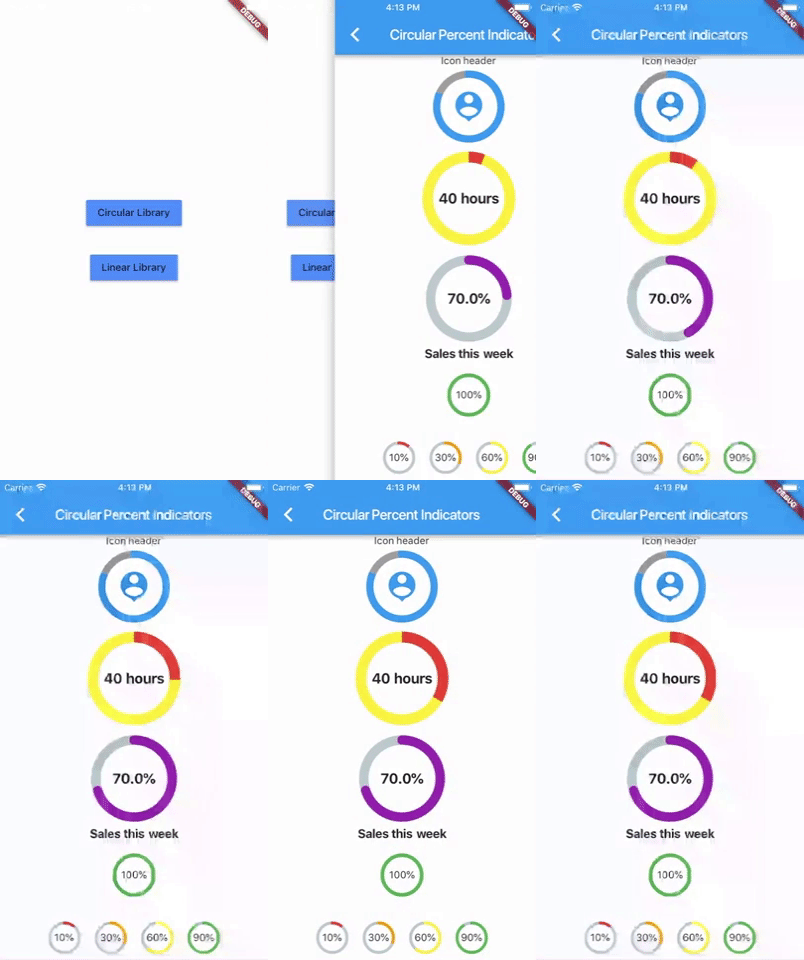
new CircularPercentIndicator(
                  radius: 60.0,
                  lineWidth: 5.0,
                  percent: 1.0,
                  center: new Text("100%"),
                  progressColor: Colors.green,
                )
Complete example
  @override
  Widget build(BuildContext context) {
    return Scaffold(
      appBar: new AppBar(
        title: new Text("Circular Percent Indicators"),
      ),
          body: Center(
        child: ListView(
            children: <Widget>[
              new CircularPercentIndicator(
                radius: 100.0,
                lineWidth: 10.0,
                percent: 0.8,
                header: new Text("Icon header"),
                center: new Icon(
                  Icons.person_pin,
                  size: 50.0,
                  color: Colors.blue,
                ),
                backgroundColor: Colors.grey,
                progressColor: Colors.blue,
              ),
              new CircularPercentIndicator(
                radius: 130.0,
                animation: true,
                animationDuration: 1200,
                lineWidth: 15.0,
                percent: 0.4,
                center: new Text(
                  "40 hours",
                  style:
                      new TextStyle(fontWeight: FontWeight.bold, fontSize: 20.0),
                ),
                circularStrokeCap: CircularStrokeCap.butt,
                backgroundColor: Colors.yellow,
                progressColor: Colors.red,
              ),
              new CircularPercentIndicator(
                radius: 120.0,
                lineWidth: 13.0,
                animation: true,
                percent: 0.7,
                center: new Text(
                  "70.0%",
                  style:
                      new TextStyle(fontWeight: FontWeight.bold, fontSize: 20.0),
                ),
                footer: new Text(
                  "Sales this week",
                  style:
                      new TextStyle(fontWeight: FontWeight.bold, fontSize: 17.0),
                ),
                circularStrokeCap: CircularStrokeCap.round,
                progressColor: Colors.purple,
              ),
              Padding(
                padding: EdgeInsets.all(15.0),
                child: new CircularPercentIndicator(
                  radius: 60.0,
                  lineWidth: 5.0,
                  percent: 1.0,
                  center: new Text("100%"),
                  progressColor: Colors.green,
                ),
              ),
              Container(
                padding: EdgeInsets.all(15.0),
                child: new Row(
                  mainAxisAlignment: MainAxisAlignment.center,
                  children: <Widget>[
                    new CircularPercentIndicator(
                      radius: 45.0,
                      lineWidth: 4.0,
                      percent: 0.10,
                      center: new Text("10%"),
                      progressColor: Colors.red,
                    ),
                    new Padding(
                      padding: EdgeInsets.symmetric(horizontal: 10.0),
                    ),
                    new CircularPercentIndicator(
                      radius: 45.0,
                      lineWidth: 4.0,
                      percent: 0.30,
                      center: new Text("30%"),
                      progressColor: Colors.orange,
                    ),
                    new Padding(
                      padding: EdgeInsets.symmetric(horizontal: 10.0),
                    ),
                    new CircularPercentIndicator(
                      radius: 45.0,
                      lineWidth: 4.0,
                      percent: 0.60,
                      center: new Text("60%"),
                      progressColor: Colors.yellow,
                    ),
                    new Padding(
                      padding: EdgeInsets.symmetric(horizontal: 10.0),
                    ),
                    new CircularPercentIndicator(
                      radius: 45.0,
                      lineWidth: 4.0,
                      percent: 0.90,
                      center: new Text("90%"),
                      progressColor: Colors.green,
                    )
                  ],
                ),
              )
            ]),
      ),
    );
  }
Linear percent indicator
Basic Widget
new LinearPercentIndicator(
                width: 140.0,
                lineHeight: 14.0,
                percent: 0.5,
                backgroundColor: Colors.grey,
                progressColor: Colors.blue,
              ),
Complete example
@override
  Widget build(BuildContext context) {
    return Scaffold(
      appBar: new AppBar(
        title: new Text("Linear Percent Indicators"),
      ),
      body: Center(
        child: Column(
          mainAxisAlignment: MainAxisAlignment.center,
          children: <Widget>[
            Padding(
              padding: EdgeInsets.all(15.0),
              child: new LinearPercentIndicator(
                width: 140.0,
                lineHeight: 14.0,
                percent: 0.5,
                center: Text(
                  "50.0%",
                  style: new TextStyle(fontSize: 12.0),
                ),
                trailing: Icon(Icons.mood),
                linearStrokeCap: LinearStrokeCap.roundAll,
                backgroundColor: Colors.grey,
                progressColor: Colors.blue,
              ),
            ),
            Padding(
              padding: EdgeInsets.all(15.0),
              child: new LinearPercentIndicator(
                width: 170.0,
                animation: true,
                animationDuration: 1000,
                lineHeight: 20.0,
                leading: new Text("left content"),
                trailing: new Text("right content"),
                percent: 0.2,
                center: Text("20.0%"),
                linearStrokeCap: LinearStrokeCap.butt,
                progressColor: Colors.red,
              ),
            ),
            Padding(
              padding: EdgeInsets.all(15.0),
              child: new LinearPercentIndicator(
                width: MediaQuery.of(context).size.width - 50,
                animation: true,
                lineHeight: 20.0,
                animationDuration: 2000,
                percent: 0.9,
                center: Text("90.0%"),
                linearStrokeCap: LinearStrokeCap.roundAll,
                progressColor: Colors.greenAccent,
              ),
            ),
            Padding(
              padding: EdgeInsets.all(15.0),
              child: new LinearPercentIndicator(
                width: MediaQuery.of(context).size.width - 50,
                animation: true,
                lineHeight: 20.0,
                animationDuration: 2500,
                percent: 0.8,
                center: Text("80.0%"),
                linearStrokeCap: LinearStrokeCap.roundAll,
                progressColor: Colors.green,
              ),
            ),
            Padding(
              padding: EdgeInsets.all(15.0),
              child: Column(
                children: <Widget>[
                  new LinearPercentIndicator(
                    width: 100.0,
                    lineHeight: 8.0,
                    percent: 0.2,
                    progressColor: Colors.red,
                  ),
                  new LinearPercentIndicator(
                    width: 100.0,
                    lineHeight: 8.0,
                    percent: 0.5,
                    progressColor: Colors.orange,
                  ),
                  new LinearPercentIndicator(
                    width: 100.0,
                    lineHeight: 8.0,
                    percent: 0.9,
                    progressColor: Colors.blue,
                  )
                ],
              ),
            ),
          ],
        ),
      ),
    );
  }
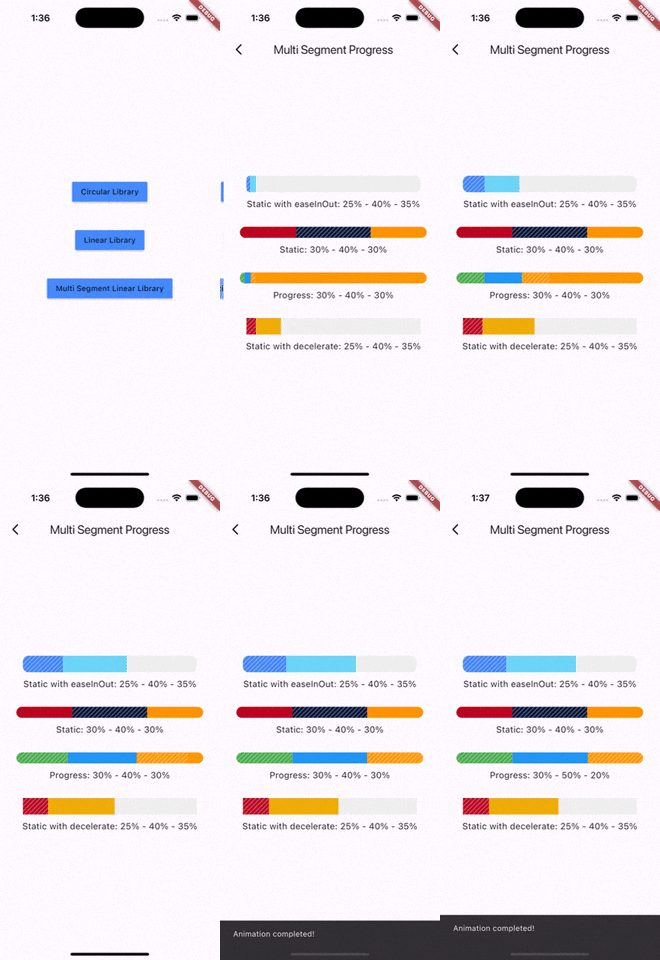
Multi-segment linear indicator
Basic Widget
new MultiSegmentLinearIndicator(
                width: MediaQuery.of(context).size.width - 64,
                lineHeight: 30.0,
                segments: [
                  SegmentLinearIndicator(
                    percent: 0.25,
                    color: Color(0xFF4285F4),
                    enableStripes: true,
                  ),
                  SegmentLinearIndicator(
                    percent: 0.4,
                    color: Color(0xFF6DD5F6),
                  ),
                  SegmentLinearIndicator(
                    percent: 0.35,
                    color: Color(0xFFEFEFEF),
                  ),
                ],
                barRadius: Radius.circular(10.0),
                animation: true,
                animationDuration: 1000,
                curve: Curves.easeInOut,
                animateFromLastPercent: true,
                onAnimationEnd: () {
                  ScaffoldMessenger.of(context).showSnackBar(
                    const SnackBar(
                      content: Text('Animation completed!'),
                      duration: Duration(seconds: 1),
                    ),
                  );
                },
              ),
Complete example
@override
  Widget build(BuildContext context) {
    return Scaffold(
      appBar: AppBar(
        title: Text('Multi Segment Progress'),
      ),
      body: Center(
        child: Padding(
          padding: const EdgeInsets.all(20.0),
          child: Column(
            mainAxisAlignment: MainAxisAlignment.center,
            children: [
              MultiSegmentLinearIndicator(
                width: MediaQuery.of(context).size.width - 64,
                lineHeight: 30.0,
                segments: [
                  SegmentLinearIndicator(
                    percent: 0.25,
                    color: Color(0xFF4285F4),
                    enableStripes: true,
                  ),
                  SegmentLinearIndicator(
                    percent: 0.4,
                    color: Color(0xFF6DD5F6),
                  ),
                  SegmentLinearIndicator(
                    percent: 0.35,
                    color: Color(0xFFEFEFEF),
                  ),
                ],
                barRadius: Radius.circular(10.0),
                animation: true,
                animationDuration: 1000,
                curve: Curves.easeInOut,
                animateFromLastPercent: true,
                onAnimationEnd: () {
                  ScaffoldMessenger.of(context).showSnackBar(
                    const SnackBar(
                      content: Text('Animation completed!'),
                      duration: Duration(seconds: 1),
                    ),
                  );
                },
              ),
              SizedBox(height: 10),
              Text(
                'Static with easeInOut: 25% - 40% - 35%',
                style: TextStyle(fontSize: 16),
              ),
              SizedBox(height: 30),
              MultiSegmentLinearIndicator(
                width: MediaQuery.of(context).size.width - 40,
                lineHeight: 20.0,
                segments: [
                  SegmentLinearIndicator(
                    percent: 0.3,
                    color: Color(0xFFBA0521),
                  ),
                  SegmentLinearIndicator(
                    percent: 0.4,
                    color: Color(0xFF071437),
                    enableStripes: true,
                  ),
                  SegmentLinearIndicator(
                    percent: 0.3,
                    color: Color(0xFFFF9205),
                  ),
                ],
                barRadius: Radius.circular(20),
              ),
              SizedBox(height: 10),
              Text(
                'Static: 30% - 40% - 30%',
                style: TextStyle(fontSize: 16),
              ),
              SizedBox(height: 30),
              MultiSegmentLinearIndicator(
                width: MediaQuery.of(context).size.width - 40,
                lineHeight: 20.0,
                segments: [
                  SegmentLinearIndicator(
                    percent: firstSegment,
                    color: Colors.green,
                    enableStripes: true,
                  ),
                  SegmentLinearIndicator(
                    percent: secondSegment,
                    color: Colors.blue,
                    enableStripes: true,
                  ),
                  SegmentLinearIndicator(
                    percent: thirdSegment,
                    color: Colors.orange,
                  ),
                ],
                animation: true,
                animateFromLastPercent: true,
                animationDuration: 1000,
                curve: Curves.easeInOut,
                barRadius: Radius.circular(10),
              ),
              SizedBox(height: 10),
              Text(
                'Progress: ${(firstSegment * 100).toInt()}% - ${(secondSegment * 100).toInt()}% - ${(thirdSegment * 100).toInt()}%',
                style: TextStyle(fontSize: 16),
              ),
              SizedBox(height: 30),
              MultiSegmentLinearIndicator(
                width: MediaQuery.of(context).size.width - 64,
                lineHeight: 30.0,
                segments: [
                  SegmentLinearIndicator(
                    percent: 0.15,
                    color: Color(0xFFBA0521),
                    enableStripes: true,
                  ),
                  SegmentLinearIndicator(
                      percent: 0.4, color: Color(0xFFAEFAB00)),
                  SegmentLinearIndicator(
                      percent: 0.45, color: Color(0xFFEFEFEF)),
                ],
                animation: true,
                animationDuration: 1000,
                curve: Curves.decelerate,
                animateFromLastPercent: true,
              ),
              SizedBox(height: 10),
              Text(
                'Static with decelerate: 25% - 40% - 35%',
                style: TextStyle(fontSize: 16),
              ),
              SizedBox(height: 30),
            ],
          ),
        ),
      ),
    );
  }
You can follow me on twitter @diegoveloper
Metadata


Documentation
Publisher
unverified uploader
Weekly Downloads
Metadata
Flutter 升级 3.35.7 之后,对 percent_indicator 插件的升级(After Flutter upgrade 3.35.7, the upgrade of percent_indicator plugins.)。
Repository (GitHub)
View/report issues
License
 BSD-2-Clause (license)

