
indexscroll_listview_builder 2.0.0  indexscroll_listview_builder: ^2.0.0 copied to clipboard
Enhanced ListView.builder with index-based programmatic scrolling, alignment control, offset handling, and optional customizable scrollbar for Flutter.
# indexscroll_listview_builder
Enhanced `ListView.builder` for Flutter with powerful **bidirectional** index-based programmatic scrolling, precise viewport control, item alignment, offset handling, and optional customizable scrollbar.
[](https://pub.dev/packages/indexscroll_listview_builder)
[](https://opensource.org/licenses/MIT)
## 📱 Demo
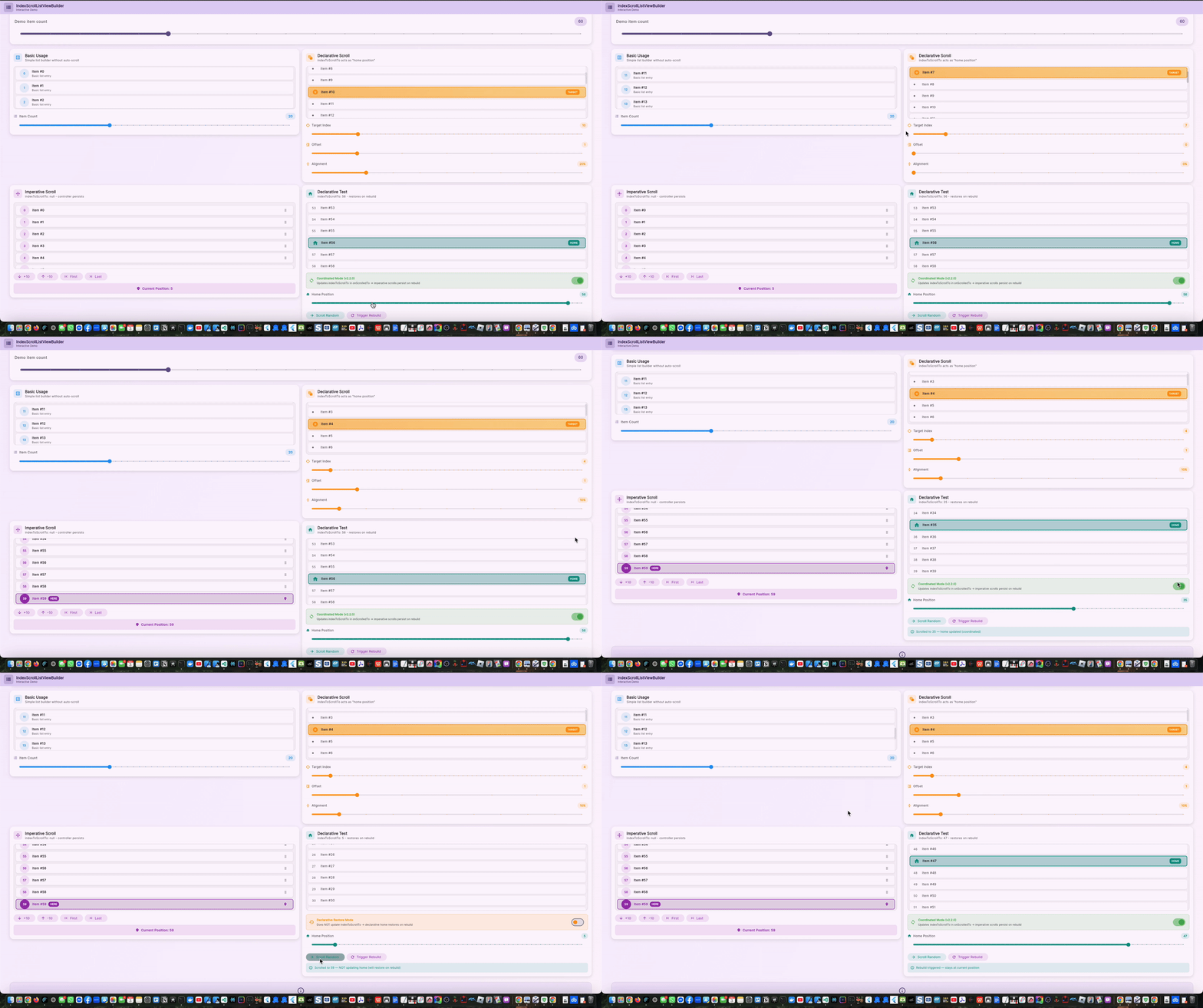
*Interactive demonstration showing bidirectional scrolling, auto-scroll with alignment control, and external controller buttons*
## ✨ Features
* **🎯 Bidirectional scrolling**: Scroll to any item by index - works perfectly both up and down the list
* **🚀 Viewport-based precision**: Direct viewport offset calculations for accurate positioning
* **⚡ Off-screen item support**: Scroll to items not yet rendered with smart position estimation
* **🎮 Automatic initial scroll**: Navigate to target index on widget build via `indexToScrollTo`
* **📍 Offset support**: Keep items before the target visible (`numberOfOffsetedItemsPriorToSelectedItem`)
* **🎨 Customizable alignment**: Position target item anywhere in viewport with `scrollAlignment` (0.0–1.0)
* **🕹️ External controller**: Advanced programmatic control with `IndexedScrollController`
* **📜 Optional scrollbar**: Full customization (thumb, track, thickness, radius, orientation)
* **🔄 Operation cancellation**: Superseded scroll operations are cancelled to prevent interrupted animations
* **📱 Smart `shrinkWrap`**: Automatic handling for unbounded constraints
* **✨ Smooth animations**: Configurable duration and curve
* **🎬 Frame-delayed execution**: Reduces layout jank during scroll operations
## 🆕 What's New in 2.0.0
### Major Improvements
* ✅ **Fixed bidirectional scrolling**: Now works perfectly scrolling both up and down
* ✅ **Fixed external controller**: Buttons now scroll the correct ListView (not the outer page)
* ✅ **Viewport-based implementation**: Precise control using `RenderAbstractViewport.getOffsetToReveal`
* ✅ **Smart off-screen handling**: Estimates position for items not yet rendered
* ✅ **Operation cancellation**: Prevents interrupted animations during rapid scrolling
* ✅ **Performance optimized**: Fast-path index resolution for common cases
### Breaking Change
The `scrollToIndex()` method now requires an `itemCount` parameter:
```dart
// v1.x
controller.scrollToIndex(50);
// v2.0.0
controller.scrollToIndex(50, itemCount: totalItems);
```
This enables accurate position estimation for off-screen items.
## 🛠 Installation
Add to your `pubspec.yaml`:
```yaml
dependencies:
indexscroll_listview_builder: ^2.0.0
```
Then import:
```dart
import 'package:indexscroll_listview_builder/indexscroll_listview_builder.dart';
```
## 🚀 Quick Start
```dart
IndexScrollListViewBuilder(
itemCount: 100,
itemBuilder: (context, index) => ListTile(title: Text('Item #$index')),
)
```
## 🎯 Auto Scroll on Build
Automatically scroll to a target index when the widget builds:
```dart
IndexScrollListViewBuilder(
itemCount: 50,
indexToScrollTo: 25, // scroll after first frame
numberOfOffsetedItemsPriorToSelectedItem: 2, // keep previous 2 items visible
itemBuilder: (context, index) => ListTile(
title: Text('Item #$index'),
),
)
```
## 🧭 External Controller
Use an `IndexedScrollController` for programmatic control:
```dart
final controller = IndexedScrollController();
final itemCount = 100;
IndexScrollListViewBuilder(
controller: controller,
itemCount: itemCount,
itemBuilder: (context, index) => ListTile(title: Text('Item #$index')),
);
// Later (e.g. button press)
await controller.scrollToIndex(75, itemCount: itemCount, alignmentOverride: 0.3);
// Scroll to first item
await controller.scrollToIndex(0, itemCount: itemCount);
// Scroll to last item
await controller.scrollToIndex(itemCount - 1, itemCount: itemCount);
```
## 🪟 Scrollbar Example
```dart
IndexScrollListViewBuilder(
itemCount: 80,
showScrollbar: true,
scrollbarThumbVisibility: true,
scrollbarThickness: 8,
scrollbarRadius: const Radius.circular(8),
itemBuilder: (context, index) => ListTile(title: Text('Item #$index')),
)
```
## 📐 Alignment & Offset
### scrollAlignment
Controls where the target item appears in the viewport:
- `0.0` - Item aligns at the **start** (top for vertical, left for horizontal)
- `0.5` - Item appears **centered** in the viewport
- `1.0` - Item aligns at the **end** (bottom for vertical, right for horizontal)
- Default: `0.2` (20% from start)
### numberOfOffsetedItemsPriorToSelectedItem
Shifts the scroll position backward to keep previous items visible:
- `1` - Shows the target item (default)
- `2` - Shows 1 item before the target
- `3` - Shows 2 items before the target
- etc.
Example:
```dart
IndexScrollListViewBuilder(
indexToScrollTo: 50,
numberOfOffsetedItemsPriorToSelectedItem: 3, // Shows items 48, 49, 50
scrollAlignment: 0.0, // Items 48-50 appear at top
itemCount: 100,
itemBuilder: (context, index) => ListTile(title: Text('Item $index')),
)
```
## 🧪 Example Application
See the complete interactive example in `example/lib/main.dart` demonstrating:
* **Basic List**: Simple list with 100 items
* **Auto-scroll Demo**: Dynamic target selection with slider, offset control, and alignment settings
* **External Controller**: Comprehensive button controls:
- Scroll to First/Last item
- Jump +10/-10 items
- Direct index input
- Perfect handling of list boundaries
Run the example:
```bash
cd example
flutter run
```
## 🔍 API Overview
### `IndexScrollListViewBuilder`
Primary widget that extends `ListView.builder` with index-based scrolling capabilities.
**Key Methods:**
- Automatically wraps items with `IndexedScrollTag` for registration
- Handles viewport constraints and `shrinkWrap` logic
- Manages scroll controller lifecycle
### `IndexedScrollController`
Core controller that powers the scrolling mechanism.
**Key Methods:**
- `scrollToIndex(int index, {required int itemCount, double? alignmentOverride})` - Scroll to specific index
- `register(int index, GlobalKey key)` - Register an item (called internally)
- `unregister(int index)` - Unregister an item (called internally)
**Features:**
- Maintains registry of `GlobalKey`s for each list item
- Smart index resolution with fallback logic
- Viewport-based offset calculation
- Operation versioning for cancellation
- Special handling for list extremes (first/last items)
### `IndexedScrollTag`
Internal widget that tags each list item for the controller.
**Lifecycle:**
- Registers item on `initState`
- Updates registration on index/controller changes
- Unregisters on `dispose`
## ⚙ Parameters
### Core Parameters
| Parameter | Type | Default | Description |
|-----------|------|---------|-------------|
| `itemCount` | `int` | Required | Total number of items in the list |
| `itemBuilder` | `Widget Function(BuildContext, int)` | Required | Builder function for list items |
| `indexToScrollTo` | `int?` | `null` | Auto-scroll target index after build |
| `controller` | `IndexedScrollController?` | `null` | External controller for programmatic scrolling |
### Scrolling Behavior
| Parameter | Type | Default | Description |
|-----------|------|---------|-------------|
| `numberOfOffsetedItemsPriorToSelectedItem` | `int` | `1` | Number of items to keep visible before target |
| `scrollAlignment` | `double?` | `0.2` | Target item alignment in viewport (0.0–1.0) |
| `scrollAnimationDuration` | `Duration` | `400ms` | Animation duration for scrolling |
| `scrollDirection` | `Axis?` | `Axis.vertical` | Scroll direction (vertical/horizontal) |
| `physics` | `ScrollPhysics?` | `BouncingScrollPhysics` | Scroll physics |
| `shrinkWrap` | `bool?` | Auto | Whether to shrink-wrap content (auto-detected) |
### Scrollbar Customization
| Parameter | Type | Default | Description |
|-----------|------|---------|-------------|
| `showScrollbar` | `bool` | `false` | Whether to display scrollbar |
| `scrollbarThumbVisibility` | `bool?` | `null` | Force scrollbar thumb visibility |
| `scrollbarTrackVisibility` | `bool?` | `null` | Force scrollbar track visibility |
| `scrollbarThickness` | `double?` | Platform default | Scrollbar thickness in pixels |
| `scrollbarRadius` | `Radius?` | Platform default | Scrollbar corner radius |
| `scrollbarOrientation` | `ScrollbarOrientation?` | `null` | Which side to show scrollbar |
| `scrollbarInteractive` | `bool?` | `true` | Whether scrollbar can be dragged |
| `suppressPlatformScrollbars` | `bool` | `false` | Hide platform-specific scrollbars |
### Advanced Options
| Parameter | Type | Default | Description |
|-----------|------|---------|-------------|
| `padding` | `EdgeInsetsGeometry?` | `EdgeInsets.zero` | List content padding |
| `autoScrollMaxFrameDelay` | `int?` | Controller default | Max frames to wait before auto-scroll |
| `autoScrollEndOfFrameDelay` | `int?` | Controller default | Frames to wait at end of auto-scroll |
## � Technical Details
### How It Works
1. **Registration System**: Each list item is wrapped with `IndexedScrollTag` that registers a `GlobalKey` with the controller
2. **Index Resolution**: When scrolling to an index, the controller finds the nearest registered key using smart fallback logic
3. **Viewport Calculation**: Uses `RenderAbstractViewport.getOffsetToReveal` to calculate precise scroll offsets
4. **Off-screen Estimation**: For items not yet rendered, estimates position based on visible items and animates there
5. **Operation Versioning**: Each scroll operation gets a version number; superseded operations are cancelled
### Edge Cases Handled
- **First item (index 0)**: Always scrolls to offset `0.0` for perfect alignment
- **Last item**: Uses `maxScrollExtent` to ensure full visibility
- **Rapid scrolling**: Operation cancellation prevents interrupted animations
- **Off-screen items**: Position estimation enables scrolling before item is built
- **Dynamic lists**: Handles controller and index changes gracefully
### Performance Considerations
- **Fast-path optimization**: Checks exact index before searching all registered keys
- **Const constructors**: All widgets use `const` constructors where possible
- **Key caching**: GlobalKeys are created once and reused across rebuilds
- **Frame-delayed execution**: Reduces layout jank during scroll operations
## �📄 CHANGELOG
See `CHANGELOG.md` for detailed version history.
## 📜 License
Licensed under the MIT License. See `LICENSE`.
## 🔗 Repository & Issues
Repository: https://github.com/SoundSliced/indexscroll_listview_builder
Issues: https://github.com/SoundSliced/indexscroll_listview_builder/issues
## 🙌 Contributing
Contributions welcome! Feel free to open issues or PRs for improvements, examples, or documentation refinements.
---
If this package helps you, Like it on Pub.dev, and add a ⭐ on GitHub. This is appreciated!
## ❓ FAQ
### Q: Can I scroll to items that haven't been built yet?
**A:** Yes! Version 2.0.0 estimates the position of off-screen items and scrolls there smoothly.
### Q: Why does scrollToIndex require itemCount in v2.0.0?
**A:** The `itemCount` parameter enables accurate position estimation for off-screen items, especially when scrolling to the last item or items near the end.
### Q: How do I scroll to the exact last item?
**A:** Use `controller.scrollToIndex(itemCount - 1, itemCount: itemCount)`. The controller automatically uses `maxScrollExtent` for the last index.
### Q: What happens if I scroll rapidly or drag a slider?
**A:** Version 2.0.0 includes operation versioning that cancels superseded scroll operations, ensuring smooth animations without interruption.
### Q: Can I use this with horizontal lists?
**A:** Yes! Set `scrollDirection: Axis.horizontal` and the package handles everything correctly.
### Q: Does this work with dynamic lists that change size?
**A:** Yes, the registration system automatically handles items being added or removed. The controller maintains a registry that updates as widgets are built/disposed.
Metadata
0
likes
0
points
57
downloads
Publisher
unverified uploader
Weekly Downloads
Metadata
Enhanced ListView.builder with index-based programmatic scrolling, alignment control, offset handling, and optional customizable scrollbar for Flutter.
Repository (GitHub)
View/report issues
License
 unknown (license)
Dependencies
flutter, google_fonts, post_frame

