
floating_pdf_viewer 0.0.2  floating_pdf_viewer: ^0.0.2 copied to clipboard
A Flutter package that provides a draggable, resizable floating PDF viewer widget with zoom controls and overlay support.
floating_pdf_viewer #
A Flutter package that provides a draggable, resizable floating PDF viewer widget with zoom controls and overlay support.
📱 Preview #
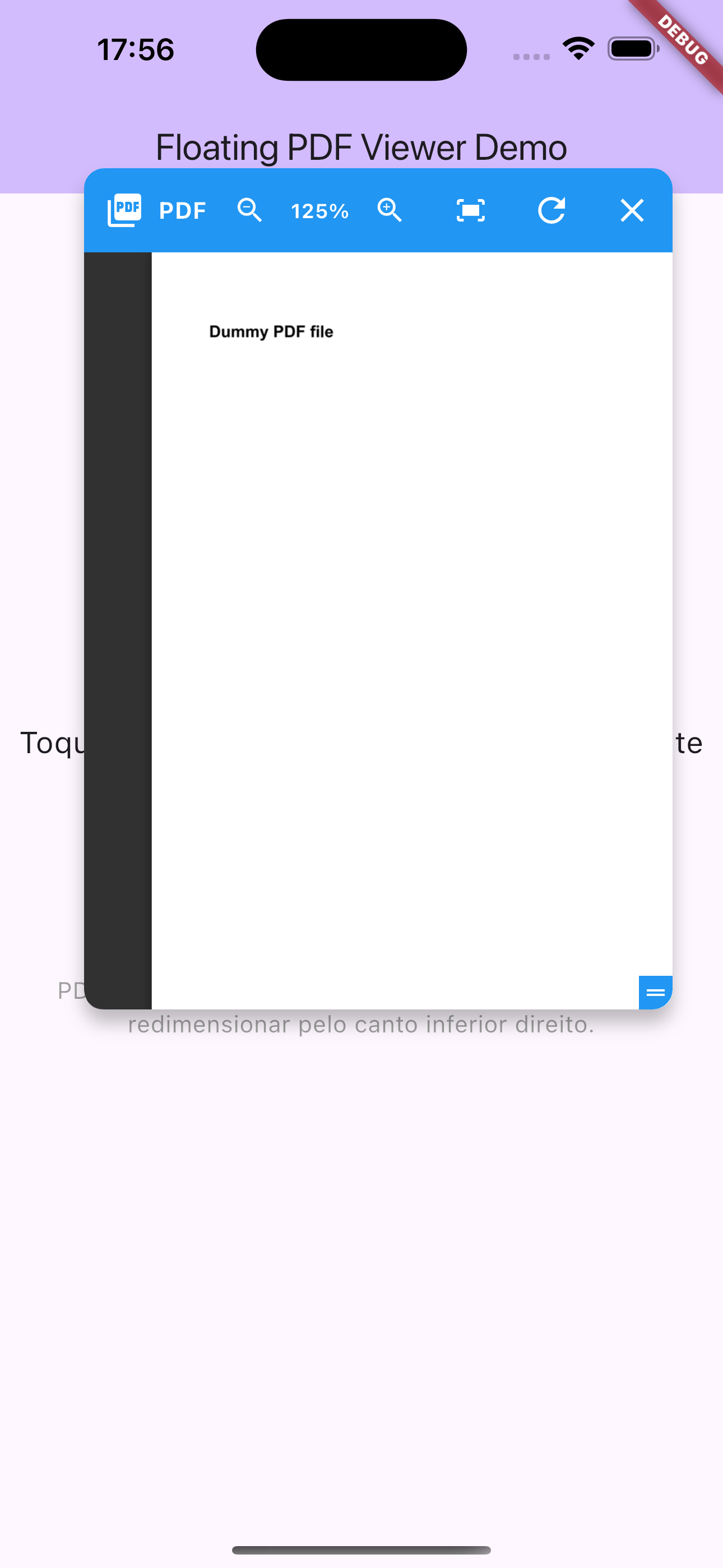
Floating PDF viewer in action - draggable, resizable window with zoom controls
Note: See the example app in the
/examplefolder for a complete working demo.
Features #
- ✅ Draggable floating window
- ✅ Interactive resizing
- ✅ Zoom controls (zoom in, zoom out, reset)
- ✅ PDF loading via URL
- ✅ Customizable interface (colors, sizes, position)
- ✅ Automatic overlay management
- ✅ Reload button
- ✅ Easy integration
Installation #
Add this package to your pubspec.yaml:
dependencies:
  floating_pdf_viewer: ^0.0.1
Quick Start #
import 'package:flutter/material.dart';
import 'package:floating_pdf_viewer/floating_pdf_viewer.dart';

class MyPage extends StatefulWidget {
  @override
  _MyPageState createState() => _MyPageState();
}

class _MyPageState extends State<MyPage> {
  final FloatingPdfViewerManager _pdfManager = FloatingPdfViewerManager();

  @override
  Widget build(BuildContext context) {
    return Scaffold(
      body: Center(
        child: ElevatedButton(
          onPressed: () {
            _pdfManager.show(
              context: context,
              pdfUrl: 'https://www.example.com/your-document.pdf',
              title: 'My Document',
            );
          },
          child: Text('Open PDF'),
        ),
      ),
    );
  }

  @override
  void dispose() {
    _pdfManager.dispose();
    super.dispose();
  }
}
Basic Usage #
1. Using FloatingPdfViewerManager (Recommended) #
import 'package:flutter/material.dart';
import 'package:floating_pdf_viewer/floating_pdf_viewer.dart';

class MyApp extends StatelessWidget {
  @override
  Widget build(BuildContext context) {
    return MaterialApp(
      home: HomePage(),
    );
  }
}

class HomePage extends StatefulWidget {
  @override
  _HomePageState createState() => _HomePageState();
}

class _HomePageState extends State<HomePage> {
  final FloatingPdfViewerManager _pdfManager = FloatingPdfViewerManager();

  @override
  Widget build(BuildContext context) {
    return Scaffold(
      appBar: AppBar(title: Text('PDF Viewer Demo')),
      body: Center(
        child: ElevatedButton(
          onPressed: () {
            if (_pdfManager.isVisible) {
              _pdfManager.hide();
            } else {
              _pdfManager.show(
                context: context,
                pdfUrl: 'https://www.example.com/sample.pdf',
                title: 'My PDF',
                headerColor: Colors.deepPurple,
              );
            }
          },
          child: Text(_pdfManager.isVisible ? 'Close PDF' : 'Open PDF'),
        ),
      ),
    );
  }

  @override
  void dispose() {
    _pdfManager.dispose();
    super.dispose();
  }
}
2. Manual Usage with Overlay #
class _MyHomePageState extends State<MyHomePage> {
  OverlayEntry? _overlayEntry;
  bool _isOverlayVisible = false;

  void _showOverlay() {
    if (_overlayEntry != null) return;

    _overlayEntry = OverlayEntry(
      builder: (context) => FloatingPdfViewer(
        pdfUrl: 'https://www.example.com/sample.pdf',
        onClose: _hideOverlay,
        title: 'PDF Document',
        headerColor: Colors.green,
        initialLeft: 100,
        initialTop: 150,
        initialWidth: 400,
        initialHeight: 600,
      ),
    );

    Overlay.of(context).insert(_overlayEntry!);
    setState(() {
      _isOverlayVisible = true;
    });
  }

  void _hideOverlay() {
    _overlayEntry?.remove();
    _overlayEntry = null;
    setState(() {
      _isOverlayVisible = false;
    });
  }

  @override
  void dispose() {
    _hideOverlay();
    super.dispose();
  }
}
Customization Parameters #
FloatingPdfViewer #
| Parameter | Type | Required | Description |
|---|---|---|---|
onClose |
VoidCallback |
✅ | Callback executed when closing the viewer |
pdfUrl |
String |
✅ | URL of the PDF to display |
title |
String? |
❌ | Title displayed in the header bar |
headerColor |
Color? |
❌ | Color of the header bar |
initialLeft |
double? |
❌ | Initial horizontal position |
initialTop |
double? |
❌ | Initial vertical position |
initialWidth |
double? |
❌ | Initial width (default: 350) |
initialHeight |
double? |
❌ | Initial height (default: 500) |
minWidth |
double? |
❌ | Minimum width (default: 300) |
minHeight |
double? |
❌ | Minimum height (default: 250) |
maxWidth |
double? |
❌ | Maximum width (default: 600) |
maxHeight |
double? |
❌ | Maximum height (default: 800) |
FloatingPdfViewerManager.show() #
Accepts the same parameters as FloatingPdfViewer, plus:
| Parameter | Type | Required | Description |
|---|---|---|---|
context |
BuildContext |
✅ | Context to insert the overlay |
Advanced Examples #
PDF with Custom Settings #
_pdfManager.show(
  context: context,
  pdfUrl: 'https://www.example.com/document.pdf',
  title: 'Monthly Report',
  headerColor: Colors.indigo,
  initialLeft: 200,
  initialTop: 100,
  initialWidth: 450,
  initialHeight: 650,
  minWidth: 350,
  maxWidth: 700,
  minHeight: 400,
  maxHeight: 900,
);
Multiple PDFs #
class _MyPageState extends State<MyPage> {
  final FloatingPdfViewerManager _pdfManager1 = FloatingPdfViewerManager();
  final FloatingPdfViewerManager _pdfManager2 = FloatingPdfViewerManager();

  @override
  Widget build(BuildContext context) {
    return Scaffold(
      body: Column(
        children: [
          ElevatedButton(
            onPressed: () => _pdfManager1.show(
              context: context,
              pdfUrl: 'https://example.com/doc1.pdf',
              title: 'Document 1',
              headerColor: Colors.blue,
            ),
            child: Text('Open PDF 1'),
          ),
          ElevatedButton(
            onPressed: () => _pdfManager2.show(
              context: context,
              pdfUrl: 'https://example.com/doc2.pdf',
              title: 'Document 2',
              headerColor: Colors.red,
              initialLeft: 300,
            ),
            child: Text('Open PDF 2'),
          ),
        ],
      ),
    );
  }

  @override
  void dispose() {
    _pdfManager1.dispose();
    _pdfManager2.dispose();
    super.dispose();
  }
}
Requirements #
- Flutter SDK:
>=1.17.0 - Dart SDK:
^3.8.1
Dependencies #
flutter: Flutter SDKwebview_flutter:^4.4.2for web content display
Compatibility #
- ✅ Android
- ✅ iOS
- ✅ Web
- ✅ macOS
- ✅ Windows
- ✅ Linux
Limitations #
- Depends on Google Docs Viewer for PDF rendering
- Requires internet connection
- PDFs must be publicly accessible via URL
Contributing #
Contributions are welcome! Please open an issue or submit a pull request.
License #
This package is licensed under the MIT License. See the LICENSE file for more details.
Metadata
Publisher
unverified uploader
Weekly Downloads
Metadata
A Flutter package that provides a draggable, resizable floating PDF viewer widget with zoom controls and overlay support.
Repository (GitHub)
View/report issues
License
 unknown (license)

