
fhir_questionnaire 11.0.0  fhir_questionnaire: ^11.0.0 copied to clipboard
 dev.lamt.dev
Renders FHIR R4 Questionnaires, generates the QuestionnaireResponse, and lets code or an AI agent fill the form for the user.
FHIR Questionnaire #
A Flutter package for working with FHIR® Questionnaires. FHIR® is the registered trademark of HL7 and is used with the permission of HL7. Use of the FHIR trademark does not constitute endorsement of this product by HL7.
This package takes care building the UI of a FHIR R4 Questionnaire, handle behavior and validations and finally generates the QuestionnaireResponse from the user answers. It also lets you drive the rendered form from code, so an AI agent can help a user answer it (see Helping users with an AI agent).
Important #
This package is now based on fhir_plus if you need a version based on fhir_r4 from fhirfli.dev use fhir_questionnaire_r4
Since version 10.0.0 this package is built with the standalone material_ui package instead of package:flutter/material.dart, and requires Flutter 3.47.0 or later. Your app must use MaterialApp/Theme from package:material_ui/material_ui.dart too, otherwise the questionnaire widgets won't find your app theme and localizations. Check Flutter's migration guide to migrate your app.
Supported Questionnaire Items #
So far this package only supports FHIR R4 Item Types
| Item | Supported |
|---|---|
| Group | ✅ |
| Display | ✅ |
| Question | ☑️ |
| Boolean | ✅ |
| Decimal | ✅ |
| Integer | ✅ |
| Date | ✅ |
| DateTime | ✅ |
| Time | ✅ |
| String | ✅ |
| Text | ✅ |
| Url | ✅ |
| Choice | ✅ |
| OpenChoice | ✅ |
| Attachment | ✅ |
| Reference | ☑️ |
| Quantity | ✅ |
Supported extra features #
- enableWhen supported
- enableBehavior supported.
- Calculated Expression supported
- Extension for translation supported.
- Extension for questionnaire-hidden supported.
- Extension for minLength extension.
- Extesion for minValue extension.
- Extesion for maxValue extension.
- Extesion for hint texts using entryFormat extension.
- Extension for helper text or helper button using questionnaire-displayCategory and questionnaire-itemControl with the codes
helpandflyover. - Hand written signature capture via the questionnaire-signatureRequired extension (root or item level), emitted in the response as a questionnaireresponse-signature. See the Signatures section.
- Driving the rendered form from code with
QuestionnaireFormController: read, answer, highlight, scroll to, validate and submit items, for example from an AI agent's tools. See the Driving a form from code section.
How to use #
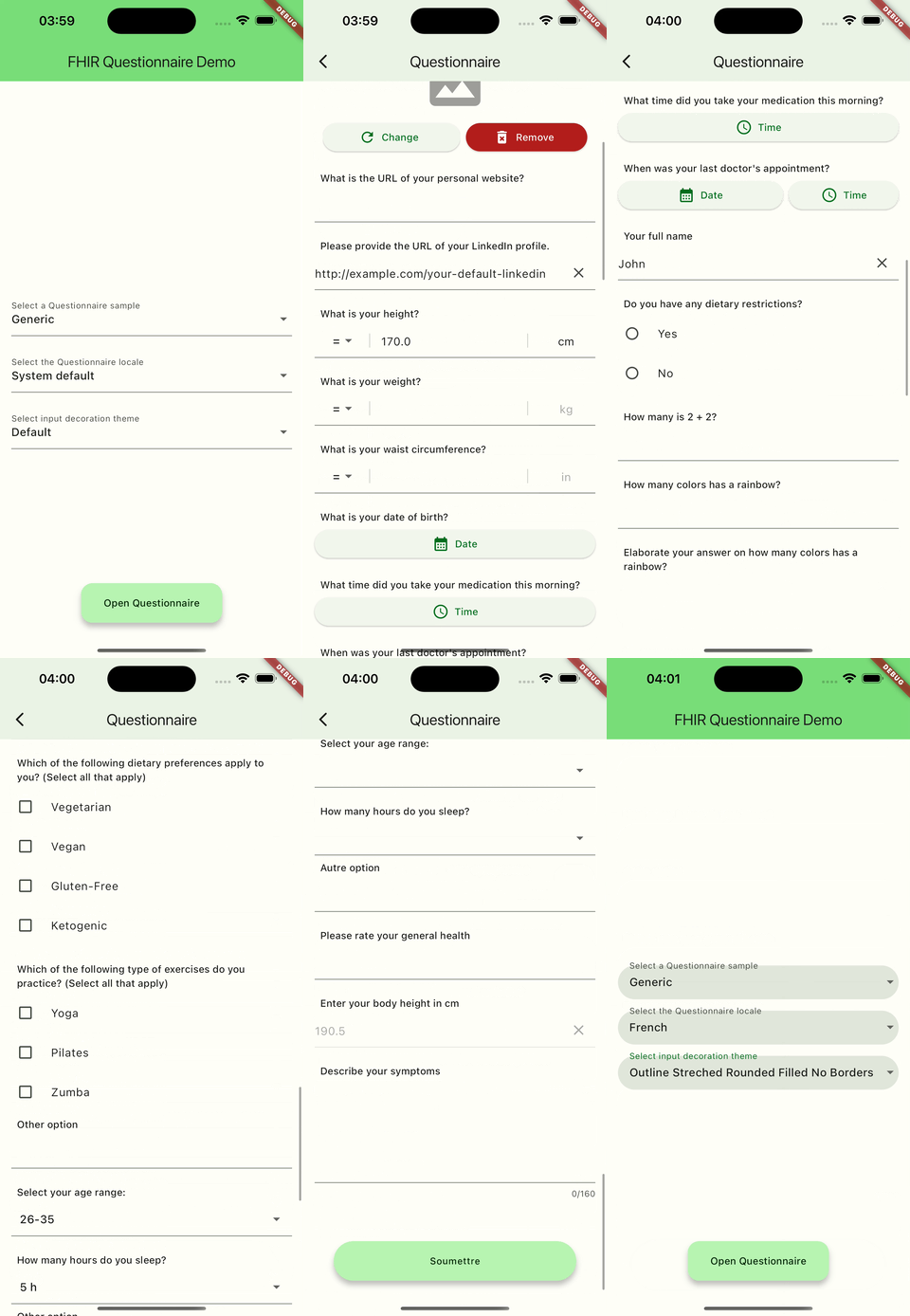
Just add a QuestionnaireView widget to your widget tree and you will have your Questionnaire UI.
QuestionnaireView(
    questionnaire: questionnaire, // A FHIR R4 Questionnaire instance
    onAttachmentLoaded: onAttachmentLoaded, // A callback to handle attachment loading (explained below)
    locale: locale, // The specific locale for the Button and validation texts
    localizations: localizations, // To add support for extra localization
    isLoading: loading, // Wether is some ongoing operation before loading the UI
    onSubmit: onSubmit, // Callback to get the QuestionnaireResponse
    controller: controller, // The QuestionnaireController to use for item view and response generation.
    subject: patient, // QuestionnairePerson subject of the QuestionnaireResponse
    author: practitioner, // QuestionnairePerson author of the QuestionnaireResponse
    source: practitioner, // QuestionnairePerson who provided the answers
    whoSigns: practitioner, // QuestionnairePerson who signs the QuestionnaireResponse / signatures
    signsOnBehalfOf: patient, // QuestionnairePerson the response is signed on behalf of
)
QuestionnaireView #
- Questionnaire questionnaire:
QuestionnaireViewrequires an object of type Questionnaire this is the definition of the Questionnaire and will be used to build the Form UI and generate the Questions and Answers. - Locale? locale: Optionally you can specify the language like "es" or "en" or "fr", etc. you want to use for validation messages and Submit button, by default the system language will be used.
- List: this is a list allows you to add extra language translations to the Questionnaire, currently the package supports only English and Spanish, so you can add other Languages, you just need to create a class for each new Language you want to support and extend QuestionnaireBaseLocalization.
- QuestionnaireBaseLocalization? defaultLocalization: Indicates what should be the fallback localization if the specified language or the system language is not supported, by default English is the fallback.
- bool isLoading: use this to indicate there is an ongoing operation, for instance if you need to make an API request to load your Questionnaire you can set
isLoading = trueso theQuestionnaireViewwill show a Shimmer loading effect view. - Future<Attachment?> Function()? onAttachmentLoaded: To make this package simpler and compatible with all Flutter supported platforms, the feature to load an attachment is delegated to the App, so you have to handle this logic by implementing this function and returning an Attachment instance according to FHIR.
- ValueChanged: This is the callback that will be triggered once the user taps on the Submit button, and you will get a
QuestionnaireResponseinstance ready with the answers covered, and with thesubject,authorandsourcealready set if you provided them (see below). You can still set any extra data you consider necessary. - QuestionnaireController? controller: This is the controller to be used for items and response generation within the
QuestionnaireView, the purpose of this controller here is to allow you to use an instance of an extension ofQuestionnaireControllerso you can override the behavior and widgets. - QuestionnairePerson? subject: Optional
QuestionnairePersonfor the subject of theQuestionnaireResponse(e.g. thePatientthe answers are about). When provided itsreferenceis set on the generatedQuestionnaireResponse.subject. - QuestionnairePerson? author: Optional person for the author of the
QuestionnaireResponse(the person or device that received and recorded the answers). When provided itsreferenceis set onQuestionnaireResponse.author. - QuestionnairePerson? source: Optional person for the individual who provided the information reflected in the answers. When provided its
referenceis set onQuestionnaireResponse.source. - QuestionnairePerson? whoSigns: Optional person who signs the
QuestionnaireResponse. Itsreferenceis used asSignature.who, and itsname/titleare shown beneath each signature pad. - QuestionnairePerson? signsOnBehalfOf: Optional person on behalf of which the
QuestionnaireResponseis signed. Itsreferenceis used asSignature.onBehalfOf. - QuestionnaireFormController? formController: Reads and drives the rendered form from code, see Driving a form from code.
If you use your own
controllerinstead of lettingQuestionnaireViewcreate one, thesubject,author,source,whoSignsandsignsOnBehalfOfproperties are ignored; provide the correspondingsubjectProvider,authorProvider,sourceProvider,whoSignsProviderandsignsOnBehalfOfProvidercallbacks to yourQuestionnaireControllerinstead.
Driving a form from code #
Pass a QuestionnaireFormController to read and fill a rendered form from code, for example to walk a user through it item by item, or to let an AI agent help a user answer it (see Helping users with an AI agent). Everything it sets goes through the item's own controller, so the form shows it at once, the user can still change it by hand, and the response is exactly what the Submit button builds.
final form = QuestionnaireFormController();

QuestionnaireView(
  questionnaire: questionnaire,
  onSubmit: onSubmit,
  formController: form,
);

// Once the view is built (form.isAttached):
for (final item in form.items) {
  if (item.hidden || !item.enabled) continue;
  form.highlight(item.uid); // Highlight first: it makes the item bigger.
  await form.scrollTo(item.uid); // The whole item is now on screen.
  if (item.type == QuestionnaireItemType.choice) {
    form.setAnswer(item.uid, item.options.first);
  }
}
final invalid = form.validate(); // The uids of the invalid items.
if (invalid.isEmpty) form.submit(); // Or build it yourself: form.buildResponse().
itemslists every item depth first, with itsuid,text,type,required,options,depthandparentUid; a root level signature is listed last asQuestionnaireFormController.rootSignatureUid.setAnswertakes aString,num,bool,DateTime,Quantity, one of the item'soptions(or aListof them when it repeats), or free text for anopen-choice. It throws anArgumentErrorfor attachments, signatures, display, group and read only items, and for values outside the options.answerOfreturns the answers the item would submit, andisEnabledevaluatesenableWheneven for items not shown yet.- The controller notifies once per changed answer;
lastChangedUidandlastChangeByCodetell which item changed and whether the user orsetAnswerchanged it. - Signatures and attachments are left to the user.
Helping users with an AI agent #
QuestionnaireFormController gives an AI agent, such as a chat or voice assistant, what it needs to help a user answer a Questionnaire on screen, with the user watching and in control. Expose its methods to the agent as tools (function calls):
- Read:
items,itemOf,isEnabledandanswerOfgive each item's text, type, options, whether it is required, whether it is shown now and its current answer, so the agent can read the questions to the user and skip the ones that don't apply. - Show:
highlightandscrollTopoint the user to the item the agent is talking about. - Answer:
setAnswerandclearAnswerput the user's answer in the form, where they see it appear and can still change it by hand;lastChangeByCodetells the agent's answers from the user's own. - Finish:
validatelists what is still missing, andbuildResponseorsubmitproduce exactly what the Submit button would.
Only set answers the user actually gave, and ask them to confirm before submitting. Signatures and attachments stay with the user: setAnswer rejects them.
Signatures #
This package can capture hand written signatures and embed them into the generated QuestionnaireResponse, powered by the hand_signature package.
Declaring a required signature #
A signature is requested wherever a questionnaire-signatureRequired extension is present, either at the root of the Questionnaire or on any item (typically a group). The extension's valueCodeableConcept.coding declares the kind of signature required and is reused verbatim as the Signature.type in the response.
{
  "url": "http://hl7.org/fhir/StructureDefinition/questionnaire-signatureRequired",
  "valueCodeableConcept": {
    "coding": [
      {
        "system": "urn:iso-astm:E1762-95:2013",
        "code": "1.2.840.10065.1.12.1.7",
        "display": "Consent Signature"
      }
    ]
  }
}
A questionnaire may declare several signatures at once (root level plus one or more item level markers); each one is captured and validated independently. A signature declared this way is always required before the form can be submitted, regardless of the item's own required flag.
Capturing the signature (UI) #
For each signature marker a QuestionnaireSignatureView renders a tappable preview:
- Empty: a placeholder ("Tap to sign") inviting the user to sign.
- Tapping it opens a
SignaturePadDialogwith the actual drawing pad; the user draws and taps Done to commit or Cancel to discard. Drawing happens in a dialog so the pad's gesture is not stolen by the surrounding scrolling form. - Once signed, the preview shows the drawn signature, with a button to clear it and sign again.
Placement depends on where the marker is declared:
- Root level: shown at the end of the form.
- Group item: shown inside the group's container, after the group's own items.
- Non-group item: shown together with the item's normal content.
The generated response #
On submit, each drawn signature is embedded as a PNG (base64) inside a questionnaireresponse-signature extension holding a FHIR Signature:
- on
QuestionnaireResponse.extensionfor a root level signature, - on the matching
QuestionnaireResponseItem.extensionfor an item level signature.
The Signature.type is taken from the marker's coding (falling back to a default Author's Signature coding only when the marker declares none), sigFormat is image/png, when is the submit time, and who / onBehalfOf come from the whoSigns / signsOnBehalfOf you provide.
Signer information (QuestionnairePerson) #
subject, author, source, whoSigns and signsOnBehalfOf are of type QuestionnairePerson:
QuestionnairePerson(
  reference: practitionerReference, // FHIR Reference written into the response
  name: 'Dr. Jane Doe',             // Display name
  title: 'Attending Physician',     // Optional subtitle
)
When whoSigns (and optionally signsOnBehalfOf) is provided, the signature field also shows the signer's name/title beneath the pad ("By: …" / "On behalf of: …"), and the reference is written into the response Signature.who / Signature.onBehalfOf.
Overriding the UI #
All signature widgets are public and can be extended/overridden: QuestionnaireSignatureView, SignaturePadDialog (with its public generic SignaturePadDialogState) and SignatureController. Detection helpers hasSignature and signatureTypeCoding are exposed as extensions on Questionnaire and QuestionnaireItem.
Some extra notes #
- This widget will use the app Theme (from
material_ui) to build, so if you want to change colors, InputDecorations, etc, you just have to change it in your app Theme. Also all the package widgets are public and exposed so you could override it if necessary. - The
QuestionnaireViewimplementation takes care of validations depending on eachQuestionnaireItemdefinition. - Check the example project which shows all the features in action.
Demo #
Try the demo app here. #
Metadata
Documentation
Publisher
Weekly Downloads
Metadata
Renders FHIR R4 Questionnaires, generates the QuestionnaireResponse, and lets code or an AI agent fill the form for the user.
Repository (GitHub)
View/report issues
Topics
#fhir #questionnaire #hl7 #r4 #ai
License
 BSD-2-Clause (license)
Dependencies
collection, fhir_path_plus, fhir_plus, flutter, hand_signature, intl, material_ui, shimmer, validators