
ffmpeg_kit_extended_flutter 0.6.2  ffmpeg_kit_extended_flutter: ^0.6.2 copied to clipboard
 fryingpan.games
A comprehensive Flutter plugin for executing FFmpeg, FFprobe, and FFplay commands using FFmpeg 9.0.1 API. Supports Android, iOS, macOS, Linux, and Windows.
FFmpegKit Extended for Flutter #

Translations #
ffmpeg-kit-extended is a comprehensive Flutter plugin for executing FFmpeg, FFprobe, and FFplay 9.0.1 API commands on Android, iOS, macOS, Linux, and Windows. It leverages Dart FFI to interact directly with native FFmpeg libraries, providing high performance, flexibility, and complete video playback capabilities.
If you like the project and are using it in your app give it a ⭐ on ffmpeg-kit-builders and ffmpeg-kit-extended, and a 👍 on pub.dev. It helps a lot 🙏! Happy coding 🚀!
1. Features #
- Cross-Platform Support: Works on
Android,iOS,macOS,Linux, andWindows.- Android: Full video playback support with native surface rendering.
- x86:
x86architecture is not supported due to its legacy status.
- x86:
- iOS & macOS: High-performance video playback with
CVPixelBufferand Metal integration.- iOS: Supports both physical
devicesandsimulators.x86_64architecture is not supported due to its legacy status.
- iOS: Supports both physical
- Linux: Full video playback support with
OpenGLintegration.- arm64:
arm64architecture currently not supported, coming soon!
- arm64:
- Android: Full video playback support with native surface rendering.
FFmpeg,FFprobe&FFplay: Latest9.0.1 APIsupport for media manipulation, information retrieval, and audio/video playback.- Video Playback: Complete cross-platform video playback with unified surface API.
- Real-time Streaming: Position and video dimension streams for live playback monitoring.
- Dart FFI: Direct native bindings for optimal performance.
- Asynchronous Execution: Run long-running tasks without blocking the UI thread.
- Parallel Execution: Run multiple tasks in parallel.
- Callback Support: detailed hooks for logs, statistics, and session completion.
- Session Management: Full control over execution lifecycle (start, cancel, list).
- Extensible: Designed to allow custom native library loading and configuration.
- Full package Introspection API: Get detailed information about the package, including version, build date, and available muxers, demuxers, encoders, decoders, filters, etc.
- Deploy Custom Builds: You can deploy custom builds of ffmpeg-kit-extended. See: https://github.com/akashskypatel/ffmpeg-kit-builders
Platform Support #
| Platform | Status | Video Playback | Architecture | Minimum Requirements |
|---|---|---|---|---|
| Android (and Android TV) | ✅ Supported | ✅ Native | armv7, arm64, x86_64 | API 26+ |
| iOS (and Simulator) | ✅ Supported | ✅ Texture | arm64 | iOS 13+ |
| macOS | ✅ Supported | ✅ Texture | arm64, x86_64 | macOS 13+ |
| Linux | ✅ Supported | ✅ Texture | x86_64 | glibc 2.28+ |
| Windows | ✅ Supported | ✅ Texture | x86_64 | Windows 8+ |
You will have to update your app's minimum requirements on your own to match the requirements above.
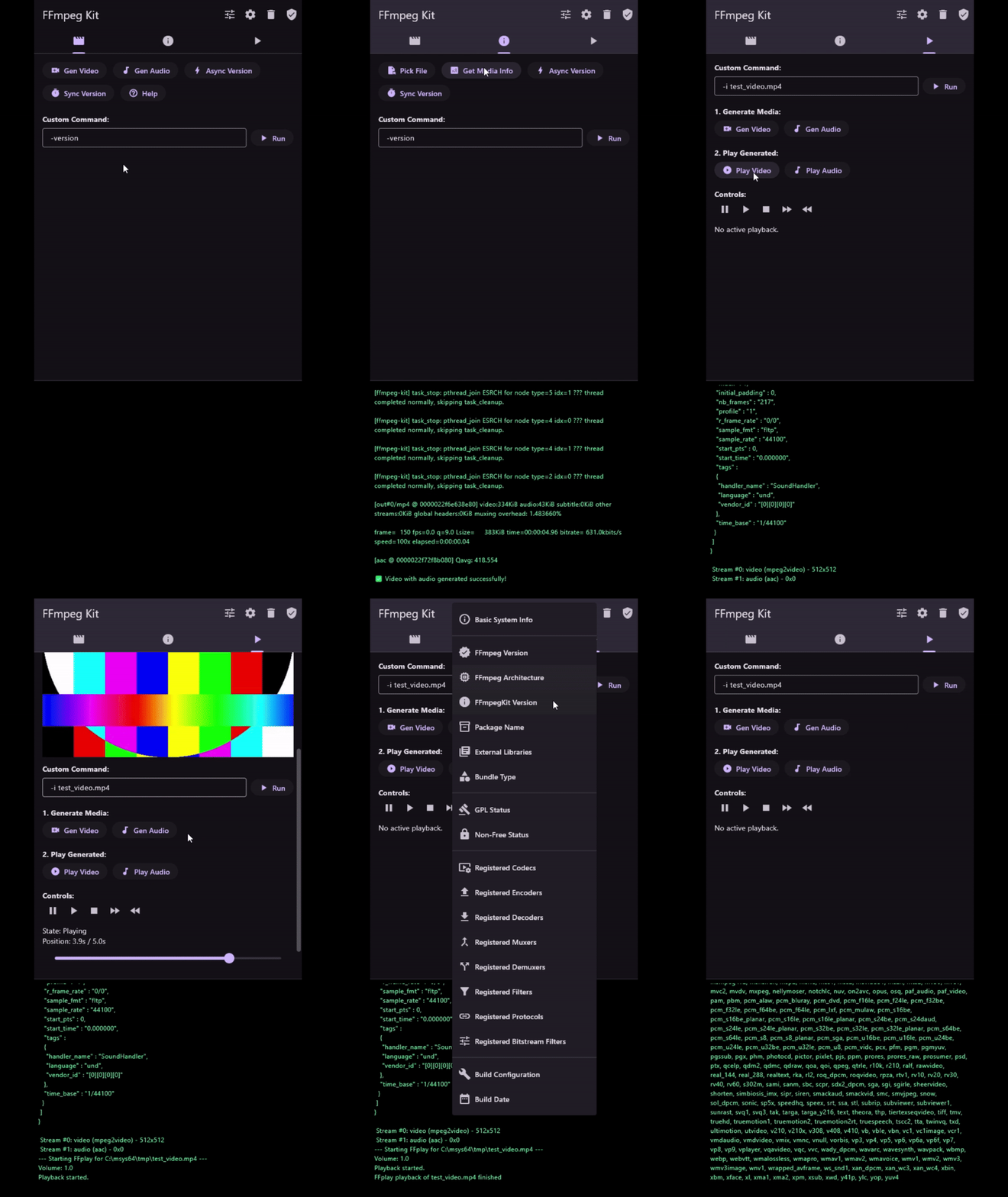
🎬 Demo #

2. Installation #
-
Install the package:
flutter pub add ffmpeg_kit_extended_flutter -
Add the
ffmpeg_kit_extended_configsection to yourpubspec.yaml:ffmpeg_kit_extended_config: type: "base" # pre-bundled builds: debug, base, full, audio, video, video_hw gpl: true # enable to include GPL libraries. WARNING: Make sure you understand what GPL license means before enabling. Check https://www.ffmpeg.org/legal.html for more information. small: true # enable to use smaller builds # == OR == # ------------------------------------------------------------- # You can specify remote or local path to libffmpegkit libraries for each platform # This allows you to deploy custom builds of libffmpegkit. # See: https://github.com/akashskypatel/ffmpeg-kit-builders # Example: # windows: "path/to/ffmpeg-kit/libraries" # ios: "https://path/to/bundle.xcframework.zip"Note: Native libraries are now automatically downloaded and bundled during the build process using Dart Hooks. No manual configuration script is required.
Important: If you change the bundle after you have already created a build with another bundle, you must flutter clean and flutter build to re-run the build hook and download updated binaries for the new bundle selection.
-
Import the package in your Dart code:
import 'package:ffmpeg_kit_extended_flutter/ffmpeg_kit_extended_flutter.dart'; -
Initialize the plugin at application startup before calling any API:
void main() async { WidgetsFlutterBinding.ensureInitialized(); await FFmpegKitExtended.initialize(); runApp(MyApp()); }Important: Any FFmpeg, FFprobe, or FFplay API call made before
initialize()completes will throw aStateError.
2.1 Platform specific configuration #
-
iOS and iOS Simulator - Your app's Podfile will need to be updated to add post-install hooks to exclude building for architectures that aren't supported Add the following to your Podfile:
post_install do |installer|
  installer.pods_project.targets.each do |target|
    flutter_additional_ios_build_settings(target)
    target.build_configurations.each do |config|
      config.build_settings['EXCLUDED_ARCHS[sdk=iphonesimulator*]'] = 'i386 x86_64'
      config.build_settings['EXCLUDED_ARCHS[sdk=iphoneos*]'] = 'i386 x86_64'
    end
  end

  installer.generated_projects.each do |project|
    project.targets.each do |target|
      target.build_configurations.each do |config|
        config.build_settings['EXCLUDED_ARCHS[sdk=iphonesimulator*]'] = 'i386 x86_64'
        config.build_settings['EXCLUDED_ARCHS[sdk=iphoneos*]'] = 'i386 x86_64'
        config.build_settings['ONLY_ACTIVE_ARCH'] = 'YES'
      end
    end
    project.save
  end
end
2.2 Pre-bundled Builds #
- base: Basic build with core FFmpeg libraries. Does not contain any extra libraries.
- full: Full build with all platform-compatible FFmpeg libraries. See: https://github.com/akashskypatel/ffmpeg-kit-builders?tab=readme-ov-file#supported-external-libraries
- audio: Build with audio-only FFmpeg libraries.
- video: Build with video-only FFmpeg libraries.
- video_hw: Build with hardware-accelerated video FFmpeg libraries.
2.2 Feature Matrix #
GPL licensing
⚠️ WARNING ⚠️: Enabling GPL libraries makes your application GPL-licensed as well and may face additional challenges during app store approval. GPL license requires your application to be open-source and distributed under the same license.
It is recommended to use LGPL bundle if you are not familiar with GPL licensing.
- Libraries marked 10 Enabling any GPL library makes the resulting FFmpeg binary GPL-licensed and non-redistributable under a permissive license.
- Audio+: libbs2b, libcdio, librubberband, libjack (Linux)
- Video+: libx264, libx265, libdavs2, libdvdnav, libdvdread, libxavs, libxavs2, libxvid (Linux), frei0r, libvidstab
- Video+HW+: v4l2-m2m (Linux)
- Video+ (Desktop only): avisynth
AI
libopenvinoandlibtensorfloware only available on Desktop builds (MacOS,Linux, andWindows).libtorchis only available onLinuxandMacOsbuilds (Windowsnot supported due ABI mismatch).libonnxruntimeis not available onx86_64MacOS.- Only CPU AI libraries are vendored with pre-built bundles. GPU libraries must be custom deployed.
| Feature | Base | Audio | Video | Video+Hardware | Full |
|---|---|---|---|---|---|
| Video | x | x | x | ||
| Audio | x | x | x | x | |
| Streaming | x | x | x | x | |
| Hardware | x | x | |||
| AI* | x* | ||||
| HTTPS | * | x | x | x | x |
| Platform* | x | x | x | x | x |
| Other* | x |
-
AI features are not supported on all platforms. You must deploy your own custom build of ffmpeg-kit-extended to enable certain AI features.
- See Supported External Libraries for more information.
-
Platform features are built-in platform libraries that FFmpeg support like AVFounation, VideoToolbox, etc. on apple platforms or DirectX, MediaFoundation on Windows.
-
HTTPS features are enabled by default for Platforms that have built-in HTTPS support like Windows or Apple. For Linux and Android OpenSSL is enabled by default.
-
Other features are additional features that are not covered by the above categories. See Supported External Libraries for more information.
-
To deploy a custom build see ffmpeg-kit-builders.
Bundle Sizes #
Note: Bundle sizes are approximate compressed sizes and may vary depending on the platform, license type (GPL/LGPL), and build configuration.
Please see bundle distribution page for exact sizes: https://github.com/akashskypatel/ffmpeg-kit-builders/releases
Apple libraries (iOS/macOS) are universal fatlibs and include both ARM64 and x86_64 (macOS) architectures as well as simulator binaries for iOS. Apple libraries also include debug symbols addresses for crash analytics which may marginally increase the bundle size.
| Bundle Type | Android (MB) | iOS (MB) | macOS (MB) | Linux (MB) | Windows (MB) |
|---|---|---|---|---|---|
| (Universal) | (Universal) | (Universal) | |||
| debug | ~33 | ~55 | ~56 | ~44 | ~140 |
| base | ~30-38 | ~50-55 | ~30-56 | ~12-17 | ~11-17 |
| audio | ~42-86 | ~65-95 | ~45-78 | ~18-40 | ~21-40 |
| video | ~94-150 | ~100-135 | ~97-136 | ~56-83 | ~60-83 |
| video_hw | ~102-158 | ~105-140 | ~103-142 | ~67-95 | ~65-88 |
| full | ~113-170 | ~112-147 | ~520-560 | ~475-501 | ~320-343 |
3. Usage #
3.1 Basic Command Execution #
Execute an FFmpeg command asynchronously:
import 'package:ffmpeg_kit_extended_flutter/ffmpeg_kit_extended_flutter.dart';

FFmpegKit.executeAsync('-i input.mp4 -c:v libx264 output.mp4', onComplete: (session) async {
  final returnCode = session.getReturnCode();

  if (ReturnCode.isSuccess(returnCode)) {
    print("Command success");
  } else if (ReturnCode.isCancel(returnCode)) {
    print("Command cancelled");
  } else {
    print("Command failed with state ${session.getState()}");
    final failStackTrace = session.getFailStackTrace();
    print("Stack trace: $failStackTrace");
  }
});
3.2 Retrieving Media Information #
Use FFprobeKit to get detailed metadata about a media file:
import 'package:ffmpeg_kit_extended_flutter/ffmpeg_kit_extended_flutter.dart';

FFprobeKit.getMediaInformationAsync('path/to/video.mp4', onComplete: (session) {
  final info = session.getMediaInformation();
  if (info != null) {
      print("Duration: ${info.duration}");
      print("Format: ${info.format}");
      for (var stream in info.streams) {
          print("Stream type: ${stream.type}, codec: ${stream.codec}");
      }
  }
});
3.3 Handling Logs and Statistics #
You can register logs and statistics callbacks for improved monitoring:
FFmpegKit.executeAsync(
  '-i input.mp4 output.mkv',
  onComplete: (session) { /* Complete Callback */ },
  onLog: (log) {
    print("Log: ${log.message}");
  },
  onStatistics: (statistics) {
    print("Progress: ${statistics.time} ms, size: ${statistics.size}");
  },
);
3.4 Session Management #
All executions return a Session object which can be used to control the task:
// Cancel a specific session
FFmpegKit.cancel(session);

// Cancel all active sessions
FFmpegKitExtended.cancelAllSessions();

// List all sessions
final sessions = FFmpegKitExtended.getSessions();
// OR list only FFmpeg sessions
final ffmpegSessions = FFmpegKit.getFFmpegSessions();
3.5 FFplay Video Playback #
The plugin supports complete video playback with a unified cross-platform surface API.
Basic Video Playback
import 'package:ffmpeg_kit_extended_flutter/ffmpeg_kit_extended_flutter.dart';

class VideoPlayerWidget extends StatefulWidget {
  @override
  _VideoPlayerWidgetState createState() => _VideoPlayerWidgetState();
}

class _VideoPlayerWidgetState extends State<VideoPlayerWidget> {
  FFplaySurface? _surface;
  bool _hasVideo = false;
  int _videoWidth = 0;
  int _videoHeight = 0;
  double _playbackPosition = 0.0;

  @override
  void dispose() {
    _surface?.release();
    super.dispose();
  }

  Future<void> _startPlayback(String filePath) async {
    // Create surface before starting playback
    _surface = await FFplaySurface.create();

    final session = await FFplayKit.executeAsync('-i "$filePath"');

    // Listen for video dimensions
    session.videoSizeStream.listen((size) {
      final (width, height) = size;
      if (mounted && width > 0 && height > 0) {
        setState(() {
          _videoWidth = width;
          _videoHeight = height;
          _hasVideo = true;
        });
      }
    });

    // Listen for position updates
    session.positionStream.listen((position) {
      if (mounted) {
        setState(() => _playbackPosition = position);
      }
    });
  }

  @override
  Widget build(BuildContext context) {
    return Column(
      children: [
        // Video display (only when video frames are available)
        if (_hasVideo && _surface != null)
          SizedBox(
            width: _videoWidth.toDouble(),
            height: _videoHeight.toDouble(),
            child: _surface!.toWidget(),
          ),

        // Playback controls
        Row(
          children: [
            IconButton(
              onPressed: () => FFplayKit.pause(),
              icon: Icon(Icons.pause),
            ),
            IconButton(
              onPressed: () => FFplayKit.resume(),
              icon: Icon(Icons.play_arrow),
            ),
            Expanded(
              child: Slider(
                value: _playbackPosition / (FFplayKit.duration > 0 ? FFplayKit.duration : 1.0),
                onChanged: (value) => FFplayKit.seek(value * FFplayKit.duration),
              ),
            ),
          ],
        ),
      ],
    );
  }
}
Platform-Specific Usage
The FFplaySurface class automatically handles platform differences:
- Android: Uses
SurfaceTexturebackedANativeWindowfor native rendering - iOS/macOS: Uses
CVPixelBuffertextures with Metal optimization - Linux/Windows: Uses pixel buffer textures with frame callbacks
- Audio-only: Surface is created but not displayed, preventing crashes
Advanced Features
// Get session-specific properties
final session = await FFplayKit.executeAsync('-i video.mp4');

// Video dimensions (available when first frame is decoded)
final width = session.getVideoWidth();
final height = session.getVideoHeight();

// Real-time streams
session.positionStream.listen((pos) => print('Position: ${pos}s'));
session.videoSizeStream.listen((size) => print('Size: ${size}'));

// Volume control
session.setVolume(0.8); // 0.0 to 1.0
print('Volume: ${session.getVolume()}');

// Session state
print('Playing: ${session.isPlaying()}');
print('Paused: ${session.isPaused()}');
4. Supported External Libraries
#
| Bundle Key | Description |
|---|---|
b+ |
Base bundle and above. |
a+ |
Audio bundle and above. |
v+ |
Video bundle and above. |
h+ |
Video+Hardware bundle and above. |
f |
Full bundle only. |
| (empty) | not available on this platform. |
| Library | Android | Linux | Windows | tvOS | iOS | macOS |
|---|---|---|---|---|---|---|
| System | ||||||
| bzlib, iconv, lzma, zlib | a+ | a+ | a+ | a+ | a+ | a+ |
| TLS / HTTPS4 (one selected per build) | ||||||
| openssl (default), gnutls, mbedtls, libtls | a+ | a+ | a+ | a+ | a+ | a+ |
| schannel | a+ | a+ | ||||
| Streaming | ||||||
| libsrt, librist, librtmp | a+ | a+ | a+ | a+ | a+ | a+ |
| Audio Codecs | ||||||
| libcodec2, libgsm, libilbc, liblc3, libmodplug | a+ | a+ | a+ | a+ | a+ | a+ |
| libmp3lame, libopencore-amrnb, libopencore-amrwb | a+ | a+ | a+ | a+ | a+ | a+ |
| libopenmpt, libopus, libsoxr, libspeex, libtwolame | a+ | a+ | a+ | a+ | a+ | a+ |
| libvo-amrwbenc, libvorbis, openal | a+ | a+ | a+ | a+ | a+ | a+ |
| alsa | a+ | |||||
| libbs2b10 | a+ | a+ | a+ | a+ | a+ | a+ |
| libmpeghdec9 (custom deployment only) | a+ | a+ | a+ | a+ | a+ | a+ |
Audio Extras (not in small builds) |
||||||
| chromaprint, libflite, libgme, libmysofa, libshine, lv2 | a+ | a+ | a+ | a+ | a+ | a+ |
| libcdio, librubberband10 | a+ | a+ | a+ | a+ | a+ | a+ |
| ladspa, libpulse, sndio | a+ | |||||
| libjack10 | a+ | |||||
| Video Libraries | ||||||
| lcms2, libaom, libaribcaption | v+ | v+ | v+ | v+ | v+ | v+ |
| libass, libbluray, libcaca, libdav1d | v+ | v+ | v+ | v+ | v+ | v+ |
| libdav1d, libfontconfig, libfreetype, libfribidi | v+ | v+ | v+ | v+ | v+ | v+ |
| libharfbuzz, libjxl, libkvazaar, liblcevc-dec | v+ | v+ | v+ | v+ | v+ | v+ |
| liboapv, libopenh264, libopenjpeg, librav1e | v+ | v+ | v+ | v+ | v+ | v+ |
| librsvg, libsnappy, libsvtav1, libtheora | v+ | v+ | v+ | v+ | v+ | v+ |
| libuavs3d, libvpx, libvvenc, libwebp | v+ | v+ | v+ | v+ | v+ | v+ |
| libxevd, libxeve, libzimg, libzvbi, libxml2, sdl2 | v+ | v+ | v+ | v+ | v+ | v+ |
| libdavs2, libdvdnav, libdvdread, libx26410 | v+ | v+ | v+ | v+ | v+ | v+ |
| libx265, libxavs, libxavs2, libaribb2410 | v+ | v+ | v+ | v+ | v+ | v+ |
| libdc1394, libiec61883, libsvtjpegxs | v+ | |||||
| libxvid10 | v+ | |||||
| libopencolorio15 | v+ | v+ | v+ | v+ | v+ | v+ |
Video Extras (not in small builds) |
||||||
| libklvanc, liblensfun, libqrencode, libvmaf, vapoursynth | v+ | v+ | v+ | v+ | v+ | v+ |
| frei0r, libvidstab10 | v+ | v+ | v+ | v+ | v+ | |
| libv4l2, libxcb, libxcb-shape, libxcb-shm, libxcb-xfixes, xlib | v+ | |||||
| avisynth10 | v+ | v+ | v+ | |||
| decklink9 (custom deployment only) | v+ | v+ | v+ | v+ | v+ | v+ |
| Hardware Acceleration | ||||||
| amf, libmfx, libplacebo, libvpl | h+ | h+ | h+ | h+ | h+ | h+ |
| opencl, opengl, vulkan, vulkan-static | h+ | h+ | h+ | h+ | h+ | h+ |
| ffnvcodec, cuvid, nvdec, nvenc12 (custom deployment only) | h+ | h+ | ||||
| cuda-llvm, cuda-nvcc12 (custom deployment only) | h+ | h+ | ||||
| libdrm, vaapi, rkmpp, vdpau | h+ | |||||
| v4l2-m2m10 | h+ | |||||
| AI (Full bundle only) | ||||||
| pocketsphinx, whisper | f | f | f | f | f | f |
| libopencv, libquirc, libtesseract11 | f | f | f | f | f | f |
| libopenvino, libtensorflow11 | f | f | f | |||
| libonnxruntime11 | f | f | f | |||
| libtorch11 | f | f | ||||
| Nonfree additions (custom deployment only) | ||||||
| libfdk-aac9 | f | f | f | f | f | f |
| Platform-specific (All bundles) | ||||||
| jni, mediacodec | b+ | |||||
| appkit, avfoundation, audiotoolbox, coreimage, metal, securetransport | b+ | b+ | b+ | |||
| videotoolbox, schannel, dxva2, d3d12va, d3d11va, mediafoundation | b+ | b+ | b+ | |||
| appkit | b+ | |||||
| schannel, dxva2, d3d12va, d3d11va, mediafoundation | b+ | |||||
| alsa | b+ |
frei0r, liblensfun, librsvg, and pocketsphinx are not available on
tvOS.
You can also get the full list of supported external libraries by running --list-libraries
| Library | Description | Platform1 | Extra2 | Base | Audio | Video | Video+Hardware | Full |
|---|---|---|---|---|---|---|---|---|
| jni8 | Enables Java Native Interface interactions on Android | Android | x | x | x | x | x | |
| appkit8 | Accesses AppKit for screen and window capture | Apple | x | 9 | 9 | 9 | 9 | |
| avfoundation8 | Captures input from AVFoundation devices (cameras/mics) | Apple | x | 9 | 9 | 9 | 9 | |
| pocketsphinx | Performs offline speech-to-text conversion | x | ||||||
| whisper | Integrates OpenAI Whisper for speech recognition | x | ||||||
| audiotoolbox8 | Accesses AudioToolbox for native codec support | Apple | x | 9 | 9 | 9 | 9 | |
| alsa | Accesses ALSA for audio input and output | Linux | x | x | x | x | x | |
| chromaprint | Calculates audio fingerprints for identification | x | x | x | x | x | ||
| ladspa | Loads LADSPA plugins for audio filtering | Linux | x | x | x | x | x | |
| libbs2b | Simulates binaural audio via DSP | 10 | 10 | 10 | 10 | |||
| libcdio | Reads and extracts audio from CDs | 10 | 10 | 10 | 10 | 10 | ||
| libcodec2 | Encodes and decodes Codec2 speech format | x | x | x | x | |||
| libfdk-aac | Encodes and decodes high-quality AAC audio | 9 | 9 | 9 | 9 | |||
| libflite | Synthesizes speech from text (TTS) filter | x | x | x | x | x | ||
| libgme | Emulates and plays video game music formats | x | x | x | x | x | ||
| libgsm | Encodes and decodes GSM audio | x | x | x | x | |||
| libilbc | Encodes and decodes iLBC audio | x | x | x | x | |||
| libjack8 | Connects to the JACK audio connection kit | Linux | 10 | 10 | 10 | 10 | 10 | |
| liblc3 | Encodes and decodes LC3 (Bluetooth LE) audio | x | x | x | x | |||
| libmodplug | Decodes module music formats (MOD, etc.) | x | x | x | x | |||
| libmp3lame | Encodes MP3 audio | x | x | x | x | |||
| libmysofa | Reads HRTF files for the sofalizer filter | x | x | x | x | x | ||
| libopencore-amrnb | Encodes and decodes AMR-NB audio | x | x | x | x | |||
| libopencore-amrwb | Decodes AMR-WB audio | x | x | x | x | |||
| libopenmpt | Decodes tracked music files (OpenMPT based) | x | x | x | x | |||
| libopus | Encodes and decodes Opus audio | x | x | x | x | |||
| libpulse8 | Captures audio via PulseAudio server | Linux | x | x | x | x | x | |
| librubberband | Performs high-quality time stretching/pitch shifting | 10 | 10 | 10 | 10 | 10 | ||
| libshine | Encodes MP3 using fixed-point math | x | x | x | x | x | ||
| libsoxr | Resamples audio using the SoX library | x | x | x | x | |||
| libspeex | Encodes and decodes Speex audio | x | x | x | x | |||
| libtwolame | Encodes MP2 audio | x | x | x | x | |||
| libvo-amrwbenc | Encodes AMR-WB audio | x | x | x | x | |||
| libvorbis | Encodes and decodes Vorbis audio | x | x | x | x | |||
| lv2 | Loads LV2 plugins for audio filtering | x | x | x | x | x | ||
| openal | Captures audio via OpenAL 1.1 | x | x | x | x | |||
| sndio | Accesses sndio for audio I/O on OpenBSD | Linux | x | x | x | x | x | |
| gcrypt | Provides crypto functions for RTMP/RTMPE | 3 | ||||||
| gmp | Provides math functions for crypto contexts | 3 | ||||||
| bzlib | Compresses and decompresses bzip2 streams | x | x | x | x | |||
| iconv | Converts character encodings for text/subtitles | x | x | x | x | |||
| libxml2 | Parses XML for DASH, IMF, and other formats | x | x | x | ||||
| lzma | Provides LZMA lossless data compression | x | x | x | x | |||
| zlib | Provides Deflate/zlib lossless data compression | x | x | x | x | |||
| amf | Accesses AMD Advanced Media Framework (GPU encoding) | x | x | |||||
| mediacodec8 | Accesses Android MediaCodec hardware acceleration | Android | x | x | x | |||
| coreimage8 | Applies video filters via Apple CoreImage | Apple | x | 9 | 9 | |||
| metal8 | Utilizes Apple Metal for GPU acceleration | Apple | x | 9 | 9 | |||
| videotoolbox8 | Accesses VideoToolbox for hardware encoding/decoding | Apple | x | 9 | 9 | |||
| cuda-llvm8 | Compiles CUDA kernels at runtime using Clang | Nvidia | 12 | 12 | ||||
| cuda-nvcc8 | Compiles CUDA kernels using NVCC | Nvidia | 12 | 12 | ||||
| cuvid8 | Accesses Nvidia CUVID for decoding (Legacy) | Nvidia | 12 | 12 | ||||
| ffnvcodec | Provides headers for Nvidia codec API integration | Nvidia | 12 | 12 | ||||
| libdrm | Accesses Direct Rendering Manager for Linux GPU buffer | Linux | x | x | ||||
| libglslang14 | Compiles GLSL shaders to SPIR-V for Vulkan filters | x | x | |||||
| libmfx14 | Accesses Intel Quick Sync Video (QSV) via MediaSDK | x | x | |||||
| libnpp13 | Uses Nvidia Performance Primitives for image processing | Nvidia | ||||||
| libplacebo | Applies high-quality GPU video processing filters | x | x | |||||
| libshaderc14 | Compiles GLSL shaders to SPIR-V (Google implementation) | x | x | |||||
| libvpl14 | Accesses Intel oneVPL video processing library | x | x | |||||
| nvdec8 | Accesses Nvidia NVDEC for hardware decoding | Nvidia | 12 | 12 | ||||
| nvenc8 | Accesses Nvidia NVENC for hardware encoding | Nvidia | 12 | 12 | ||||
| opencl | Enables OpenCL-based video filtering | x | x | |||||
| rkmpp | Accesses Rockchip Media Process Platform for HW codecs | Linux | x | x | ||||
| v4l2-m2m | Accesses V4L2 Memory-to-Memory hardware codecs | Linux | 10 | 10 | ||||
| vaapi | Accesses Video Acceleration API for HW codecs | Linux | x | x | ||||
| vdpau8 | Accesses VDPAU for hardware decoding on Unix | Linux+Nvidia | x | x | ||||
| vulkan | Enables Vulkan-based filtering and rendering | x | x | |||||
| vulkan-static | Links libvulkan statically | x | x | |||||
| opengl | Enables OpenGL-based rendering and filtering | x | x | |||||
| d3d11va8 | Accesses Direct3D 11 for video acceleration | Windows | x | 9 | 9 | |||
| d3d12va8 | Accesses Direct3D 12 for video acceleration | Windows | x | 9 | 9 | |||
| dxva28 | Accesses DirectX 9 for video acceleration | Windows | x | 9 | 9 | |||
| mediafoundation8 | Accesses Windows Media Foundation for encoding | Windows | x | 9 | 9 | |||
| ohcodec8 | Accesses OpenHarmony multimedia codec capabilities | HarmonyOS | 9 | 9 | ||||
| mmal | Accesses Broadcom MMAL for Raspberry Pi multimedia | Raspberry Pi | 9 | 9 | ||||
| securetransport8 | Provides TLS/SSL support via Apple Secure Transport | Apple | x | 4 | 4 | 4 | 4 | |
| gnutls | Provides TLS/SSL support via GnuTLS | 4 | 4 | 4 | 4 | |||
| libtls | Provides TLS/SSL support via LibreSSL | 4 | 4 | 4 | 4 | |||
| mbedtls | Provides TLS/SSL support via mbedTLS | 4 | 4 | 4 | 4 | |||
| openssl | Provides TLS/SSL support via OpenSSL | 4 | 4 | 4 | 4 | |||
| schannel8 | Provides TLS/SSL support via Windows SChannel | Windows | x | 4 | 4 | 4 | 4 | |
| librabbitmq | Enables AMQP protocol support (RabbitMQ) | 5 | ||||||
| libzmq | Enables ZeroMQ message passing protocol | 5 | ||||||
| libsmbclient | Enables SMB/CIFS protocol support | 6 & 10 | ||||||
| libssh | Enables SFTP protocol support | 7 | ||||||
| librist | Enables Reliable Internet Stream Transport (RIST) | x | x | x | x | |||
| librtmp | Enables RTMP and RTMPE stream support | x | x | x | x | |||
| libsrt | Enables Secure Reliable Transport (SRT) protocol | x | x | x | x | |||
| libopencv | Applies computer vision filters via OpenCV | x | ||||||
| libopenvino8 | Runs DNN-based filters using Intel OpenVINO backend | 11 | ||||||
| libtensorflow8 | Runs DNN-based filters using TensorFlow backend | 11 | ||||||
| libtorch8 | Runs DNN-based filters using PyTorch backend | 11 | ||||||
| libonnxruntime8 | Runs DNN-based filters using ONNX Runtime backend | 11 | ||||||
| libquirc | Decodes QR codes from video streams | x | ||||||
| libtesseract | Performs Optical Character Recognition (OCR) | x | ||||||
| sdl2 | Outputs audio/video to window using SDL2 | x | x | x | x | |||
| avisynth | Reads and demuxes AviSynth script files | 10 | 10 | 10 | 10 | |||
| decklink | Captures/Outputs via Blackmagic DeckLink devices | 9 | 9 | 9 | ||||
| frei0r | Loads Frei0r plugins for video filtering | 10 | 10 | 10 | 10 | |||
| lcms2 | Applies ICC color profiles using LittleCMS 2 | x | x | x | ||||
| libaom | Encodes and decodes AV1 video | x | x | x | ||||
| libaribb24 | Decodes ARIB STD-B24 captions | x | x | x | ||||
| libaribcaption | Decodes ARIB captions (alternative library) | x | x | x | ||||
| libass | Renders ASS/SSA subtitles | x | x | x | ||||
| libbluray | Reads Blu-ray playlists and protocols | x | x | x | ||||
| libcaca | Renders video as ASCII characters | x | x | x | ||||
| libdav1d | Decodes AV1 video (high performance) | x | x | x | ||||
| libdavs2 | Decodes AVS2 video | 10 | 10 | 10 | ||||
| libdc1394 | Captures video from FireWire cameras | Linux | x | x | x | |||
| libdvdnav | Navigates and demuxes DVD menus/content | 10 | 10 | 10 | ||||
| libdvdread | Reads DVD filesystem structures | 10 | 10 | 10 | ||||
| libfontconfig | Configures and locates fonts for text rendering | x | x | x | ||||
| libfreetype | Renders fonts for text overlays | x | x | x | ||||
| libfribidi | Handles bi-directional text logic | x | x | x | ||||
| libharfbuzz | Shapes complex text for subtitles | x | x | x | ||||
| libiec61883 | Captures DV/HDV via FireWire | Linux | x | x | x | |||
| libjxl | Encodes and decodes JPEG XL images | x | x | x | ||||
| libklvanc | Processes Vertical Ancillary Data (VANC) | x | x | x | x | |||
| libkvazaar | Encodes HEVC video | x | x | x | ||||
| liblcevc-dec | Decodes LCEVC video enhancement layers | x | x | x | ||||
| liblensfun | Corrects lens distortion using Lensfun | x | x | x | x | |||
| liboapv | Encodes OAPV (Open Advanced Photos/Video) | x | x | x | ||||
| libopenh264 | Encodes H.264 video (Cisco implementation) | x | x | x | ||||
| libopenjpeg | Encodes and decodes JPEG 2000 images | x | x | x | ||||
| libqrencode | Generates QR codes as video sources | x | x | x | x | |||
| librav1e | Encodes AV1 video (Rust implementation) | x | x | x | ||||
| librsvg | Renders SVG files for overlays | x | x | x | ||||
| libsnappy | Compresses data for the Hap codec | x | x | x | ||||
| libsvtav1 | Encodes AV1 video (SVT implementation) | x | x | x | ||||
| libtheora | Encodes Theora video | x | x | x | ||||
| libuavs3d | Decodes AVS3 video | x | x | x | ||||
| libv4l2 | Accesses V4L2 devices and utilities | Linux | x | x | x | x | ||
| libvidstab | Stabilizes video using motion analysis | 10 | 10 | 10 | 10 | |||
| libvmaf | Calculates VMAF video quality scores | x | x | x | x | |||
| libvpx | Encodes and decodes VP8 and VP9 video | x | x | x | ||||
| libvvenc | Encodes H.266/VVC video | x | x | x | ||||
| libwebp | Encodes WebP images | x | x | x | ||||
| libx264 | Encodes H.264/AVC video | 10 | 10 | 10 | ||||
| libx265 | Encodes HEVC/H.265 video | 10 | 10 | 10 | ||||
| libxavs | Encodes AVS video | 10 | 10 | 10 | ||||
| libxavs2 | Encodes AVS2 video | 10 | 10 | 10 | ||||
| libxcb | Captures screen content via XCB | Linux | x | x | x | x | ||
| libxcb-shape | Handles X11 shapes during capture | Linux | x | x | x | x | ||
| libxcb-shm | Uses shared memory for X11 capture | Linux | x | x | x | x | ||
| libxcb-xfixes | Fixes cursor rendering in X11 capture | Linux | x | x | x | x | ||
| libxevd | Decodes EVC video | x | x | x | ||||
| libxeve | Encodes EVC video | x | x | x | ||||
| libxvid | Encodes MPEG-4 video (Xvid) | Linux | 10 | 10 | 10 | |||
| libzimg | Performs scaling and color conversion (zscale) | x | x | x | ||||
| libzvbi | Decodes VBI teletext data | x | x | x | ||||
| vapoursynth | Demuxes VapourSynth script frames | x | x | x | x | |||
| xlib | Captures screen content via Xlib | Linux | x | x | x | x | ||
| libsvtjpegxs | Encodes JPEG XS video | x | x | x | ||||
| libopencolorio15 | Color space conversion | 15 | 15 | 15 | ||||
| libmpeghdec | Decodes MPEG-H 3D Audio | 9 | 9 | 9 | 9 |
1 Platform specific libraries are enabled by default for target platform and bundle.
2 Extra libraries are enabled on non-small bundles.
3 RTMP(T)E support requires either gcrypt or gmp if the requires SSL library is not selected in the bundle.
4 HTTPS feature in FFmpeg supports multiple SSL libraries. By default OpenSSL is selected unless you build a custom bundle with a specific supported library.
5 MQ libraries are not enabled by default in any bundle. A custom build must be deployed to enable them using --enable-mq OR --enable-librabbitmq and --enable-libzmq.
6 SAMBA (SMB protocol) library is not enabled by default in any bundle (except on Windows, which supports SMB by default). A custom build must be deployed to enable them using --enable-smb OR --enable-libsmbclient.
7 SSH library is not enabled by default in any bundle. A custom build must be deployed to enable them using --enable-ssh OR --enable-libssh.
8 These libraries cannot be built statically. If you deploy a static build with these libraries they will not be bundled with FFmpegKit wrapper bundle. The target system will need these libraries installed or running the wrapper may crash immediately.
9 These libraries have restrictive licenses that may make the binaries non-redistributable, are not compatible with GPL and only included with --enable-nonfree.
10 These libraries are GPL and only included with --enable-gpl.
11 These libraries can either be selected with GPU support or CPU only. Note that some of them do not support AMD ROCm framework. These libraries are not available on Mobile platforms due to platform limitations.
12 while these libraries are not compatible with GPL and have a more restrictive license, they are redistributable and will be bundled with non-gpl ffmpeg-kit bundle.
13 These libraries have been deprecated and will be auto-disabled and repalced by modern library if available.
14 These libraries conflict with other libraries with overlapping functionality. If both conflicting libraries are enabled, the preferred library, indicated by an * will be enabled and the other library will be disabled:
- libmfx -> libvpl*
- libglslang -> libshaderc*
15 These libraries are only supported on specific CPU architectures.
- libsvtjpegxs -> x86_64 only
5. License #
This project is licensed under the LGPL v3.0 by default. However, depending on the underlying FFmpeg build configuration and external libraries used, the effective license may be GPL v3.0. Please review the licenses of the included libraries.
Understand the difference between LGPL and GPL licenses before using this plugin in your project.
Using GPL licensed components in your application may require your application to also be licensed under GPL.
Metadata
Documentation
Publisher
Weekly Downloads
Metadata
A comprehensive Flutter plugin for executing FFmpeg, FFprobe, and FFplay commands using FFmpeg 9.0.1 API. Supports Android, iOS, macOS, Linux, and Windows.
Repository (GitHub)
View/report issues
Contributing
Topics
#ffmpeg #media-processing #transcoding #media-tagging #ffmpeg-kit
License
 LGPL-3.0 (license)
Dependencies
code_assets, crypto, ffi, flutter, hooks, logging, meta, path, yaml
More
Packages that depend on ffmpeg_kit_extended_flutter
Packages that implement ffmpeg_kit_extended_flutter