dev_hud 0.0.9  dev_hud: ^0.0.9 copied to clipboard
A lightweight, draggable, game-focused debug overlay for Flutter.
🎮 DevHud #
A beautiful, high-performance debug overlay for Flutter games and apps
Monitor FPS, track custom data, and debug in real-time — all without compromising performance.


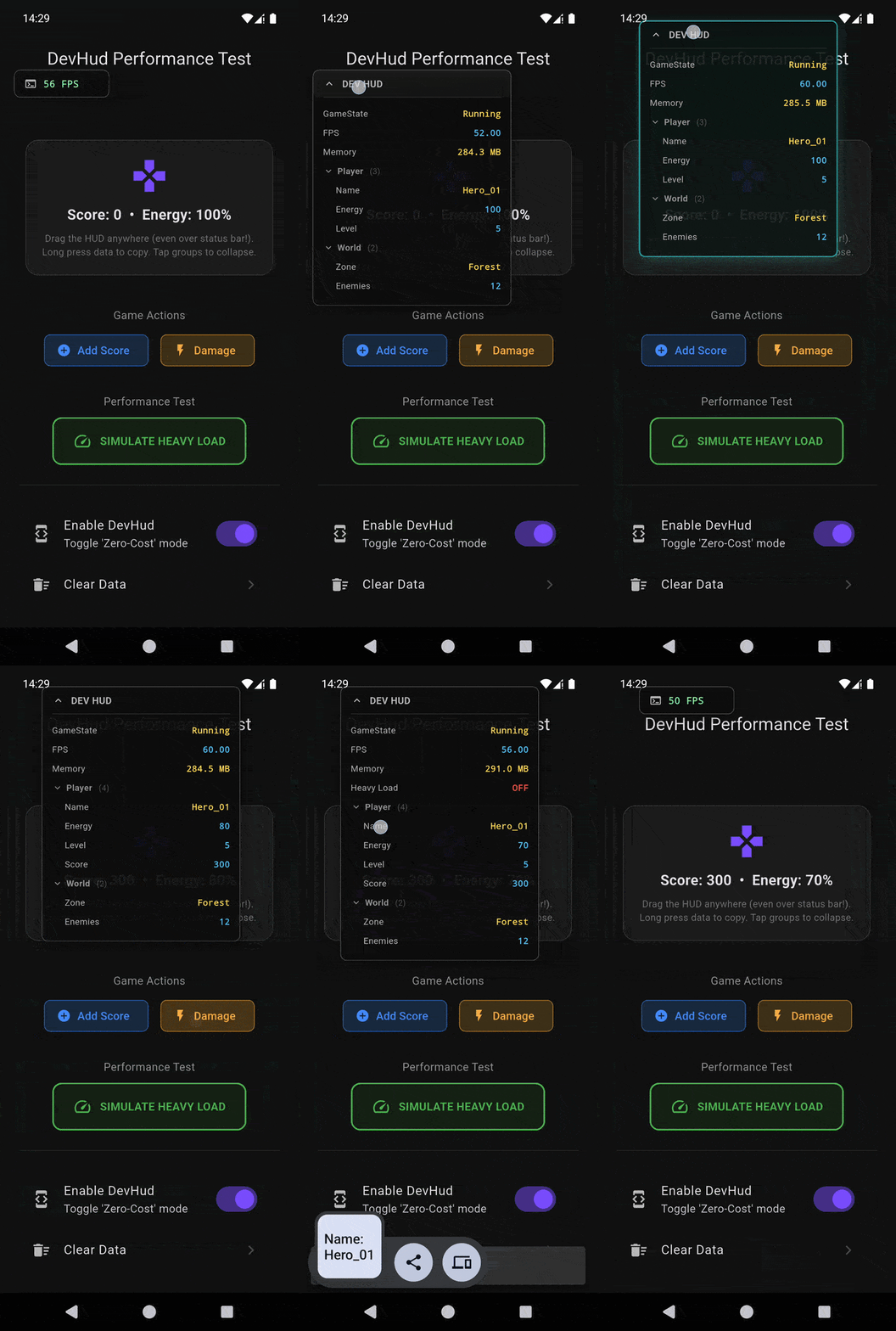
📹 Watch demo video • 🖼️ Static screenshot
Features • Installation • Quick Start • Usage • Examples
✨ Features #
🚀 Performance First #
|
🎨 Developer Experience #
|
🎯 What You Get #
| Feature | Description |
|---|---|
| ⚡ Real-time FPS | Visual performance monitoring with color-coded alerts |
| 📊 Custom Metrics | Track any data: scores, coordinates, API states |
| 🎨 Smart Colors | Auto-detects types: Booleans, Numbers, Strings |
| 📋 Quick Copy | Long-press any row to copy values to clipboard |
| 🖱️ Persistent Position | Remembers where you placed it |
| 🛡️ Production Safe | Zero overhead when disabled |
📦 Installation #
Add dev_hud to your pubspec.yaml:
dependencies:
  dev_hud: ^0.0.9
Then run:
flutter pub get
🚀 Quick Start #
1️⃣ Wrap Your App #
Wrap your MaterialApp with DevHud:
import 'package:dev_hud/dev_hud.dart';
import 'package:flutter/foundation.dart';

void main() {
  runApp(
    DevHud(
      enabled: kDebugMode,  // Only show in debug mode
      showFps: true,
      initialPosition: const Offset(20, 60),
      child: MaterialApp(
        title: 'My Game',
        home: GamePage(),
      ),
    ),
  );
}
2️⃣ Track Your Data #
Update the HUD from anywhere using DevHudService:
import 'package:dev_hud/dev_hud.dart';

// In your game loop, controller, or service
void updateGameStats() {
  DevHudService.instance.update("Score", 1250);
  DevHudService.instance.update("Health", 85.5);
  DevHudService.instance.update("GodMode", true);
  DevHudService.instance.update("Level", "Forest_Zone_2");
}
That's it! 🎉
📝 Usage #
Basic Tracking #
// Track numbers (auto-colored in cyan)
DevHudService.instance.update("Score", 1250);
DevHudService.instance.update("Health", 85.5);

// Track booleans (auto-colored green/red)
DevHudService.instance.update("IsConnected", true);
DevHudService.instance.update("GamePaused", false);

// Track strings (auto-colored in amber)
DevHudService.instance.update("Status", "Loading...");
DevHudService.instance.update("PlayerID", "abc-123-xyz");
Advanced Operations #
// Clear all tracked data
DevHudService.instance.clear();

// Remove specific entry
DevHudService.instance.remove("OldMetric");

// Bulk updates in game loop
void onGameTick() {
  final service = DevHudService.instance;
  service.update("FPS", currentFps);
  service.update("Entities", entityCount);
  service.update("Memory", "${(memoryMb).toStringAsFixed(1)} MB");
}
Configuration Options #
DevHud(
  enabled: true,                    // Toggle visibility
  showFps: true,                    // Show FPS counter
  showMemory: false,                // Show memory usage (NEW)
  persistPosition: false,           // Remember position across restarts (NEW)
  initialPosition: Offset(20, 60),  // Starting position
  child: YourApp(),
)
Collapsible Groups (NEW) #
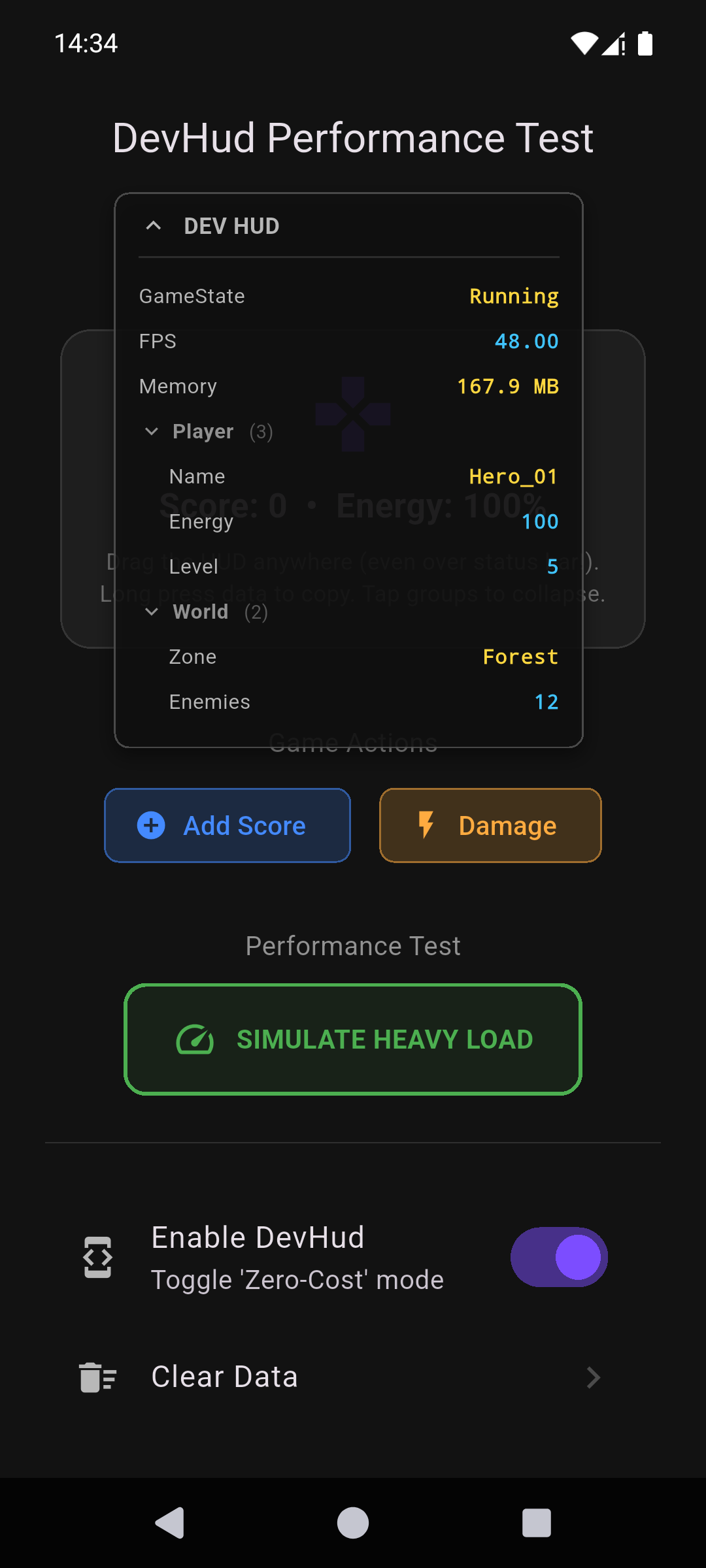
Use / in keys to automatically create collapsible sections:
// These will be grouped under "Player"
DevHudService.instance.update("Player/Health", 100);
DevHudService.instance.update("Player/Score", 500);
DevHudService.instance.update("Player/Level", 5);

// These will be grouped under "World"
DevHudService.instance.update("World/Zone", "Forest");
DevHudService.instance.update("World/Enemies", 12);

// Tap group headers to collapse/expand!
🎯 Examples #
Game Development #
class GameController {
  void updateHud() {
    DevHudService.instance.update("Level", currentLevel);
    DevHudService.instance.update("Enemies", enemyCount);
    DevHudService.instance.update("Combo", comboMultiplier);
    DevHudService.instance.update("PowerUp", hasPowerUp);
  }
}
API Monitoring #
class ApiService {
  Future<void> fetchData() async {
    DevHudService.instance.update("API_Status", "Connecting...");

    try {
      final response = await http.get(url);
      DevHudService.instance.update("API_Status", "✓ ${response.statusCode}");
      DevHudService.instance.update("Latency", "${latency}ms");
    } catch (e) {
      DevHudService.instance.update("API_Status", "✗ Error");
    }
  }
}
Performance Testing #
// Simulate lag to test FPS counter
ElevatedButton(
  onPressed: () {
    final start = DateTime.now();
    while (DateTime.now().difference(start).inMilliseconds < 100) {
      // Block UI thread
    }
  },
  child: Text('Simulate Lag'),
)
Check the example folder for a complete demo with lag simulation.
🎨 Color Coding #
DevHud automatically applies colors based on data types:
| Type | Color | Example |
|---|---|---|
bool |
🟢 Green (true) / 🔴 Red (false) | true → true |
int / double |
🔵 Cyan | 42 → 42 |
String |
🟡 Amber | "Hello" → "Hello" |
FPS Color Indicators #
| Range | Color | Meaning |
|---|---|---|
| ≥ 55 FPS | 🟢 Green | Excellent performance |
| 30-54 FPS | 🟠 Orange | Moderate performance |
| < 30 FPS | 🔴 Red | Poor performance |
🔧 Tips & Best Practices #
✅ Do #
- Use
kDebugModeor remote config to control visibility - Update HUD in existing game loops, not extra tickers
- Use descriptive keys:
"Player_Health"instead of"h" - Long-press values to copy them during debugging
❌ Don't #
- Leave
enabled: truein production builds - Create separate timers just for HUD updates
- Update HUD on every frame if data hasn't changed
- Track sensitive data that shouldn't be visible
🛠️ Troubleshooting #
HUD not showing?
- Check
enabled: trueis set - Ensure you wrapped the correct widget (usually
MaterialApp) - Verify you're calling
DevHudService.instance.update()
FPS counter seems inaccurate?
- FPS is measured using
SchedulerBindingand updates every ~500ms - Heavy background work may affect readings
- Use Flutter DevTools for precise profiling
Can't drag the HUD?
- Make sure nothing is blocking touch events
- The draggable area is the terminal icon at the top
🤝 Contributing #
Contributions are welcome! Feel free to:
- 🐛 Report bugs
- 💡 Suggest features
- 🔧 Submit pull requests
📄 License #
This project is licensed under the MIT License - see the LICENSE file for details.
Made with ❤️ for Flutter developers
If this package helped you, consider giving it a ⭐ on pub.dev!
Metadata
Publisher
unverified uploader
Weekly Downloads
Metadata
A lightweight, draggable, game-focused debug overlay for Flutter.
Repository (GitHub)
View/report issues
Documentation
License
 MIT (license)