
customprompt 0.2.1  customprompt: ^0.2.1 copied to clipboard
Customprompt is a simple animated modal dialog for flutter IOS, Android and Web apps.
Customprompt for Flutter #
Customprompt is a simple animated modal for flutter IOS, Android and Web apps. Customprompt was built with with you in mind, all widgets like Icon, Text, Color can be replaced by the user, plus animation curve and animation duration.
It should look something like this:
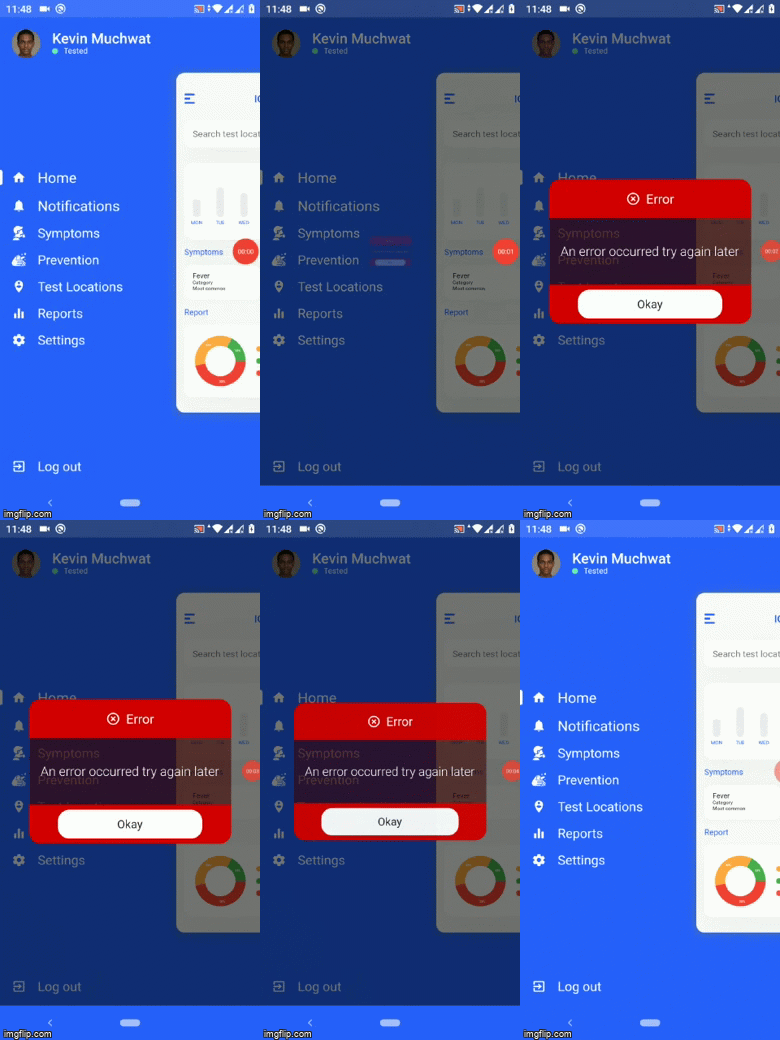
Pull requests certainly welcome.
Installation #
In your pubspec.yaml root add:
dependencies:
  customprompt: ^0.2.1
then,
import 'package:customprompt/customprompt.dart';
Usage #
Typically, customprompt will be used, as follows:
type: 'error' #
 CustomPrompt(
     context: context,
     animDuration: 500,
     title: 'Error',
     type: 'error',
     transparent = false,
     color: Colors.red,
     curve: Curves.easeInCubic,
     btnOneColor: Colors.white,
     btnOneText: 'Okay',
     content: 'An error occurred!',
     onOkay: handleOkay,
 ).alert();

 void handleOkay() {
   print('Okay button clicked');
 }
type: 'warning' #
 CustomPrompt(
     context: context,
     animDuration: 500,
     title: 'Error',
     type: 'warning',
     transparent = false,
     color: Colors.orange,
     curve: Curves.easeInCubic,
     btnOneColor: Colors.white,
     btnOneText: 'Okay',
     content: 'An error occurred!',
     onOkay: handleOkay,
 ).alert();

 void handleOkay() {
   print('Okay button clicked');
 }
type: 'confirm' #
 CustomPrompt(
     context: context,
     animDuration: 500,
     title: 'Error',
     type: 'confirm',
     transparent = true,
     color: Colors.blue,
     curve: Curves.easeInCubic,
     btnOneColor: Colors.green,
     btnTwoColor: Colors.red,
     btnOneText: 'Okay',
     btnTwoText: 'Cancel',
     content: 'An error occurred!',
     onOkay: handleOkay,
     onCancel: handleCancel,
 ).alert();

 void handleOkay() {
   print('Okay button clicked');
 }

 void handleCancel() {
   print('Cancel button clicked');
 }
type: 'input' #
CustomPrompt(
    context: context,
    animDuration: 500,
    title: 'Enter email',
    type: 'input',
    inputHint: 'Enter email...',
    transparent = true,
    color: Colors.blue,
    curve: Curves.easeInCubic,
    btnOneColor: Colors.white,
    btnOneText: 'Submit',
    content: 'An error occurred!',
    onSubmit: handleSubmit,
).alert();

void handleSubmit(data) {
  print('Input data ${data}');
}
Metadata
8
likes
0
points
123
downloads
Publisher
unverified uploader
Weekly Downloads
Metadata
Customprompt is a simple animated modal dialog for flutter IOS, Android and Web apps.
Repository (GitHub)
View/report issues
License
 unknown (license)

