
code_forge 7.0.0  code_forge: ^7.0.0 copied to clipboard
A sophisticated code editor package with AI completion, LSP support, syntax highlighting, and advanced editing capabilities.
⚒️ CodeForge
A powerful, feature-rich code editor created using Flutter
Bring VS Code-level editing experience to your Flutter apps
A complete and better alternative for re_editor, flutter_code_crafter, flutter_code_editor, code_text_field, etc



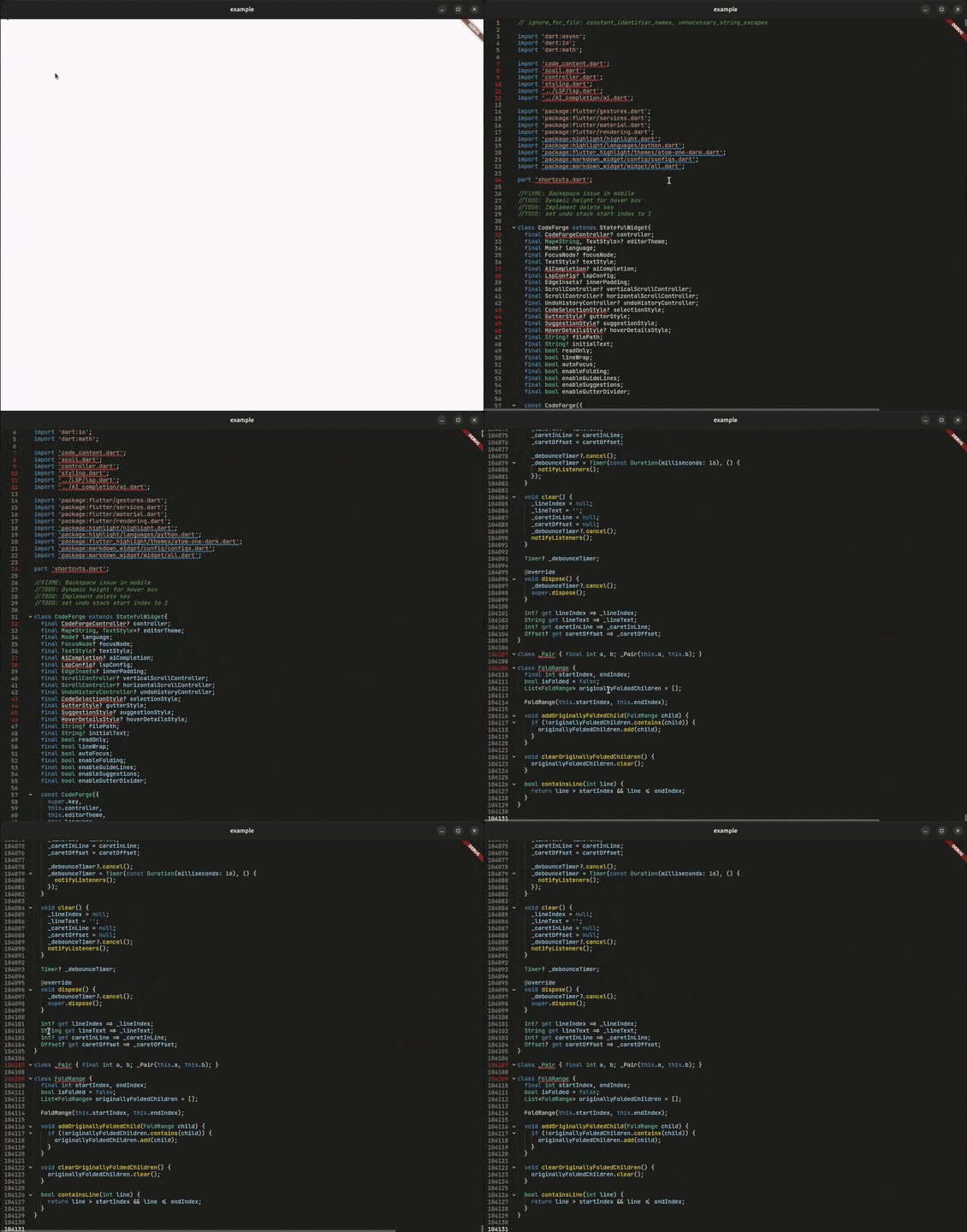
large code support (tested with 100k+ lines) and LSP based intelligent lazy highlighting
Note
CodeForge does not support Flutter web, as it relies on dart:io for core functionality. Web support may be considered in the future if dependencies allow.
What's new in 7.0.0
-
FEATURE: Added
LspClientCapabilitiesclass to selectively enable/disable LSP features during initialization.
•semanticHighlighting— Enable/disable semantic token highlighting
•codeCompletion— Enable/disable code completion suggestions
•hoverInfo— Enable/disable hover documentation
•codeAction— Enable/disable code actions and quick fixes
•signatureHelp— Enable/disable signature help
•documentColor— Enable/disable document color detection
•documentHighlight— Enable/disable document highlighting
•codeFolding— Enable/disable code folding
•inlayHint— Enable/disable inlay hints
•goToDefinition— Enable/disable "go to definition"
•rename— Enable/disable symbol renaming -
FEATURE: Added
deleteFoldRangeOnDeletingFirstLineparameter toCodeForgewidget as requested in #24. When set totrue, deleting the entire first line of a folded block will delete the whole folded region. -
ENHANCEMENT: Mobile context menu toolbar now persists after "Select All" action.
-
ENHANCEMENT: Repositioned code action bulb icon on mobile to avoid overlap with fold icons and gutter.
-
ENHANCEMENT: LSP methods now check capability flags before executing, returning early with appropriate empty values when features are disabled.
-
ENHANCEMENT: Dynamic capability building during LSP initialization — only enabled features are advertised to the language server.
-
FEATURE: Inlay hints and color picker:
- Added LSP inlay hints and Colour picker as requested in #22.
Inlay hint demo: https://github.com/user-attachments/assets/658fd76f-5650-4374-b44d-58db69813e66
Color pciker demo: https://github.com/user-attachments/assets/a7e1795c-83ca-411f-9c1d-81c8d4949926
- Added LSP inlay hints and Colour picker as requested in #22.
-
FEATURE: Added doucment highlight as requested in #22.
-
FEATURE: Added arrow key navigation for LSP suggestions in mobile as requested in #21.
-
FIX: #25
-
FIX: Fixed action icon misposition in mobile as requested in #23
✨ Why CodeForge? #
CodeForge is a next-generation code editor widget designed for developers who demand more. Whether you're building an IDE, a code snippet viewer, or an educational coding platform, CodeForge delivers:
| Feature | CodeForge | Others |
|---|---|---|
| 🎨 Syntax Highlighting | ✅ 180+ languages Availabe languages |
✅ |
| 📁 Code Folding | ✅ Smart detection | ⚠️ Limited |
| 🔌 LSP Integration | ✅ Full support | ❌ |
| 🤖 AI Completion | ✅ Multi-model | ❌ |
| ⚡ Semantic Tokens | ✅ Real-time | ❌ |
| 🎯 Diagnostics | ✅ Inline errors | ❌ |
| ↩️ Undo/Redo | ✅ Smart grouping | ⚠️ Basic |
| 🎨 Full Theming | ✅ Everything Available themes |
⚠️ Limited |
What makes CodeForge different from other editors: #
- Uses the rope data structure instead of regular char array to to handle large text.
- Uses flutter's low level
RenderBoxandParagrahBuilderto render text insted ofTextFieldfor efficiency. - Built in Language Server Protocol client
- AI Code completion.
🎬 Features #
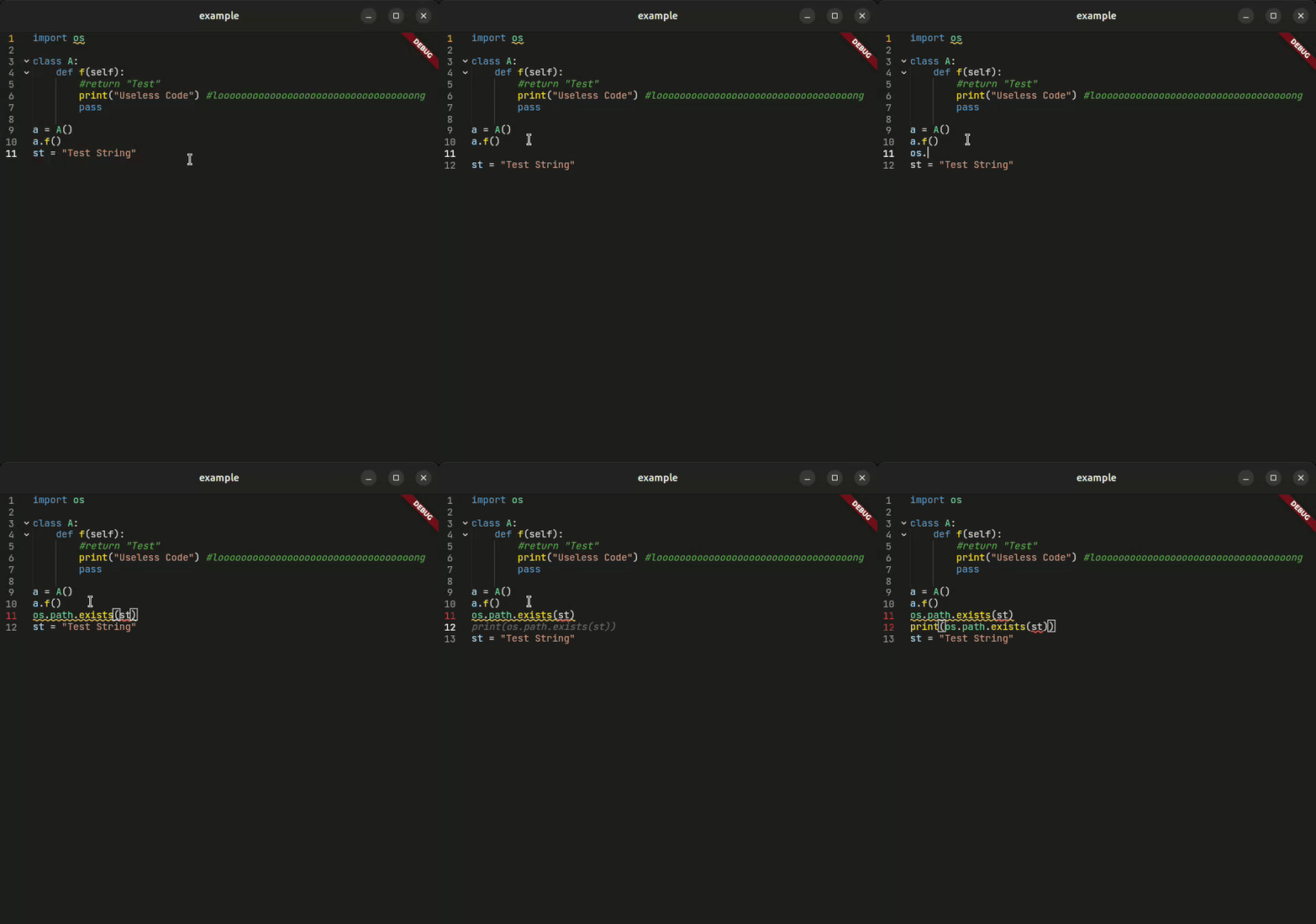
🤖 AI Code Completion
Intelligent code suggestions powered by AI models like Gemini. Auto, manual, or mixed completion modes with smart debouncing.
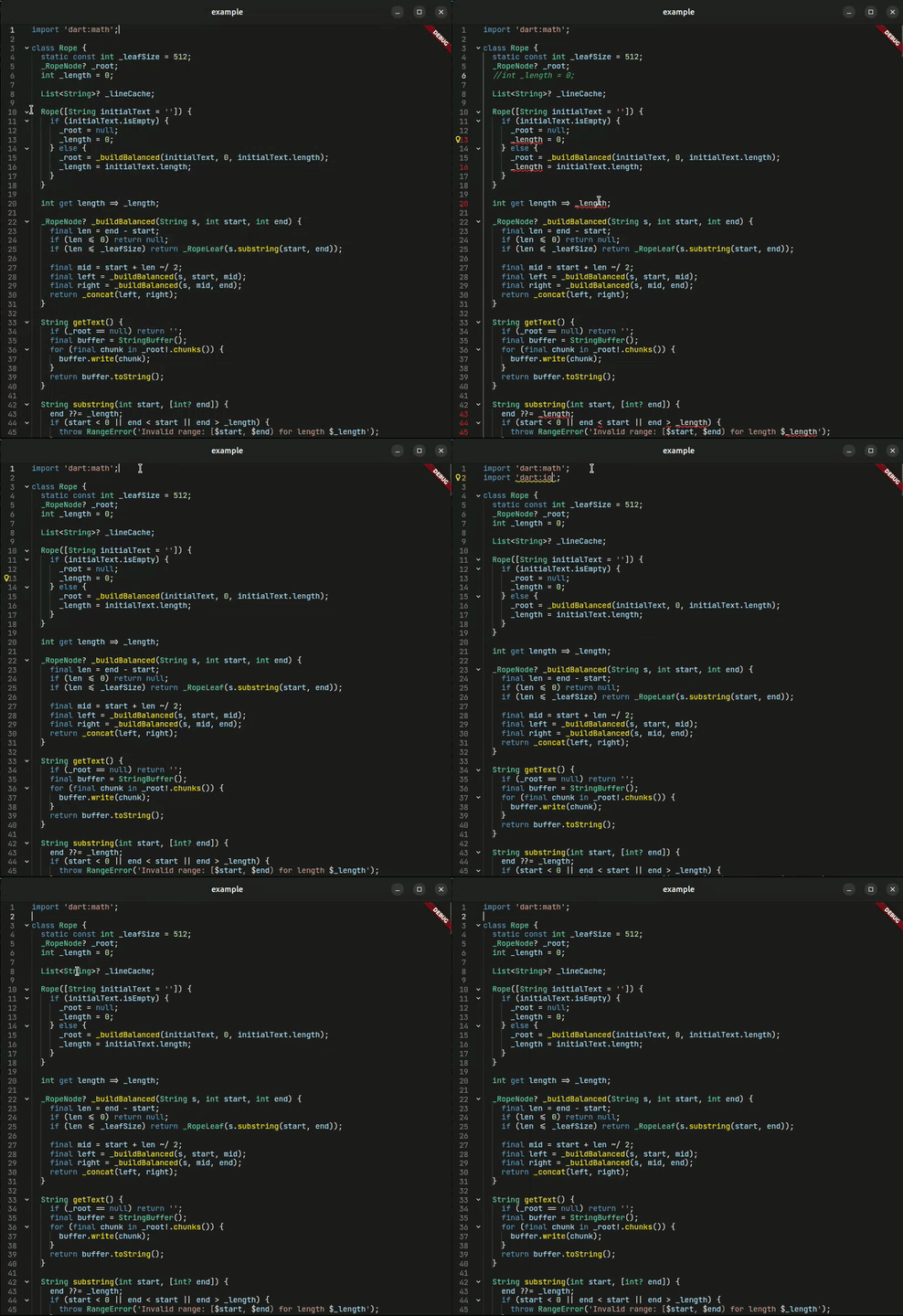
🔌 LSP Integration
Full Language Server Protocol support with real-time diagnostics, hover documentation, Code Actions and semantic highlighting.
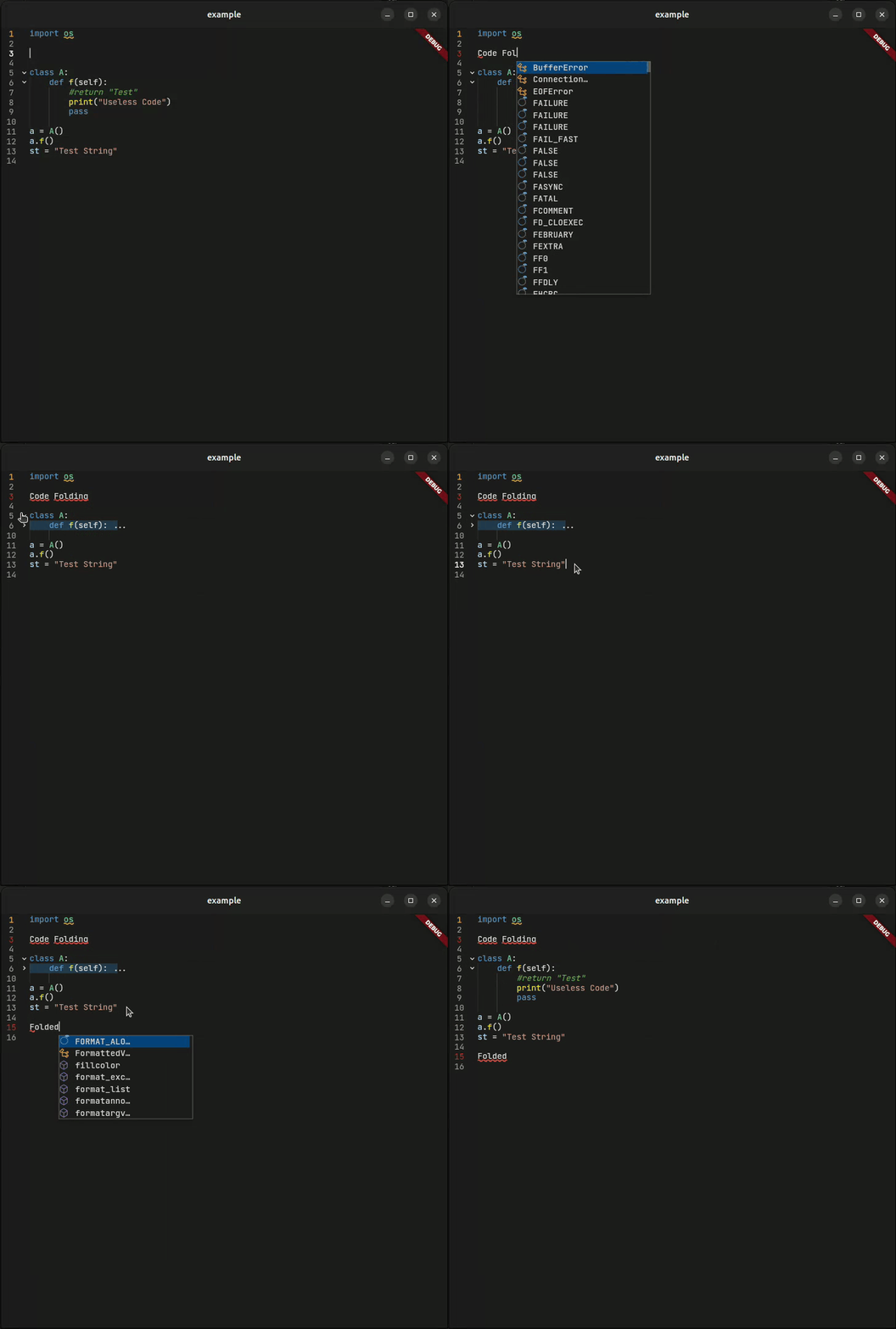
📁 Smart Code Folding
Collapse and expand code blocks with visual indicators. Navigate large files with ease.
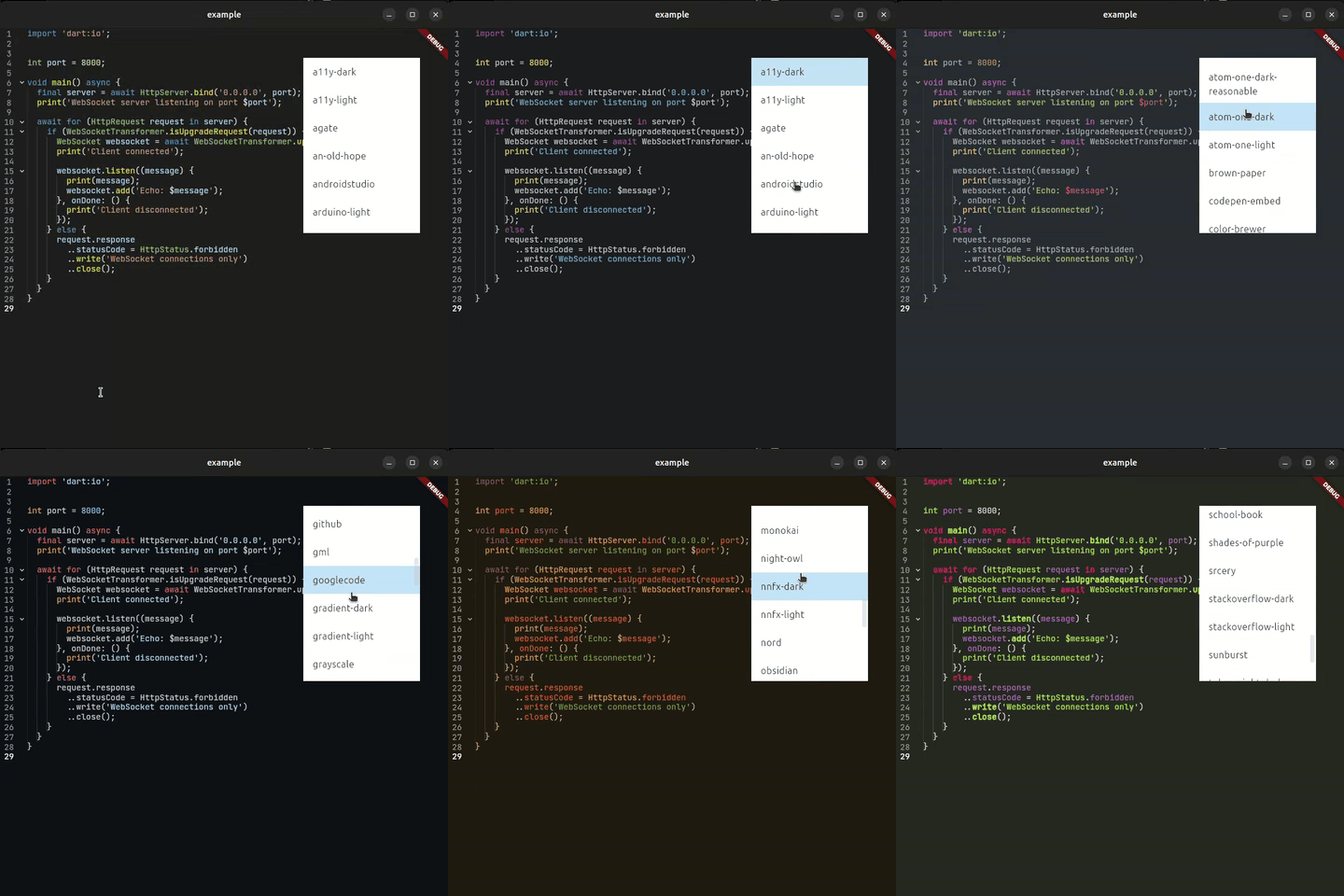
🎨 Syntax Highlighting
Beautiful syntax highlighting for 180+ languages with customizable themes and semantic token support.
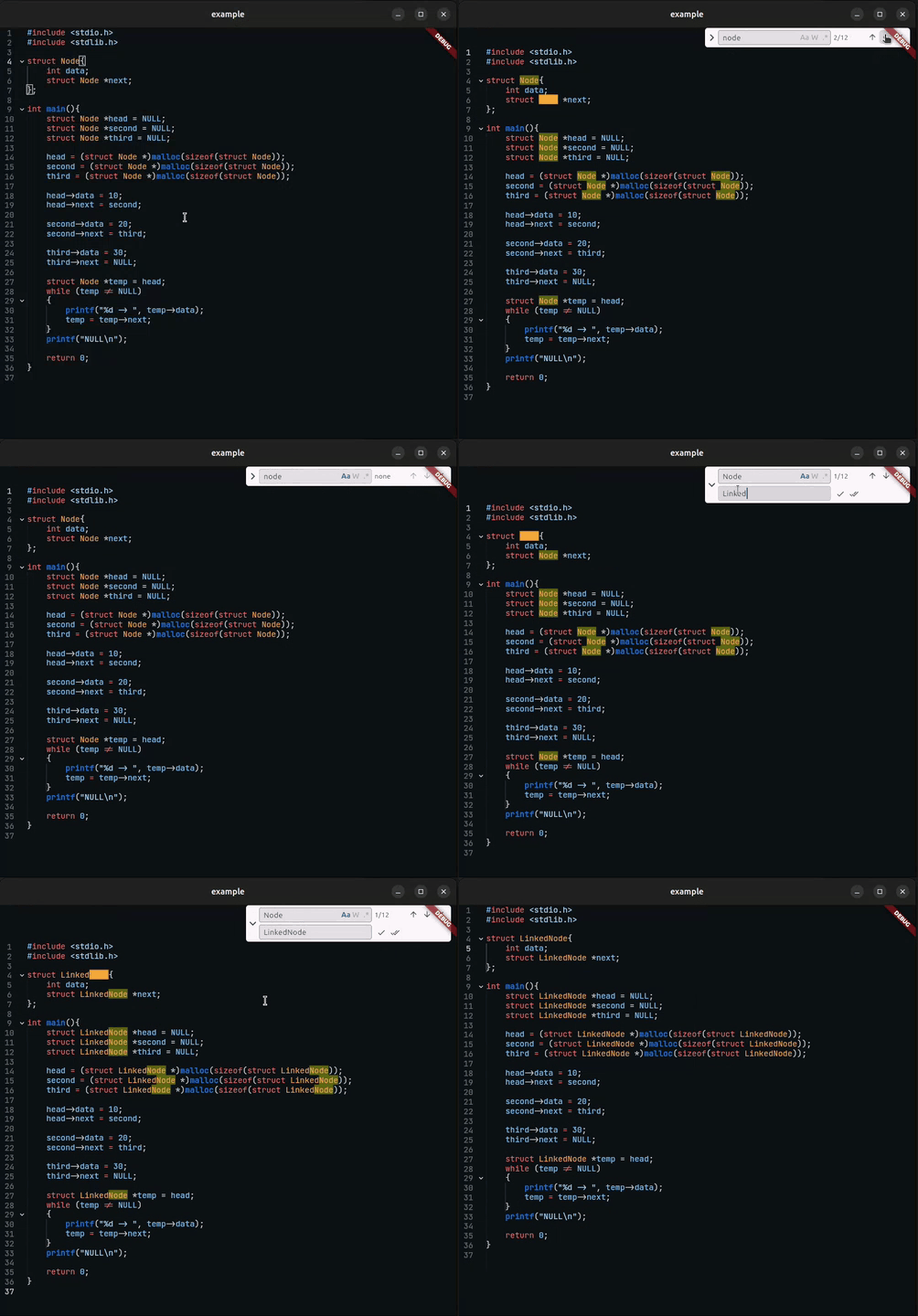
🔍 Search and replace
Search and replace words like in VSCode.
🌟 More Features #
📋 Complete Feature List
Editor Core
- ⚡ Rope Data Structure — Optimized for large files
- 🎨 180+ Languages — Via
re_highlightpackage - 📁 Code Folding — Smart block detection
- 📏 Indentation Guides — Visual code structure
- 🔢 Line Numbers — With active line highlighting
- ↩️ Smart Undo/Redo — Timestamp-based grouping
- 🔍 Search Highlighting — Find and highlight matches
- ✂️ Line Operations — Move, duplicate, delete lines
LSP Features
- 💡 Intelligent Completions — Context-aware code suggestions with auto-import
- 📖 Hover Documentation — Rich markdown tooltips with type information
- 🚨 Real-time Diagnostics — Errors and warnings with quick fixes
- 🎨 Semantic Highlighting — Token-based coloring with modifiers
- 💬 Signature Help — Function signatures and parameter hints
- 🔧 Code Actions — Quick fixes and refactoring suggestions
- ✨ Inlay Hints — Inline annotations for types and parameters
- 🎯 Document Highlight — Highlight symbol occurrences
- 🎨 Document Colors — Color value detection and picker
- 📍 Go to Definition — Navigate to symbol definitions
- ✏️ Symbol Renaming — Rename symbols across workspace
- 📡 Multiple Protocols — Stdio and WebSocket support
- ⚙️ Capability Control — Selectively enable/disable LSP features
Customization
- 🎨 Full Theming — Every element customizable
- 📐 Gutter Styling — Colors, icons, sizes
- ✨ Selection Styling — Cursor, selection, bubbles
- 💬 Popup Styling — Suggestions, hover details
📦 Installation #
Add CodeForge to your pubspec.yaml:
dependencies:
  code_forge: ^7.0.0
Then run:
flutter pub get
🚀 Quick Start #
Basic Usage #
Import a theme and a language from the re_highlight package and you are good to go. (Defaults to langDart and vs2015Theme):
import 'package:flutter/material.dart';
import 'package:code_forge/code_forge.dart';
import 'package:re_highlight/languages/python.dart';
import 'package:re_highlight/styles/atom-one-dark.dart';

void main() => runApp(const MyApp());

class MyApp extends StatelessWidget {
  const MyApp({super.key});

  @override
  Widget build(BuildContext context) {
    return MaterialApp(
      home: Scaffold(
        body: CodeForge(
          language: langPython, // Defaults to langDart
          editorTheme: atomOneDarkTheme, // Defaults to vs2015Theme
        ),
      ),
    );
  }
}
With Controller #
For more control over the editor:
class _EditorState extends State<Editor> {
  final _controller = CodeForgeController();
  final _undoController = UndoRedoController();

  @override
  Widget build(BuildContext context) {
    return CodeForge(
      controller: _controller, // Optional controller for more features.
      undoController: _undoController, // Optional undo controller to control the undo-redo operations.
    );
  }
}
🔌 LSP Integration
Connect to any Language Server Protocol compatible server for intelligent code assistance.
CodeForge provides a built-in LSP client that allows you to connect to any LSP server for intelligent highlighting, completions, hover details, diagnostics, and more.
Types #
There are two ways to configure LSP client with the CodeForge:
- Using WebSocket (easy and recommended)
- Using stdio
1. Using WebSocket
The class LspSocketConfig is used to connect to an LSP server using WebSocket. It takes the following parameters:
serverUrl: The WebSocket URL of the LSP server.filePath: A filePath is required by the LSP server to provide completions and diagnostics.workspacePath: The workspace path is the current directory or the parent directory which holds thefilePathfile.languageId: This is a server specific parameter. eg:'python'is the language ID used in basedpyright/pyright language server.
You can easily start any language server using websocket using the lsp-ws-proxy package. For example, to start the basedpyright language server, you can use the following command:
(On Android, you can use Termux)
cd /Downloads/lsp-ws-proxy_linux # Navigate to the directory where lsp-ws-proxy is located

./lsp-ws-proxy --listen 5656 -- basedpyright-langserver --stdio # Start the pyright language server on port 5656
Example:
create a LspSocketConfig object and pass it to the CodeForgeController widget.
final lspConfig = LspSocketConfig(
    workspacePath: "/home/athul/Projects/lsp",
    languageId: "python",
    serverUrl: "ws://localhost:5656"
),
Then pass the lspConfig instance to the CodeForgeController widget:
final _controller = CodeForgeController(
  lspConfig: lspConfig // Pass the LspConfig here.
)

CodeForge(
    controller: _controller, // Pass the controller here.
    theme: anOldHopeTheme,
    filePath: "/home/athul/Projects/lsp/example.py"
),
2. Using Stdio
This method is easy to start—no terminal setup or extra packages are needed—but it does require a bit more setup in your code. The LspStdioConfig.start() method connects to an LSP server using stdio and is asynchronous, so you'll typically use a FutureBuilder to handle initialization. It accepts the following parameters:
executable: Location of the LSP server executable file.args: Arguments to pass to the LSP server executable.filePath: A filePath is required by the LSP server to provide completions and diagnostics.workspacePath: The workspace path is the current directory or parent directory which holds thefilePathfile.languageId: This is a server specific parameter. eg:'python'is the language ID used in pyright language server.
To get the executable path, you can use the which command in the terminal. For example, to get the path of the basedpyright-langserver, you can use the following command:
which basedpyright-langserver
Example:
Create an async method to initialize the LSP configuration.
Future<LspConfig?> _initLsp() async {
    try {
      final config = await LspStdioConfig.start(
        executable: '/home/athul/.nvm/versions/node/v20.19.2/bin/basedpyright-langserver',
        args: ['--stdio'],
        workspacePath: '/home/athul/Projects/lsp',
        languageId: 'python',
      );

      return config;
    } catch (e) {
      debugPrint('LSP Initialization failed: $e');
      return null;
    }
  }
Then use a FutureBuilder to initialize the LSP configuration and pass it to the CodeForgeController widget:
  @override
  Widget build(BuildContext context) {
    return MaterialApp(
      home: Scaffold(
        body: SafeArea(
          child: FutureBuilder(
            future: _initLsp(), // Call the async method to get the LSP config.
            builder: (context, snapshot) {
              if(snapshot.connectionState == ConnectionState.waiting) {
                return Center(child: CircularProgressIndicator());
              }
              return CodeForge(
                editorTheme: anOldHopeTheme,
                controller: CodeForgeController(
                  lspConfig: snapshot.data // Pass the config here.
                ),
                filePath: '/home/athul/Projects/lsp/example.py',
                textStyle: TextStyle(fontSize: 15, fontFamily: 'monospace'),
              );
            }
          ),
        )
      ),
    );
  }
Dart LSP Example Using Stdio #
Future<LspConfig> setupDartLsp() async {
  return await LspStdioConfig.start(
    executable: 'dart',
    args: ['language-server', '--protocol=lsp'],
    workspacePath: '/path/to/your/project',
    languageId: 'dart',
  );
}

// In your widget
@override
  Widget build(BuildContext context) {
    return MaterialApp(
      home: Scaffold(
        body: SafeArea(
          child: FutureBuilder<LspConfig>(
            future: setupDartLsp(),
            builder: (context, snapshot) {
              if (snapshot.connectionState == ConnectionState.waiting) {
                return CircularProgressIndicator();
              }
              return CodeForge(
                language: langDart,
                textStyle: GoogleFonts.jetBrainsMono(),
                controller: CodeForgeController(
                  lspConfig: snapshot.data
                ),
                filePath: '/path/to/your/file.dart', // Mandatory field
              )
            },
          ),
        ),
      ),
    );
  }
🎨 Customization
CodeForge offers extensive customization options for every aspect of the editor.
Theme & Styling #
CodeForge(
  controller: controller,
  language: langDart,

  // Editor theme (syntax colors)
  editorTheme: vs2015Theme,

  // Text styling
  textStyle: GoogleFonts.jetBrainsMono(fontSize: 14),

  // AI Completion styling
  aiCompletionTextStyle: TextStyle(
    color: Colors.grey, // Change the color of the AI completion text
    fontStyle: FontStyle.italic, // Make the AI completion text italic
  ),

  // Selection & cursor
  selectionStyle: CodeSelectionStyle(
    cursorColor: Colors.white,
    selectionColor: Colors.blue.withOpacity(0.3),
    cursorBubbleColor: Colors.blue,
  ),

  // Gutter (line numbers & fold icons)
  gutterStyle: GutterStyle(
    lineNumberStyle: TextStyle(color: Colors.grey),
    backgroundColor: Color(0xFF1E1E1E),
    activeLineNumberColor: Colors.white,
    foldedIconColor: Colors.grey,
    unfoldedIconColor: Colors.grey,
    errorLineNumberColor: Colors.red,
    warningLineNumberColor: Colors.orange,
  ),

  // Suggestion popup
  suggestionStyle: SuggestionStyle(
    backgroundColor: Color(0xFF252526),
    textStyle: TextStyle(color: Colors.white),
    elevation: 8,
  ),

  // Hover documentation
  hoverDetailsStyle: HoverDetailsStyle(
    backgroundColor: Color(0xFF252526),
    textStyle: TextStyle(color: Colors.white),
  ),

  // Highlight matching text using [controller.findWord()] and [controller.findRegex()]
  matchHighlightStyle: const MatchHighlightStyle(
    currentMatchStyle: TextStyle(
      backgroundColor: Color(0xFFFFA726),
    ),
    otherMatchStyle: TextStyle(
      backgroundColor: Color(0x55FFFF00),
    ),
  ),
)
Feature Toggles #
CodeForge(
  // Enable/disable features
  enableFolding: true,        // Code folding
  enableGutter: true,         // Line numbers
  enableGuideLines: true,     // Indentation guides
  enableGutterDivider: false, // Gutter separator line
  enableSuggestions: true,    // Autocomplete
  enableKeyboardSuggestions: true // Suggestions from the OS keyboard

  // Behavior
  readOnly: false,            // Read-only mode
  autoFocus: true,            // Auto-focus on mount
  lineWrap: false,            // Line wrapping
)
📚 API Reference
CodeForge Widget #
| Property | Type | Description |
|---|---|---|
controller |
CodeForgeController? |
Text and selection controller |
findController |
FindController? |
Finder controller for managing search functionality |
undoController |
UndoRedoController? |
Undo/redo history controller |
editorTheme |
Map<String, TextStyle>? |
Syntax color theme |
language |
Mode? |
Syntax highlighting language |
focusNode |
FocusNode? |
Focus node for managing keyboard focus |
textStyle |
TextStyle? |
Base text style |
ghostTextStyle |
TextStyle? |
Text style for ghost text (inline suggestions) |
innerPadding |
EdgeInsets? |
Padding inside the editor content area |
verticalScrollController |
ScrollController? |
Custom scroll controller for vertical scrolling |
horizontalScrollController |
ScrollController? |
Custom scroll controller for horizontal scrolling |
selectionStyle |
CodeSelectionStyle? |
Selection styling |
gutterStyle |
GutterStyle? |
Gutter styling |
suggestionStyle |
SuggestionStyle? |
Suggestion popup styling |
hoverDetailsStyle |
HoverDetailsStyle? |
Hover popup styling |
matchHighlightStyle |
MatchHighlightStyle? |
Highlight the matching words in the controller.findWord() API |
filePath |
String? |
File path for LSP |
initialText |
String? |
Initial editor content |
readOnly |
bool |
Read-only mode |
lineWrap |
bool |
Line wrapping |
autoFocus |
bool |
Auto-focus on mount |
enableFolding |
bool |
Enable code folding |
enableGuideLines |
bool |
Show indentation guides |
enableGutter |
bool |
Show line numbers |
enableGutterDivider |
bool |
Show gutter divider |
enableSuggestions |
bool |
Enable autocomplete suggestions |
enableKeyboardSuggestions |
bool |
Show auto completions in OS virtual keyboard |
keyboardType |
TextInputType |
Type of virtual keyboard |
deleteFoldRangeOnDeletingFirstLine |
bool |
When true, deleting the first line of a folded block removes the entire block |
finderBuilder |
PreferredSizeWidget Function(FindController findController)? |
Builder for custom Finder widget |
CodeForgeController #
final controller = CodeForgeController();

// Text operations
controller.text = 'Hello, World!';
String content = controller.text;
controller.getLineText(int lineIndex);
controller.insertText(String text, int line, int character);
controller.insertAtCurrentCursor(String text);

// Selection & modification
controller.selection = TextSelection(baseOffset: 0, extentOffset: 5);
controller.selectAll();
controller.copy();
controller.cut();
controller.paste();

// Line operations
int lineCount = controller.lineCount;
String line = controller.getLineText(0);
int lineStart = controller.getLineStartOffset(0);
controller.duplicateLine();
controller.moveLineDown();
controller.moveLineUp();
controller.backspace();
controller.delete();

// Folding
controller.foldAll();
controller.unfoldAll();
controller.toggleFold(lineNumber);

// Search & find
controller.findWord(String word, matchCase: false, matchWholeWord: false);
controller.findRegex(String pattern);
controller.searchHighlights = [
  SearchHighlight(start: 0, end: 5, color: Colors.yellow),
];

// Scroll navigation
controller.scrollToLine(int line);

// Inlay hints
await controller.fetchInlayHints(int startLine, int startCharacter, int endLine, int endCharacter);
controller.showInlayHints();
controller.hideInlayHints();
controller.setInlayHints(List<InlayHint> hints);
controller.clearInlayHints();

// Document colors
await controller.fetchDocumentColors();

// Document highlights
await controller.fetchDocumentHighlights(int line, int character);
controller.clearDocumentHighlights();

// LSP features
await controller.callSignatureHelp();
controller.getCodeAction();

// Editor decorations
controller.setGitDiffDecorations(
  addedRanges: [(int startLine, int endLine), ...],
  removedRanges: [...],
  modifiedRanges: [...],
  addedColor: const Color(0xFF4CAF50),
  removedColor: const Color(0xFFE53935),
  modifiedColor: const Color(0xFF2196F3),
);
controller.clearGitDiffDecorations();

controller.addLineDecoration(LineDecoration decoration);
controller.addLineDecorations(List<LineDecoration> decorations);
controller.removeLineDecoration(String id);
controller.addGutterDecoration(GutterDecoration decoration);
controller.addGutterDecorations(List<GutterDecoration> decorations);
controller.removeGutterDecoration(String id);
controller.clearGutterDecorations();

// Ghost text (inline suggestions)
controller.setGhostText(GhostText ghostText);
controller.clearGhostText();

// File operations
controller.saveFile();

// Navigation
controller.pressLeftArrowKey(isShiftPressed: false);
controller.pressRightArrowKey(isShiftPressed: false);
controller.pressUpArrowKey(isShiftPressed: false);
controller.pressDownArrowKey(isShiftPressed: false);
controller.pressHomeKey(isShiftPressed: false);
controller.pressEndKey(isShiftPressed: false);
controller.pressDocumentHomeKey(isShiftPressed: false);
controller.pressDocumentEndKey(isShiftPressed: false);
controller.pressWordLeftArrowKey(isShiftPressed: false);
controller.pressWordRightArrowKey(isShiftPressed: false);
There are more methods available in the CodeForgeController API. You can see the complete list here
GutterStyle #
GutterStyle({
  TextStyle? lineNumberStyle,
  Color? backgroundColor,
  double? gutterWidth,
  IconData foldedIcon,
  IconData unfoldedIcon,
  double? foldingIconSize,
  Color? foldedIconColor,
  Color? unfoldedIconColor,
  Color? activeLineNumberColor,
  Color? inactiveLineNumberColor,
  Color errorLineNumberColor,
  Color warningLineNumberColor,
  Color? foldedLineHighlightColor,
})
CodeSelectionStyle #
CodeSelectionStyle({
  Color? cursorColor,
  Color selectionColor,
  Color cursorBubbleColor,
})
SuggestionStyle #
SuggestionStyle(
  shape: RoundedRectangleBorder(borderRadius: BorderRadius.circular(8)),
  backgroundColor: Colors.grey[900]!,
  focusColor: Colors.blue.withOpacity(0.3),
  hoverColor: Colors.blue.withOpacity(0.1),
  splashColor: Colors.blue.withOpacity(0.2),
  textStyle: TextStyle(color: Colors.white),
)
HoverDetailsStyle #
HoverDetailsStyle(
  shape: RoundedRectangleBorder(borderRadius: BorderRadius.circular(8)),
  backgroundColor: Colors.grey[850]!,
  focusColor: Colors.blue.withOpacity(0.3),
  hoverColor: Colors.blue.withOpacity(0.1),
  splashColor: Colors.blue.withOpacity(0.2),
  textStyle: TextStyle(color: Colors.white),
)
MatchHighlightStyle #
matchHighlightStyle: const MatchHighlightStyle(
  currentMatchStyle: TextStyle(
    backgroundColor: Color(0xFFFFA726),
  ),
  otherMatchStyle: TextStyle(
    backgroundColor: Color(0x55FFFF00),
  ),
),
LspClientCapabilities #
Controls which LSP features are enabled during language server initialization.
// Pass to LspSocketConfig or LspStdioConfig
final lspConfig = LspSocketConfig(
  workspacePath: "/path/to/workspace",
  languageId: "dart",
  serverUrl: "ws://localhost:5656",
  capabilities: LspClientCapabilities(
    semanticHighlighting: true,  // Semantic token highlighting
    codeCompletion: true,        // Code completion suggestions
    hoverInfo: true,             // Hover documentation
    codeAction: true,            // Code actions and quick fixes
    signatureHelp: true,         // Signature help
    documentColor: true,         // Document color detection
    documentHighlight: true,     // Symbol occurrence highlighting
    codeFolding: true,           // Code folding ranges
    inlayHint: true,             // Inlay hints
    goToDefinition: true,        // Go to definition
    rename: true,                // Symbol renaming
  ),
);
⌨️ Keyboard Shortcuts
CodeForge supports a variety of keyboard shortcuts for efficient editing:
Editing #
- Ctrl+C — Copy selected text.
- Ctrl+X — Cut selected text.
- Ctrl+V — Paste text.
- Ctrl+A — Select all text.
- Ctrl+D — Duplicate current line.
- Ctrl+Z — Undo last action.
- Ctrl+Y — Redo last action.
- Ctrl+Backspace — Delete word backward.
- Ctrl+Delete — Delete word forward.
Navigation #
- Ctrl+Arrow Left — Move cursor to previous word.
- Ctrl+Arrow Right — Move cursor to next word.
- Ctrl+Shift+Arrow Left — Select to previous word.
- Ctrl+Shift+Arrow Right — Select to next word.
- Ctrl+Shift+Arrow Up — Move current line up.
- Ctrl+Shift+Arrow Down — Move current line down.
Indentation #
- Tab — Indent current line or accept AI completion/suggestion.
- Shift+Tab — Unindent current line.
Suggestions & AI Completion #
- Ctrl+. — Show available LSP code actions.
- Ctrl + Shift + Space — Show available LSP signature help.
- Ctrl + Alt — Show LSP inlay hints.
- Arrow Up/Down — Navigate through suggestions.
- Enter/Tab — Accept current suggestion.
- Escape — Close suggestions or hover details.
Selection #
- Shift+Arrow Keys — Extend selection.
- Shift+Home — Select to line start.
- Shift+End — Select to line end.
Search #
- Ctrl + F — Show search bar.
- Ctrl + H — Show replace bar.
🤝 Contributing #
Contributions are welcome! Whether it's bug fixes, new features, or documentation improvements.
- Fork the repository
- Create your feature branch (
git checkout -b feature/amazing-feature) - Commit your changes (
git commit -m 'Add amazing feature') - Push to the branch (
git push origin feature/amazing-feature) - Open a Pull Request
📄 License #
This project is licensed under the MIT License - see the LICENSE file for details.
🙏 Acknowledgments #
- re_highlight — Syntax highlighting
- markdown_widget — Markdown rendering
- web_socket_channel — WebSocket support
Built with ❤️ for the Flutter community

Metadata
Publisher
unverified uploader
Weekly Downloads
Metadata
A sophisticated code editor package with AI completion, LSP support, syntax highlighting, and advanced editing capabilities.
Repository (GitHub)
View/report issues
Documentation
License
 MIT (license)
Dependencies
flutter, flutter_colorpicker, markdown_widget, re_highlight, web_socket_channel

