








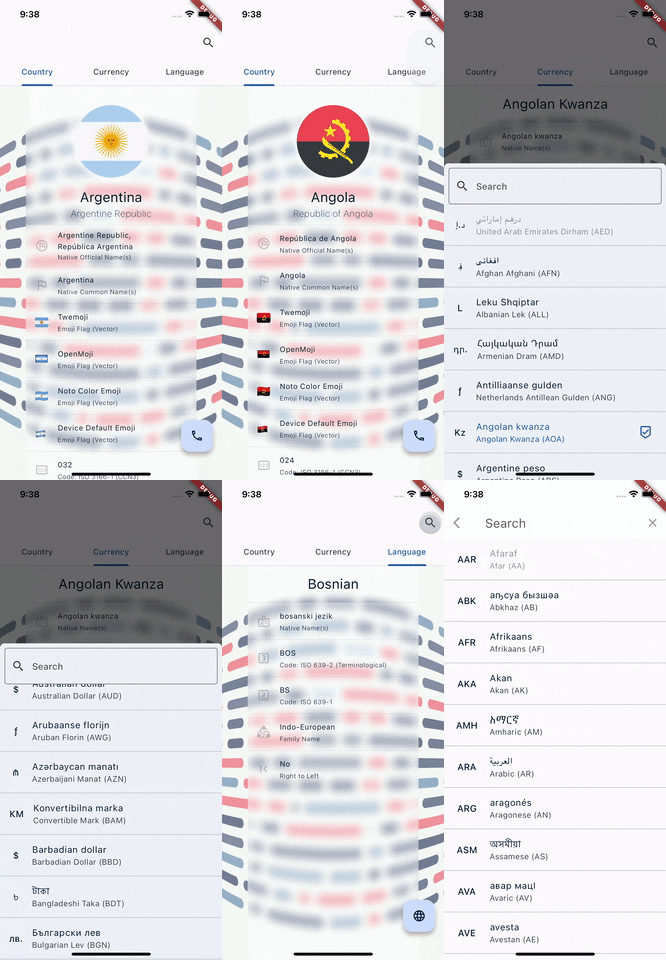
This ISO-driven and fully tested package provides information about world countries, currencies, languages, etc. in the form of compile-time, tree-shakable constant classes with a sealed origin and customizable pickers. This is a Flutter wrapper on top of the sealed_countries package, that extends all the country/currency/language data, like codes, names, translations, etc. (for example different flag look) and provides ready-to-use widgets for showing countries, languages, currencies lists and pickers. Country flags are created with optimized CustomPainters with a help of underlying world_flags package.
Table of Contents
- Features
- Demo
- Getting started
- Usage
- L10N
- Example
- Data
- Additional information
- References and credits
- FAQ
Features
This package provides the following ready-to-use widgets and classes:
CountryPicker- A picker widget that displays a list of world countries.PhoneCodePicker- A picker widget that displays a list of phone codes.CurrencyPicker- A picker widget that displays a list of fiat currencies.LanguagePicker- A picker widget that displays a list of natural languages.
Or you can just create your own pickers by extending BasicPicker.
-
TypedLocaleDelegate- A locale delegate for automatic translation of pickers. Provides CLDR-like translations including (all GlobalMaterialLocalizations and GlobalCupertinoLocalizations locales and more). -
PickersThemeData,FlagThemeData,CountryTileThemeData,CurrencyTileThemeDataandLanguageTileThemeDataare theme extensions that you can use in yourThemeDatato specify global theme to your pickers, themes of your tiles (for example country flag adjustments or builders).
Demo
To preview the demo from the example, you can visit this web page using the Chrome or Firefox browser (version 120 or higher). Please allow up 10 seconds for initial fonts and data caching.
Important
Note: Please keep in mind that the demo was built with Flutter WASM which is in very early alpha stage, so performance might be affected.


Getting started
To use this package, you will need a stable Flutter SDK. Add world_countries as a dependency in your pubspec.yaml file.
dependencies:
  world_countries: any
Usage
You can use provided widgets directly, or just use their methods:
- searchSuggestions (for use in
suggestionsBuilderof SearchAnchor) - showInModalBottomSheet
- showInSearch
- showInDialog
L10N
Warning
Adding TypedLocaleDelegate to your app is essential for both proper localization AND optimized search functionality in pickers. It automatically caches translations based on the user's locale, significantly improving search performance.
For automatic translations of the pickers just add delegate to your app widget:
MaterialApp(localizationsDelegates: [TypedLocaleDelegate()])
Then you can also extract this delegate data from the context via context.maybeLocale getter, in any place of your app (from a BuildContext).
Tip
The package also provides access to the TypedLocale class, allowing you to work with type-safe versions of default Locale. These maybeCommonNameFor() and commonNameFor() methods can also be used with country, currency, or language data.
Example
import "dart:async" show unawaited;

import "package:flutter/material.dart";
import "package:flutter_localizations/flutter_localizations.dart";
import "package:world_countries/world_countries.dart";

void main() => runApp(
  MaterialApp(
    home: const MainPage(),
    theme: ThemeData(
      /// And also [CurrencyTileThemeData], [LanguageTileThemeData], [CountryTileThemeData]...
      extensions: const <ThemeExtension>[
        PickersThemeData(primary: true), // Specify global pickers theme.
        FlagThemeData(
          aspectRatio: FlagConstants.defaultAspectRatio,
          decoration: BoxDecoration(
            borderRadius: BorderRadius.all(Radius.circular(4)),
          ),
        ),
      ],
    ),
    localizationsDelegates: const [
      ...GlobalMaterialLocalizations.delegates,
      TypedLocaleDelegate(), // <-- ! ESSENTIAL FOR L10N AND OPTIMIZED SEARCH !
    ],
    supportedLocales: [
      for (final locale in kMaterialSupportedLanguages) Locale(locale),
      const Locale("pt", "PT"),
      const Locale("pt", "BR"),
    ],
  ),
);

class MainPage extends StatefulWidget {
  const MainPage({
    super.key,
    // Immutable compile-time constant constructors in every picker.
    this.basicPicker = const CountryPicker(disabled: [.abw()]),
  });

  final CountryPicker basicPicker;

  @override
  State<MainPage> createState() => _MainPageState();
}

class _MainPageState extends State<MainPage>
    with SingleTickerProviderStateMixin {
  /// Highly customizable, for example use itemBuilder param. for custom tiles.
  late CountryPicker picker = widget.basicPicker.copyWith(onSelect: onSelect);

  void onSelect(WorldCountry newCountry) {
    debugPrint("New country selected: $newCountry");
    setState(
      () => picker = picker.copyWith(
        // A copyWith methods in every picker.
        chosen: selectedCountry == newCountry ? const [] : [newCountry],
      ),
    );
  }

  void onFabPressed({bool isLongPress = false}) {
    /// Or for example: [LanguagePicker], [CurrencyPicker].
    final phonePicker = PhoneCodePicker.fromCountryPicker(picker);
    unawaited(
      isLongPress
          ? phonePicker.showInDialog(context)
          : phonePicker.showInModalBottomSheet(context),
    );
  }

  void onAppBarSearchLongPressed() => unawaited(picker.showInSearch(context));

  WorldCountry? get selectedCountry => picker.chosen?.firstOrNull;

  @override
  Widget build(BuildContext context) => Scaffold(
    appBar: AppBar(
      actions: [
        SearchAnchor(
          isFullScreen: false,
          viewConstraints: const BoxConstraints(minWidth: 220, maxWidth: 320),
          builder: (_, controller) => GestureDetector(
            onLongPress: onAppBarSearchLongPressed,
            child: IconButton(
              onPressed: controller.openView,
              icon: const Icon(Icons.search),
            ),
          ),
          suggestionsBuilder: picker.searchSuggestions,
        ),
      ],
    ),
    body: Center(
      child: MaybeWidget(
        context.maybeLocale?.maps.countryTranslations[selectedCountry],
        Text.new,
        orElse: const Text(
          "Please select country by pressing on the search icon",
        ),
      ),
    ),
    floatingActionButton: GestureDetector(
      onLongPress: () => onFabPressed(isLongPress: true),
      child: FloatingActionButton(
        onPressed: onFabPressed,
        child: const Icon(Icons.search),
      ),
    ),
  );
}
For more usage examples, please see the /example folder.
Tip
Pickers are showing country flags by default. For example, they automatically show the most relevant flag based on the user's device locale, like showing the Austrian flag 🇦🇹 for the German language or Euro (currency), if the user's region is Austria. You can adjust those mappings (and their sorting) with TypedLocaleDelegate and maps parameter in theme or picker.
Data
Pickers are providing a lot of info about the countries/languages/currencies:
PhoneCodePickerandCountryPickerworking with WorldCountry data.LanguagePicker- works with NaturalLanguage and Script data.CurrencyPicker- works with FiatCurrency data.
Additional information
For more information on using this package, check out the API documentation. If you have any issues or suggestions for the package, please file them in the GitHub repository. PRs or ideas are always welcome. If you like this package, please give it a star or like.
References and credits
This package is licensed under the MIT license (see LICENSE for details). Its dependencies are under their respective licenses, which can be found in the corresponding LICENSE and NOTICE files.
FAQ
I don't like default tiles UI in the pickers
Answer: Every picker (and also its theme) has a itemBuilder parameter, providing access to specific list item properties, for example this is how you can show only an emoji flag in CountryPicker:
CountryPicker(itemBuilder: (country, defaultTile) => EmojiFlag.platformDefault(country.item)); // Or defaultTile.copyWith(...)
How to format/adjust automatic global translations of ISO objects in my app?
For instance, you may want to capitalize all French currency names in auto-translations. You enhance the TypedLocaleDelegate with a custom l10nFormatter as follows:
TypedLocaleDelegate(
  l10nFormatter: (l10n, locale) =>
      locale.language == LangFra() && l10n.key is FiatCurrency
          ? l10n.value.toUpperCase() // Format French currency names only.
          : l10n.value, // Don't change other translations.
)
How to use locale-aware sorting with proper diacritics handling?
By default, translations are sorted using simple Unicode code-point comparison (String.compareTo), which doesn't handle diacritics correctly for many languages. You can provide a custom l10nSorter factory to use locale-sensitive collation, for example with the intl4x package:
import 'package:intl4x/collation.dart' as intl;

TypedLocaleDelegate(
  l10nSorter: (typedLocale) {
    // Create locale and collator once for the current locale.
    final locale = intl.Locale.parse(typedLocale.toUnicodeLocaleId());
    final collator = intl.Collation(locale: locale);
    // Return comparator that will be used for all comparisons.
    return (a, b) => collator.compare(a.value, b.value);
  },
)
The factory pattern ensures the locale and collator are constructed only once per sorting operation, not on every comparison (which would be ~4k times for all countries).
This ensures that characters like ä, ö, ü in German or č, š, ž in Czech are sorted according to their respective language rules, not by their Unicode code points.
How to use fuzzy or similar search functionality?
For example, use custom onSearchResultsBuilder in your picker. Here, fuzzy matching is performed using fuse.search from your favorite fuzzy search package, add its import and:
import "package:fuzzy/fuzzy.dart"; // Example with `fuzzy` package, any other will work too.

onSearchResultsBuilder: (query, map) {
      if (query.isEmpty) return map.keys; // Return all items if query is empty.
      final entries = map.entries.toList(growable: false);
      final fuse = Fuzzy<MapEntry<WorldCountry, SearchData>>(
        entries,
        options: FuzzyOptions(
          keys: [ // Define searchable keys, for example by name:
            WeightedKey(
              name: "name",
              getter: (iso) => iso.value.anyName, // Search in localized name.
              weight: 1,
            ),
          ],
          threshold: 0.5, // Lower = stricter, higher = more lenient.
          findAllMatches: true,
          shouldSort: false,
        ),
      );

      return fuse.search(query).map((iso) => iso.item.key);
    },
How does the benchmark & regression verification system work?
This package includes an automated benchmark system that runs on every release to detect performance regressions. Each version produces immutable JSON artifacts containing build metadata (APK size, toolchain versions, Android configuration) and runtime metrics (startup time, frame performance, memory and CPU usage, etc.).
Tip
These artifacts are attached to GitHub Releases and committed to the repository, enabling historical comparison and transparent performance tracking across versions. The benchmark flow uses low-end physical ARM64 Android devices with Flashlight + Maestro for reproducible, device-driven testing.
To run benchmarks locally or learn more about the system, see the benchmarks documentation. Execute the shared CLI via dart run tools/bin/benchmarks.dart world_countries (or cd tools && dart run :benchmarks world_countries). All benchmark data is immutable and versioned, ensuring full auditability and regression traceability.
Why should I use this package over any other country/currency/language picker package?
- Every flag is a Widget: This package doesn't use heavy SVG or any other assets to show country flags in the pickers. All flags are declarative-style optimized
CustomPainters. That means that you don't have to worry about pre-caching, increased app size, platform-dependent look of the flags, etc. And since it's a widget - you can always change its look - shape, decoration, aspect ratio, etc. Just ask yourself for example - how you can easily change the aspect ratio of asset-based flags without stretching/shrinking them. - Fully accessible: All pickers are meticulously crafted with accessibility in mind, ensuring seamless integration with screen readers and assistive technologies.
- Up-to-date flags: This package ensures accurate and timely flag representations, reflecting current designs. Unlike other packages or emoji/font sets that often use outdated flags, this package offers flags with the most recent designs (such as the Afghan flag from 2013 is shown here correctly with a design from year 2021, or the Syrian flag is displayed with a design from year 2026, etc.).
- Sealed classes: Unlike enums, you can create your own ISO instances, yet unlike open classes, the sealed hierarchy guarantees exhaustive pattern matching and compile-time safety. You get the immutability and type-safety of enums with the extensibility to define custom values — all while maintaining full switch exhaustiveness checking.
- No external 3rd-party dependencies: This package has no external third-party dependencies. It relies on the Flutter SDK and other packages within the
sealed_worldmonorepo, ensuring controlled and consistent integration. - Rich data: This package offers far more data than any other package + tons of translations (all GlobalMaterialLocalizations and GlobalCupertinoLocalizations locales and more).
- Type-safe: The contracts and types in this package are exceptionally strong, ensuring that your code is strongly typed and well-defined.
- High code coverage: The code in this package boasts nearly 100% test coverage, with almost 5K tests (150+ in this package, 4.8K+ in underlying Dart packages) ensuring reliability and stability.
- Comprehensive documentation: This package provides full documentation for every non-code generated public member, usually with examples, ensuring clarity and ease of use.
- Lightweight: This package keeps under 500 KB, ensuring it fits within the pub cache limit. This leads to quick, low-bandwidth downloads and faster caching, minimizing resource impact.
- Mirrored Repository: The GitHub repository, including all package tags, is mirrored on GitLab, providing an alternative access point should GitHub become unavailable.
- Industry adopted: This package is actively used in production by numerous European companies, ensuring its efficacy and robustness in real-world scenarios.
- MIT license: This package and sources are released under the MIT license, which is a permissive license that allows users to use, modify, and distribute the code with minimal restrictions. The MIT license is considered better than most other open-source licenses because it provides flexibility and allows users to incorporate the code into their projects without worrying about legal implications.
- Customizability: It also allows you to provide your own search algorithm and custom l10n formatter, etc., offering a fully tailored picker experience.
Libraries
- helpers
- Additional helpers and widgets used in world_countries project.
- world_countries
- Sealed world data in form of Flutter widgets (country, phone, currency pickers, etc.).