
wallpaper_setter 0.0.4  wallpaper_setter: ^0.0.4 copied to clipboard
A Flutter plugin for setting device wallpapers directly from your app. Uses the default Android system wallpaper picker UI to set wallpapers from asset or network images for the home screen, lock scre [...]
wallpaper_setter #
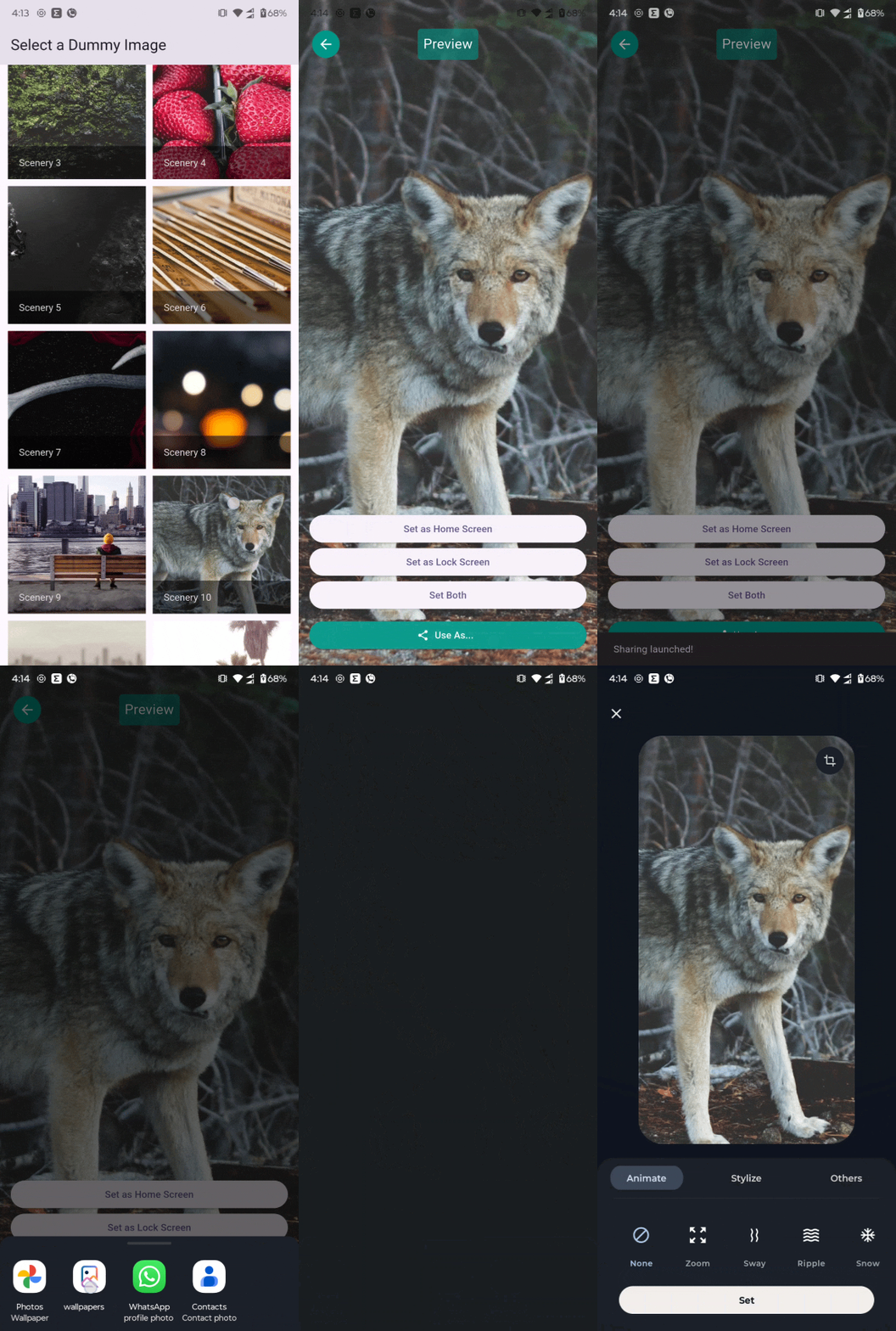
wallpaper_setter is a Flutter plugin that allows you to set wallpapers from a URL or asset on Android devices.
It uses the default Android system wallpaper picker UI to set wallpapers for:
- Home screen
- Lock screen
- Or both
Demo #
🚀 Getting Started #
- For using System Wallpaper you will need to add file_paths.xml in xml folder android\app\src\main\res\xml\file_paths.xml where downloaded image will be stored. and Code is Here...
   <?xml version="1.0" encoding="utf-8"?>
<paths xmlns:android="http://schemas.android.com/apk/res/android">
    <cache-path
        name="cache"
        path="." />
    <external-path
        name="external_files"
        path="." />
    <external-files-path
        name="external_files"
        path="." />
    <files-path
        name="files"
        path="." />
</paths>
- include this permission in your manifest
  <uses-permission android:name="android.permission.SET_WALLPAPER"/>
  <uses-permission android:name="android.permission.READ_EXTERNAL_STORAGE"/>
  <uses-permission android:name="android.permission.READ_MEDIA_IMAGES" />
-
Inside of Android
<application ...old code <provider android:name="androidx.core.content.FileProvider" android:authorities="${applicationId}.fileprovider" android:exported="false" android:grantUriPermissions="true"> <meta-data android:name="android.support.FILE_PROVIDER_PATHS" android:resource="@xml/file_paths" /> </provider> ...old code -
also make sure you have internet connection on device.
Example #
import 'dart:io';
import 'package:flutter/material.dart';
import 'package:walpaper_demo/home_screen.dart';
import 'package:walpaper_demo/preview_screen.dart';
import 'package:photo_view/photo_view.dart';
import 'package:wallpaper_setter/wallpaper_setter.dart';

void main() {
  runApp(const MyApp());
}

class MyApp extends StatelessWidget {
  const MyApp({super.key});

  @override
  Widget build(BuildContext context) {
    return MaterialApp(
      title: 'Wallpaper App',
      theme: ThemeData(useMaterial3: true, colorSchemeSeed: Colors.deepPurple),
      home: const HomeScreen(),
      debugShowCheckedModeBanner: false,
    );
  }
}


class HomeScreen extends StatelessWidget {
  const HomeScreen({super.key});

  final List<Map<String, String>> dummyImageList = const [
    {
      "id": "1",
      "title": "Nature",
      "url": "https://picsum.photos/seed/1/600/800",
    },
    {"id": "2",
    "title": "City",
    "url": "https://picsum.photos/seed/2/600/800",
    },
    {
      "id": "3",
      "title": "Mountains",
      "url": "https://picsum.photos/seed/3/600/800",
    },
  ];

  @override
  Widget build(BuildContext context) {
    return Scaffold(
      appBar: AppBar(title: const Text("Select a Dummy Image")),
      body: GridView.builder(
        padding: const EdgeInsets.all(12),
        gridDelegate: const SliverGridDelegateWithFixedCrossAxisCount(
          crossAxisCount: 2, // Show 2 images per row
          crossAxisSpacing: 10,
          mainAxisSpacing: 10,
        ),
        itemCount: dummyImageList.length,
        itemBuilder: (context, index) {
          final item = dummyImageList[index];
          return GestureDetector(
            onTap: () {
              Navigator.push(
                context,
                MaterialPageRoute(
                  builder: (_) => PreviewScreen(imagePath: item['url']!),
                ),
              );
            },
            child: GridTile(
              footer: GridTileBar(
                backgroundColor: Colors.black54,
                title: Text(item['title']!),
              ),
              child: Image.network(item['url']!, fit: BoxFit.cover),
            ),
          );
        },
      ),
    );
  }
}

class PreviewScreen extends StatefulWidget {
  final String imagePath;

  const PreviewScreen({super.key, required this.imagePath});

  @override
  State<PreviewScreen> createState() => _PreviewScreenState();
}

class _PreviewScreenState extends State<PreviewScreen> {
  final GlobalKey previewContainer = GlobalKey();

  Future<void> _handleSetWallpaper(String target) async {
    final success = await WallpaperPlugin.setWallpaperFromRepaintBoundary(
      previewContainer,
      target,
    );
    _showSnack(success ? 'Wallpaper set!' : 'Failed to set wallpaper');
  }

  Future<void> _handleUseAs() async {
    final success = await WallpaperPlugin.useAsImageFromRepaintBoundary(
      previewContainer,
    );
    _showSnack(success ? 'Sharing launched!' : 'Use As failed');
  }

  void _showSnack(String message) {
    ScaffoldMessenger.of(
      context,
    ).showSnackBar(SnackBar(content: Text(message)));
  }

  @override
  Widget build(BuildContext context) {
    return Scaffold(
      appBar: AppBar(title: const Text("Preview")),
      body: Stack(
        children: [
          RepaintBoundary(
            key: previewContainer,
            child: PhotoView(
              imageProvider:
                  widget.imagePath.startsWith("http")
                      ? NetworkImage(widget.imagePath)
                      : FileImage(File(widget.imagePath)),
              backgroundDecoration: const BoxDecoration(color: Colors.black),
            ),
          ),
          Positioned(
            bottom: 20,
            left: 16,
            right: 16,
            child: Column(
              crossAxisAlignment: CrossAxisAlignment.stretch,
              children: [
                ElevatedButton(
                  onPressed: () => _handleSetWallpaper("home"),
                  child: const Text("Set as Home Screen"),
                ),
                ElevatedButton(
                  onPressed: () => _handleSetWallpaper("lock"),
                  child: const Text("Set as Lock Screen"),
                ),
                ElevatedButton(
                  onPressed: () => _handleSetWallpaper("both"),
                  child: const Text("Set Both"),
                ),
                const SizedBox(height: 10),
                ElevatedButton.icon(
                  onPressed: () => _handleUseAs(),
                  icon: const Icon(Icons.share),
                  label: const Text("Use As..."),
                  style: ElevatedButton.styleFrom(
                    backgroundColor: Colors.teal,
                    foregroundColor: Colors.white,
                  ),
                ),
              ],
            ),
          ),
        ],
      ),
    );
  }
}
Getting Started #
This project is a starting point for a Flutter plug-in package, a specialized package that includes platform-specific implementation code for Android.
For help getting started with Flutter, view our online documentation, which offers tutorials, samples, guidance on mobile development, and a full API reference.
Metadata
Publisher
unverified uploader
Weekly Downloads
Metadata
A Flutter plugin for setting device wallpapers directly from your app. Uses the default Android system wallpaper picker UI to set wallpapers from asset or network images for the home screen, lock screen, or both.
Documentation
License
 MIT (license)
Dependencies
flutter, path_provider, plugin_platform_interface
More
Packages that depend on wallpaper_setter
Packages that implement wallpaper_setter

