
wagmi_web 2.0.9  wagmi_web: ^2.0.9 copied to clipboard
 0xmetalabs.com
Wagmi JS SDK wrapper for Dart Web
Wagmi SDK wrapper for Flutter Web #




Overview #
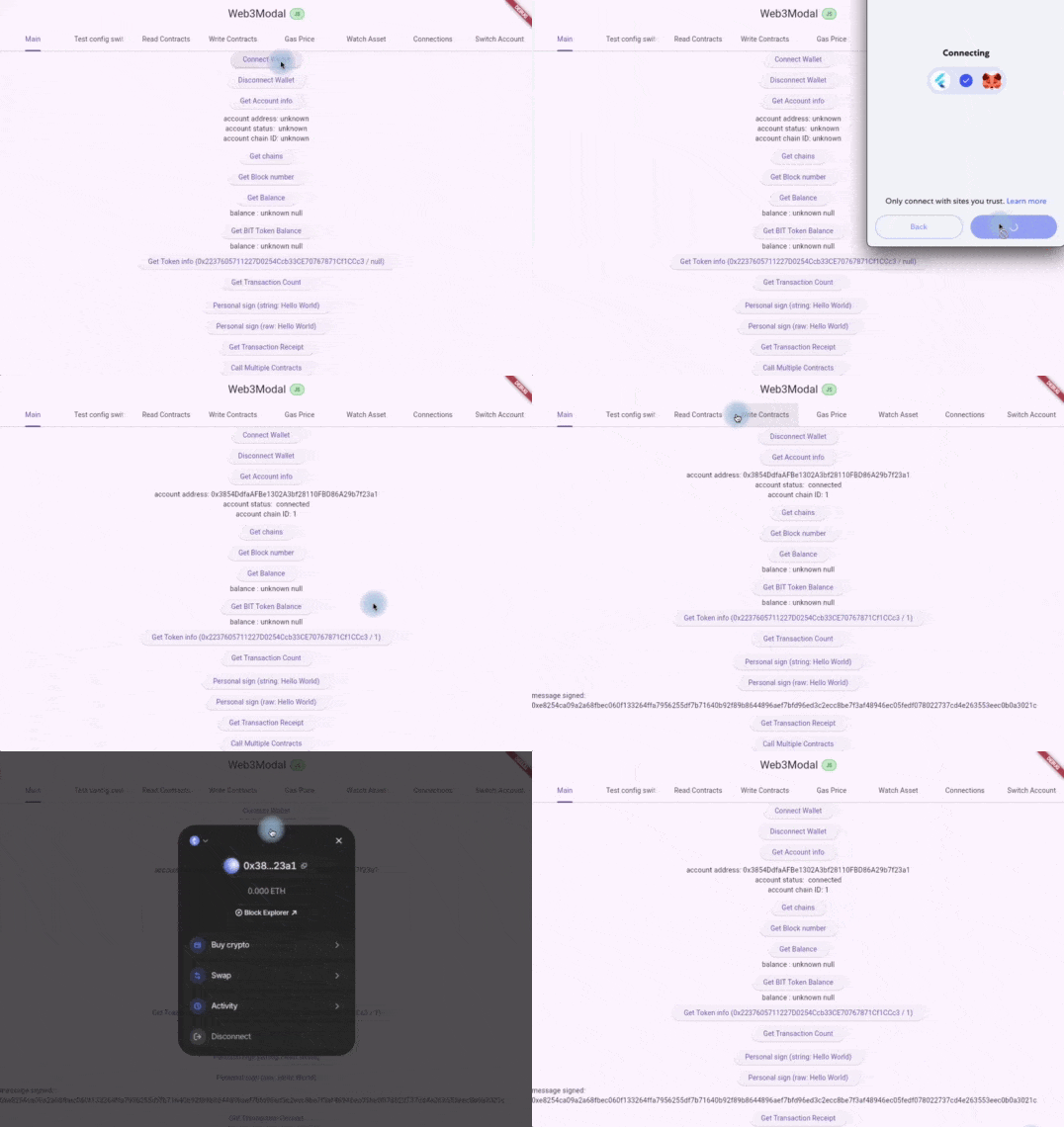
Wagmi Web exposes the powerful Wagmi SDK to your Flutter web projects, providing intuitive building blocks for creating Ethereum applications. This plugin enables Wallet Connect (Reown AppKit) integration, allowing seamless blockchain-based wallet connections in your Flutter web apps.
Key Features #
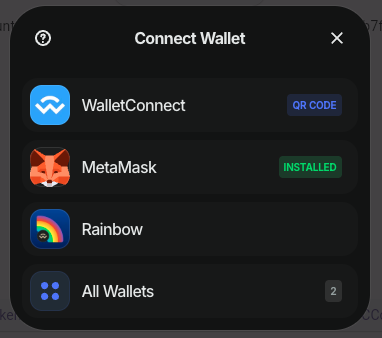
- 🔗 Wallet Connect Integration - Connect to 300+ wallets through Reown AppKit (formerly WalletConnect) or injected web3 exposed by Wagmi.
- ⚡ Direct Modal Access - Skip navigation and go directly to Activity, Buy Crypto, or Meld.io purchase flows
- 🚀 100% WASM Compatible - Full support for WebAssembly compilation
- 🛠️ Comprehensive Ethereum Tools - Access to Wagmi's complete suite of Web3 utilities
- 📱 Flutter Web Optimized - Seamlessly integrates with Flutter's web platform
Live Examples #
Try out Wagmi Web in action:
- JavaScript Version: https://wagmiweb.web.app
- WASM Version: https://wagmiweb-wasm.web.app
Getting started #
Add wagmi_web to your pubspec.yaml:
dependencies:
  wagmi_web:
Usage #
Basic Setup #
import 'package:wagmi_web/wagmi.dart' as wagmi;

// Load and initialize Wagmi lib
await wagmi.init();

// Initialize AppKit (Reown AppKit)
wagmi.AppKit.init(
    'f642e3f39ba3e375f8f714f18354faa4', // Your project ID
    [wagmi.Chain.ethereum.name!, wagmi.Chain.sepolia.name!], // Supported chains
    true, // Include recommended wallets
    true, // Set as default
    wagmi.AppKitMetadata(
        name: 'Reown AppKit',
        description: 'Reown AppKit Example',
        url: 'https://reown.com',
        icons: ['https://avatars.githubusercontent.com/u/37784886'],
    ),
    false, // Email wallet
    [], // Social networks
    true, // Show wallets
    true, // Wallet features
);

// Open the wallet connection modal
wagmi.AppKit.open();
Error Management #
Handle Wagmi errors effectively using the WagmiError object:
try {
    final transactionHash = await wagmi.Core.writeContract(
        parameters,
    );
} on wagmi.WagmiError catch (e, stackTrace) {
    if (e.findError(wagmi.WagmiErrors.UserRejectedRequestError) != null) {
        throw Exception('userRejected');
    }
    if (e.findError(wagmi.WagmiErrors.InsufficientFundsError) != null) {
        throw Exception('insufficientFunds');
    }
    throw Exception('${e.shortMessage}');
}
The error stack is accessible through the cause property, and you can use findError to check for specific error types available in the WagmiErrors enumeration.
Available Actions #
Implementation Status #
✅ Implemented - Ready to use
🟠 Work In Progress - Coming soon
🔴 Not Implemented Yet - Planned for future
📄 TODO - To be managed
For detailed API documentation, visit Wagmi Actions Documentation.
| Action Name | Status |
|---|---|
call |
✅ Implemented |
connect |
🔴 |
deployContract |
🔴 |
disconnect |
✅ Implemented |
estimateFeesPerGas |
✅ Implemented |
estimateGas |
✅ Implemented |
estimateMaxPriorityFeePerGas |
✅ Implemented |
getAccount |
✅ Implemented |
getBalance |
✅ Implemented |
getBlock |
✅ Implemented |
getBlockNumber |
✅ Implemented |
getBlockTransactionCount |
✅ Implemented |
getBytecode |
✅ Implemented |
getChainId |
✅ Implemented |
getChains |
✅ Implemented |
getClient |
🔴 |
getConnections |
✅ Implemented |
getConnectorClient |
🔴 |
getConnectors |
🔴 |
getEnsAddress |
🔴 |
getEnsAvatar |
🔴 |
getEnsName |
🔴 |
getEnsResolver |
🔴 |
getEnsText |
🔴 |
getFeeHistory |
✅ Implemented |
getGasPrice |
✅ Implemented |
getProof |
🔴 |
getPublicClient |
🔴 |
getStorageAt |
🔴 |
getToken |
✅ Implemented |
getTransaction |
✅ Implemented |
getTransactionConfirmations |
✅ Implemented |
getTransactionCount |
✅ Implemented |
getTransactionReceipt |
✅ Implemented |
getWalletClient |
🔴 |
multicall |
🔴 |
prepareTransactionRequest |
🔴 |
readContract |
✅ Implemented |
readContracts |
✅ Implemented |
reconnect |
✅ Implemented |
sendTransaction |
✅ Implemented |
signMessage |
✅ Implemented |
signTypedData |
🔴 |
simulateContract |
🔴 |
switchAccount |
✅ Implemented |
switchChain |
✅ Implemented |
verifyMessage |
✅ Implemented |
verifyTypedData |
🔴 |
waitForTransactionReceipt |
✅ Implemented |
watchAccount |
✅ Implemented |
watchAsset |
✅ Implemented |
watchBlockNumber |
🔴 |
watchBlocks |
🔴 |
watchChainId |
✅ Implemented |
watchClient |
🔴 |
watchConnections |
✅ Implemented |
watchConnectors |
🔴 |
watchContractEvent |
✅ Implemented |
watchPendingTransactions |
🔴 |
watchPublicClient |
🔴 |
writeContract |
✅ Implemented |
Direct Modal Access #
Wagmi Web provides direct access to specific AppKit modal views, allowing you to bypass the main modal interface and navigate users directly to the functionality they need.
Available Modal Methods #
1. Activity View
Access transaction history and activity directly:
// Opens the Activity/Transactions view directly
await wagmi.AppKit.openActivity();
2. Buy Crypto (OnRamp Providers)
Show available crypto purchase providers:
// Opens the OnRamp providers selection
await wagmi.AppKit.openBuyCrypto();
3. Meld.io Direct Integration
The most powerful feature - bypass all modals and go directly to Meld.io for crypto purchases:
// Default behavior - Meld.io auto-detects everything
await wagmi.AppKit.openMeld();

// Override specific parameters only when needed
await wagmi.AppKit.openMeld(wagmi.MeldOptions(
  countryCode: 'US',
  sourceCurrencyCode: 'USD',
  destinationCurrencyCode: 'ETH',
  amount: '100',
));
MeldOptions Configuration #
The MeldOptions class provides full control over the Meld.io integration:
class MeldOptions {
  MeldOptions({
    this.countryCode,           // 'US', 'IN', 'GB', etc.
    this.country,               // 'USA', 'India', 'United Kingdom'
    this.sourceCurrencyCode,    // 'USD', 'INR', 'GBP', 'EUR'
    this.destinationCurrencyCode, // 'USDC', 'SOL', 'ETH', 'BTC'
    this.walletAddress,         // Custom wallet address
    this.amount,                // Pre-filled amount like '100'
    this.paymentMethod,         // 'card', 'bank'
    this.language,              // 'en', 'hi', 'es', 'fr'
    this.locale,                // 'en-US', 'en-IN', 'es-ES'
  });
}
Smart Defaults
When parameters are not provided, Meld.io automatically detects:
- Location & Currency from IP geolocation
- Language from browser settings
- Payment Methods available in user's region
- Crypto Token based on active blockchain (SOL for Solana, USDC for Ethereum)
Only override when you need specific behavior!
Usage Examples #
// 1. Auto-detection (recommended for most users)
await wagmi.AppKit.openMeld();

// 2. Target specific crypto
await wagmi.AppKit.openMeld(wagmi.MeldOptions(
  destinationCurrencyCode: 'ETH',
));

// 3. Pre-fill purchase amount
await wagmi.AppKit.openMeld(wagmi.MeldOptions(
  amount: '50',
));

// 4. Full regional customization
await wagmi.AppKit.openMeld(wagmi.MeldOptions(
  countryCode: 'GB',
  sourceCurrencyCode: 'GBP',
  destinationCurrencyCode: 'ETH',
  amount: '100',
  locale: 'en-GB',
));

// 5. Custom wallet (no connection required)
await wagmi.AppKit.openMeld(wagmi.MeldOptions(
  walletAddress: '0x1234567890abcdef...',
  countryCode: 'US',
));
Key Benefits #
- ✅ Streamlined UX - Direct access to specific functionality
- ✅ Global Support - Auto-detects user location and currency
- ✅ Flexible Configuration - Override any parameter as needed
- ✅ No API Keys Required - Built-in Meld.io integration
- ✅ Transaction Tracking - Full AppKit progress tracking and callbacks
Requirements #
- Wallet Connection: All modal methods require an active wallet connection (unless using custom
walletAddressin MeldOptions) - Supported Networks: Works with all AppKit-supported networks (Ethereum, Polygon, Solana, etc.)
Development Environment #
Prerequisites #
Ensure you have the following tools installed:
- Flutter >= 3.22.3
- Node.js >= 18
Building & Running #
Compile TypeScript Code
Build the JavaScript code for web browser embedding:
# Install dependencies
npm install

# Build production library
npm run build

# Build & watch in development mode
npm run dev
Run Flutter Project
After building the TypeScript code, run your Flutter project normally:
flutter run -d chrome
flutter run -d chrome --wasm
Testing #
TypeScript Tests
npm test
VSCode Tip: For debugging support, create your terminal using the command
Debug: JavaScript Debug Terminal
Dart Tests
# Run tests
dart test -p chrome

# Run with debugging
dart test -p chrome --pause-after-load
Contributing #
We welcome all contributions! Whether it's:
- 🐛 Bug reports
- 💡 Feature requests
- 📝 Documentation improvements
- 🔧 Code contributions
Please feel free to submit a Pull Request. All PRs are welcome!
License #
This project is licensed under the GNU Affero General Public License.
Support #
For issues, feature requests, or questions:
- 📫 Open an issue on GitHub
- 📖 Check out the Wagmi documentation
Made with ❤️ by 0xMetaLabs
Metadata
Publisher
Weekly Downloads
Metadata
Wagmi JS SDK wrapper for Dart Web
Repository (GitHub)
View/report issues
License
 unknown (license)
Dependencies
collection, decimal, flutter, freezed_annotation, json_annotation, logging, web

