
uyava 0.2.1-beta.1  uyava: ^0.2.1-beta.1 copied to clipboard
 uyava.io
Uyava app-side SDK for graph + event emission.
Uyava SDK #


Visual event graph and debugging toolkit for Flutter apps.
Uyava turns runtime events into a live map of your app.
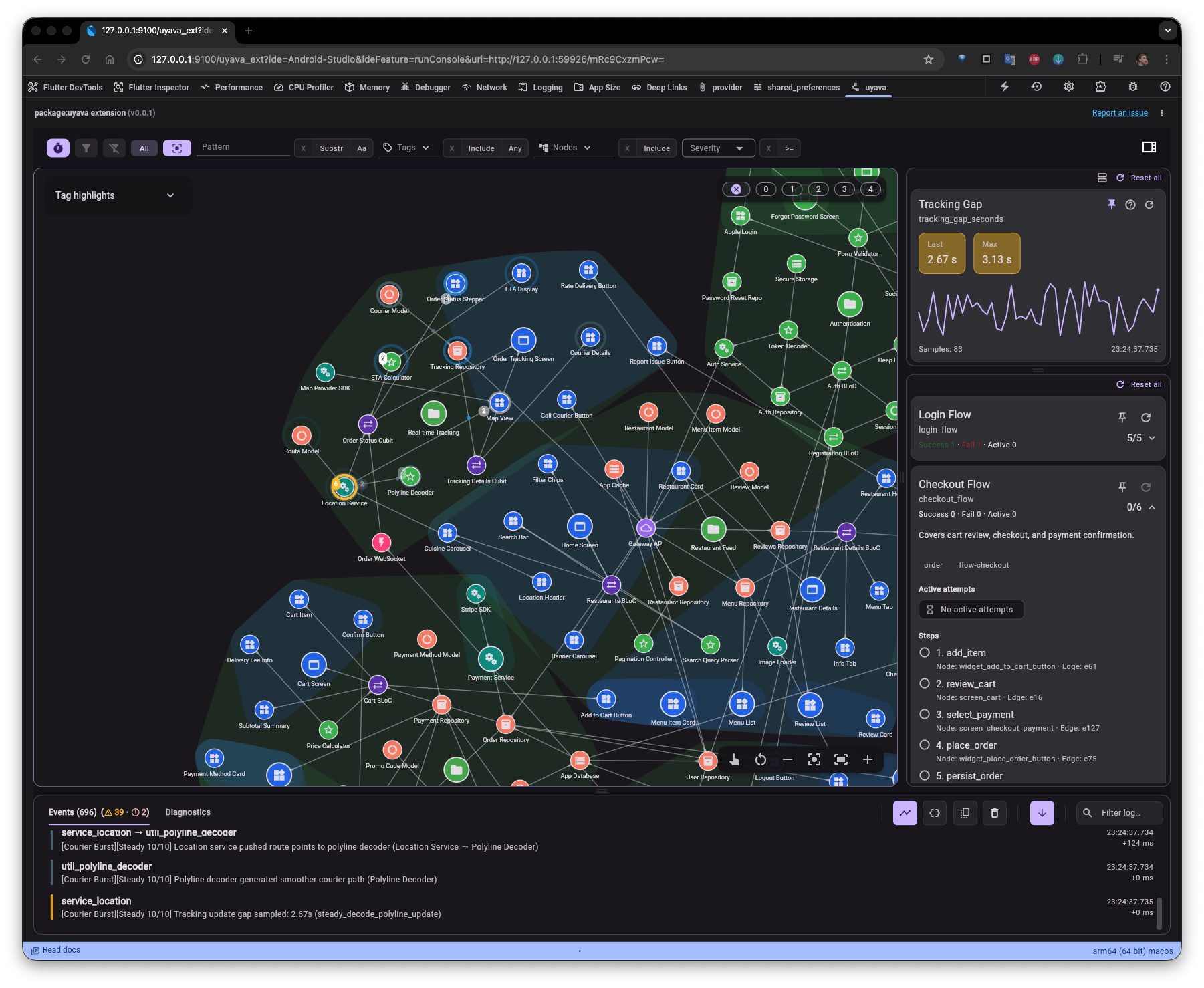
It acts as:
- visual debugging tool
- living documentation of your architecture
- a new way to understand your app beyond traditional logs
What Uyava helps you see
- your app architecture in motion
- event chains and happy flows
- module lifecycle
- key app metrics
- relationships between components
Status: Public Beta.
Quick start (Flutter app) #
- Add the SDK:
flutter pub add uyava
- Initialize and publish an initial graph snapshot:
import 'package:flutter/widgets.dart';
import 'package:uyava/uyava.dart';

void main() {
  WidgetsFlutterBinding.ensureInitialized();
  Uyava.initialize();

  Uyava.replaceGraph(
    nodes: const [
      UyavaNode(id: 'ui.login', type: 'screen', label: 'Login', tags: ['ui']),
      UyavaNode(id: 'logic.auth', type: 'service', label: 'Auth', tags: ['auth']),
    ],
    edges: const [
      UyavaEdge(id: 'ui.login->logic.auth', from: 'ui.login', to: 'logic.auth'),
    ],
  );

  runApp(const MyApp());
}
- Emit runtime events:
Uyava.emitNodeEvent(
  nodeId: 'logic.auth',
  message: 'Sign in pressed',
  severity: UyavaSeverity.info,
  sourceRef: Uyava.caller(),
);

Uyava.emitEdgeEvent(
  edge: 'ui.login->logic.auth',
  message: 'Auth request dispatched',
  severity: UyavaSeverity.info,
  sourceRef: Uyava.caller(),
);
message must be non-empty for both emitNodeEvent and emitEdgeEvent.
- Optional: mirror Uyava events to your app console:
Uyava.enableConsoleLogging(
  config: UyavaConsoleLoggerConfig(minLevel: UyavaSeverity.info),
);
Hosts #
Uyava SDK events can be consumed by:
- Flutter DevTools extension (live inspection in DevTools).
- Uyava Desktop app (live inspection and replay workflows).
Setup and installation:
Lifecycle signals (recommended) #
Use lifecycle updates to reflect active/inactive parts of your app:
Uyava.updateNodeLifecycle(
  nodeId: 'logic.auth',
  state: UyavaLifecycleState.initialized,
);

Uyava.updateNodesListLifecycle(
  nodeIds: ['logic.auth', 'data.session'],
  state: UyavaLifecycleState.disposed,
);

Uyava.updateSubtreeLifecycle(
  rootNodeId: 'feature.checkout',
  state: UyavaLifecycleState.disposed,
  includeRoot: true,
);
Metrics and event chains #
Define metrics once, then send samples in event payloads:
Uyava.defineMetric(
  id: 'auth.latency_ms',
  label: 'Auth latency',
  unit: 'ms',
  tags: ['auth', 'latency'],
  aggregators: [
    UyavaMetricAggregator.last,
    UyavaMetricAggregator.max,
    UyavaMetricAggregator.sum,
    UyavaMetricAggregator.count,
  ],
);

Uyava.emitNodeEvent(
  nodeId: 'logic.auth',
  message: 'Auth latency sample',
  payload: {
    'metric': {'id': 'auth.latency_ms', 'value': 180},
  },
);
Define event chains for multi-step flows:
Uyava.defineEventChain(
  id: 'auth.login_flow',
  label: 'Login flow',
  tags: ['auth'],
  steps: const [
    UyavaEventChainStep(stepId: 'open', nodeId: 'ui.login'),
    UyavaEventChainStep(stepId: 'submit', nodeId: 'logic.auth'),
    UyavaEventChainStep(stepId: 'success', nodeId: 'logic.auth'),
  ],
);
SDK file logging (.uyava) #
If you need shareable logs from app-side instrumentation:
import 'package:path_provider/path_provider.dart';
import 'package:uyava/uyava.dart';

Future<void> startLogging() async {
  final dir = await getApplicationDocumentsDirectory();
  await Uyava.enableFileLogging(
    config: UyavaFileLoggerConfig(directoryPath: dir.path),
  );
}
Export a sealed archive for replay:
final archive = await Uyava.exportCurrentArchive();
Also available:
Uyava.cloneActiveArchive()Uyava.latestArchiveSnapshot()Uyava.archiveEventsUyava.discardStatsStreamUyava.latestDiscardStats
Best practices (short) #
- Build a mostly static graph at startup, then use events/lifecycle for runtime behavior.
- Keep node/edge IDs stable and unique.
- Avoid one synthetic global root for the entire graph.
- Keep runtime data in event payloads and metrics, not in graph structure.
API reference #
Main API groups:
- Graph:
replaceGraph,loadGraph,addNode,addEdge,patchNode,patchEdge,removeNode,removeEdge - Events:
emitNodeEvent,emitEdgeEvent - Lifecycle:
updateNodeLifecycle,updateNodesListLifecycle,updateSubtreeLifecycle - Diagnostics:
postDiagnostic,clearDiagnostics - Metrics/chains:
defineMetric,defineEventChain - Transports:
registerTransport,unregisterTransport,shutdownTransports,enableFileLogging
Detailed docs:
- Getting started: https://uyava.io/docs/getting-started
- SDK integration reference: https://uyava.io/docs/sdk-integration
- Recording/replay: https://uyava.io/docs/recording-logs
- Session file format: https://uyava.io/docs/session-file-format
- Best practices: https://uyava.io/docs/best-practices
- Architecture: https://uyava.io/docs/architecture
Development #
Run from the repository root:
melos bootstrap
melos run test
Optional checks:
melos exec -- "dart analyze ."
melos exec -- "dart format --set-exit-if-changed ."
melos test may work as a shorthand, but melos run test is the explicit and
recommended form.
Windows note:
melos bootstrapworks normally.- In this repository,
melos run testusesbash tool/run_package_tests.sh, so on Windows you need WSL or Git Bash.
License #
MIT. See LICENSE.
Metadata
Documentation
Publisher
Weekly Downloads
Metadata
Uyava app-side SDK for graph + event emission.
Homepage
Repository (GitHub)
View/report issues
License
 unknown (license)

