
tldr_get_location 0.0.4  tldr_get_location: ^0.0.4 copied to clipboard
 camelcodes.net
TLDR get location
TLDR get location #
A simple flutter plugin to get current user location with minimum boilerplate.
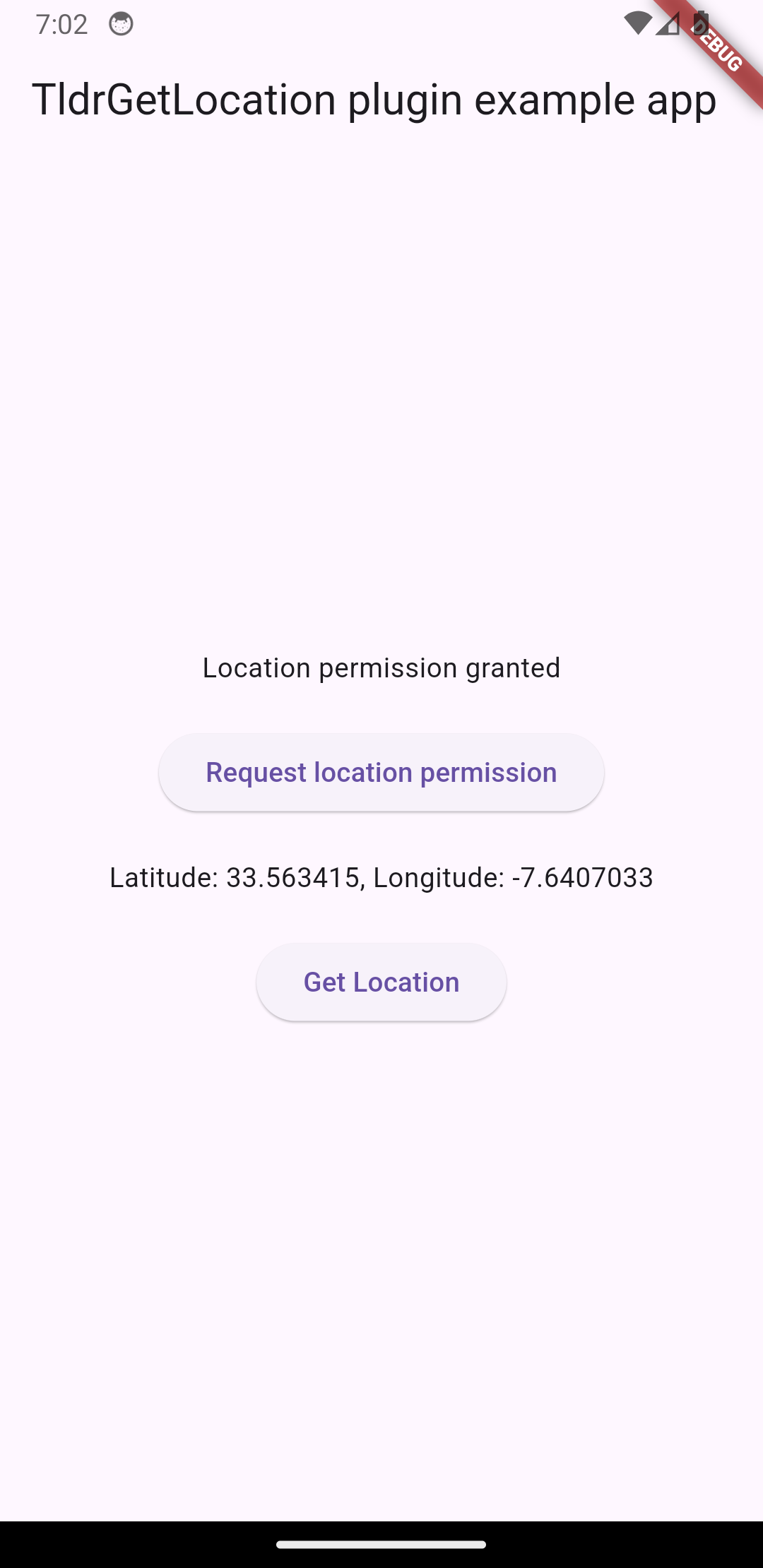
Screenshots #
Getting Started #
Update MainActivity.kt to extends FlutterFragmentActivity vs FlutterActivity.
Otherwise you'll get an error.
//import io.flutter.embedding.android.FlutterActivity
import io.flutter.embedding.android.FlutterFragmentActivity

class MainActivity: FlutterFragmentActivity() {
}
IOS Configuration #
Add the following to your info.plist file
    <dict>
        ...
        <key>NSLocationWhenInUseUsageDescription</key>
        <string>Do you allow this app to know your current location?</string>
        <true/>
        ...
    </dict>
Android Configuration #
Add the following permissions to the app level Android Manifest
<manifest>
    ...
    <uses-permission android:name="android.permission.ACCESS_COARSE_LOCATION" />
    <uses-permission android:name="android.permission.ACCESS_FINE_LOCATION" />
    ...
</manifest>
How to use ? #
The plugin have to mathods requestLocationPermission and getCurrentLocation
Call requestLocationPermission to request location permission, it will show the location permission popup and return true or false.
Call getCurrentLocation to get the current location, it will return an object TldrLatLng with latitude and longitude.
- Initialize the plugin
final locationPlugin = TldrGetLocation();
- Ask for location permission
  final bool permissionGranted =
    await locationPlugin.requestLocationPermission();
- Get current location
  TldrLatLng? location = await locationPlugin.getCurrentLocation();
  // check if null before using
  double? latitude = location?.latitude;
  double? longitude = location?.longitude;
Example #
import 'package:flutter/material.dart';
import 'package:tldr_get_location/model.dart';
import 'package:tldr_get_location/tldr_get_location.dart';

void main() {
  runApp(const MyApp());
}

class MyApp extends StatelessWidget {
  const MyApp({super.key});

  @override
  Widget build(BuildContext context) {
    return MaterialApp(
      home: Scaffold(
        appBar: AppBar(
          title: const Text('TldrGetLocation plugin example app'),
        ),
        body: const LocationWidget(),
      ),
    );
  }
}

class LocationWidget extends StatefulWidget {
  const LocationWidget({super.key});

  @override
  State<LocationWidget> createState() => _LocationWidgetState();
}

class _LocationWidgetState extends State<LocationWidget> {
  final _tldrGetLocationPlugin = TldrGetLocation();

  String _locationMessage = "Location not retrieved yet";
  bool? _permissionGranted;

  void _requestLocationPermission() async {
    final bool permissionGranted =
    await _tldrGetLocationPlugin.requestLocationPermission();
    setState(() {
      _permissionGranted = permissionGranted;
    });
  }

  void _getLocation() async {
    if (_permissionGranted == null || !_permissionGranted!) {
      showErrorDialog(context, "Please request location permission first");
      return;
    }
    final TldrLatLng? location =
    await _tldrGetLocationPlugin.getCurrentLocation();
    if (location != null) {
      setState(() {
        _locationMessage =
        "Latitude: ${location.latitude}, Longitude: ${location.longitude}";
      });
    } else {
      setState(() {
        _locationMessage = "Failed to get location";
      });
    }
  }

  @override
  Widget build(BuildContext context) {
    return Center(
      child: Column(
        mainAxisAlignment: MainAxisAlignment.center,
        children: <Widget>[
          Text(_permissionGranted == null
              ? "Location permission not requested yet"
              : _permissionGranted!
              ? "Location permission granted"
              : "Location permission denied"),
          const SizedBox(height: 20),
          ElevatedButton(
            onPressed: _requestLocationPermission,
            child: const Text('Request location permission'),
          ),
          const SizedBox(
            height: 20,
          ),
          Text(_locationMessage),
          const SizedBox(height: 20),
          ElevatedButton(
            onPressed: _getLocation,
            child: const Text('Get Location'),
          ),
        ],
      ),
    );
  }
}

void showErrorDialog(BuildContext context, String errorMessage) {
  showDialog(
    context: context,
    builder: (BuildContext context) {
      return AlertDialog(
          title: Text("Error"),
          content: Text(errorMessage),
          actions: [
            Center(
                child: ElevatedButton(
                  child: Text("Dismiss"),
                  onPressed: () {
                    Navigator.of(context).pop();
                  },
                ))
          ]);
    },
  );
}
Metadata
Documentation
Publisher
Weekly Downloads
Metadata
TLDR get location
Homepage
Repository (GitHub)
View/report issues
License
 Apache-2.0 (license)
Dependencies
flutter, plugin_platform_interface
More
Packages that depend on tldr_get_location
Packages that implement tldr_get_location

