
thumbnail_slider 0.1.0  thumbnail_slider: ^0.1.0 copied to clipboard
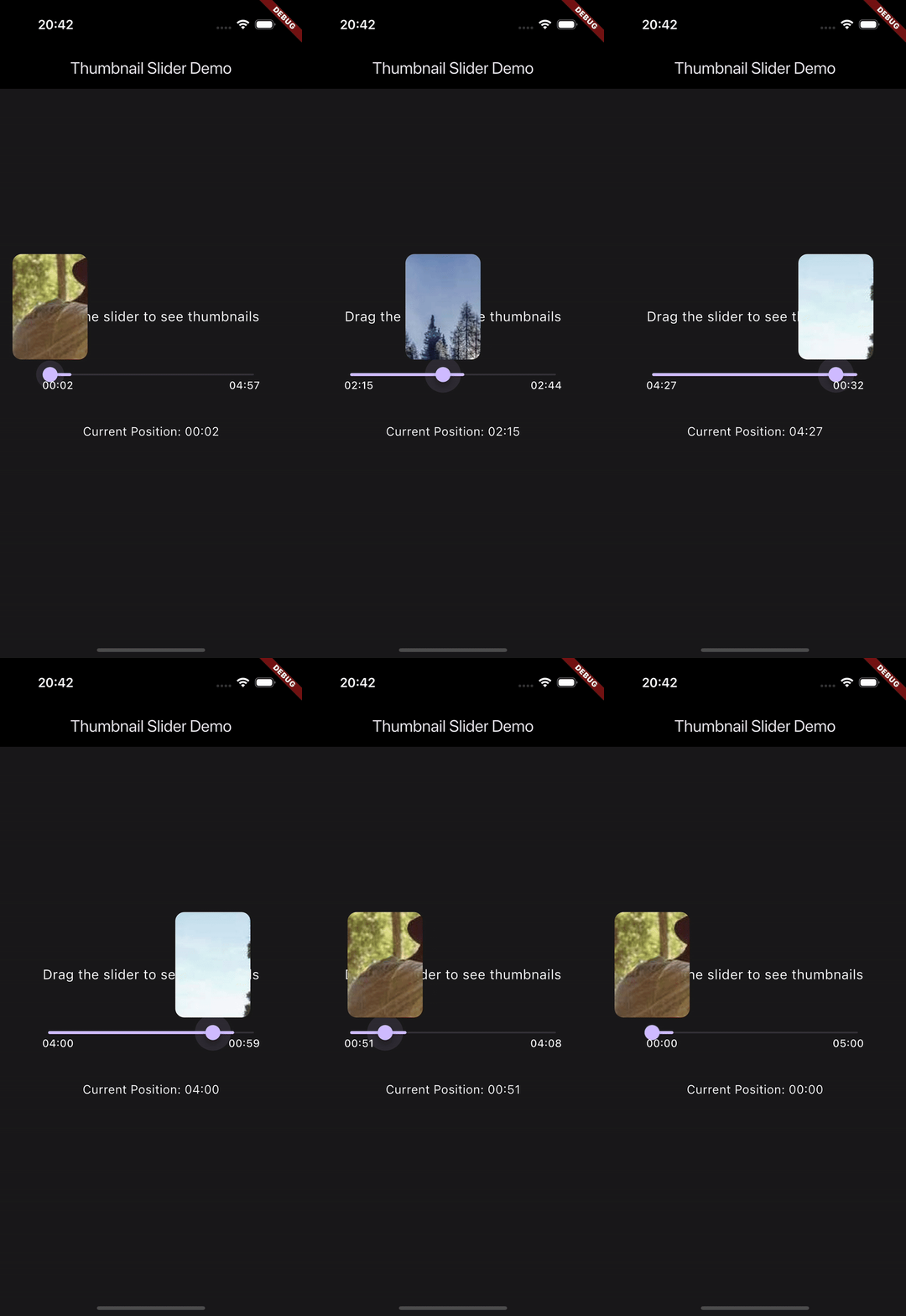
A Flutter slider widget that displays thumbnails while dragging.
🎯 Thumbnail Slider #


A beautiful and customizable Flutter slider widget that displays thumbnails while dragging. Perfect for video players, audio players, or any media playback interface that needs visual feedback during seeking.
✨ Features #
- 🖼️ Thumbnail Preview: Display image thumbnails while dragging the slider
- 🌐 Network Image Support: Load thumbnails from URLs
- 🎨 Customizable Appearance: Adjust thumbnail size, border radius, and position
- ⏱️ Time Display: Show elapsed and remaining time with customizable styling
- 📊 Buffer Indicator: Visual feedback for buffered content
- 🎯 Smooth Interaction: Fluid dragging experience with thumbnail preview
- 🎨 Theme Support: Integrates with Flutter's theming system
📦 Installation #
Add this to your package's pubspec.yaml file:
dependencies:
  thumbnail_slider: ^0.1.0
🚀 Quick Start #
import 'package:thumbnail_slider/thumbnail_slider.dart';

SeekBar(
  duration: Duration(minutes: 5),
  position: Duration(minutes: 2),
  bufferedPosition: Duration(minutes: 3),
  imageList: [
    'https://example.com/thumbnail1.jpg',
    'https://example.com/thumbnail2.jpg',
  ],
  onChanged: (position) {
    // Handle position change
  },
)
🎨 Customization #
Thumbnail Appearance #
SeekBar(
  // ... other properties ...
  thumbnailWidth: 80,  // Custom width
  thumbnailHeight: 120,  // Custom height
  thumbnailBorderRadius: 12,  // Custom border radius
  thumbnailOffset: Offset(0, -70),  // Custom position offset
)
Time Display #
SeekBar(
  // ... other properties ...
  showElapsedTime: true,  // Show elapsed time
  showRemainingTime: true,  // Show remaining time
  textStyle: TextStyle(
    color: Colors.white,
    fontSize: 12,
    fontWeight: FontWeight.bold,
  ),
  leftTextPadding: EdgeInsets.only(left: 20),
  rightTextPadding: EdgeInsets.only(right: 20),
)
📋 API Reference #
SeekBar Properties #
| Property | Type | Default | Description |
|---|---|---|---|
duration |
Duration |
Required | Total duration of the media |
position |
Duration |
Required | Current playback position |
bufferedPosition |
Duration? |
null | Current buffered position |
imageList |
List<String>? |
null | List of thumbnail image URLs |
thumbnailWidth |
double |
60 | Width of the thumbnail |
thumbnailHeight |
double |
100 | Height of the thumbnail |
thumbnailBorderRadius |
double |
8 | Border radius of the thumbnail |
thumbnailOffset |
Offset |
Offset(0, -60) | Position offset of the thumbnail |
showElapsedTime |
bool |
true | Show elapsed time |
showRemainingTime |
bool |
true | Show remaining time |
textStyle |
TextStyle? |
null | Custom text style for time displays |
leftTextPadding |
EdgeInsets |
EdgeInsets.only(left: 16) | Padding for elapsed time |
rightTextPadding |
EdgeInsets |
EdgeInsets.only(right: 16) | Padding for remaining time |
Callbacks #
| Callback | Description |
|---|---|
onChanged |
Called when the position changes during dragging |
onChangeEnd |
Called when the user stops dragging |
onEnd |
Called when playback ends |
💡 Usage Examples #
Basic Video Player #
SeekBar(
  duration: videoController.value.duration,
  position: videoController.value.position,
  bufferedPosition: videoController.value.bufferedPosition,
  imageList: videoThumbnails,
  onChanged: (position) {
    videoController.seekTo(position);
  },
)
Audio Player with Custom Styling #
SeekBar(
  duration: audioDuration,
  position: currentPosition,
  bufferedPosition: bufferedPosition,
  thumbnailWidth: 100,
  thumbnailHeight: 150,
  thumbnailBorderRadius: 16,
  textStyle: TextStyle(
    color: Colors.white,
    fontSize: 14,
    fontWeight: FontWeight.w500,
  ),
  onChanged: (position) {
    audioPlayer.seek(position);
  },
)
🤝 Contributing #
Contributions are welcome! Please feel free to submit a Pull Request.
- Fork the repository
- Create your feature branch (
git checkout -b feature/amazing-feature) - Commit your changes (
git commit -m 'Add some amazing feature') - Push to the branch (
git push origin feature/amazing-feature) - Open a Pull Request
📝 License #
This project is licensed under the MIT License - see the LICENSE file for details.
🙏 Acknowledgments #
- Flutter team for the amazing framework
- All contributors who have helped shape this package
📫 Contact #
Miroslav Skoda - @visit_my_website
Project Link: https://github.com/miraskoda/thumbnail_slider
Metadata
4
likes
145
points
14
downloads
Publisher
unverified uploader
Weekly Downloads
Metadata
A Flutter slider widget that displays thumbnails while dragging.
Repository (GitHub)
View/report issues
Documentation
License
 MIT (license)

