
swipe_screen 1.0.0  swipe_screen: ^1.0.0 copied to clipboard
A widget that enables screen transitions by swiping.
A Flutter package that enables screen transitions by swiping.

Features #
- Screen transitions can be assigned to swipe operations in each of the four directions.
- swipeFromLeft: Left to Right
- swipeFromTop: Top to Bottom
- swipeFromRight: Right to Left
- swipeFromBottom: Bottom to Top.
- The type of screen transition can be selected.
- Overlay the destination screen on top of the current screen (
TransitionType.push) - Display the destination screen from the below of the current screen (
TransitionType.pop)
- Overlay the destination screen on top of the current screen (
- Can coexist with scrollable widgets.
- The
controllerof the scrollable widget must be assigned theScrollControllerprovided bycurrentScreenBuilder.
- The
- The process to be performed when the screen transition by swiping is completed can be specified.
- With 'onSwiped', the direction of the swipe can get.
- Different processes can be implemented for each swipe direction.
Getting started #
Add the latest version of swipe_screen to pubspec.yaml as a dependency.
dependencies:
  swipe_screen: ^[latest version]
Usage #
Parameters #
- Both
SwipeScreenandSwipeTransitionare needed to enable screen transitions by swiping. - The parameters of each class are shown below.
SwipeScreen
| Parameter | Class | Description |
|---|---|---|
currentScreenBuilder |
Function | A builder for creating the current screen. If a scrollable widget is to be placed on the screen, the controller for that widget must be the ScrollController provided by this function. |
swipeFromLeft |
SwipeTransition | Create a screen that transitions by swiping from left to right. |
swipeFromTop |
SwipeTransition | Create a screen that transitions by swiping from top to bottom. |
swipeFromRight |
SwipeTransition | Create a screen that transitions by swiping from right to left. |
swipeFromBottom |
SwipeTransition | Create a screen that transitions by swiping from bottom to top. |
onSwiped |
SwipeCallBack | A callback called when a swipe is made and screen transition is complete. The direction of the swipe can get. |
isScrollEnable |
bool | If a scrollable widget is to be placed on the currentScreenBuilder, assign true. |
SwipeTransition
| Parameter | Class | Description |
|---|---|---|
screen |
Widget | A widget that creates a screen that transitions with a swipe. |
transitionType |
TransitionType | A type of transition by swiping the screen. |
- There are two types of
TransitionTypeas follows.TransitionType.push
The transition is made so that the destination screen overlaps the current screen.TransitionType.pop
The screen to be transitioned to is displayed from below of the current screen.
Example #
Code
SwipeScreen(
      key: UniqueKey(),
      swipeFromRight: SwipeTransition(
        screen: LeftScreen(),
        transitionType: TransitionType.push,
      ),
      currentScreenBuilder: (ScrollController controller) {
        return Scaffold(
          body: Center(
            child: Text(
              'HomeScreen',
              style: TextStyle(
                fontSize: 32,
              ),
            ),
          ),
        );
      },
      onSwiped: (direction) {
        switch(direction) {
          case SwipeDirection.fromLeft:
            Navigator.push(
              context,
              PageRouteBuilder(
                pageBuilder: (_, __, ___) => LeftScreen(),
                transitionDuration: const Duration(seconds: 0),
              ),
            );
            break;
          default:
            break;
        }
      },
    );
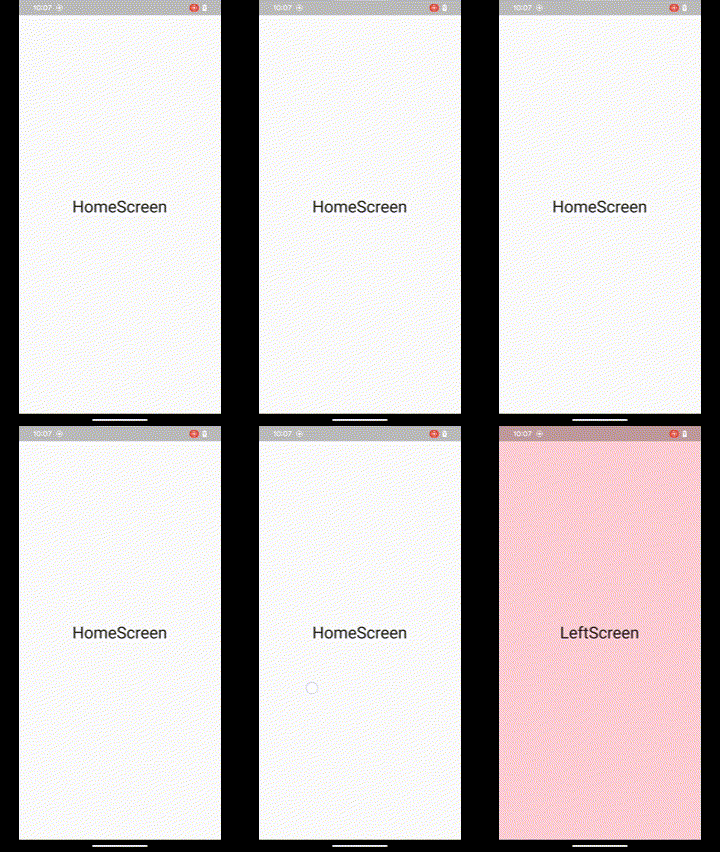
Motion
Metadata
6
likes
0
points
16
downloads
Publisher
unverified uploader
Weekly Downloads
Metadata
A widget that enables screen transitions by swiping.
Repository (GitHub)
View/report issues
License
 unknown (license)

