
speech_recognition_kvc 1.0.2  speech_recognition_kvc: ^1.0.2 copied to clipboard
 kavacode.com
A flutter plugin to use the speech recognition on iOS and Android
speech_recognition_kvc #

This is a maintenance fork of the original speech_recognition plugin, which has been discontinued.
🚀 Why this fork? #
The original library was no longer compatible with modern Flutter environments. To ensure the sustainability of my project, Wano Collector (Android | iOS), and provide the community with a reliable bridge for speech-to-text, I've updated and maintained this version.
Credits to the original authors for the initial implementation.
Introduction #
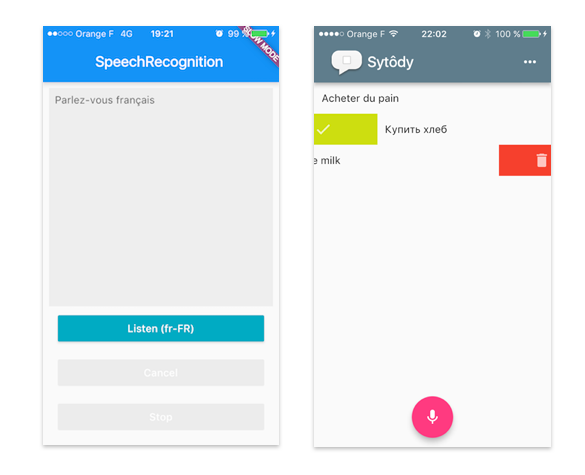
A flutter plugin to use the speech recognition.
Installation #
- Depend on it Add this to your package's pubspec.yaml file:
dependencies:
  speech_recognition_kvc: "^1.0.2"
- Install it You can install packages from the command line:
$ flutter packages get
- Import it Now in your Dart code, you can use:
import 'package:speech_recognition_kvc/speech_recognition_kvc.dart';
Usage #
//..
_speech = SpeechRecognitionKVC();

// The flutter app not only call methods on the host platform,
// it also needs to receive method calls from host.
_speech.setAvailabilityHandler((bool result)
  => setState(() => _speechRecognitionAvailable = result));

// handle device current locale detection
_speech.setCurrentLocaleHandler((String locale) =>
 setState(() => _currentLocale = locale));

_speech.setRecognitionStartedHandler(()
  => setState(() => _isListening = true));

// this handler will be called during recognition.
// the iOS API sends intermediate results,
// On my Android device, only the final transcription is received
_speech.setRecognitionResultHandler((String text)
  => setState(() => transcription = text));

_speech.setRecognitionCompleteHandler(()
  => setState(() => _isListening = false));

// 1st launch : speech recognition permission / initialization
_speech
    .activate()
    .then((res) => setState(() => _speechRecognitionAvailable = res));
//..

speech.listen(locale:_currentLocale).then((result)=> print('result : $result'));

// ...

speech.cancel();

// ||

speech.stop();

// Handle recognition errors
_speech.setErrorHandler((SpeechRecognitionError e) => print('error: $e'));
Recognition #
- iOS : Speech API
- Android : SpeechRecognizer
Permissions #
iOS #
⚠️ iOS : Swift 4.2 project
infos.plist, add :
- Privacy - Microphone Usage Description
- Privacy - Speech Recognition Usage Description
<key>NSMicrophoneUsageDescription</key>
<string>This application needs to access your microphone</string>
<key>NSSpeechRecognitionUsageDescription</key>
<string>This application needs the speech recognition permission</string>
Android #
<uses-permission android:name="android.permission.RECORD_AUDIO" />
Limitation #
On iOS, by default the plugin is configured for French, English, Russian, Spanish, Italian. On Android, without additional installations, it will probably works only with the default device locale.
Troubleshooting #
If you get a MissingPluginException, try to flutter build apk on Android, or flutter build ios
Getting Started #
For help getting started with Flutter, view our online documentation.
For help on editing plugin code, view the documentation.
Metadata
Publisher
Metadata
A flutter plugin to use the speech recognition on iOS and Android
Repository (GitHub)
View/report issues
Documentation
License
 MIT (license)
Dependencies
More
Packages that depend on speech_recognition_kvc
Packages that implement speech_recognition_kvc

