
slot_machine_ui 1.2.4  slot_machine_ui: ^1.2.4 copied to clipboard
 kabyachalise.com.np
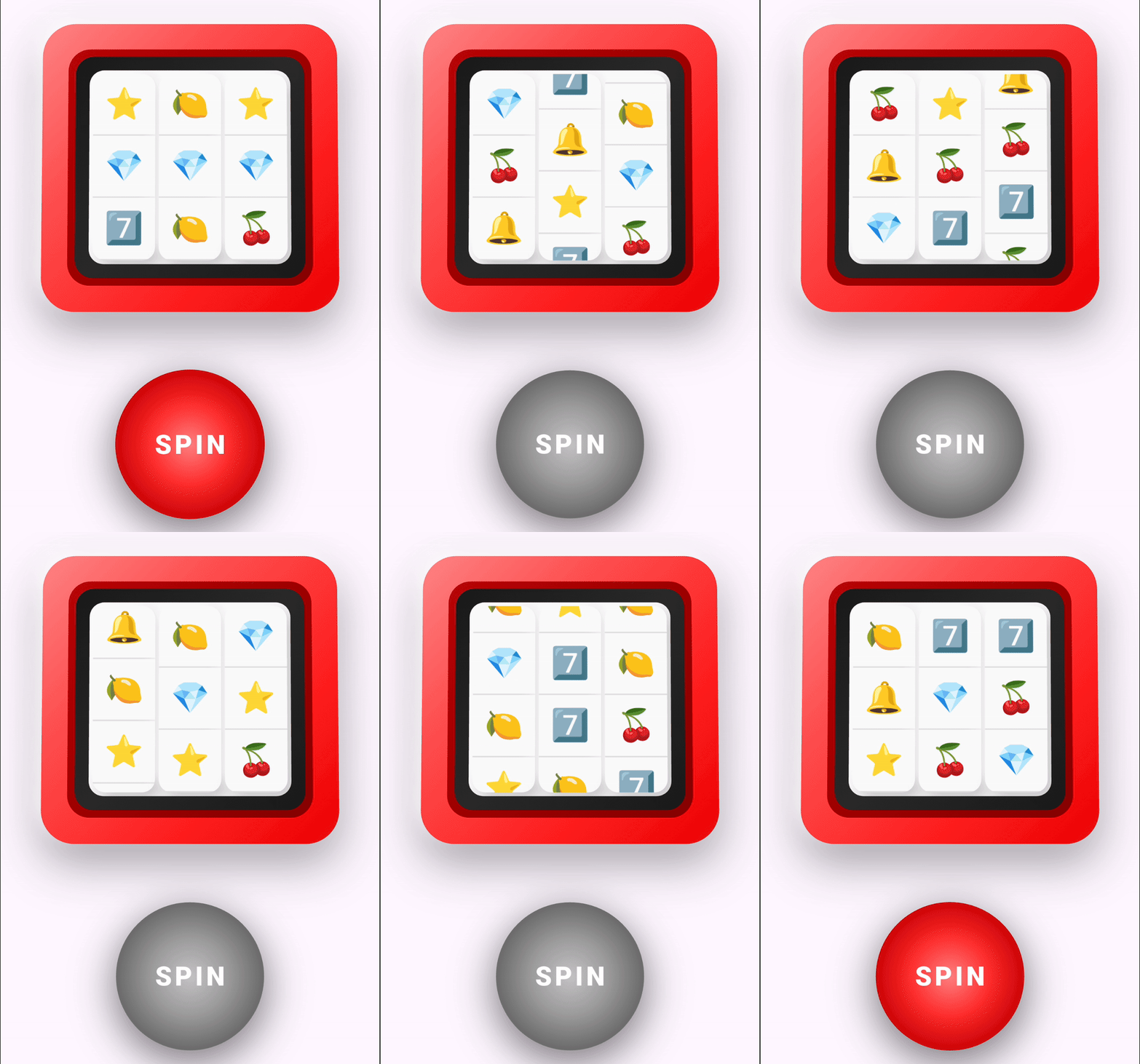
A highly customizable slot machine widget for Flutter with smooth animations, beautiful skeuomorphic design, and sound support.
slot_machine_ui #
A highly customizable slot-machine-style UI widget for Flutter, featuring smooth reel animations, a skeuomorphic design, and optional sound effects.


📋 Table of Contents #
- Features
- Installation
- Basic Usage
- Advanced Usage
- Customization Options
- Examples
- FAQ
- Contributing
- License
✨ Features #
- 🎰 Smooth reel animations with configurable timing
- 🎨 Clean skeuomorphic-inspired design
- 🎵 Optional asset-based sound effects (spin & result)
- 🔧 Highly customizable layout, colors, and behavior
- 📱 Responsive sizing for different screen widths
- 🎮 Controller-based API for programmatic control
- 🌐 Cross-platform support (iOS, Android, Web, Desktop)
📦 Installation #
Add the dependency to your pubspec.yaml:
dependencies:
  slot_machine_ui: ^0.1.0
Then run:
flutter pub get
Or install directly:
flutter pub add slot_machine_ui
🚀 Basic Usage #
import 'package:flutter/material.dart';
import 'package:slot_machine_ui/slot_machine_ui.dart';

class MySlotMachine extends StatefulWidget {
  @override
  State<MySlotMachine> createState() => _MySlotMachineState();
}

class _MySlotMachineState extends State<MySlotMachine> {
  final _controller = SlotMachineController();
  final _symbols = ['🍒', '🍋', '7️⃣', '💎', '⭐', '🔔'];

  @override
  void dispose() {
    _controller.dispose();
    super.dispose();
  }

  @override
  Widget build(BuildContext context) {
    return Scaffold(
      body: Center(
        child: SlotMachineWidget(
          primaryColor: Colors.redAccent,
          showInnerFrame: true,
          width: 300,
          controller: _controller,
          symbols: _symbols,
          onSpinStart: () {
            debugPrint('Spin started');
          },
          onResult: (results) {
            debugPrint('Spin result: $results');
          },
          onSpinEnd: () {
            debugPrint('Spin ended');
          },
        ),
      ),
    );
  }
}
🎨 Advanced Usage #
Custom Colors and Layout #
SlotMachineWidget(
  controller: _controller,
  symbols: _symbols,
  numberOfReels: 4,
  visibleSymbolsPerReel: 3,
  width: 400,
  primaryColor: Color(0xFF2C3E50),
  accentColor: Color(0xFFE74C3C),
  reelBackgroundColor: Colors.white,
  buttonPosition: SpinButtonPosition.below,
  buttonText: 'PULL',
)
Using Image Assets #
First, add your images to pubspec.yaml:
flutter:
  assets:
    - assets/images/cherry.png
    - assets/images/lemon.png
    - assets/images/seven.png
Then use them in your widget:
SlotMachineWidget(
  controller: _controller,
  symbols: [
    'assets/images/cherry.png',
    'assets/images/lemon.png',
    'assets/images/seven.png',
  ],
  useImageAssets: true,
)
Adding Sound Effects #
- Add sound files to your project's
pubspec.yaml:
flutter:
  assets:
    - assets/sounds/spin.mp3
    - assets/sounds/win.mp3
- Configure the widget with asset paths:
SlotMachineWidget(
  controller: _controller,
  symbols: _symbols,
  // Both path formats are supported:
  spinSoundAsset: 'sounds/spin.mp3',           // ✅ Recommended
  resultSoundAsset: 'assets/sounds/win.mp3',   // ✅ Also works
)
Supported audio formats: MP3, WAV, OGG, AAC
Platform notes:
- iOS/Android: Works out of the box
- Web: May require user interaction before playing (browser security)
- Desktop: Fully supported
Technical details: Sound playback uses the audioplayers package, which is included as a dependency. If audio fails to load, the widget gracefully falls back to haptic feedback.
Troubleshooting:
- Ensure asset paths in
pubspec.yamlare properly indented - Run
flutter clean && flutter pub getafter adding new assets - Check that audio files exist at the specified paths
- Test on actual devices (not just emulator) for best results
Programmatic Control #
// Spin programmatically
_controller.spin();

// Check if spinning
if (_controller.isSpinning) {
  print('Currently spinning!');
}

// Get results
if (_controller.finalResults != null) {
  print('Last result: ${_controller.finalResults}');
}
Callbacks #
SlotMachineWidget(
  controller: _controller,
  symbols: _symbols,
  onSpinStart: () {
    print('Spin started!');
  },
  onResult: (results) {
    // Check for wins
    bool hasWin = results.every((reel) => reel[0] == results[0][0]);
    if (hasWin) {
      print('Winner! 🎉');
    }
  },
  onSpinEnd: () {
    print('Spin completed!');
  },
)
⚙️ Customization Options #
| Parameter | Type | Default | Description |
|---|---|---|---|
controller |
SlotMachineController |
required | Controller to manage state |
symbols |
List<String> |
required | List of symbols (emoji or asset paths) |
useImageAssets |
bool |
false |
Whether symbols are image asset paths |
numberOfReels |
int |
3 |
Number of reels (columns) |
visibleSymbolsPerReel |
int |
3 |
Visible symbols per reel (rows) |
width |
double? |
null |
Width of machine (auto-sized if null) |
primaryColor |
Color |
Color(0xFFE0E0E0) |
Main machine body color |
accentColor |
Color |
Color(0xFFFF3333) |
Spin button color |
reelBackgroundColor |
Color |
Color(0xFFFAFAFA) |
Background color of reels |
showSpinButton |
bool |
true |
Whether to show the spin button |
showInnerFrame |
bool |
false |
Whether to show inner frame decoration |
buttonPosition |
SpinButtonPosition |
below |
Position of button (below/above/left/right) |
buttonText |
String |
'SPIN' |
Text on the spin button |
spinSoundAsset |
String? |
null |
Asset path for spin sound |
resultSoundAsset |
String? |
null |
Asset path for result sound |
onResult |
Function? |
null |
Callback with final grid results |
onSpinStart |
Function? |
null |
Callback when spin starts |
onSpinEnd |
Function? |
null |
Callback when spin ends |
Button Positions #
enum SpinButtonPosition {
  below,  // Button below the machine
  above,  // Button above the machine
  right,  // Button to the right
  left,   // Button to the left
}
📱 Examples #
Check out the example folder for complete examples:
- Basic emoji slot machine - Simple setup with emoji symbols
- Custom themed machine - Custom colors and image assets
- Sound-enabled machine - With spin and win sound effects
- Programmatic control - Controlling spins from code
To run the example app:
cd example
flutter run
💡 Tips #
- Performance: Use 3-6 symbols for best performance
- Responsive Design: Leave
widthasnullto auto-size based on screen width - Win Detection: Compare symbols in the
onResultcallback - Accessibility: Consider adding haptic feedback for better UX
- Asset Optimization: Compress images and use appropriate formats (PNG for symbols, MP3/AAC for sounds)
❓ FAQ #
Q: Can I use this in a production gambling app?
A: This package is for educational and entertainment purposes. Ensure compliance with local gambling laws and regulations.
Q: Why isn't my sound playing?
A: Make sure the asset paths are correctly added to pubspec.yaml and the files exist in your project.
Q: How do I detect a win?
A: Use the onResult callback and compare the symbols. Example:
onResult: (results) {
  // Check if all reels have the same top symbol
  bool isWin = results.every((reel) => reel[0] == results[0][0]);
}
Q: Can I customize the animation duration?
A: Currently, animation timing is handled internally. Custom timing options may be added in future versions.
Q: Does this work on web?
A: Yes! The package is tested on all Flutter platforms (iOS, Android, Web, Desktop).
🤝 Contributing #
Contributions are welcome! Here's how you can help:
- Fork the repository
- Create a feature branch (
git checkout -b feature/amazing-feature) - Commit your changes (
git commit -m 'Add amazing feature') - Push to the branch (
git push origin feature/amazing-feature) - Open a Pull Request
Please make sure to:
- Follow the existing code style
- Add tests for new features
- Update documentation as needed
📄 License #
This project is licensed under the MIT License - see the LICENSE file for details.
⚠️ Disclaimer #
This package is for educational and entertainment purposes only. Please ensure compliance with local gambling laws and regulations if used in production applications.
🙏 Acknowledgments #
- Inspired by classic slot machine designs
- Built with Flutter and ❤️
Made with Flutter 💙
Metadata
Publisher
Weekly Downloads
Metadata
A highly customizable slot machine widget for Flutter with smooth animations, beautiful skeuomorphic design, and sound support.
Repository (GitHub)
View/report issues
License
 unknown (license)

