
s_webview 2.0.4  s_webview: ^2.0.4 copied to clipboard
A Flutter package that provides an enhanced WebView widget with smooth animations, loading states, and multi-platform support including desktop platforms
s_webview #
A robust, cross-platform WebView widget for Flutter that provides a seamless browsing experience with built-in loading states, error handling, and smooth animations.
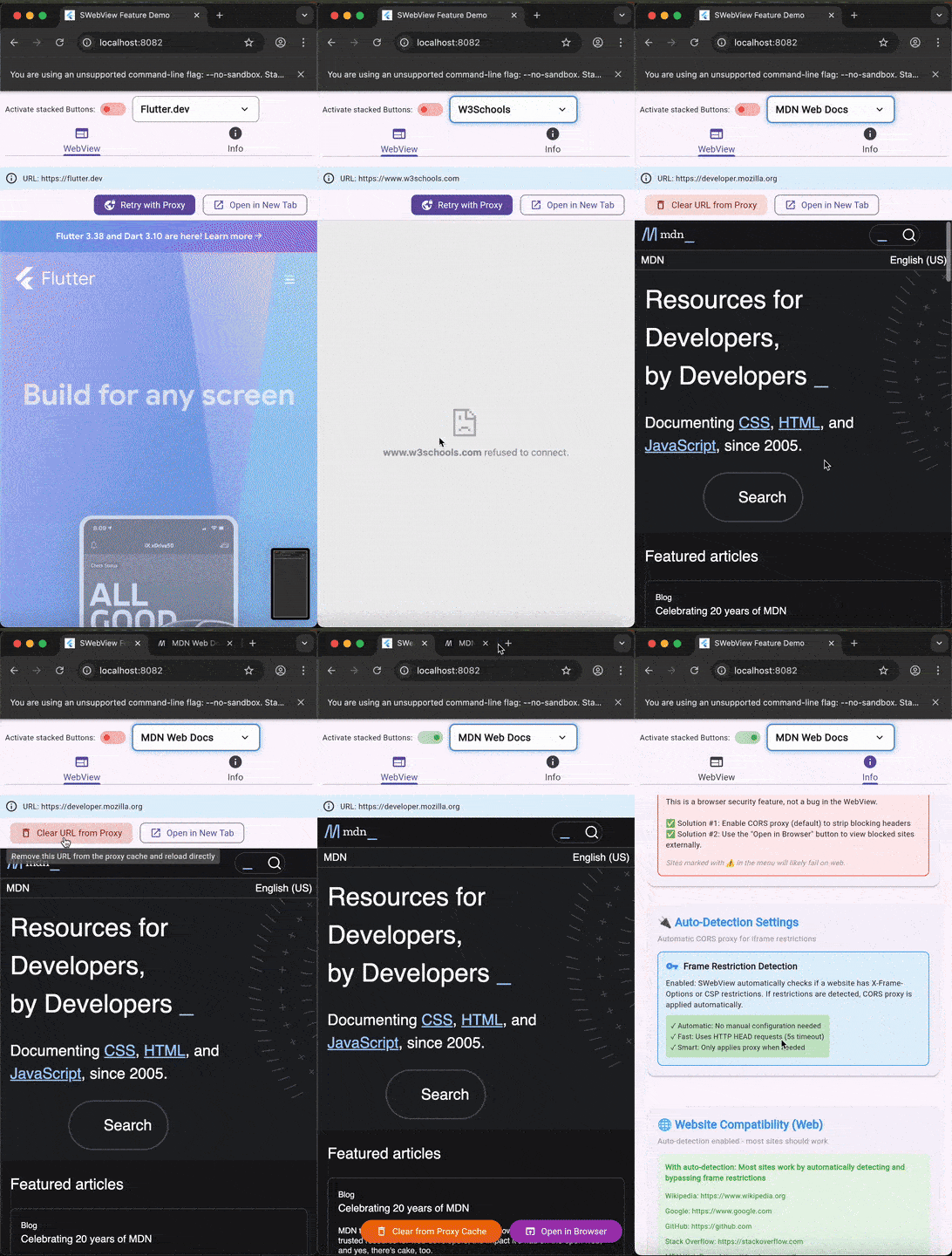
Features #
- Cross-Platform Support: Works on iOS, Android, Web, Windows, macOS, and Linux.
- Smooth Animations: Features fade-in transitions for a polished user experience.
- Smart Loading State: Displays a ticker-free circular progress indicator while content loads.
- Error Handling: Gracefully handles load errors with user-friendly messages.
- Dynamic URL Updates: Automatically reloads content when the URL changes.
- Web Optimization: Includes specific fixes for Web proxy handling to prevent freezing and ensure correct resource loading.
- Note: Proxy features are only needed and used on Flutter Web to bypass CORS and X-Frame-Options restrictions. Native platforms (Mobile & Desktop) use native WebViews and load all content directly.
Installation #
Add s_webview to your pubspec.yaml:
dependencies:
  s_webview: ^2.0.4
Usage #
1. Basic Usage #
The simplest way to use SWebView is to provide a URL. It handles loading states and animations automatically.
import 'package:flutter/material.dart';
import 'package:s_webview/s_webview.dart';

class SimpleWebView extends StatelessWidget {
  @override
  Widget build(BuildContext context) {
    return Scaffold(
      appBar: AppBar(title: Text('Simple WebView')),
      body: SWebView(
        url: 'https://flutter.dev',
      ),
    );
  }
}
2. Advanced Usage (Dynamic URLs & Error Handling) #
You can handle errors, listen for blocked iframes, and dynamically update the URL.
class AdvancedWebView extends StatefulWidget {
  @override
  _AdvancedWebViewState createState() => _AdvancedWebViewState();
}

class _AdvancedWebViewState extends State<AdvancedWebView> {
  String _currentUrl = 'https://flutter.dev';

  @override
  Widget build(BuildContext context) {
    return Scaffold(
      body: Column(
        children: [
          // Control Bar
          Row(
            mainAxisAlignment: MainAxisAlignment.spaceEvenly,
            children: [
              ElevatedButton(
                onPressed: () => setState(() => _currentUrl = 'https://pub.dev'),
                child: Text('Load Pub.dev'),
              ),
              ElevatedButton(
                onPressed: () => setState(() => _currentUrl = 'https://google.com'),
                child: Text('Load Google'),
              ),
            ],
          ),
          // WebView
          Expanded(
            child: SWebView(
              url: _currentUrl,
              // Handle loading errors
              onError: (error) {
                ScaffoldMessenger.of(context).showSnackBar(
                  SnackBar(content: Text('Error: $error')),
                );
              },
              // Handle iframe blocking (Web specific)
              onIframeBlocked: () {
                print('Content blocked by browser policy');
              },
            ),
          ),
        ],
      ),
    );
  }
}
3. Web-Specific Usage (Proxy & Overlays) #
Flutter Web has specific challenges like CORS, X-Frame-Options, and pointer event capturing by iframes. SWebView provides tools to handle these.
Handling Restricted Sites (CORS / X-Frame-Options)
Use autoDetectFrameRestrictions and showToolbar to help users access sites that normally block embedding (like Google or GitHub).
SWebView(
  url: 'https://github.com', // Normally blocked by X-Frame-Options

  // Automatically detects if proxy is needed and switches to it
  autoDetectFrameRestrictions: true,

  // Shows a toolbar with "Retry with Proxy" and "Open in New Tab" buttons
  showToolbar: true,
)
Handling Overlays (Pointer Interception)
On Web, iframes swallow all mouse clicks. If you stack a widget over the WebView, it won't be clickable unless you wrap it with SWebView.tapTarget.
Stack(
  children: [
    SWebView(url: 'https://flutter.dev'),

    // A floating button over the webview
    Positioned(
      bottom: 20,
      right: 20,
      // WRAPPER REQUIRED: Makes the button clickable on Web
      child: SWebView.tapTarget(
        child: FloatingActionButton(
          onPressed: () => print('Clicked!'),
          child: Icon(Icons.add),
        ),
      ),
    ),
  ],
)
Platform Specifics #
- Mobile (iOS/Android): Uses
webview_flutterfor native performance. No proxy required. - Web: Uses
webview_flutter_webwith custom proxy handling to supportX-Frame-Optionsand CORS restrictions (e.g. loading Google, GitHub). - Desktop (Windows/macOS/Linux): Uses a custom desktop implementation. No proxy required.
License #
MIT License - see the LICENSE file for details.
Repository #
Metadata
Publisher
unverified uploader
Weekly Downloads
Metadata
A Flutter package that provides an enhanced WebView widget with smooth animations, loading states, and multi-platform support including desktop platforms
Repository (GitHub)
View/report issues
License
 unknown (license)
Dependencies
desktop_webview_window, flutter, flutter_animate, http, path, pointer_interceptor, shared_preferences, ticker_free_circular_progress_indicator, universal_html, universal_io, webview_flutter, webview_flutter_web

