
radar_animation_widget 0.1.0  radar_animation_widget: ^0.1.0 copied to clipboard
Published 11 months ago •  appexp.pro
appexp.proradar animation
Radar Animation Widget #
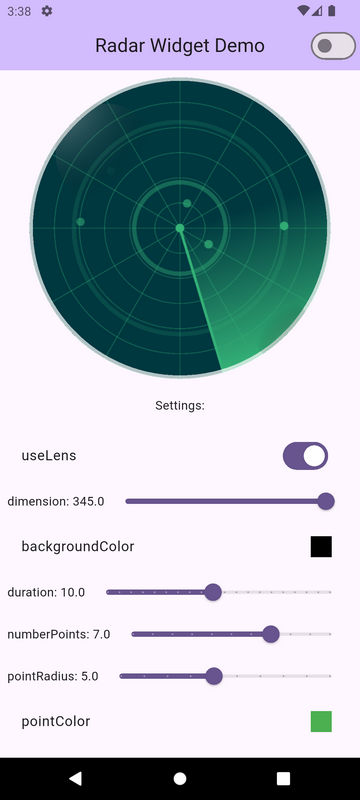
radar_animation_widget is a Flutter widget for an animated radar effect that can be customized according to your needs.
📸 Screenshot #
🔧 Installation #
Add the following line to pubspec.yaml:
dependencies:
  radar_animation_widget: latest_version
Then run the command:
flutter pub get
🚀 Usage #
import 'package:radar_animation_widget/radar_animation_widget.dart';

class RadarScreen extends StatelessWidget {
  @override
  Widget build(BuildContext context) {
    return Scaffold(
      backgroundColor: Colors.black,
      body: Center(
        child: RadarAnimationWidget(
          useLens: true,
          dimension: 300,
          backgroundColor: Colors.black,
          duration: const Duration(seconds: 10),
          numberPoints: 2,
          pointRadius: 5,
          pointColor: Colors.green,
          sectorColor: Colors.green,
          paintSector: true,
          gridColor: Colors.green,
          gridStrokeWidth: 1,
          gridCircleCount: 6,
          gridCircleLinesCount: 12,
          waveStrokeWidth: 5,
          waveColor: Colors.green,
          waveCount: 3,
          radarLineStrokeWidth: 3,
          radarLineColor: Colors.green,
          centerDotRadius: 5,
          centerDotColor: Colors.green,
          lensColor: Colors.cyan,
          borderColor: Colors.white70,
          lensBlur: 0.4,
          lensGlow: true,
        ),
      ),
    );
  }
}
📡 RadarController #
You can control its animation using RadarController.
🔹 Basic Setup #
Initialize the controller and pass it to the widget:
final RadarController controller = RadarController();

RadarAnimationWidget(
  controller: controller,
  ...
);
🔹 Checking Animation State #
Verify if the radar is currently running:
bool isRunning = controller.isAnimating;
print("Is the radar running? $isRunning");
🔹 Controlling the Radar Animation #
controller.start();  // Start the radar
controller.stop();   // Stop the radar
controller.toggle(); // Toggle animation state
🔹 Managing Radar Points #
int numberPoints = controller.numberPoints;  // Get the current number of points
controller.setNumberPoints(numberPoints: numberPoints + 1); // Set the number of points
🎯 Features #
✅ Start, stop, and toggle radar animation ✅ Check if the animation is running ✅ Control the number of radar points
🎨 Configuration #
| Parameter | Type | Description | Default Value |
|---|---|---|---|
useLens |
bool |
Enables lens effect | false |
dimension |
double |
Radar size | 200.0 |
backgroundColor |
Color |
Background color | Colors.black |
duration |
Duration |
Animation duration | Duration(seconds: 5) |
numberPoints |
int |
Number of points on the radar | 5 |
pointRadius |
double |
Radius of points | 3.0 |
pointColor |
Color |
Color of points | Colors.white |
sectorColor |
Color |
Color of sectors | Colors.blue |
paintSector |
bool |
Whether to display sectors | false |
gridColor |
Color |
Grid color | Colors.grey |
gridStrokeWidth |
double? |
Grid line thickness (if null, grid is hidden) |
1.0 |
gridCircleCount |
int |
Number of circles in the grid | 4 |
gridCircleLinesCount |
int |
Number of lines in the grid | 8 |
waveStrokeWidth |
double? |
Wave effect stroke width (if null, wave is hidden) |
2.0 |
waveColor |
Color |
Wave effect color | Colors.blueAccent |
waveCount |
int |
Number of waves | 3 |
radarLineStrokeWidth |
double? |
Radar line stroke width (if null, radar line is hidden) |
2.0 |
radarLineColor |
Color |
Radar line color | Colors.red |
centerDotRadius |
double? |
Center dot radius (if null, center dot is hidden) |
4.0 |
centerDotColor |
Color |
Center dot color | Colors.white |
lensColor |
Color |
Lens color | Colors.white24 |
borderColor |
Color |
Radar border color | Colors.grey |
lensBlur |
double |
Lens blur level | 0.5 |
lensGlow |
bool |
Enables lens glow | true |
📌 License #
This package is distributed under the MIT license. See the LICENSE file for details.
📢 If you have any questions or suggestions – open an issue on GitHub.
Metadata
2
likes
140
points
31
downloads
Publisher
Weekly Downloads
Metadata
radar animation
Repository (GitHub)
View/report issues
Documentation
License
 MIT (license)

