
qcf_quran 0.0.5  qcf_quran: ^0.0.5 copied to clipboard
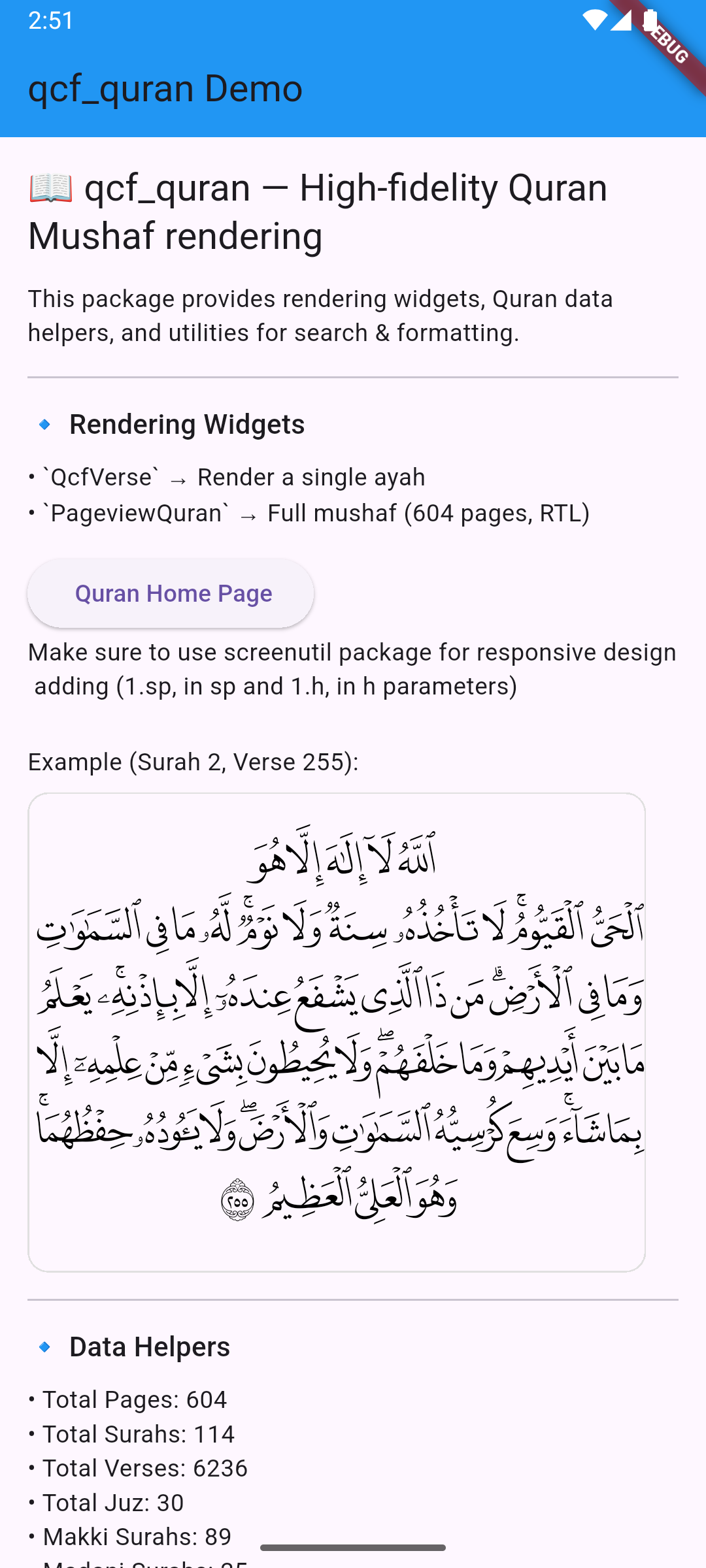
High-fidelity Quran Mushaf (QCF) rendering with per-page bundled fonts. Includes widgets for a single ayah (QcfVerse) and a full RTL PageView mushaf (PageviewQuran), plus search and helpers.
qcf_quran 📖 #



[English] | العربية
High-fidelity Quran Mushaf rendering in Flutter.
qcf_quran bundles 604 page-specific QCF fonts to ensure every page looks exactly like the printed Madani Mushaf, with correct ligatures, verse endings, and scaling.
Note: This package includes ~600 font files (one for each page), which increases the package size but guarantees 100% accurate rendering without internet dependency.
📑 Table of Contents #
✨ Features #
- Page-Accurate Rendering: 604 QCF fonts for exact Mushaf replication.
PageviewQuranWidget: Ready-to-use horizontally swipeable Quran (RTL format).QcfVerseWidget: Render any single ayah with the correct font and verse number glyph.QcfVersesWidget: Render multiple verses from a surah with proper alignment and responsive sizing.- Rich Data API: Get page numbers, surah names (EN/AR), juz info, verses, and more.
- Search: Built-in simple Arabic text search.
- Full Customization: Control colors, backgrounds, headers, and interactions via
QcfThemeData.
🚀 Getting Started #
-
Add dependency:
dependencies: qcf_quran: ^0.0.2 -
Use it: The fonts are bundled, so no extra asset configuration is needed!
🟢 Basic Usage #
Full Quran PageView #
The easiest way to display the Quran. Handles paging, fonts, and layout automatically.
import 'package:qcf_quran/qcf_quran.dart';

@override
Widget build(BuildContext context) {
  return Scaffold(
    body: PageviewQuran(
      initialPageNumber: 1, // Start at Al-Fatiha
      onPageChanged: (page) {
        print("Current page: $page");
      },
    ),
  );
}
Single Verse Rendering #
Render a specific verse anywhere in your app.
QcfVerse(
  surahNumber: 2, // Al-Baqarah
  verseNumber: 255, // Ayat al-Kursi
  sp: 1.sp, // Responsive font scaling
  h: 1.h,   // Responsive height scaling
)
Multiple Verses Rendering #
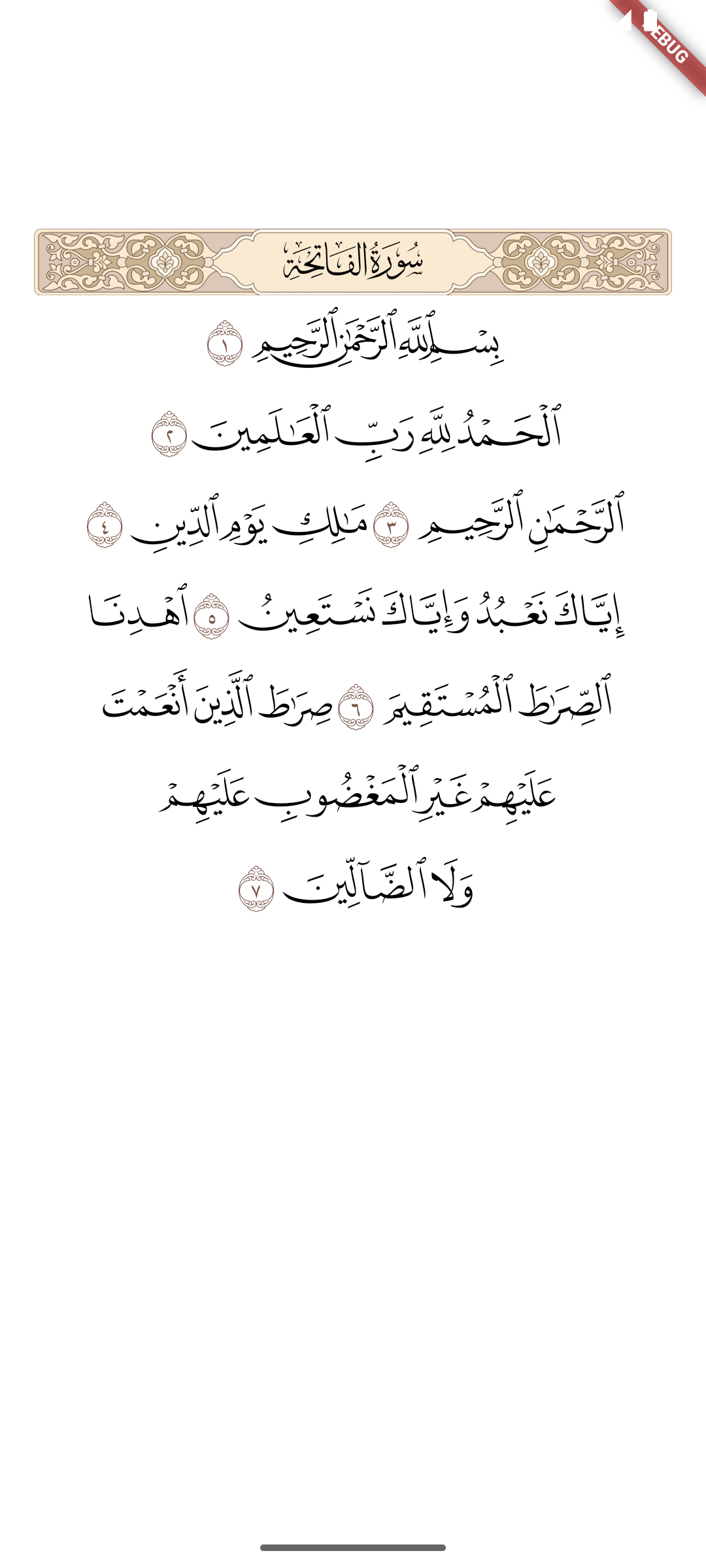
Render a range of verses from a single surah.
QcfVerses(
  surahNumber: 1,   // Al-Fatiha
  firstVerse: 1,
  lastVerse: 7,     // All 7 verses
  sp: 1.sp,         // Responsive font scaling
  h: 1.h,           // Responsive height scaling
)
Responsive Design (ScreenUtil) #
For best results across mobile and tablets, use flutter_screenutil and pass scale factors.
Important: Initialize ScreenUtil in your app:
import 'package:flutter_screenutil/flutter_screenutil.dart';

void main() {
  runApp(const MyApp());
}

class MyApp extends StatelessWidget {
  const MyApp({super.key});

  @override
  Widget build(BuildContext context) {
    return ScreenUtilInit(
      designSize: const Size(392.72727272727275, 800.7272727272727),
      minTextAdapt: true,
      builder: (context, child) {
        return MaterialApp(
          home: QuranPage(),
        );
      },
    );
  }
}
Then use sp and h parameters in widgets:
PageviewQuran(
  sp: 1.sp, // Font size scaling (higher = smaller font)
  h: 1.h,   // Line height scaling (higher = less height)
)

QcfVerse(
  surahNumber: 2,
  verseNumber: 255,
  sp: 1.sp, // Font size scaling
  h: 1.h,   // Line height scaling
)

QcfVerses(
  surahNumber: 18,
  firstVerse: 1,
  lastVerse: 10,
  sp: 1.sp, // Font size scaling
  h: 1.h,   // Line height scaling
)
Understanding sp and h parameters:
sp: Controls font size scaling. Higher values = smaller font (e.g.,1.2.spmakes text smaller than1.sp)h: Controls line height scaling. Higher values = less height (e.g.,1.2.hreduces line spacing compared to1.h)- Default: Both are
1.0if not specified
Data & Search #
Access Quranic data easily:
// Get Surah Name
print(getSurahNameArabic(114)); // "الناس"

// Get Page Number for a Verse
print(getPageNumber(2, 255)); // 42

// Search Arabic Text
final results = searchWords("الرحمن");
// Returns: { "occurences": 57, "result": [ { "suraNumber": 1, "verseNumber": 3 }, ... ] }
🔴 Advanced Usage #
Customization (Themes) #
Customize colors, fonts, and visibility using QcfThemeData.
// Built-in Themes
PageviewQuran(theme: QcfThemeData.dark())
PageviewQuran(theme: QcfThemeData.sepia())

// Custom Theme
PageviewQuran(
  theme: QcfThemeData(
    verseTextColor: Colors.indigo.shade900,
    pageBackgroundColor: Colors.grey.shade50,
    verseBackgroundColor: (surah, verse) {
      if (surah == 18 && verse == 1) return Colors.yellow.withOpacity(0.3);
      return null;
    },
  ),
)
QcfVerses Advanced Features #
The QcfVerses widget supports all the customization options available in other widgets.
// With Theme
QcfVerses(
  surahNumber: 18,
  firstVerse: 1,
  lastVerse: 10,
  sp: 1.sp,
  h: 1.h,
  theme: QcfThemeData.dark(),
)

// Custom Verse Number Formatting
QcfVerses(
  surahNumber: 112,
  firstVerse: 1,
  lastVerse: 4,
  sp: 1.sp,
  h: 1.h,
  verseNumberFormatter: (num) => '($num)', // Western-style numbers
)

// Hide Verse Numbers
QcfVerses(
  surahNumber: 103,
  firstVerse: 1,
  lastVerse: 3,
  sp: 1.sp,
  h: 1.h,
  showVerseNumbers: false,
)

// Verses Spanning Multiple Pages (automatic font handling)
QcfVerses(
  surahNumber: 2,
  firstVerse: 1,
  lastVerse: 20, // Spans multiple pages
  sp: 1.sp,
  h: 1.h,
  // Widget automatically selects correct QCF font for each verse
)
Developer Controls #
Handle user interactions and scroll physics.
PageviewQuran(
  // Interactions
  onTap: (surah, verse) => print("Tapped $surah:$verse"),
  onLongPress: (surah, verse) => print("Long pressed $surah:$verse"),

  // Physics
  physics: BouncingScrollPhysics(), // e.g. iOS style bounce
)
Custom Builders #
Replace default elements (headers, basmala, verse numbers) with your own widgets.
final theme = QcfThemeData(
  // Use an image for Basmala
  basmalaBuilder: (surah) => Image.asset('assets/bismillah.png'),

  // Custom verse number styling
  verseNumberBuilder: (surah, verse, text) {
    return Container(
      padding: EdgeInsets.all(4),
      decoration: BoxDecoration(shape: BoxShape.circle, color: Colors.blue),
      child: Text(text, style: TextStyle(color: Colors.white)),
    );
  },

  // Custom Surah Header
  customHeaderBuilder: (surah) => MyCustomHeaderWidget(surah),
);
State Management #
For full control (e.g., using Bloc or Provider), use the QcfPage widget directly to build your own PageView.
PageView.builder(
  itemBuilder: (context, index) {
    return BlocProvider(
      create: (_) => PageBloc(),
      child: BlocBuilder<PageBloc, PageState>(
        builder: (context, state) {
          return QcfPage(
            pageNumber: index + 1,
            theme: state.theme,
            onTap: (s, v) => context.read<PageBloc>().add(VerseTapped(s, v)),
          );
        },
      ),
    );
  },
)
ℹ️ Technical Details (QCF Fonts) #
- Fonts: Bundles 604 WOFF font files (
QCF_P001toQCF_P604). - Glyphs: Verse numbers and symbols are handled via the
QCF_BSMLfamily. - Logic:
QcfVerseautomatically resolves the correct font family for the requested page number. - Normalization: Helper functions
normalise()andremoveDiacritics()are available for search implementation.
❤️ Support #
If you find this package useful, consider buying me a coffee!

📜 License & Credits #
Disclaimer: This package and its bundled fonts are NOT for commercial use.
- Code: MIT License.
- Fonts: King Fahd Complex for the Printing of the Holy Quran (KFGQPC).
- Data: Mapped internally from standard datasets.
📞 Contact #
- Package Developer (Mahmoud Atef): GitHub (@m4hmoud-atef)
- Font Developer: Discord
ayman24x7
Metadata


Publisher
unverified uploader
Weekly Downloads
Metadata
High-fidelity Quran Mushaf (QCF) rendering with per-page bundled fonts. Includes widgets for a single ayah (QcfVerse) and a full RTL PageView mushaf (PageviewQuran), plus search and helpers.
Repository (GitHub)
View/report issues
Topics
#flutter #quran #arabic #fonts #qcf
Documentation
License
 MIT (license)

