
progressive_ui 0.2.0  progressive_ui: ^0.2.0 copied to clipboard
Priority-based responsive layout utilities for Flutter.
progressive_ui #
A Flutter package for priority-based responsive layouts, focused on making adaptive layouts that react predictably to available space.
Instead of resizing or wrapping widgets, progressive_ui shows and hides groups of
widgets in a defined order, based on what fully fits.
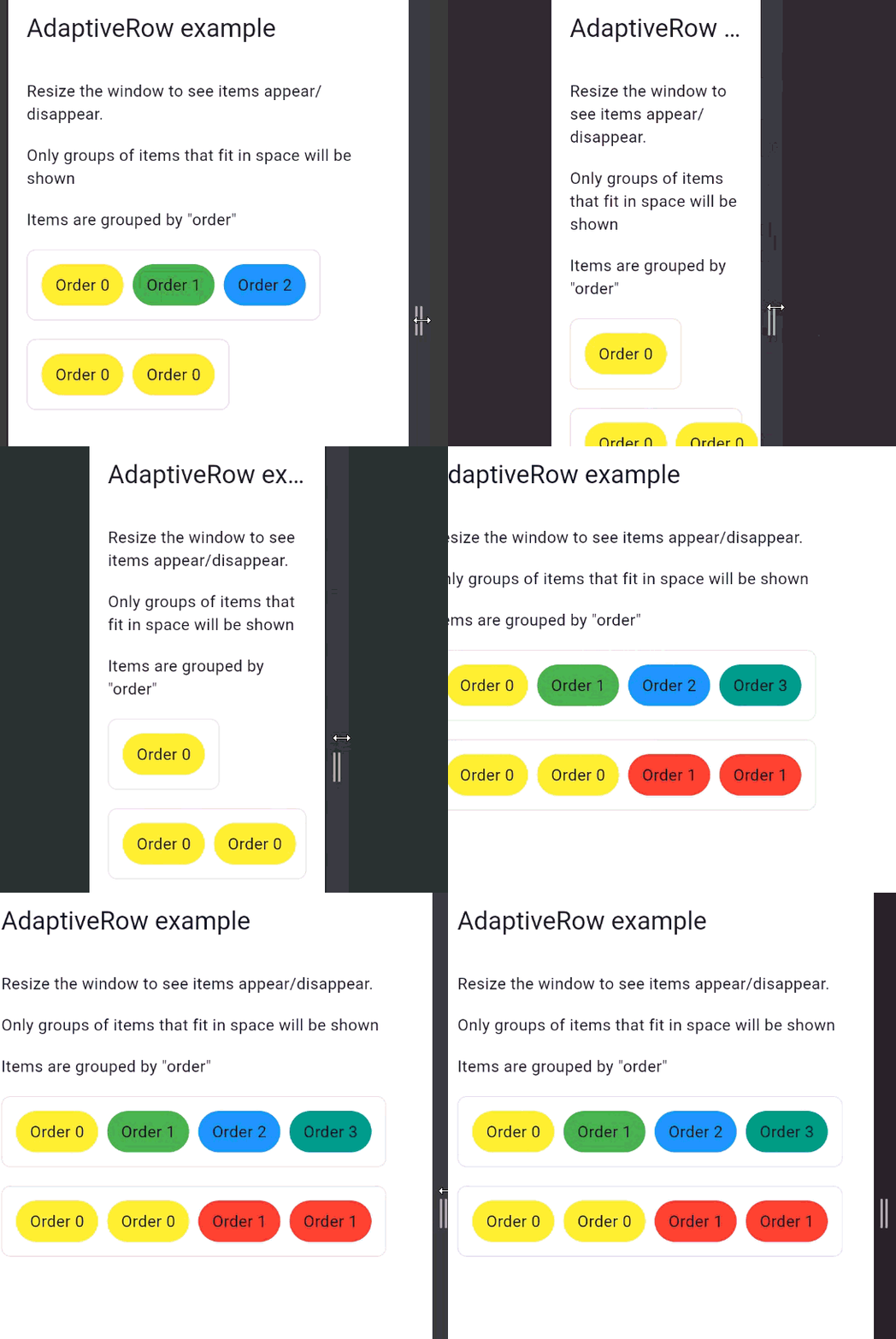
Table of Contents #
Motivation #
Flutter provides powerful layout primitives, but handling progressive disclosure of UI elements (toolbars, actions, filters) often leads to:
- complex breakpoint logic
- manual
Visibilityoriftrees - layouts that partially render important UI
progressive_ui aims to solve this by offering deterministic, size-aware layouts
that behave the same way regardless of platform or screen size.
Core Idea #
Children are assigned a non-negative order.
- Widgets with the same order form a group
- Groups are evaluated from lowest to highest order
- A group is rendered only if all its widgets fit
- If a group does not fit, it and all higher orders are skipped
This guarantees:
- no partial UI
- no skipped priorities
- no visual instability
Installation #
dependencies:
  progressive_ui: ^<latest-version>
Usage #
AdaptiveRow(
  spacing: 8,
  children: const [
    AdaptiveChild(
      order: 0,
      child: Text('Required'),
    ),
    AdaptiveChild(
      order: 1,
      child: Icon(Icons.download),
    ),
    AdaptiveChild(
      order: 2,
      child: Text('Optional'),
    ),
  ],
)
As available space decreases, widgets disappear group by group, never individually.
Grouping Behavior #
Multiple widgets may share the same order.
AdaptiveRow(
  children: const [
    AdaptiveChild(order: 0, child: Text('A')),
    AdaptiveChild(order: 0, child: Text('B')),
    AdaptiveChild(order: 1, child: Icon(Icons.settings)),
    AdaptiveChild(order: 1, child: Icon(Icons.share)),
  ],
)
If order 1 does not fit, both icons are hidden together.
This makes the layout ideal for:
- toolbars
- admin interfaces
- dense data UIs
- desktop and web applications
Example #
An example application is available in the example/ directory. It demonstrates:
- resizing behavior
- order-based visibility (0, 1, 2, 3)
- multiple widgets per order group
- strict priority enforcement
Contributing #
Contributions are welcome. If you plan to add new widgets, behaviors, or API changes:
- open an issue first
- include tests
- keep APIs minimal and predictable
Metadata
Publisher
unverified uploader
Weekly Downloads
Metadata
Priority-based responsive layout utilities for Flutter.
Repository (GitHub)
View/report issues
Documentation
License
 MIT (license)

