
pointer_manger 1.0.0  pointer_manger: ^1.0.0 copied to clipboard
Mange the number, type, how, and where touch pointers should interact with your widgets.

Description #
Mange the number, type, how, and where touch pointers should interact with your widgets.
How can things go wrong?! #
Suppose you have this setup where the number in between may refer to some non-negative quantity you need.
class MyApp extends StatefulWidget {
  const MyApp({super.key});

  @override
  State<MyApp> createState() => _MyAppState();
}

class _MyAppState extends State<MyApp> {
  int _n = 0;

  @override
  Widget build(BuildContext context) => Row(
    mainAxisAlignment: MainAxisAlignment.center,
    children: [
      ElevatedButton(
        onPressed: _n <= 1 ? null : () => setState(() => _n = _n - 2),
        child: const Text("-2"),
      ),
      ElevatedButton(
        onPressed: _n <= 0 ? null : () => setState(() => --_n),
        child: const Text("-1"),
      ),
      Text(_n.toString()),
      ElevatedButton(
        onPressed: () => setState(() => ++_n),
        child: const Text("+1"),
      ),
    ],
  );
}
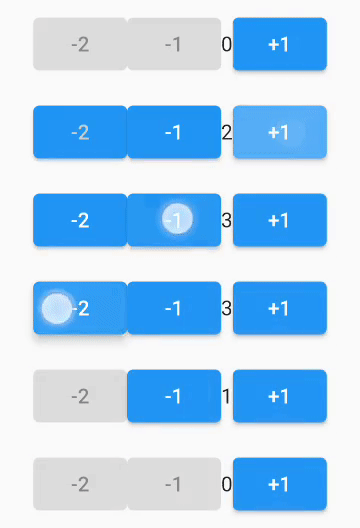
Then the user do THIS:
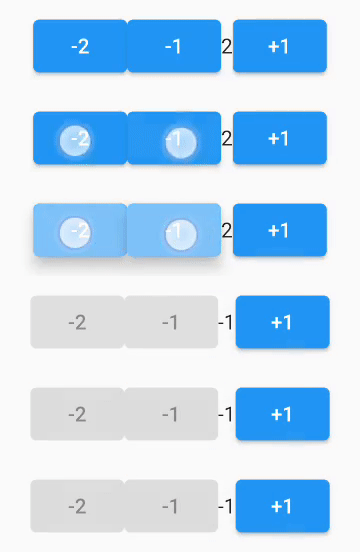
-
This leaves you with unwanted negative value!!
-
Obviously, you can solve this situation with checking before altering the value, but this example to show you a use case.
The solution #
The easiest solution is to use this package.
- just wrap your two buttons with
PointerMangerWidget.withAlland addPointerGroupHandleras a parent to theRow.
class MyApp extends StatefulWidget {
  const MyApp({super.key});

  @override
  State<MyApp> createState() => _MyAppState();
}

class _MyAppState extends State<MyApp> {
  int _n = 0;

  @override
  Widget build(BuildContext context) => PointerGroupHandler( // here
    groupTag: "no-negative", // this is a single group
    child: Row(
      mainAxisAlignment: MainAxisAlignment.center,
      children: [
        PointerMangerWidget.withAll( // here
          // groupTag: "no-negative", // you can specify the parent group tag.
          child: ElevatedButton(
            onPressed: _n <= 1 ? null : () => setState(() => _n = _n - 2),
            child: const Text("-2"),
          ),
        ),
        PointerMangerWidget.withAll( // here
          child: ElevatedButton(
            onPressed: _n <= 0 ? null : () => setState(() => --_n),
            child: const Text("-"),
          ),
        ),
        Text(_n.toString()),
        ElevatedButton(
          onPressed: () => setState(() => ++_n),
          child: const Text("+"),
        ),
      ],
    ),
  );
}
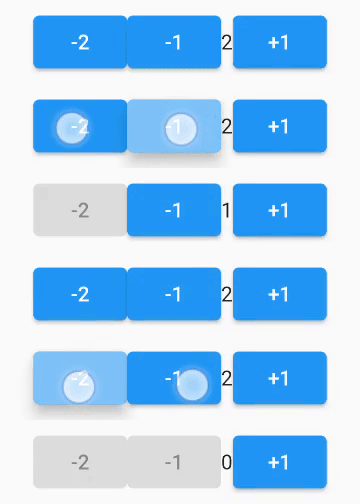
- Then, this is the result:
Additional information #
-
You can use multiple groups.
-
You can use
PointerMangerWidget.thisOnlyto mange pointers on specific widget only regardless of any other widget. -
You can also specify the number of touch pointer allowed on specific widget with the
maxNumOfPointersparameter inPointerMangerWidget.withAllorPointerMangerWidget.thisOnlyconstructors. -
You can use
replaceCurrentWithNextparameter to choose what to do withoverflow pointers(This parameter is documented in the package). -
For a more detailed example you can see
/example/main.dart.
Metadata
Publisher
unverified uploader
Weekly Downloads
Metadata
Mange the number, type, how, and where touch pointers should interact with your widgets.
Repository (GitHub)
View/report issues
Documentation
License
 MIT (license)

