
nrb 2.0.0  nrb: ^2.0.0 copied to clipboard
 innovatenestlabs.com
A highly responsive Flutter table and report builder for complex nested headers, editable data grids, and premium Excel/PDF exports.
📊 nrb (Nexora Report Builder) #
A customizable and highly responsive Flutter table widget builder designed for complex, nested headers and dynamic data visualization. Ideal for enterprise dashboards, inventory tracking, financial reports, or structured data-entry UIs.
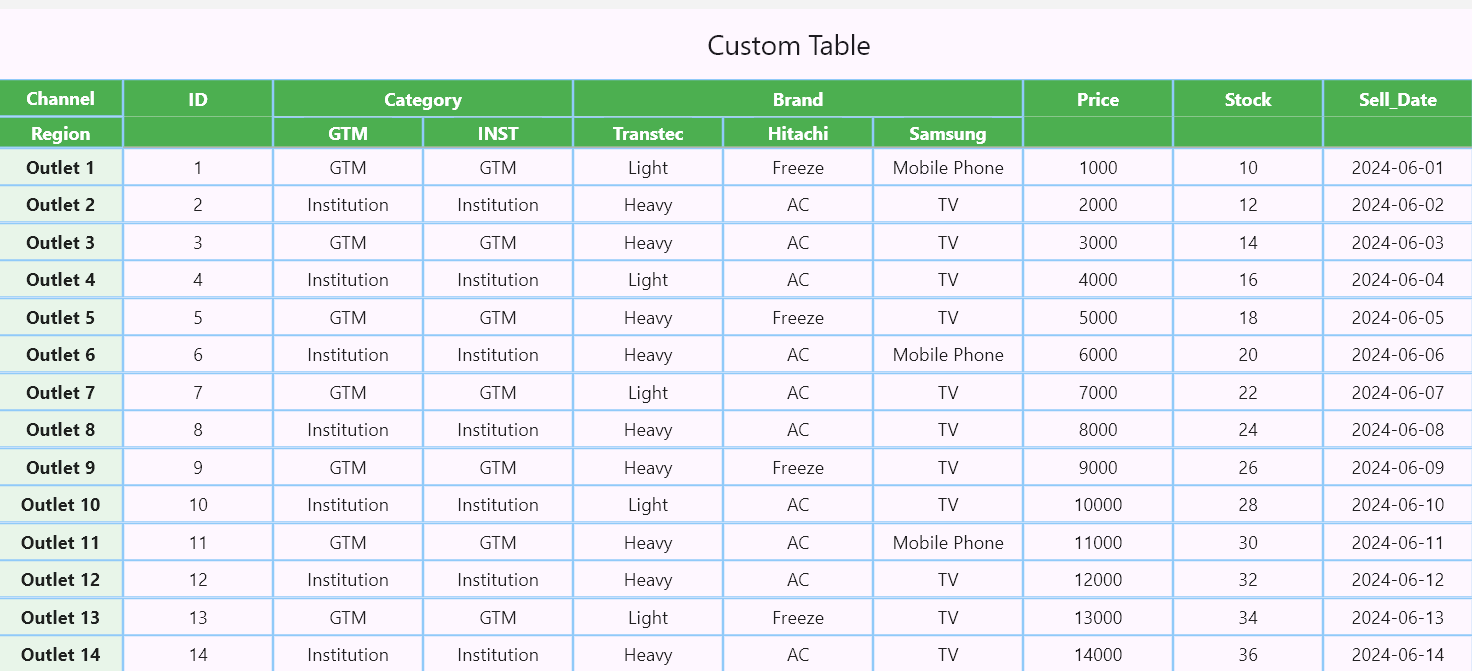
✨ Features #
- 📱 Fully Responsive: Columns auto-measure their content (
wrap_content) and expand proportionally to fill available screen space. - 📌 Complex Nested Headers: Build main headers, sub-headers, and sticky left-side columns (like Excel-style freeze panes).
- ✍️ Editable Data Grids: Mix static
TextCells with interactiveTextFieldCells to turn your report into a scrollable data-entry form. - 🔄 Real-time Data Extraction: Use
ReportControllerto extract all grid data instantly via a Submit action. - 💰 Advanced Number Formatting: Built-in
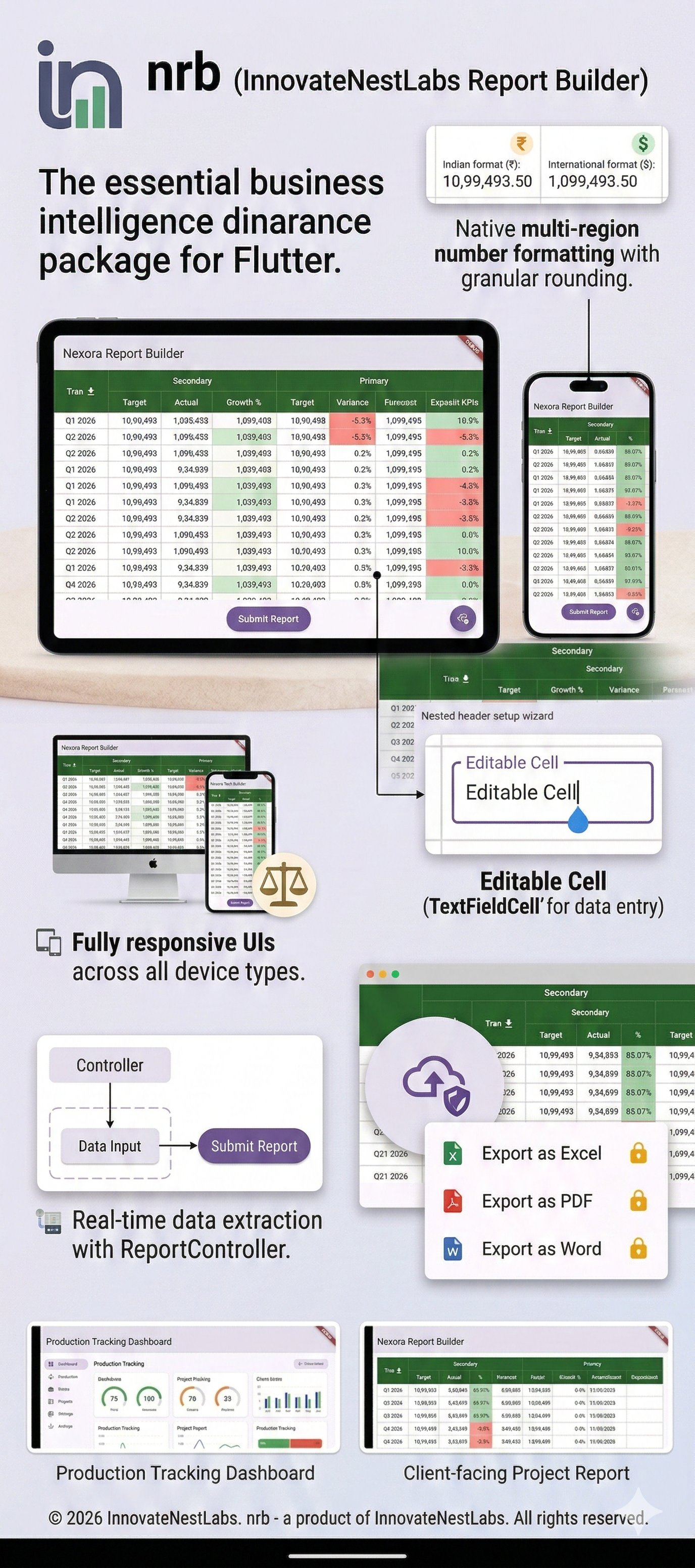
NRBNumberFormatterhandles International and Indian comma separation, along with granular rounding rules. - 📏 Resizable Columns: Double-click column edges to auto-fit, or drag to manually resize.
- 📥 Premium Export & Share: Instantly download tables to Excel, PDF, or Word, or share them directly via native device dialogs (Requires an active subscription bound to your App's Package Name).
🚀 Getting Started #
To integrate nrb into your Flutter project:
1. Add dependency #
dependencies:
  nrb: ^[latest_version]
2. Prepare main to include the report layout #
import 'dart:io';
import 'package:flutter/foundation.dart';
import 'package:flutter/material.dart';
import 'package:nrb/nrb.dart';

void main() {
  runApp(const MyReportBuilderApp());
}

class MyReportBuilderApp extends StatefulWidget {
  const MyReportBuilderApp({super.key});

  @override
  State<MyReportBuilderApp> createState() => _MyReportBuilderAppState();
}

class _MyReportBuilderAppState extends State<MyReportBuilderApp> {
  // 1. Initialize the controller to extract data later
  final ReportController _reportController = ReportController();

  final List<HeaderCell> headers = [
    HeaderCell(text: "Financial Overview", span: 3, backgroundColor: Colors.green),
  ];

  final List<SubHeaderCell> subHeaders = [
    SubHeaderCell(text: "Target", backgroundColor: Colors.green),
    SubHeaderCell(text: "Actual", backgroundColor: Colors.green),
    SubHeaderCell(text: "Growth %", backgroundColor: Colors.green),
  ];

  final leftColumns = [
    TextCell(itemContent: "Q1 - 2026", backgroundColor: Colors.blue[200], textColor: Colors.black),
    TextCell(itemContent: "Q2 - 2026", backgroundColor: Colors.blue[200], textColor: Colors.black),
  ];

  final tableData = [
    [
      TextCell(
        itemContent: "1500000",
        isAmount: true,
        numberFormatType: CellNumberFormat.indian,
        textAlignment: Alignment.centerRight,
      ),
      TextCell(
        itemContent: "1250000",
        isAmount: true,
        numberFormatType: CellNumberFormat.indian,
        textAlignment: Alignment.centerRight,
      ),
      // Editable Cell for user input
      TextFieldCell(initialValue: "83.33%"),
    ],
    [
      TextCell(
        itemContent: "2000000",
        isAmount: true,
        numberFormatType: CellNumberFormat.international,
        textAlignment: Alignment.centerRight,
      ),
      TextCell(
        itemContent: "1900000",
        isAmount: true,
        numberFormatType: CellNumberFormat.international,
        textAlignment: Alignment.centerRight,
      ),
      // Editable Cell for user input
      TextFieldCell(initialValue: "95.00%"),
    ],
  ];

  @override
  Widget build(BuildContext context) {
    return MaterialApp(
      theme: ThemeData(primarySwatch: Colors.blue),
      home: Scaffold(
        appBar: AppBar(title: const Text('Enterprise Dashboard')),
        body: Column(
          children: [
            Expanded(
              child: ReportMaker(
                headers: headers,
                subHeaders: subHeaders,
                leftColumn: leftColumns,
                tableData: tableData,
                stickyHeaderLabel: "Quarter",
                stickyHeaderBackgroundColor: Colors.green,

                // --- NEW FEATURES OVERVIEW ---
                controller: _reportController, // Attach controller for data extraction
                enableDownload: true,          // Enable premium export
                showDownloadFloatingButton: true, // Render the interactive FAB
                packageName: "com.yourcompany.yourapp", // Your registered subscription package
                reportName: "Your Business Report Name",
                apiKey: "Your-Secret-API-key",
                onDownloadCompleted: (bytes, fileName) async {
                  if (!kIsWeb) {
                    final directory = Directory('/storage/emulated/0/Download');
                    if (!await directory.exists()) await directory.create(recursive: true);

                    final file = File('${directory.path}/$fileName');
                    await file.writeAsBytes(bytes);
                    if (kDebugMode) print('File saved to: ${file.path}');
                  }
                },
              ),
            ),
            Padding(
              padding: const EdgeInsets.all(8.0),
              child: ElevatedButton(
                onPressed: () {
                  // 2. Extract all current UI data instantly!
                  List<List<String>> finalData = _reportController.getSubmitData();
                  if (kDebugMode) print("Extracted Data: $finalData");
                },
                child: const Text("Submit Report Data"),
              ),
            )
          ],
        ),
      ),
    );
  }
}
💡 Note on Premium Exporting (Test it for free!) #
Want to test the export and sharing capabilities before purchasing a subscription? You can use our live demo credentials!
To successfully trigger the Download and Share features, you MUST pass the following three parameters to ReportMaker:
enableDownload: true(Master switch to activate the export features)packageName: "com.innovatenestlabs.demoapp"(Use this exact demo package name to test)apiKey: ""(Pass the demo API key as blank string)
⚠️ Free Tier Limits: The demo package name operates on a free testing tier, which is strictly limited to 10 API hit requests per day (equivalent to 5 successful file exports). If you exceed this limit, the export network requests will be temporarily blocked until the daily quota resets.
🧮 Number Formatting #
nrb comes with a powerful formatter built directly into TextCell. Simply flag the cell as an amount and choose your style:
TextCell(
  itemContent: "1099493.5",
  isAmount: true, // Automatically applies commas
  numberFormatType: CellNumberFormat.indian, // Formats as 10,99,493.5
  roundMode: RoundMode.withRoundUp,
  roundTo: 2, // Formats as 10,99,493.50
  textAlignment: Alignment.centerRight,
)
Want to directly use on any part? Just follow the syntax below:
NRBNumberFormatter.format(yourAmountValue, style: NumberStyle.indian, roundTo: 2)
📥 Premium Export & Share Features (Subscription) #
nrb supports backend-driven exporting of your perfectly formatted grids to Excel (.xlsx), PDF, and Word, complete with an interactive floating action menu for downloading and sharing.
To enable the interactive download and share buttons in the UI:
- Set
enableDownload: trueandshowDownloadFloatingButton: trueinReportMaker. - Crucial: Provide your app's exact
packageName. This package name must be registered and hold an active premium subscription. - Use the interactive FAB to either Download the file directly or Share it instantly via your device's native sharing dialog (e.g., email, messaging apps).
- Handle the incoming bytes using the
onDownloadCompletedcallback if you need custom save logic.
👑 Get Premium: Access to the official Nexora API for file generation and sharing requires an active premium subscription tied to your application's package name.
📂 Example Output #
📄 License #
© 2025-2026 Innovate Nest Labs
Authors: Mehedi Hasan & Fahad Mia
This software is released under the Innovate Nest Labs Custom License (Proprietary). Integration into personal and commercial applications is fully permitted, subject to the following strict conditions:
- ❌ No Modification: You may not modify, adapt, or create derivative works from the source code.
- ❌ No Redistribution or Resale: You may not redistribute, sub-license, or sell this package as a standalone product or library.
- ✅ Attribution Required: The original copyright notices must remain intact.
See the full LICENSE file in the repository for complete terms and conditions regarding usage and premium API access.
📬 Support & Contributions #
For issues, feature requests, or contributions, feel free to open a GitHub Issue.
Metadata
Publisher
Weekly Downloads
Metadata
A highly responsive Flutter table and report builder for complex nested headers, editable data grids, and premium Excel/PDF exports.
Homepage
Repository (GitHub)
View/report issues
License
 unknown (license)
Dependencies
cross_file, flutter, share_plus, web

