
navigation_stack_previewer 0.0.3  navigation_stack_previewer: ^0.0.3 copied to clipboard
A visual navigation stack previewer for Flutter. Swipe down from the top to see real-time screenshots of your navigation history and navigate back instantly by tapping on them.
Navigation Stack Previewer #
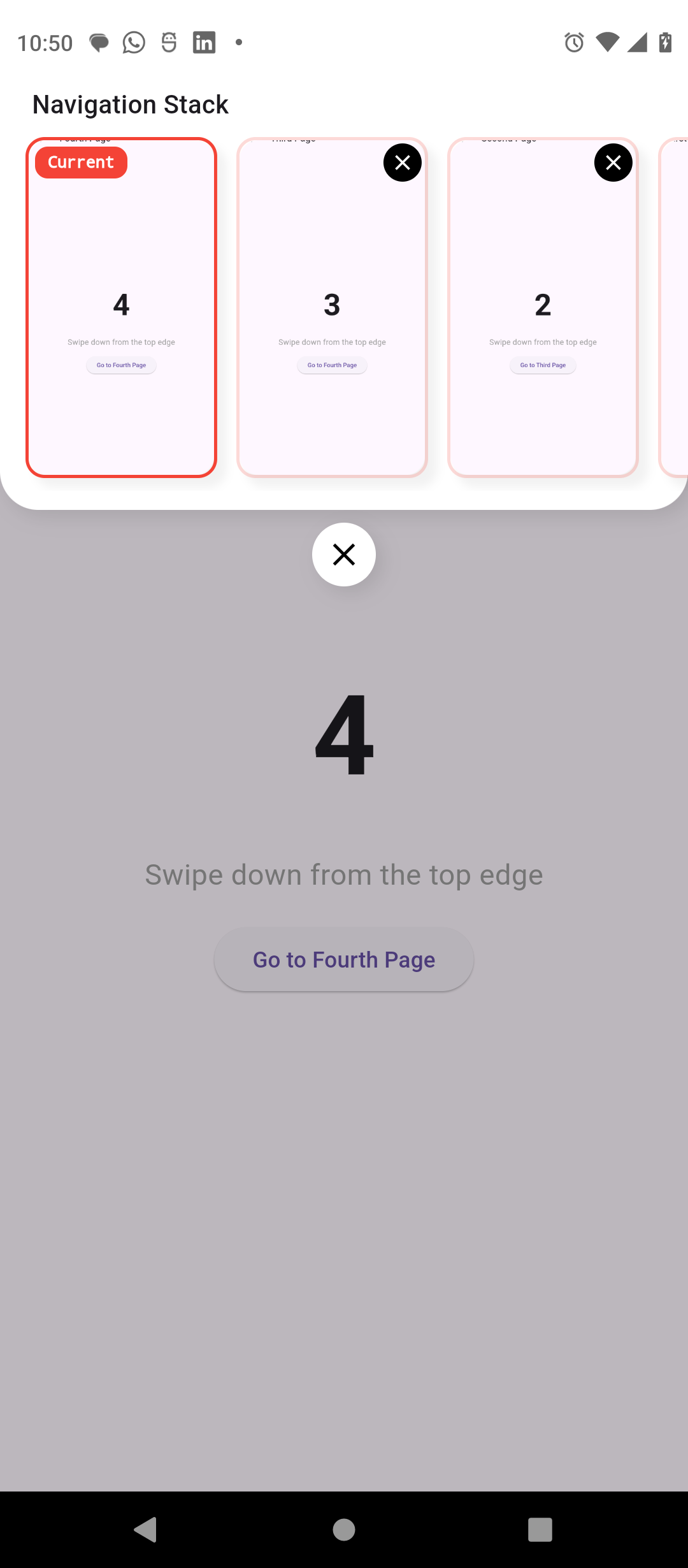
A Flutter package that provides a visual preview of your app's navigation stack. Simply swipe down from the top edge to see screenshots of your previous screens and navigate back instantly.
Screenshot #
Video #
https://github.com/user-attachments/assets/33ed6b5d-d293-417c-a920-eeb8267d0092
Features #
- Visual History: See real screenshots of previous screens in your navigation stack.
- Easy Navigation: Tap on any screenshot to jump directly back to that screen.
- Auto-Detection: Automatically detects
push,pushReplacement, andpopoperations. - Global Integration: Set it up once and it works across your entire app.
- Customizable Appearance: Change colors and panel dimensions to match your app's theme.
- Filtering: Decide which screens to hide from the previewer.
Getting started #
Add the package to your pubspec.yaml:
dependencies:
  navigation_stack_previewer: ^0.0.2
Usage #
1. Initialize the library #
Call initNavHistory() in your main() function:
import 'package:navigation_stack_previewer/navigation_stack_previewer.dart';

Future<void> main() async {
  WidgetsFlutterBinding.ensureInitialized();
  await initNavHistory(); // Initialize dependencies
  runApp(const MyApp());
}
2. Configure MaterialApp #
Add the NavigationStackObserver and wrap your app with NavigationStackPreviewer:
class MyApp extends StatelessWidget {
  @override
  Widget build(BuildContext context) {
    return MaterialApp(
      // Add the observer
      navigatorObservers: [
        NavigationStackObserver(),
      ],
      // Wrap the navigator
      builder: (context, child) {
        return NavigationStackPreviewer(
          primaryColor: Colors.deepPurple, // Custom primary color
          backgroundColor: Colors.white,   // Custom background color
          child: child!,
        );
      },
      home: const MyHomePage(),
    );
  }
}
3. Swipe and Navigate! #
- Swipe down from the top edge of your screen to open the preview panel.
- Tap a previous screen's screenshot to navigate back to it.
- Tap the X on a screenshot to remove that specific screen from the stack.
- Tap the current screen or swipe up to close the panel.
Advanced Customization #
Hiding Screens #
You can exclude specific screens from the navigation history by passing preview: false in RouteSettings arguments when navigating:
Navigator.of(context).push(
  MaterialPageRoute(
    builder: (_) => const SecretPage(),
    settings: const RouteSettings(
      arguments: {'preview': false}, // This screen won't be added to history
    ),
  ),
);
By default, the library only tracks PageRoutes, so dialogs and bottom sheets are automatically excluded.
Theming Parameters #
The NavigationStackPreviewer widget accepts several optional parameters:
| Parameter | Type | Default | Description |
|---|---|---|---|
primaryColor |
Color |
Colors.blue |
Color used for borders, labels, and icons. |
backgroundColor |
Color |
Colors.white |
Background color of the history panel. |
panelHeight |
double |
200.0 |
Total height of the sliding history panel. |
Additional information #
This package uses RepaintBoundary and toImage() to capture screenshots efficiently. It is designed for development and debugging purposes to help visualize complex navigation flows.
Contributions and issue reports are welcome on the GitHub repository!
Metadata
Publisher
unverified uploader
Weekly Downloads
Metadata
A visual navigation stack previewer for Flutter. Swipe down from the top to see real-time screenshots of your navigation history and navigate back instantly by tapping on them.
Repository (GitHub)
View/report issues
Documentation
License
 MIT (license)

