
mobile_rag_engine 0.10.1  mobile_rag_engine: ^0.10.1 copied to clipboard
 glasses-dev.win
A high-performance, on-device RAG (Retrieval-Augmented Generation) engine for Flutter. Run semantic search completely offline on iOS and Android with HNSW vector indexing.
Mobile RAG Engine #




Production-ready, fully local RAG (Retrieval-Augmented Generation) engine for Flutter.
Powered by a Rust core, it delivers lightning-fast vector search and embedding generation directly on the device. No servers, no API costs, no latency.
Why this package? #
No Rust Installation Required #
You do NOT need to install Rust, Cargo, or Android NDK.
This package includes pre-compiled binaries for iOS, Android, and macOS. Just pub add and run.
Performance #
| Feature | Pure Dart | Mobile RAG Engine (Rust) |
|---|---|---|
| Tokenization | Slow | 10x Faster (HuggingFace tokenizers) |
| Vector Search | O(n) | O(log n) (HNSW Index) |
| Memory Usage | High | Optimized (Zero-copy FFI) |
100% Offline & Private #
Data never leaves the user's device. Perfect for privacy-focused apps (journals, secure chats, enterprise tools).
Features #
End-to-End RAG Pipeline #
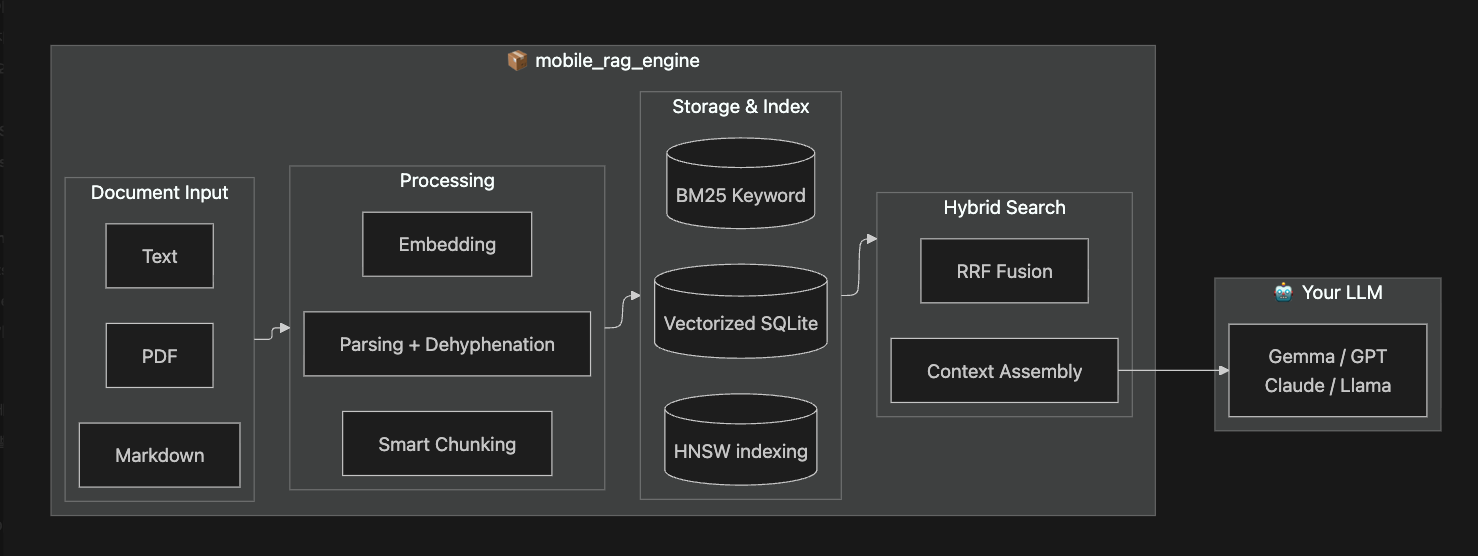
One package, complete pipeline. From any document format to LLM-ready context.
Key Features #
| Category | Features |
|---|---|
| Document Input | PDF, DOCX, Markdown, Plain Text with smart dehyphenation |
| Chunking | Semantic chunking, Markdown structure-aware, header path inheritance |
| Search | HNSW vector + BM25 keyword hybrid search with RRF fusion |
| Storage | SQLite persistence, HNSW Index persistence (fast startup), connection pooling, resumable indexing |
| Performance | Rust core, 10x faster tokenization, thread control, memory optimized |
| Context | Token budget, adjacent chunk expansion, single source mode |
Requirements #
| Platform | Minimum Version |
|---|---|
| iOS | 13.0+ |
| Android | API 21+ (Android 5.0 Lollipop) |
| macOS | 10.15+ (Catalina) |
ONNX Runtime is bundled automatically via the
onnxruntimeplugin. No additional native setup required.
Installation #
1. Add the dependency #
dependencies:
  mobile_rag_engine:
2. Download Model Files #
# Create assets folder
mkdir -p assets && cd assets

# Download BGE-m3 model (INT8 quantized, multilingual)
curl -L -o model.onnx "https://huggingface.co/Teradata/bge-m3/resolve/main/onnx/model_int8.onnx"
curl -L -o tokenizer.json "https://huggingface.co/BAAI/bge-m3/resolve/main/tokenizer.json"
See Model Setup Guide for alternative models and production deployment strategies.
Quick Start #
Initialize the engine once in your main() function:
import 'package:mobile_rag_engine/mobile_rag_engine.dart';

void main() async {
  WidgetsFlutterBinding.ensureInitialized();

  // 1. Initialize (Just 1 step!)
  await MobileRag.initialize(
    tokenizerAsset: 'assets/tokenizer.json',
    modelAsset: 'assets/model.onnx',
    threadLevel: ThreadUseLevel.medium, // CPU usage control
  );

  runApp(const MyApp());
}
Initialization Parameters #
| Parameter | Default | Description |
|---|---|---|
tokenizerAsset |
(required) | Path to tokenizer.json |
modelAsset |
(required) | Path to ONNX model |
databaseName |
'rag.sqlite' |
SQLite file name |
maxChunkChars |
500 |
Max characters per chunk |
overlapChars |
50 |
Overlap between chunks |
threadLevel |
null |
CPU usage: low (20%), medium (40%), high (80%) |
embeddingIntraOpNumThreads |
null |
Precise thread count (mutually exclusive with threadLevel) |
onProgress |
null |
Progress callback |
Then use it anywhere in your app:
class MySearchScreen extends StatelessWidget {
  Future<void> _search() async {
    // 2. Add Documents (auto-chunked & embedded)
    await MobileRag.instance.addDocument(
      'Flutter is a UI toolkit for building apps.',
    );
    await MobileRag.instance.addDocument(
      'Flutter is a UI toolkit for building apps.',
    );
    // Indexing is automatic! (Debounced 500ms)
    // Optional: await MobileRag.instance.rebuildIndex(); // Call if you want it done NOW

    // 3. Search with LLM-ready context
    final result = await MobileRag.instance.search(
      'What is Flutter?',
      tokenBudget: 2000,
    );

    print(result.context.text); // Ready to send to LLM
  }
}
Advanced Usage: For fine-grained control, you can still use the low-level APIs (
initTokenizer,EmbeddingService,SourceRagService) directly. See the API Reference.
PDF/DOCX Import #
Extract text from documents and add to RAG:
import 'dart:io';
import 'package:file_picker/file_picker.dart';
import 'package:mobile_rag_engine/mobile_rag_engine.dart';

Future<void> importDocument() async {
  // Pick file
  final result = await FilePicker.platform.pickFiles(
    type: FileType.custom,
    allowedExtensions: ['pdf', 'docx'],
  );
  if (result == null) return;

  // Extract text (handles hyphenation, page numbers automatically)
  final bytes = await File(result.files.single.path!).readAsBytes();
  final text = await extractTextFromDocument(fileBytes: bytes.toList());

  // Add to RAG with auto-chunking
  await MobileRag.instance.addDocument(text, filePath: result.files.single.path);
  // Add to RAG with auto-chunking
  await MobileRag.instance.addDocument(text, filePath: result.files.single.path);
  // await MobileRag.instance.rebuildIndex(); // Optional: Force immediate update
}
Note:
file_pickeris optional. You can obtain file bytes from any source (network, camera, etc.) and pass toextractTextFromDocument().
Model Options #
| Model | Dimensions | Size | Max Tokens | Languages |
|---|---|---|---|---|
| Teradata/bge-m3 (INT8) | 1024 | ~542 MB | 8,194 | 100+ (multilingual) |
| all-MiniLM-L6-v2 | 384 | ~25 MB | 256 | English only |
Important: The embedding dimension must be consistent across all documents. Switching models requires re-embedding your entire corpus.
Custom Models: Export any Sentence Transformer to ONNX:
pip install optimum[exporters]
optimum-cli export onnx --model sentence-transformers/YOUR_MODEL ./output
See Model Setup Guide for deployment strategies and troubleshooting.
Documentation #
| Guide | Description |
|---|---|
| Quick Start | Get started in 5 minutes |
| Model Setup | Model selection, download, deployment strategies |
| FAQ | Frequently asked questions |
| Troubleshooting | Problem solving guide |
Sample App #
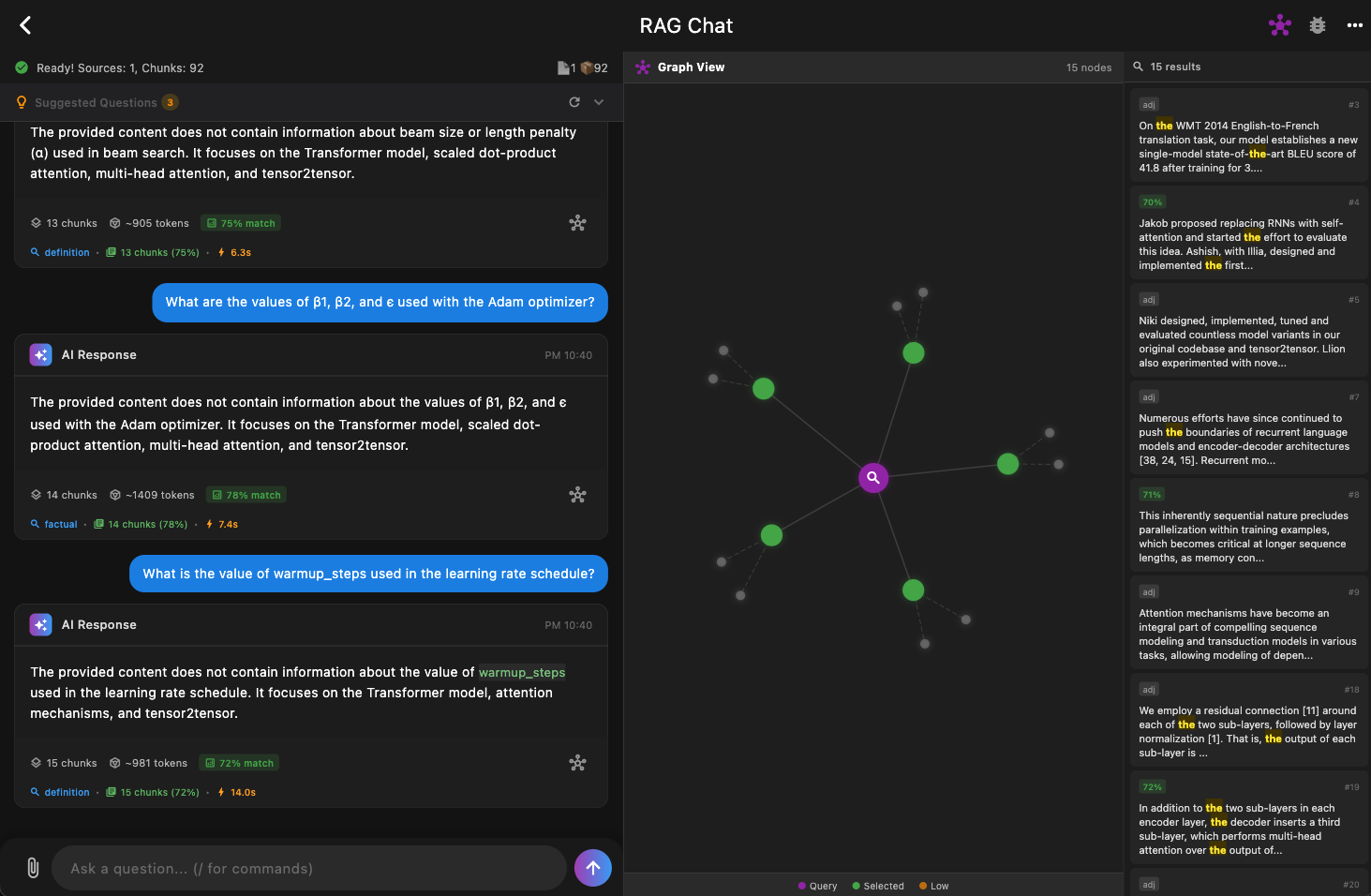
Check out the example application using this package. This desktop app demonstrates full RAG pipeline integration with an LLM (Gemma 2B) running locally on-device.
Unit Testing #
You can test your app logic without loading the native Rust library by injecting a mock instance.
import 'package:flutter_test/flutter_test.dart';
import 'package:mobile_rag_engine/mobile_rag_engine.dart';
import 'package:mocktail/mocktail.dart';

class MockMobileRag extends Mock implements MobileRag {}

void main() {
  test('UI handles search results', () async {
    final mock = MockMobileRag();

    // Inject mock (bypasses native Rust initialization)
    MobileRag.setMockInstance(mock);

    when(() => mock.search(any())).thenAnswer(
      (_) async => RagSearchResult(
        chunks: [],
        context: AssembledContext(text: 'Mock context', tokens: 10),
      )
    );

    // Run your app code
    await MobileRag.instance.search('Hello');

    verify(() => mock.search('Hello')).called(1);
  });
}
Contributing #
Bug reports, feature requests, and PRs are all welcome!
License #
This project is licensed under the MIT License.
Full Documentation Index #
Features #
- Adjacent Chunk Retrieval - Fetch surrounding context.
- Index Management - Stats, persistence, and recovery.
- Markdown Chunker - Structure-aware text splitting.
- Prompt Compression - Reduce token usage.
- Search by Source - Filter results by document.
- Search Strategies - Tune ranking and retrieval.
Guides #
- Quick Start - Setup in 5 minutes.
- Model Setup - Choosing and downloading models.
- Troubleshooting - Common fixes.
- FAQ - Frequently asked questions.
Testing #
- Unit Testing - Mocking for isolated tests.
Metadata
Publisher
Weekly Downloads
Metadata
A high-performance, on-device RAG (Retrieval-Augmented Generation) engine for Flutter. Run semantic search completely offline on iOS and Android with HNSW vector indexing.
Repository (GitHub)
View/report issues
Topics
#llm #machine-learning #semantic-search #vector-database #rag
License
 unknown (license)
Dependencies
flutter, flutter_rust_bridge, freezed_annotation, onnxruntime, path_provider, rag_engine_flutter

