
local_db_explorer 1.0.0+2  local_db_explorer: ^1.0.0+2 copied to clipboard
 lanha.space
A lightweight in-app database viewer/inspector for debugging local storage (Sqflite, Hive, SharedPreferences).
Local DB Explorer #
🔍 In-app database inspector for Flutter - Debug your local storage with a beautiful mobile UI


📱 Preview #
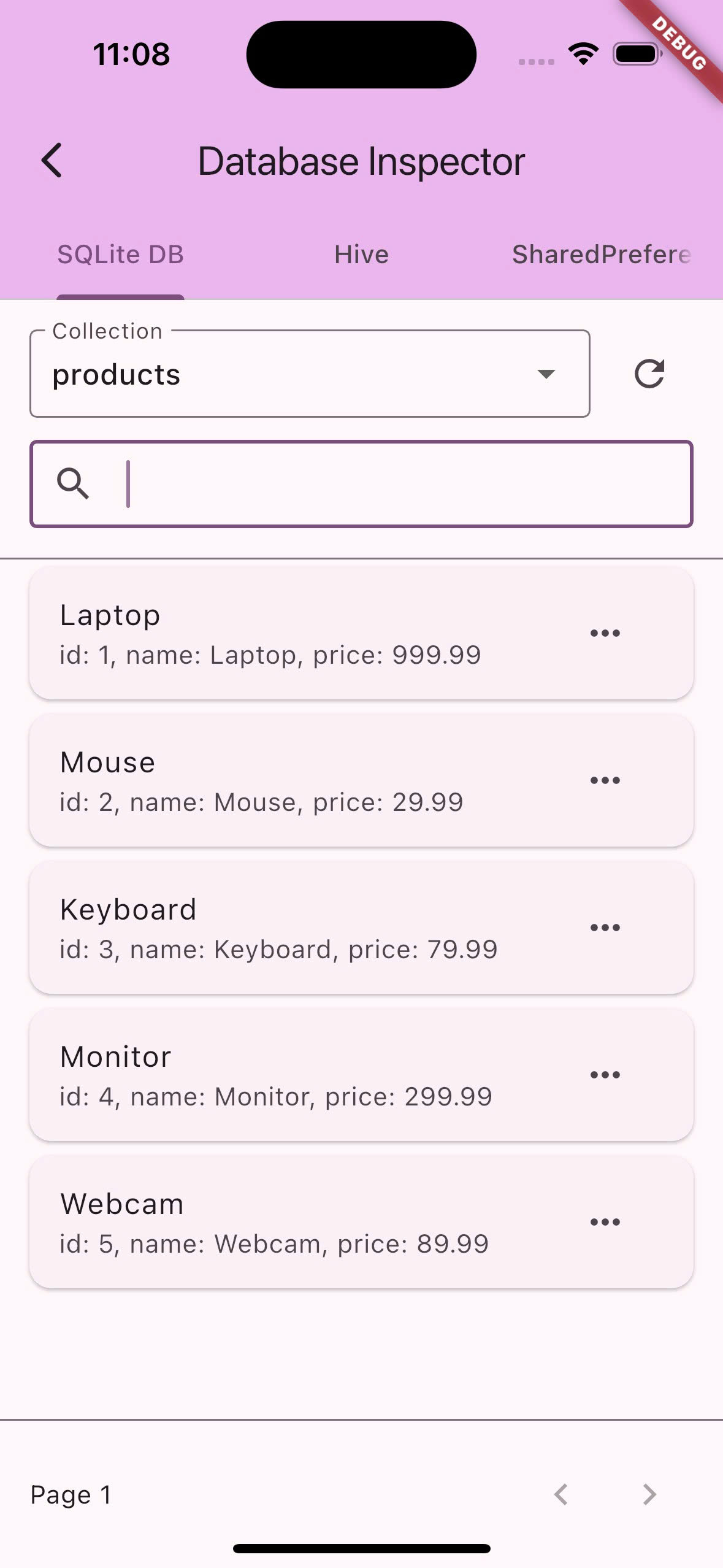
Mobile-optimized database inspector with beautiful UI for debugging your local storage
✅ Implementation Status #
| Database | Status | How to Use |
|---|---|---|
| SQLite (Sqflite) | ✅ Ready | Use SqfliteAdapter directly |
| Hive | ✅ Ready | Use HiveAdapter directly |
| SharedPreferences | ✅ Ready | Use SharedPreferencesAdapter directly |
All adapters are now production-ready!
- Full implementations with complete functionality
- Production tested - ready for real applications
- Consistent API - same interface across all database types
- Extensible - easy to add custom adapters
Quick Setup #
Choose your database type and follow the setup guide:
📱 SQLite (Sqflite) #
Perfect for: Relational data, complex queries, transactions
Installation
dependencies:
  local_db_explorer: ^1.0.0
  sqflite: ^2.3.0  # Your existing dependency
Setup (2 lines of code)
import 'package:local_db_explorer/local_db_explorer.dart';

// Register your existing database
Database database = await openDatabase('your_app.db');
DBExplorer.registerAdapter(SqfliteAdapter(database));

// Open explorer anywhere in your app
DBExplorer.open(context);
What you get
- ✅ Full CRUD support - View, edit, delete records
- ✅ Table relationships - See foreign keys and joins
- ✅ SQL schema - View table structures and indexes
- ✅ Transaction history - Debug your SQL operations
Example
class DatabaseHelper {
  static Database? _database;

  static Future<Database> get database async {
    if (_database != null) return _database!;
    _database = await _initDB();

    // 🔍 Register with DB Explorer
    DBExplorer.registerAdapter(SqfliteAdapter(_database!, databaseName: 'MyApp DB'));

    return _database!;
  }
}
📦 Hive (NoSQL) #
Perfect for: Fast local storage, typed objects, offline-first apps
Installation
dependencies:
  local_db_explorer: ^1.0.0
  hive: ^2.2.3  # Your existing dependency
  hive_flutter: ^1.1.0
Current Status: Mock Implementation
import 'package:local_db_explorer/local_db_explorer.dart';

// Register your existing Hive boxes
await Hive.initFlutter();
final userBox = await Hive.openBox<User>('users');
final settingsBox = await Hive.openBox('settings');

// Register with Local DB Explorer
DBExplorer.registerAdapter(HiveAdapter({
  'users': userBox,
  'settings': settingsBox,
}));

// Open explorer
DBExplorer.open(context);
What you get
- 📊 Box inspection - View all your Hive boxes
- 🎯 Typed objects - See your custom classes with proper formatting
- 🔧 Key-value pairs - Debug settings and simple data
- ⚡ Performance insights - Box sizes and access patterns
- 🔄 Real-time editing - Add, modify, and delete records directly
⚙️ SharedPreferences #
Perfect for: App settings, user preferences, simple flags
Installation
dependencies:
  local_db_explorer: ^1.0.0
  shared_preferences: ^2.2.2  # Your existing dependency
Quick Setup
import 'package:local_db_explorer/local_db_explorer.dart';

// Register your existing SharedPreferences
final prefs = await SharedPreferences.getInstance();

// Register with Local DB Explorer
DBExplorer.registerAdapter(SharedPreferencesAdapter(prefs));

// Open explorer
DBExplorer.open(context);
What you get
- 🔑 All data types - String, int, bool, double, List
- 🔍 Search preferences - Find settings quickly
- ✏️ Live editing - Modify preferences on the fly
- 📊 Type indicators - See data types at a glance
Supported types
// All these types are automatically detected and formatted
await prefs.setString('user_name', 'John');
await prefs.setInt('login_count', 42);
await prefs.setBool('dark_mode', true);
await prefs.setDouble('font_size', 16.5);
await prefs.setStringList('favorites', ['red', 'blue']);
🎛️ Multiple Databases #
Perfect for: Complex apps using multiple storage types
Many Flutter apps use multiple databases:
- SQLite: User data, transactions
- Hive: Cache, offline data
- SharedPreferences: Settings, flags
Setup
// Register all your databases
DBExplorer.registerAdapter(SqfliteAdapter(sqliteDB));                    // ✅ Production ready
DBExplorer.registerAdapter(HiveAdapter({'data': hiveBox}));              // ✅ Production ready
DBExplorer.registerAdapter(SharedPreferencesAdapter(prefs));             // ✅ Production ready

// Explorer shows tabs for each database
DBExplorer.open(context);
Implementation Status:
- ✅ SQLite: Production-ready adapter
- ✅ Hive: Production-ready adapter
- ✅ SharedPreferences: Production-ready adapter
What you get
- 🔄 Tabbed interface - Switch between databases easily
- 🔍 Unified search - Search across all databases
- 📊 Comparison view - Compare data across different storage types
- ⚡ Single tool - Debug all your storage in one place
🚀 How it works #
- Add the dependency to your pubspec.yaml
- Register your database with one line of code
- Add a debug button anywhere in your app
- Explore your data with the mobile-optimized interface
📱 Mobile-First Design #
- 📱 Portrait mode: Dropdown collections, card-based records
- 📺 Landscape mode: Sidebar + table view like desktop
- 🔍 Search: Real-time filtering across all records
- ✏️ Edit: Full-screen JSON editor with validation
- 📋 Copy: Tap to copy any data to clipboard
🔒 Security #
- Debug-only: Automatically disabled in release builds
- No network: Everything runs locally
- No persistence: Explorer doesn't store any data
🎯 Try the Examples #
# SQLite example
git clone https://github.com/your-repo/local_db_explorer.git
cd local_db_explorer/example && flutter run

# Hive example
cd example/hive_example && flutter pub get && flutter run

# SharedPreferences example
cd example/shared_preferences_example && flutter pub get && flutter run

# Multi-database example
cd example/multi_database_example && flutter pub get && flutter run
❓ Frequently Asked Questions #
All adapters are now production-ready:
Available Adapters:
- ✅
SqfliteAdapter- Full SQLite database support - ✅
HiveAdapter- Complete Hive NoSQL support - ✅
SharedPreferencesAdapter- Full SharedPreferences support
Key Features:
- ✅ Production-tested implementations
- ✅ Consistent API across all database types
- ✅ Real-time data editing and manipulation
- ✅ Extensible architecture for custom adapters
🛠️ API Reference #
// Register databases
DBExplorer.registerAdapter(SqfliteAdapter(database));              // ✅ Production ready
DBExplorer.registerAdapter(HiveAdapter({'data': box}));            // ✅ Production ready
DBExplorer.registerAdapter(SharedPreferencesAdapter(prefs));       // ✅ Production ready

// Open explorer (pass context for reliable navigation)
DBExplorer.open(context);

// Clean up
await DBExplorer.dispose();
🤝 Contributing #
Help us expand database support:
- ✅ HiveAdapter - ✅ Complete
- ✅ SharedPreferencesAdapter - ✅ Complete
- ✅ SqfliteAdapter - ✅ Complete
- ❌ IsarAdapter - Add support for Isar database
- ❌ DriftAdapter - Add support for Drift/Moor
- ❌ ObjectBoxAdapter - Add support for ObjectBox
📄 License #
MIT License - see LICENSE file for details.
Made with ❤️ for Flutter developers who want to debug their databases easily
Metadata
Publisher
Weekly Downloads
Metadata
A lightweight in-app database viewer/inspector for debugging local storage (Sqflite, Hive, SharedPreferences).
Repository (GitHub)
View/report issues
Topics
#database #inspector #debug #debugging #dbviewer
Documentation
License
 MIT (license)

