
legacy_tree_grid 0.4.0  legacy_tree_grid: ^0.4.0 copied to clipboard
 gantt-sync.com
Display, filter, sort, select, and edit tabular data in a tree grid.


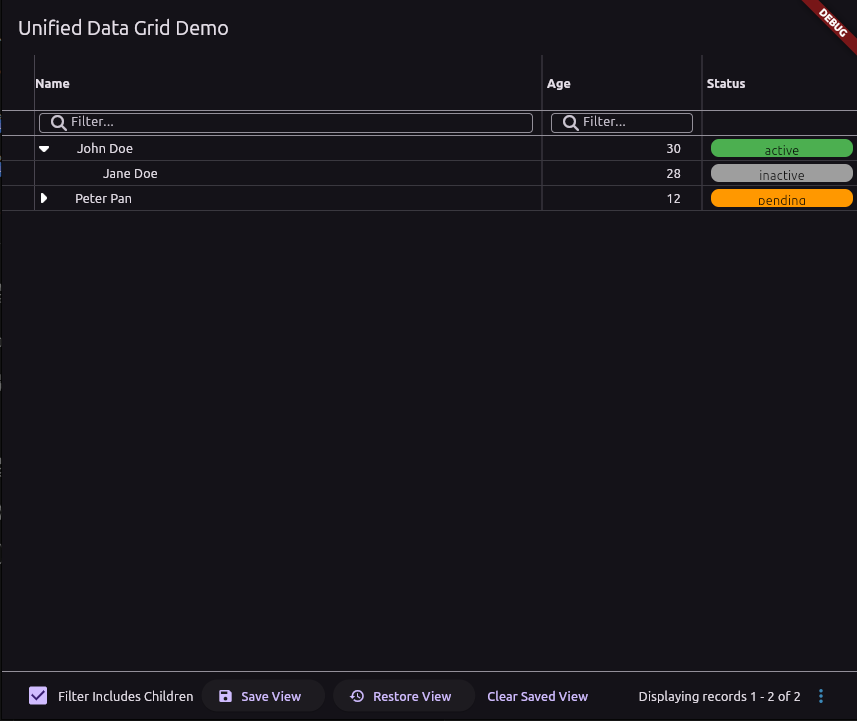
A powerful, flexible, and feature-rich data grid for Flutter, designed to handle client-side, server-side, and hierarchical (tree) data with ease.
The legacy_tree_grid provides a set of high-level widgets that simplify the display of tabular data, whether it's a small list managed on the client or a large, paginated dataset from a server.
About the Name #
The name legacy_tree_grid is a tribute to the package's author, Patrick Legacy. It does not imply that the package is outdated or unmaintained. In fact, it is a modern, actively developed, and highly capable solution for building production-ready Flutter applications.
Key Features #
- Multiple Data Modes:
ClientSideDataGrid: Manages data entirely in-memory. Perfect for smaller, static datasets with built-in filtering, sorting, and pagination.ServerSideDataGrid: Efficiently handles large datasets by delegating pagination, sorting, and filtering to a backend API.
- Tree Grid Support: Display hierarchical data with expandable/collapsible nodes, parent/child relationships, and indentation.
- Rich Column Configuration: Use
DataColumnDefto precisely control column width (flexorwidth), alignment, sorting behavior, resizing, and custom cell rendering. - Interactive: Built-in support for:
- Single-column sorting (ascending/descending).
- Per-column filtering with various types (
string,numeric,date,list,boolean). - Row selection via a checkbox column.
- Row tap events.
- Pagination: A responsive footer with automatic pagination controls for both client and server modes.
- Customization: Highly customizable rendering using builder functions (
cellBuilder) for complete control over cell content. - Responsive Footer: Action buttons (add, delete, refresh) automatically collapse into an overflow menu on smaller screens.
- And more... Column resizing, a "show deleted" toggle, UI scaling (zoom), and factory constructors for common column types like an "actions" menu.
Getting Started #
Add the legacy_tree_grid package to your pubspec.yaml file.
dependencies:
  legacy_tree_grid: ^0.0.1 # Replace with the latest version
Then, run flutter pub get and import the package in your Dart file:
import 'package:legacy_tree_grid/legacy_tree_grid.dart';
Usage #
Here is a complete example of a ClientSideDataGrid configured as a tree grid.
import 'package:flutter/material.dart';
import 'package:legacy_tree_grid/legacy_tree_grid.dart';

// 1. Define your data model
class Person {
  final String id;
  final String? parentId;
  final String name;
  final int age;

  Person({required this.id, this.parentId, required this.name, required this.age});
}

class MyTreeGridPage extends StatelessWidget {
  const MyTreeGridPage({super.key});

  // 2. Create your data source
  final List<Person> data = const [
    Person(id: '1', name: 'John Doe', age: 30),
    Person(id: '2', parentId: '1', name: 'Jane Doe', age: 28),
    Person(id: '3', parentId: '1', name: 'Jr. Doe', age: 5),
    Person(id: '4', name: 'Peter Pan', age: 12),
    Person(id: '5', parentId: '4', name: 'Wendy Darling', age: 10),
  ];

  @override
  Widget build(BuildContext context) {
    return Scaffold(
      appBar: AppBar(title: const Text('Tree Grid Example')),
      body: Padding(
        padding: const EdgeInsets.all(16.0),
        // 3. Use the ClientSideDataGrid widget
        child: ClientSideDataGrid<Person>(
          // Provide the data
          data: data,
          // Define how to map your object to a Map
          toMap: (person) => {
            'id': person.id,
            'parentId': person.parentId,
            'name': person.name,
            'age': person.age,
          },
          // Specify keys for tree structure and row identity
          rowIdKey: 'id',
          parentIdKey: 'parentId',
          // Enable tree mode
          isTree: true,
          // Define the columns
          columnDefs: [
            DataColumnDef(
              id: 'name',
              caption: 'Name',
              width: 250,
              // Mark this as the column that shows the tree hierarchy
              isNameColumn: true,
            ),
            DataColumnDef(
              id: 'age',
              caption: 'Age',
              width: 100,
              alignment: TextAlign.right,
              filterType: FilterType.numeric,
            ),
          ],
          // Enable features
          allowFiltering: true,
          showCheckboxColumn: true,
        ),
      ),
    );
  }
}
Additional Information #
For more detailed examples, including ServerSideDataGrid usage, please check the /example folder in the repository.
If you encounter any issues or have feature requests, please file them on the issue tracker. We appreciate your feedback and contributions!
Metadata
Publisher
Weekly Downloads
Metadata
Display, filter, sort, select, and edit tabular data in a tree grid.
Repository (GitHub)
View/report issues
License
 unknown (license)
Dependencies
flutter, legacy_context_menu, provider

