
kumo_ui 1.1.0  kumo_ui: ^1.1.0 copied to clipboard
 hafizhfadh.id
A mobile-first Flutter implementation of Cloudflare's Kumo UI design system, built using pure widgets.dart.
kumo_ui #
A mobile-first Flutter implementation of Cloudflare's Kumo UI design system, built on package:flutter/widgets.dart alone.

kumo_ui reconstructs the Cloudflare dashboard's dark, high-density visual
language — a near-black canvas, layered surfaces, hairline borders and a single
orange brand signal — without ever importing material.dart or
cupertino.dart. Every widget is composed from widgets.dart primitives and
resolves its colors from KumoTheme.of(context).
Screenshots #
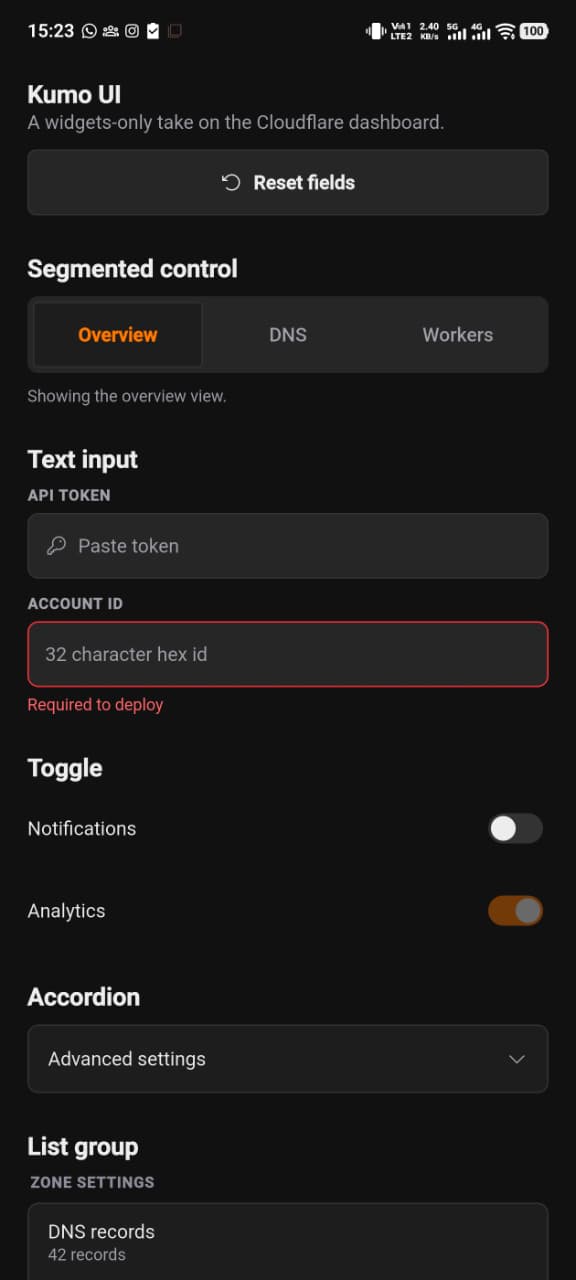
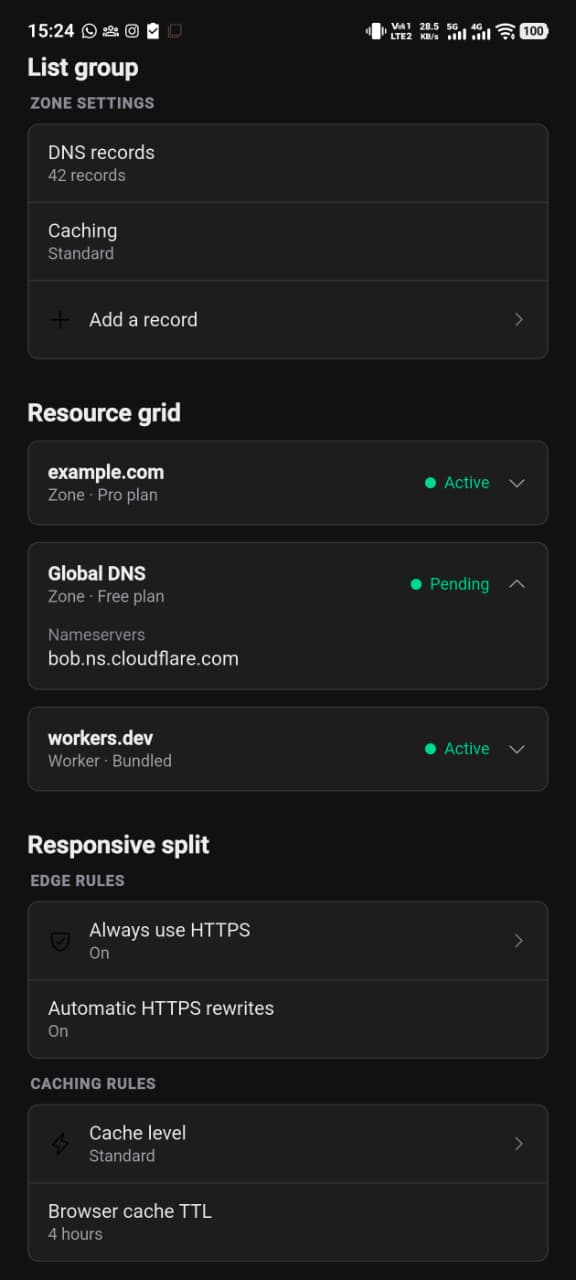
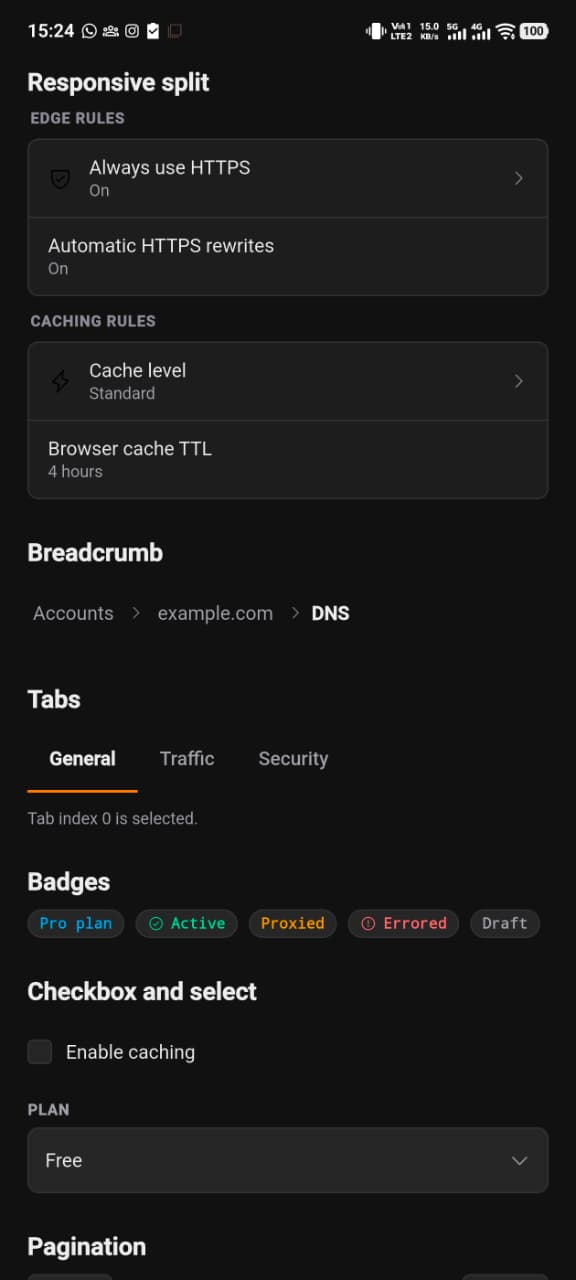
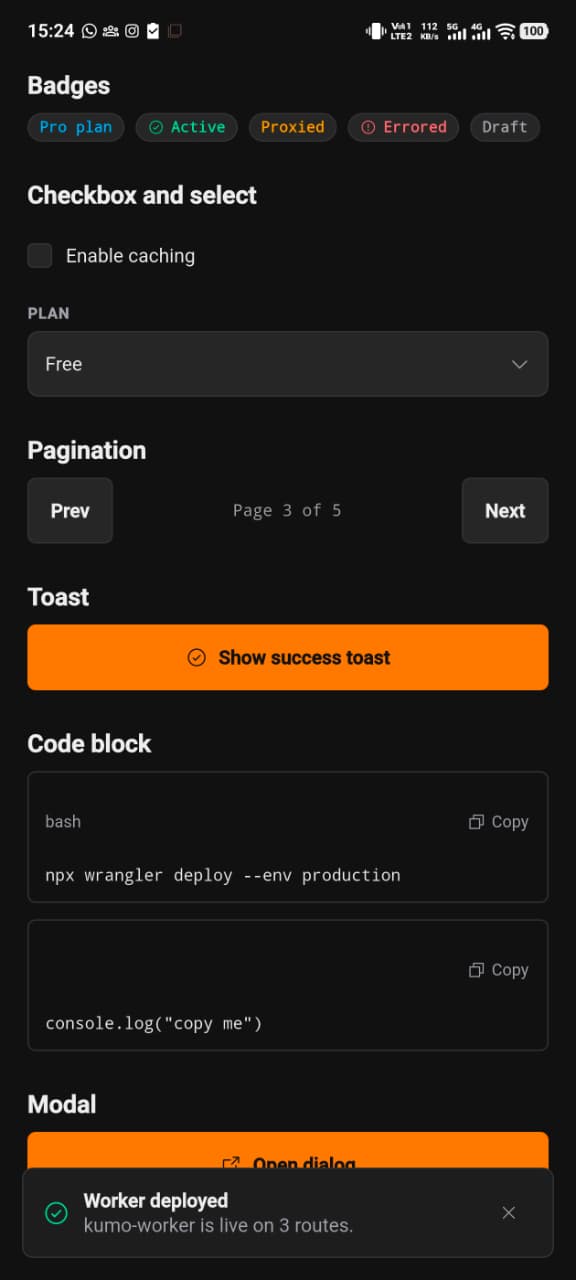
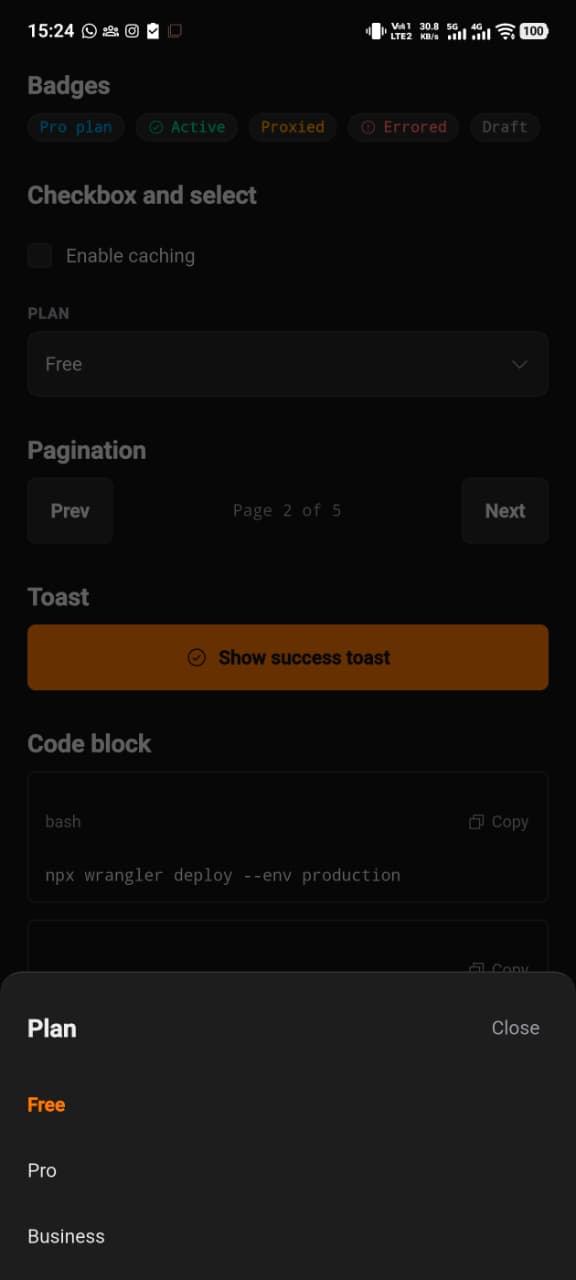
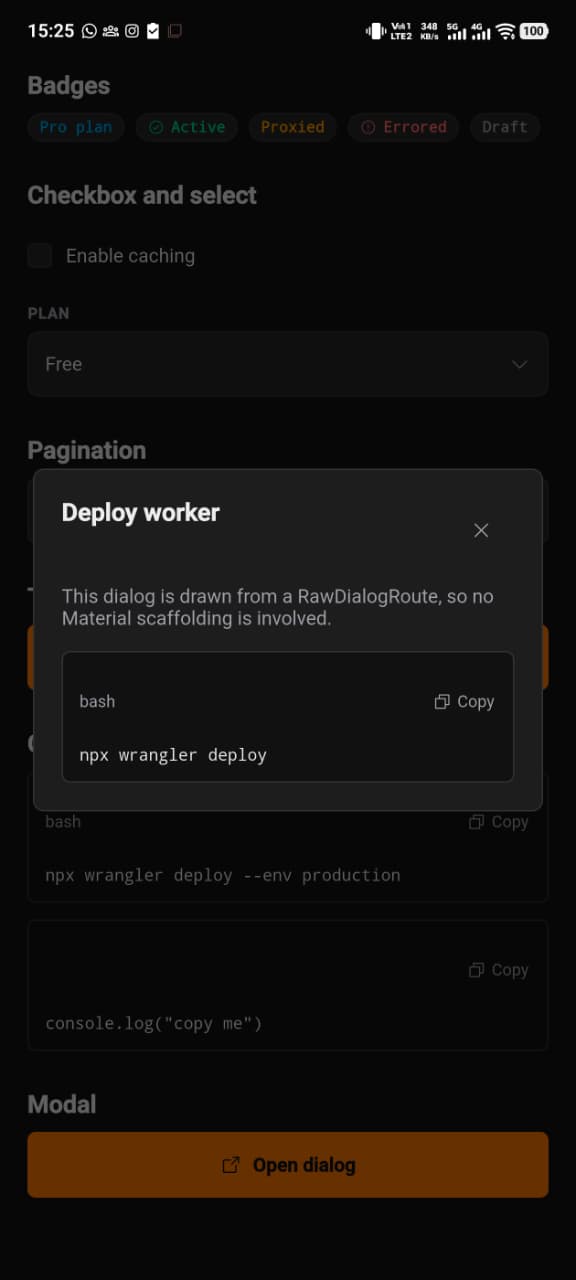
Phone captures of the bundled example/ app in the
dark scheme, top to bottom. Tap an image for the full-size version.
 |
 |
 |
 |
 |
 |
Platform support #
| Platform | Status |
|---|---|
| Android | Supported |
| iOS | Supported |
| macOS | Supported |
| Linux | Supported |
| Windows | Supported |
| Web | Not supported — throws UnsupportedError |
Platform & architectural philosophy #
- Zero Material, zero Cupertino. The library imports only
package:flutter/widgets.dart,package:flutter/services.dart(clipboard services),package:flutter/foundation.dart(thekIsWebplatform guard) andpackage:phosphor_icons/phosphor_icons.dart. There are noMaterialApp,Theme,CardorInkWelldependencies to leak into your widget tree, sokumo_uicomposes cleanly with any navigation or state solution you already use. - Single-import ergonomics. The core
widgets.dartprimitives are re-exported fromkumo_ui.dart, so an app builds a whole screen from one import. Material and Cupertino are still never exposed. - Mobile-first, then adaptive. Layouts are designed at phone widths first: full-width tap targets with a 48px minimum height, vertical stacks instead of forced multi-column rows, and expandable cards for dense resource data. The same widgets then unfold into denser arrangements as the available width grows.
- Adaptive to the container, not just the window. Adaptive widgets read
their own
LayoutBuilderconstraints, so a sidebar, split pane or embedded view adapts on its own instead of assuming it owns the whole screen. The shared switchover point lives inkKumoBreakpoint(600 logical pixels). - An explicit web boundary. Cloudflare's canonical Kumo UI is the
React/Tailwind implementation that ships with the dashboard. To avoid
fragmenting that ecosystem with an unofficial browser re-implementation,
kumo_uirefuses to run on Flutter Web:KumoTheme.ofre-assertskIsWeband throwsUnsupportedError. This package makes no claim to, and does not reproduce, Cloudflare's official web assets or trademarks.
Getting started #
Add the package and its icon dependency to your pubspec.yaml:
dependencies:
  flutter:
    sdk: flutter
  kumo_ui: ^1.1.0
  phosphor_icons: ^3.0.1
Then import it:
import 'package:kumo_ui/kumo_ui.dart';
That single import is enough to build a screen. kumo_ui re-exports the core
Flutter primitives it is itself built from, grouped as:
- Core framework —
Widget,StatelessWidget,StatefulWidget,State,BuildContext,Key,ValueKey,GlobalKey. - Layout —
Column,Row,Stack,Positioned,Expanded,Flexible,Spacer,Container,SizedBox,Padding,Align,Center,ConstrainedBox,BoxConstraints,Wrap,CrossAxisAlignment,MainAxisSize,Builder. - Geometry, paint and insets —
EdgeInsets,EdgeInsetsGeometry,Alignment,BorderRadius,BoxDecoration,Border,BorderSide,BoxShape,Color,ColoredBox. - Text —
Text,TextStyle,TextEditingController,TextOverflow. - Scrolling —
ListView,SingleChildScrollView,CustomScrollView,SliverList,SliverGrid. - Interaction, focus and semantics —
GestureDetector,MouseRegion,Focus,FocusNode,Semantics,SystemMouseCursors,VoidCallback,ValueChanged. - Animation —
AnimatedContainer,AnimatedOpacity,AnimatedCrossFade,SizeTransition,AnimationController. - Navigation and scaffolding —
runApp,WidgetsApp,Navigator,PageRouteBuilder,RouteSettings,WidgetBuilder,MediaQuery,LayoutBuilder,SafeArea,WidgetsBinding,WidgetsBindingObserver,Brightness.
Two things worth knowing about those re-exports:
- They come from
package:flutter/widgets.dartonly. Material and Cupertino symbols are never exposed. Because both paths resolve to the same Flutter declarations, importingkumo_uinext tomaterial.dartcannot produce an ambiguous name. - It is a curated subset, not the whole of
widgets.dart. If you reach for something outside it, addpackage:flutter/widgets.dartyourself — the compiler will point at the missing name immediately.
The Phosphor glyph constants still come from phosphor_icons, since that is
where the icon names are declared:
import 'package:phosphor_icons/phosphor_icons.dart';
kumo_ui targets Android, iOS, macOS, Linux and Windows. Do not add a web
target; the package will throw at runtime if you do.
Color modes #
Both schemes ship in the box. A KumoColors describes one scheme; the app
decides which one is in scope and hands it to KumoTheme. There is no mode
state inside the library, so a theme can follow the platform, a stored
preference or a switch without fighting the package for control.
// Pick a scheme from a brightness...
final colors = KumoColors.of(MediaQuery.platformBrightnessOf(context));

// ...or name one directly.
const light = KumoColors.light();
const dark = KumoColors.dark();       // same as `const KumoColors()`
| Canvas | Surface | Recessed | Border | Text | Brand | |
|---|---|---|---|---|---|---|
| Dark | #111111 |
#1D1D1D |
#262626 |
#333333 |
#EDEDED |
#F38020 |
| Light | #F7F7F7 |
#FFFFFF |
#EAEAEA |
#D4D4D8 |
#111111 |
#B03A0A |
The light brand orange is a deeper step on purpose: #F38020 measures 2.6:1 on
a white canvas, which is fine for a fill and not enough for text. Every text
token in both schemes clears WCAG 2.1 AA (4.5:1) against every surface it can be
painted on, and every non-text token clears 3:1. Both schemes are asserted by
the test suite rather than checked by eye.
KumoColors.brightness reports which scheme a token set is, for the rare case
where consumer code needs to branch on the mode.
Text follows the scheme #
KumoTypography's statics are the scale with the dark tones applied, which
keeps them safe to use outside a theme. A widget painting inside a themed
surface should use the resolved set instead, so its text tracks the active
scheme:
final styles = KumoTheme.textStylesOf(context);
Text('Zone settings', style: styles.h2);
KumoTheme.textStylesOf memoizes per KumoColors, and
KumoTypography.resolve(colors) builds the same set when the tokens are already
in hand.
Usage #
1. Wrap your app in KumoTheme and WidgetsApp #
KumoTheme supplies the color scheme to every descendant, and WidgetsApp
provides the navigator, text direction and MediaQuery that Kumo widgets rely
on — without pulling in Material. The theme takes a KumoColors; which scheme
it gets is the app's call.
import 'package:kumo_ui/kumo_ui.dart';

void main() {
  // Fails fast on Flutter Web with a clear UnsupportedError.
  KumoTheme.ensureSupportedPlatform();
  runApp(const MyApp());
}

class MyApp extends StatelessWidget {
  const MyApp({super.key});

  @override
  Widget build(BuildContext context) {
    // Follow the platform, or hand over `KumoColors.dark()` /
    // `KumoColors.light()` to pin one scheme.
    final brightness =
        WidgetsBinding.instance.platformDispatcher.platformBrightness;
    final colors = KumoColors.of(brightness);

    return KumoTheme(
      colors: colors,
      child: WidgetsApp(
        title: 'Kumo',
        color: colors.canvas,
        textStyle: KumoTypography.resolve(colors).body,
        pageRouteBuilder: <T>(RouteSettings settings, WidgetBuilder builder) =>
            PageRouteBuilder<T>(
              settings: settings,
              pageBuilder: (context, animation, secondaryAnimation) =>
                  builder(context),
            ),
        home: const HomeScreen(),
      ),
    );
  }
}
2. Build a mobile list with KumoListGroup and KumoListItem #
import 'package:kumo_ui/kumo_ui.dart';
import 'package:phosphor_icons/phosphor_icons.dart';

class SettingsList extends StatelessWidget {
  const SettingsList({super.key});

  @override
  Widget build(BuildContext context) {
    return KumoListGroup(
      title: 'Zone settings',
      children: [
        KumoListItem(
          title: 'DNS records',
          subtitle: '42 records',
          leading: const PhosphorIcon(PhosphorIconsRegular.globe, size: 18),
          onTap: () {},
        ),
        KumoListItem(
          title: 'Caching',
          subtitle: 'Standard',
          leading: const PhosphorIcon(PhosphorIconsRegular.lightning, size: 18),
          trailing: const KumoSwitch(value: true, onChanged: _noop),
        ),
      ],
    );
  }

  static void _noop(bool _) {}
}
Rows keep a 56px minimum height, share one rounded outline, and are separated by
1px dividers. A trailing caret appears automatically on any row that has an
onTap.
3. Render expandable KumoDataCard resources in a KumoDataGrid #
KumoDataGrid stacks its children on phones and lays them out as a bordered
multi-column grid on wider containers, reusing the very same cards in both
arrangements.
import 'package:kumo_ui/kumo_ui.dart';

class ZoneOverview extends StatelessWidget {
  const ZoneOverview({super.key});

  @override
  Widget build(BuildContext context) {
    return KumoDataGrid(
      maxColumns: 3,
      children: [
        const KumoDataCard(
          title: 'example.com',
          subtitle: 'Zone · Pro plan',
          statusLabel: 'Active',
          details: [
            KumoDataPair(label: 'Nameservers', value: 'ada.ns.cloudflare.com'),
            KumoDataPair(label: 'Records', value: '42'),
          ],
        ),
        KumoDataCard(
          title: 'Global DNS',
          subtitle: 'Zone · Free plan',
          statusLabel: 'Pending',
          // Pull a status token straight from the palette.
          statusColor: KumoTheme.of(context).warning,
          details: const [
            KumoDataPair(label: 'Nameservers', value: 'bob.ns.cloudflare.com'),
          ],
        ),
      ],
    );
  }
}
Each card reveals its key/value pairs when its header is tapped. On desktop viewports those pairs sit side by side; on phones each pair stacks, so long values never overflow.
4. Adapt between mobile and desktop with KumoResponsiveLayout #
import 'package:kumo_ui/kumo_ui.dart';

class AdaptivePanel extends StatelessWidget {
  const AdaptivePanel({super.key});

  @override
  Widget build(BuildContext context) {
    return KumoResponsiveLayout(
      breakpoint: kKumoBreakpoint,
      mobile: const Column(
        crossAxisAlignment: CrossAxisAlignment.stretch,
        children: [
          KumoAccordion(
            title: 'Advanced settings',
            child: Text('Zone tag and routing rules.'),
          ),
          SizedBox(height: 12),
          KumoCodeBlock(code: 'npx wrangler deploy'),
        ],
      ),
      desktop: const Row(
        crossAxisAlignment: CrossAxisAlignment.start,
        children: [
          Expanded(
            child: KumoAccordion(
              title: 'Advanced settings',
              child: Text('Zone tag and routing rules.'),
            ),
          ),
          SizedBox(width: 16),
          Expanded(child: KumoCodeBlock(code: 'npx wrangler deploy')),
        ],
      ),
    );
  }
}
KumoResponsiveLayout decides from its own constraints, so it also adapts
correctly inside a sidebar or split pane. When a widget needs the same decision
outside a builder, the KumoResponsiveLayout.isDesktop helper answers it from
the window MediaQuery instead.
Component catalog #
Form and input
KumoInput— single-line text field with label, placeholder, prefix/suffix icons, obscured entry and inline error state.KumoSwitch— compact on/off toggle with a 150ms eased thumb slide.KumoCheckbox— labelled checkbox that flips to the brand fill when checked, with the whole row as one 48px tap target. The box isKumoCheckbox.boxSize(18px) square.KumoSelect<T>— single-choice field that opens a popover on desktop and aKumoBottomSheetaction sheet on phones.KumoSegmentedControl<T>— fully controlled horizontal segmented selector for switching between sibling views.KumoButton— action with a 48px touch target and optional Phosphor icon, in aKumoButtonVariant:primary(brand fill) orsecondary(outlined).
Navigation
KumoBreadcrumb— scrollable parent-route trail with caret separators and a non-interactive current page. Each step is aKumoBreadcrumbItem; the one without anonTapis the current page.KumoTabs— tab bar with a 2px brand indicator under the active tab.KumoPagination— Prev/Next switcher with a monospacePage X of Yindicator.
Structure and layout
KumoHeader— section header that stacks its action under the title on phones and aligns it across the row on desktop.KumoListGroup— bordered group that separatesKumoListItemrows with 1px dividers.KumoDataGrid— adaptive card container: a vertical stack on phones, a bordered multi-column grid on desktop.KumoDataCard— expandable resource card with a status chip and adaptive key/value details, each detail aKumoDataPair.KumoResponsiveLayout— swaps any two arrangements at a configurable breakpoint based on the local constraints.KumoAccordion— collapsible section using aSizeTransitionreveal.KumoBottomSheet— bottom-anchored surface pushed withKumoBottomSheet.show<T>(…), for touch-first choices. Its rows areKumoBottomSheetItems at a full 48px tap height.
Content and overlay
KumoCodeBlock— monospace code surface with an optional language label and a clipboard copy action.KumoModal— modal dialog pushed withKumoModal.show<T>(…)on a customRawDialogRoute, with a dimmed barrier and a centered card. Bothshowmethods resolve to aFuture<T?>when the route pops.KumoToastandKumoToastManager— stacked, auto-dismissing status banners overlaid at the bottom centre.KumoToastManager.show(context, …)pushes one, anddismiss(id)/clear()/activeCountmanage the stack. Auto-dismiss waitsKumoToastManager.defaultDuration(4s) by default.KumoBadge— 11px monospace pill tag for metadata, plan types and status flags, in aKumoBadgeVariant:info,success,warning,errororneutral.
Enums
KumoButtonVariant—primary,secondary.KumoBadgeVariant—info,success,warning,error,neutral.KumoToastKind—info,success,warning,error.
Theming
-
KumoTheme—InheritedWidgetthat supplies the palette.KumoTheme.ofreturns the nearest ancestor's colors, falling back toconst KumoColors()when there is none, and asserts the platform guardrail on every read.KumoTheme.ensureSupportedPlatform()performs that check once at startup. -
KumoPalette— the raw dark scale: a ten-stepgray0–gray9ramp, darkest to lightest, plusorange5,blue5,red5,green5andamber5accents. -
KumoLightPalette— the raw light scale, mirroring it step for step, so a token reads the same index in either scheme. Its accents are deeper, because the dark ones do not survive a light surface. -
KumoColors— the semantic layer. Every token resolves to a step of the active scheme's palette:Token Dark Light Role canvas#111111#F7F7F7Page background surface#1D1D1D#FFFFFFDefault raised surface subtleSurface#262626#EAEAEARecessed fill (inputs, toggles, badges) border#333333#D4D4D8Hairline dividers and outlines primary#F38020#B03A0ABrand signal and active fill focus#E9E9E9#111111Focus ring textPrimary#EDEDED#111111High-emphasis text textSecondary#A1A1AA#52525BLabels, hints, placeholders textMuted#8D8D99#5A5F6BLowest-emphasis AA text info#0EA5E9#0369A1Info status success#34D399#036B4ESuccess status warning#F59E0B#9A4D08Warning status danger#EF4444#DC2626Destructive indicator only dangerText#F87171#B91C1CDestructive text (contrast-safe) scrim60% black 20% black Modal and bottom-sheet barrier wash Keep
dangerfor fills, icons and borders; usedangerTextwhenever the red is the text itself, becausedangersits below 4.5:1 on the recessed surfaces in both schemes. -
KumoColors.dark()/KumoColors.light()/KumoColors.of(brightness)— the two schemes and the lookup between them. The unnamedconst KumoColors()is the dark scheme, so it stays a valid default. -
KumoTextStylesandKumoTypography.resolve(colors)— the type scale tinted for one scheme.KumoTheme.textStylesOf(context)resolves it for whichever scheme is in scope, and is what the components paint with. -
KumoTypography—h1,h2,body,bodyMuted,captionandcodetext styles, carrying the dark tones. -
kKumoBreakpoint— the shared 600px mobile/desktop switchover point.
Example #
A runnable showcase lives in example/. It exercises
every public widget at a phone and a desktop viewport, and imports only
package:kumo_ui/kumo_ui.dart plus the Phosphor glyph constants.
A System / Light / Dark selector at the top of the screen switches the
scheme live. System mode reads
WidgetsBinding.instance.platformDispatcher.platformBrightness and rebuilds
KumoTheme with the matching KumoColors, which is the same wiring an app
would use. The KumoSelect example is what surfaces KumoBottomSheet on
phones, and a direct KumoBottomSheet.show section sits beside it.
cd example
flutter run
Additional information #
- Contributions, bug reports and feature requests are welcome via the issue tracker.
- The package page, changelog and API docs live on pub.dev.
kumo_uifollows semantic versioning from 1.0.0: additive API ships in minor releases, and fixes or internal changes ship in patches. See CHANGELOG.md for the detail of each release.
Disclaimer & Trademark Notice #
kumo_ui is an independent, community-driven Flutter package inspired by Cloudflare's Kumo UI design system.
- Independent Project: This package is NOT affiliated, endorsed, sponsored, or maintained by Cloudflare, Inc.
- Trademarks: "Cloudflare", "Kumo", and "Kumo UI" are registered trademarks of Cloudflare, Inc.
- Platform Scope: This package is explicitly designed for native mobile and desktop Flutter applications. Web targets are intentionally disabled to respect Cloudflare's canonical React web component ecosystem (
@cloudflare/kumo).
Metadata
Publisher
Weekly Downloads
Metadata
A mobile-first Flutter implementation of Cloudflare's Kumo UI design system, built using pure widgets.dart.
Repository (GitHub)
View/report issues
License
 unknown (license)