
infinite_scroll_plus 2.0.1  infinite_scroll_plus: ^2.0.1 copied to clipboard
Lightweight Flutter package for infinite scrolling, lazy loading, search, and sort in ListView & GridView.
Infinite Scroll Plus #


A simple and customizable infinite scroll widget for Flutter, supporting both ListView and GridView with:
- Skeleton loading
- Search and sort
- Pagination with backend control
- Error handling and retry
- Smooth scroll + loadMore trigger
- Optional pull-to-refresh (can be added easily)
Demo : #
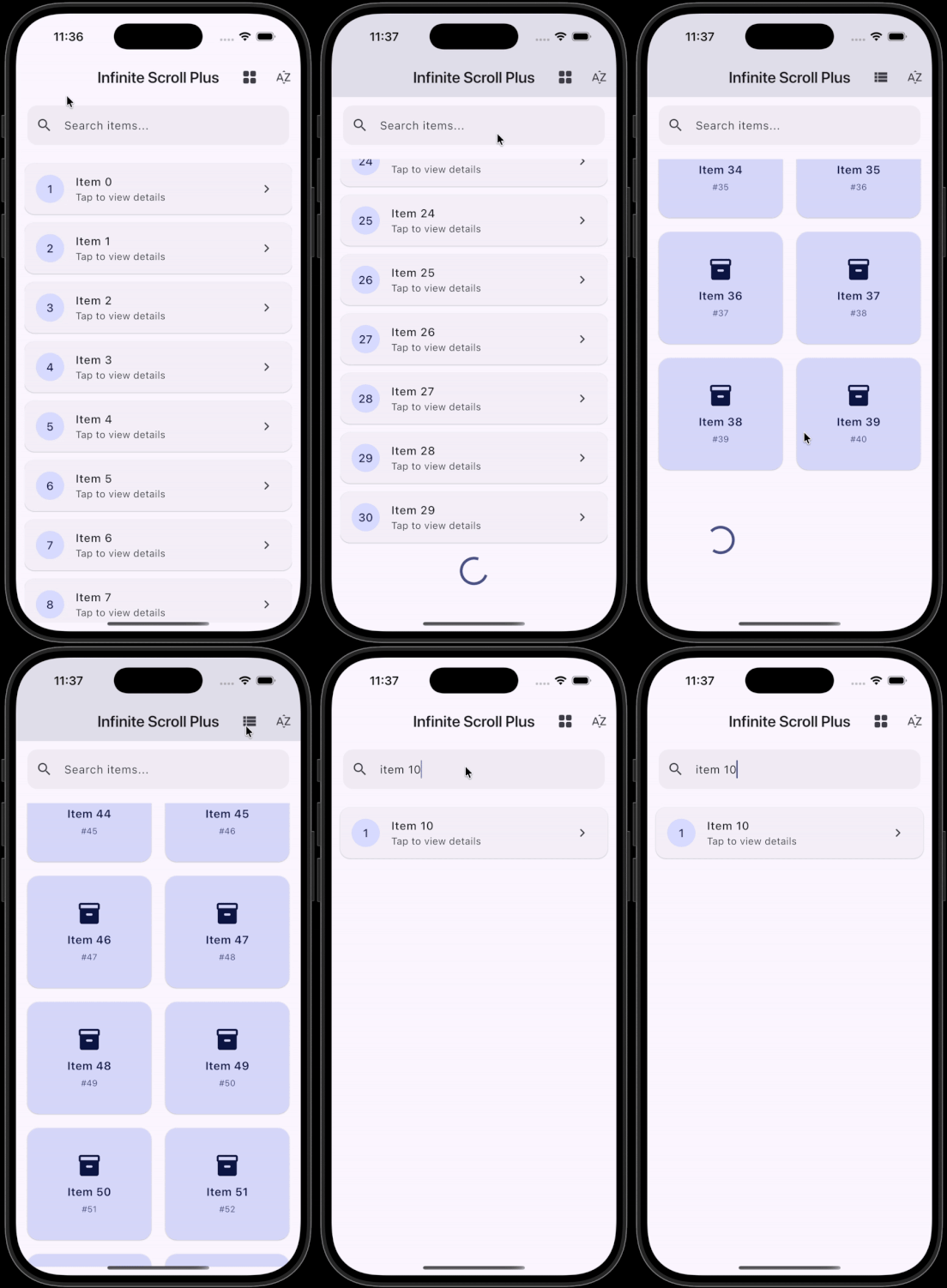
📦 Major Updated Features (from v2.0.0) #
- InfiniteScrollList & InfiniteScrollGrid widgets
- Skeleton loader for initial loading
- Custom loading, empty, and error widgets
- Search and sort functionality
- API-aware pagination via
LoadMoreRequest - Error state with optional retry callback
⚡ Installation #
Add the dependency to your pubspec.yaml:
dependencies:
  infinite_scroll_plus: <latest_version>

# flutter pub get
🧩 Basic Usage: #
 InfiniteScrollList<String>(
        items: myItems,
        hasMore: hasMore,
        onLoadMore: (LoadMoreRequest request) async {
            // Example: fetch next page from API
            final newItems = await fetchItems(page: request.page);
            myItems.addAll(newItems);
        },
        itemBuilder: (context, item, index) => ListTile(title: Text(item)),
    );
🛠 API Changes in 2.0.0 #
LoadMoreRequest #
- onLoadMore now receives a LoadMoreRequest object:
        class LoadMoreRequest {
            final int currentItemCount; // Current number of loaded items
            final int page;              // Suggested page number (starts from 1)
            final Object? cursor;        // Optional cursor for cursor-based pagination
        }
Example: #
   Future<void> _loadMore(LoadMoreRequest request) async {
       final newItems = await apiFetch(page: request.page);
       items.addAll(newItems);
   }
- This gives full control over offset/page/cursor-based APIs.
Error Handling: #
- InfiniteScrollList & InfiniteScrollGrid now support error states.
    InfiniteScrollList<String>(
        items: items,
        onLoadMore: _loadMore,
        hasMore: hasMore,
        errorBuilder: (context, error, retry) {
            return Column(
                children: [
                    Text('Failed to load more items: $error'),
                    ElevatedButton(
                        onPressed: retry,
                        child: const Text('Retry'),
                    ),
                ],
            );
        },
    );
errorBuilderis optional.- Retry callback is provided automatically.
Skeleton Loader: #
- Enable skeleton loader for initial empty state:
    InfiniteScrollList<String>(
        items: items,
        onLoadMore: _loadMore,
        enableSkeletonLoader: true,
        skeletonWidget: const MyCustomSkeleton(),
    );
Search & Sort: #
        InfiniteScrollList<String>(
          items: items,
          onLoadMore: _loadMore,
          searchQuery: searchQuery,
          onSearch: (items, query) => items
              .where((item) => item.toLowerCase().contains(query.toLowerCase()))
              .toList(),
          applySort: true,
          onSort: (items) {
            items.sort();
            return items;
          },
        );
Grid Support: #
        InfiniteScrollGrid<String>(
          items: items,
          onLoadMore: _loadMore,
          gridDelegate: const SliverGridDelegateWithFixedCrossAxisCount(
            crossAxisCount: 2,
            crossAxisSpacing: 12,
            mainAxisSpacing: 12,
            childAspectRatio: 1.1,
          ),
          itemBuilder: (context, item, index) => GridTile(
            child: Card(child: Center(child: Text(item))),
          ),
        );
⚡ Breaking Changes from v1.x → v2.0.0 : #
onLoadMorenow requiresLoadMoreRequestparameter.- Added errorBuilder for loadMore errors.
- Skeleton loader is now optional via
enableSkeletonLoader. - Version 2.0.0 is not backward compatible with v1.x code using
onLoadMore()without parameters.
📌 Example: #
        InfiniteScrollList<String>(
          items: myItems,
          hasMore: hasMore,
          enableSkeletonLoader: true,
          onLoadMore: (request) async {
            try {
              final newItems = await fetchPage(request.page);
              myItems.addAll(newItems);
            } catch (e) {
              throw e; // will trigger errorBuilder
            }
          },
          itemBuilder: (context, item, index) => ListTile(
            title: Text(item),
            leading: CircleAvatar(child: Text('${index + 1}')),
          ),
          errorBuilder: (context, error, retry) => Column(
            children: [
              Text('Failed to load: $error'),
              ElevatedButton(onPressed: retry, child: const Text('Retry')),
            ],
          ),
        );
💡 Notes / Best Practices: #
- Keep API logic outside the widget; the widget is purely for UI + scroll handling.
- Use
LoadMoreRequestto implement page/cursor-based APIs. - Skeleton loader is only for initial empty state.
hasMoremust be updated when your backend returns no more data.
Metadata
1
likes
160
points
348
downloads
Publisher
unverified uploader
Weekly Downloads
Metadata
Lightweight Flutter package for infinite scrolling, lazy loading, search, and sort in ListView & GridView.
Homepage
Repository (GitHub)
View/report issues
Documentation
License
 MIT (license)

