
im_flutter_sdk 4.18.1  im_flutter_sdk: ^4.18.1 copied to clipboard
Integrate the Chat SDK to enjoy the global IM services with high reliability, ultra-low latency, and high concurrency.
环信即时通讯 im_flutter_sdk 快速入门 #
通过本文可以实现一个集成聊天 SDK 的简单 app。
实现原理 #
下图展示在客户端发送和接收一对一文本消息的工作流程。
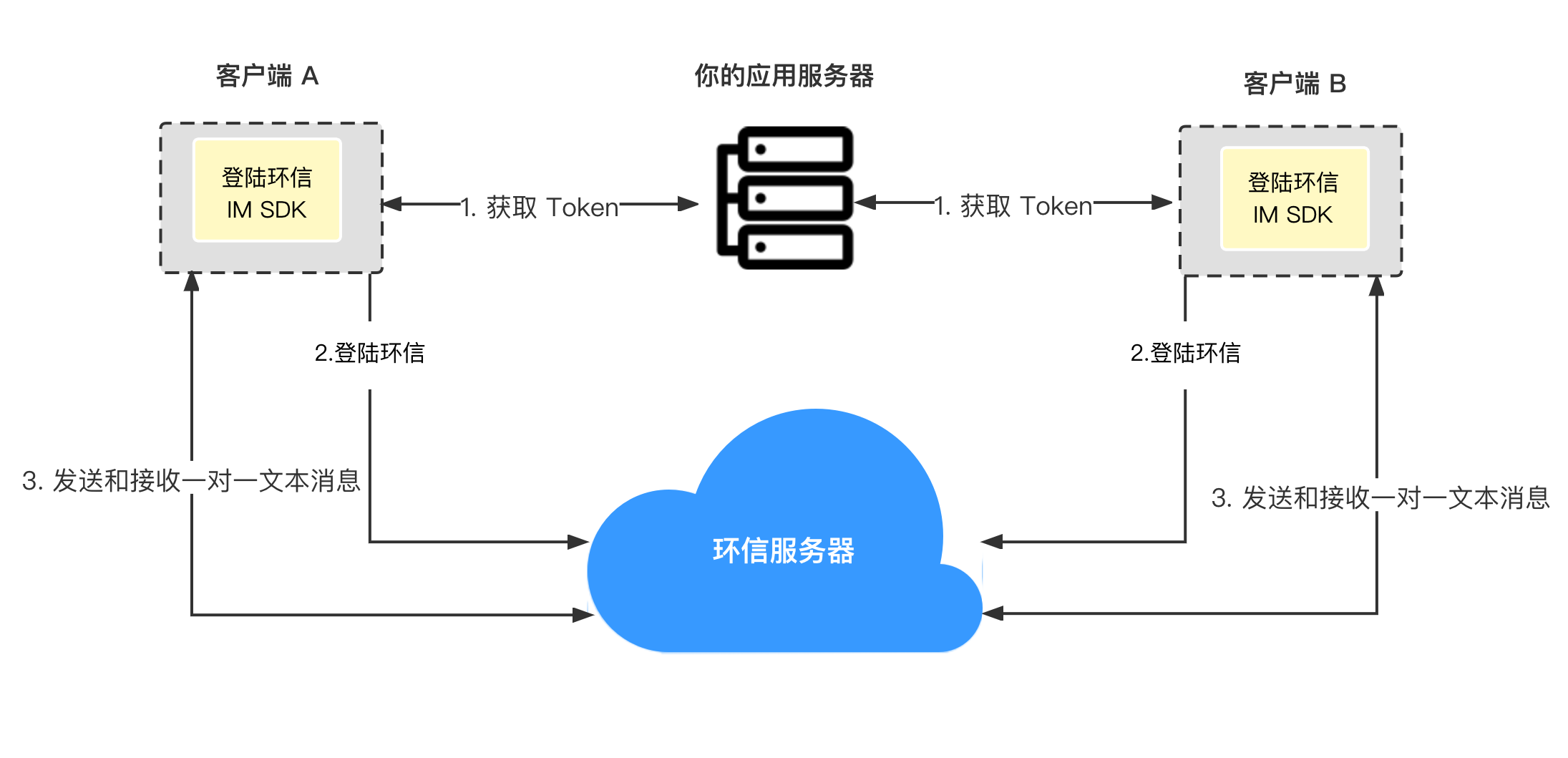
如上图所示,发送和接收单聊消息的步骤如下:
- 客户端向你的应用服务器请求 Token,你的应用服务器返回 Token。
- 客户端 A 和客户端 B 使用获得的 Token 登录环信即时通讯系统。
- 客户端 A 发送消息到环信即时通讯服务器。
- 环信即时通讯服务器将消息发送到客户端 B,客户端 B 接收消息。
前提条件 #
如果你的目标平台是iOS,你需要满足一下要求:
- iOS 12 或以上版本;
- Android SDK API 等级 21 或以上版本;
- Flutter 3.3.0 或以上版本;
- Dart 3.3.0 或以上版本;
- 有效的环信即时通讯 IM 开发者账号和 App Key,详见 环信即时通讯云控制台。
项目设置 #
使用命令创建项目 #
打开终端,进入需要创建项目的目录,输入命令进行 flutter create 项目创建:
flutter create quick_start
设置 Android #
- 打开文件
quick_start/android/app/build.gradle在文件最后添加:
android {
    defaultConfig {
        minSdkVersion 21
    }
}
- 在
quick_start/android/app/proguard-rules.pro中设置免混淆规则:
-keep class com.hyphenate.** {*;}
-dontwarn  com.hyphenate.**
设置 iOS #
打开文件 quick_start/ios/Runner.xcodeproj,然后:
- 找到
TARGETS > Runner在General的Deployment Info中修改最低版本为iOS 12.0
集成 SDK #
在终端命令行,输入命令添加依赖:
cd quick_start
flutter pub add im_flutter_sdk
flutter pub get
添加示例代码 #
打开 quick_start/lib/main.dart 文件,引入头文件:
import 'package:flutter/material.dart';
import 'package:im_flutter_sdk/im_flutter_sdk.dart';
修改 _MyHomePageState 代码:
class _MyHomePageState extends State<MyHomePage> {
  ScrollController scrollController = ScrollController();
  String _username = "";
  String _password = "";
  String _messageContent = "";
  String _chatId = "";
  final List<String> _logText = [];

  @override
  void initState() {
    super.initState();
    _initSDK();
    _addChatListener();
  }

  @override
  Widget build(BuildContext context) {
    return Scaffold(
      appBar: AppBar(
        title: Text(widget.title),
      ),
      body: Container(
        padding: const EdgeInsets.only(left: 10, right: 10),
        child: Column(
          crossAxisAlignment: CrossAxisAlignment.stretch,
          mainAxisSize: MainAxisSize.max,
          children: [
            TextField(
              decoration: const InputDecoration(hintText: "Enter userId"),
              onChanged: (username) => _username = username,
            ),
            TextField(
              decoration: const InputDecoration(hintText: "Enter password"),
              onChanged: (password) => _password = password,
            ),
            const SizedBox(height: 10),
            Row(
              mainAxisAlignment: MainAxisAlignment.spaceEvenly,
              children: [
                Expanded(
                  flex: 1,
                  child: TextButton(
                    onPressed: _signIn,
                    child: const Text("SIGN IN"),
                    style: ButtonStyle(
                      foregroundColor: MaterialStateProperty.all(Colors.white),
                      backgroundColor:
                          MaterialStateProperty.all(Colors.lightBlue),
                    ),
                  ),
                ),
                const SizedBox(width: 10),
                Expanded(
                  child: TextButton(
                    onPressed: _signOut,
                    child: const Text("SIGN OUT"),
                    style: ButtonStyle(
                      foregroundColor: MaterialStateProperty.all(Colors.white),
                      backgroundColor:
                          MaterialStateProperty.all(Colors.lightBlue),
                    ),
                  ),
                ),
                const SizedBox(width: 10),
                Expanded(
                  child: TextButton(
                    onPressed: _signUp,
                    child: const Text("SIGN UP"),
                    style: ButtonStyle(
                      foregroundColor: MaterialStateProperty.all(Colors.white),
                      backgroundColor:
                          MaterialStateProperty.all(Colors.lightBlue),
                    ),
                  ),
                ),
              ],
            ),
            const SizedBox(height: 10),
            TextField(
              decoration: const InputDecoration(
                  hintText: "Enter recipient's user name"),
              onChanged: (chatId) => _chatId = chatId,
            ),
            TextField(
              decoration: const InputDecoration(hintText: "Enter message"),
              onChanged: (msg) => _messageContent = msg,
            ),
            const SizedBox(height: 10),
            TextButton(
              onPressed: _sendMessage,
              child: const Text("SEND TEXT"),
              style: ButtonStyle(
                foregroundColor: MaterialStateProperty.all(Colors.white),
                backgroundColor: MaterialStateProperty.all(Colors.lightBlue),
              ),
            ),
            Flexible(
              child: ListView.builder(
                controller: scrollController,
                itemBuilder: (_, index) {
                  return Text(_logText[index]);
                },
                itemCount: _logText.length,
              ),
            ),
          ],
        ),
      ),
    );
  }

  void _initSDK() async {
  }

  void _addChatListener() {
  }

  void _signIn() async {
  }

  void _signOut() async {
  }

  void _signUp() async {
  }

  void _sendMessage() async {
  }

  void _addLogToConsole(String log) {
    _logText.add(_timeString + ": " + log);
    setState(() {
      scrollController.jumpTo(scrollController.position.maxScrollExtent);
    });
  }

  String get _timeString {
    return DateTime.now().toString().split(".").first;
  }
}
初始化 SDK #
在 _initSDK 方法中添加 SDK 初始化:
  void _initSDK() async {
    EMOptions options = EMOptions(
      appKey: "<#Your AppKey#>",
      autoLogin: false,
    );
    await EMClient.getInstance.init(options);
    // 通知sdk ui已经准备好,执行后才会收到`EMChatRoomEventHandler`, `EMContactEventHandler`, `EMGroupEventHandler` 回调。
    await EMClient.getInstance.startCallback();
  }
添加 注册环信Id 代码 #
Demo 中使用 sdk 注册环信id,在真实环境中,可以由你的后台调用环信rest api,
在 _signUp 方法中添加登录代码。
void _signUp() async {
  if (_username.isEmpty || _password.isEmpty) {
    _addLogToConsole("userId or password is null");
    return;
  }

  try {
    _addLogToConsole("begin create account...");
    await EMClient.getInstance.createAccount(_username, _password);
    _addLogToConsole("create account succeed, userId: $_username");
  } on EMError catch (e) {
    _addLogToConsole(
        "create account failed, code: ${e.code}, desc: ${e.description}");
  }
}
添加登录 #
在 _signIn 方法中添加登录代码。
void _signIn() async {
  if (_userId.isEmpty || _password.isEmpty) {
    _addLogToConsole("userId or password is null");
    return;
  }

  try {
    await EMClient.getInstance.login(_userId, _password);
    _addLogToConsole("sign in succeed, username: $_userId");
  } on EMError catch (e) {
    _addLogToConsole("sign in failed, e: ${e.code} , ${e.description}");
  }
}
添加退出 #
在 _signOut 方法中添加退出代码。
  void _signOut() async {
    try {
      await EMClient.getInstance.logout(true);
      _addLogToConsole("sign out succeed");
    } on EMError catch (e) {
      _addLogToConsole(
          "sign out failed, code: ${e.code}, desc: ${e.description}");
    }
  }
添加发消息 #
在 _sendMessage 方法中添加发消息代码。
  void _sendMessage() async {
    if (_chatId.isEmpty || _messageContent.isEmpty) {
      _addLogToConsole("single chat id or message content is null");
      return;
    }

    var msg = EMMessage.createTxtSendMessage(
      targetId: _chatId,
      content: _messageContent,
    );

    EMClient.getInstance.chatManager.sendMessage(msg);
  }
添加收消息监听 #
在 _addChatListener 方法中添加代码。
void _addChatListener() {

  // 添加消息状态变更监听
  EMClient.getInstance.chatManager.addMessageEvent(
      // ChatMessageEvent 对应的 key。
        "UNIQUE_HANDLER_ID",
        ChatMessageEvent(
          onSuccess: (msgId, msg) {
            _addLogToConsole("send message succeed");
          },
          onProgress: (msgId, progress) {
            _addLogToConsole("send message succeed");
          },
          onError: (msgId, msg, error) {
            _addLogToConsole(
              "send message failed, code: ${error.code}, desc: ${error.description}",
            );
          },
        ));

  // 添加收消息监听
  EMClient.getInstance.chatManager.addEventHandler(
    // EMChatEventHandle 对应的 key。
    "UNIQUE_HANDLER_ID",
    EMChatEventHandler(
      onMessagesReceived: (messages) {
        for (var msg in messages) {
          switch (msg.body.type) {
            case MessageType.TXT:
              {
                EMTextMessageBody body = msg.body as EMTextMessageBody;
                _addLogToConsole(
                  "receive text message: ${body.content}, from: ${msg.from}",
                );
              }
              break;
            case MessageType.IMAGE:
              {
                _addLogToConsole(
                  "receive image message, from: ${msg.from}",
                );
              }
              break;
            case MessageType.VIDEO:
              {
                _addLogToConsole(
                  "receive video message, from: ${msg.from}",
                );
              }
              break;
            case MessageType.LOCATION:
              {
                _addLogToConsole(
                  "receive location message, from: ${msg.from}",
                );
              }
              break;
            case MessageType.VOICE:
              {
                _addLogToConsole(
                  "receive voice message, from: ${msg.from}",
                );
              }
              break;
            case MessageType.FILE:
              {
                _addLogToConsole(
                  "receive image message, from: ${msg.from}",
                );
              }
              break;
            case MessageType.CUSTOM:
              {
                _addLogToConsole(
                  "receive custom message, from: ${msg.from}",
                );
              }
              break;
            case MessageType.CMD:
              {
                // 当前回调中不会有 CMD 类型消息,CMD 类型消息通过 [EMChatEventHandler.onCmdMessagesReceived] 回调接收
              }
              break;
          }
        }
      },
    ),
  );
}
移除消息监听 #
在 dispose 方法中添加代码移除监听:
@override
void dispose() {
  EMClient.getInstance.chatManager.removeMessageEvent("UNIQUE_HANDLER_ID");
  EMClient.getInstance.chatManager.removeEventHandler("UNIQUE_HANDLER_ID");
  super.dispose();
}
运行项目 #
以 iOS 为例,首先打开模拟器,之后在终端输入。
flutter run
Metadata
Documentation
Publisher
unverified uploader
Weekly Downloads
Metadata
Integrate the Chat SDK to enjoy the global IM services with high reliability, ultra-low latency, and high concurrency.
License
 MIT (license)
Dependencies
flutter, im_flutter_sdk_android, im_flutter_sdk_interface, im_flutter_sdk_ios
More
Packages that depend on im_flutter_sdk
Packages that implement im_flutter_sdk

