
flutter_yolo_open_kit 1.0.0  flutter_yolo_open_kit: ^1.0.0 copied to clipboard
A commercial-friendly YOLO detector for Flutter, powered by YOLOX and PP-YOLOE+ (Apache 2.0).
Flutter YOLO Open Kit #
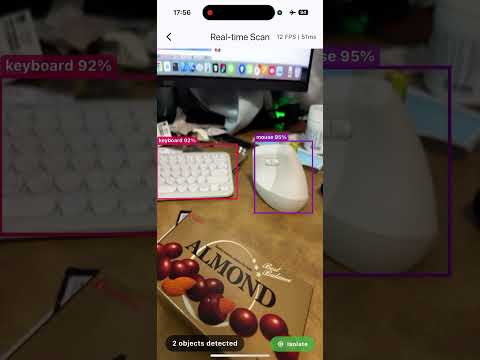
A commercial-friendly YOLO-like detector for Flutter, powered by YOLOX and PP-YOLOE+ (Apache 2.0).
A high-performance Flutter plugin for real-time object detection using YOLO models with ONNX Runtime.
Demo #
Features #
- Multiple YOLO Models: Support for YOLOX and PP-YOLOE+ models
- Real-time Detection: Optimized for camera stream processing
- Cross-platform: iOS and Android support
- Hardware Acceleration:
- iOS: Core ML integration
- Android: NNAPI support
- Flexible Input: Detect from image files, BGRA buffers, or YUV camera frames
- Isolate Support: Run detection in separate isolate to avoid UI blocking
Supported Models #
| Model | Size | Description |
|---|---|---|
| PP-YOLOE+ S | 30MB | Small, fastest |
| PP-YOLOE+ M | 90MB | Medium, balanced |
| PP-YOLOE+ L | 200MB | Large, most accurate |
| YOLOX-M | 97MB | Medium |
| YOLOX-L | 207MB | Large |
Installation #
Add to your pubspec.yaml:
dependencies:
  flutter_yolo_open_kit:
    git:
      url: https://github.com/robert008/flutter_yolo_open_kit.git
Quick Start #
Basic Usage #
import 'package:flutter_yolo_open_kit/flutter_yolo_open_kit.dart';

// Get singleton instance
final yolo = FlutterYoloOpenKit.instance;

// Initialize with model path
final success = yolo.init('/path/to/model.onnx');

// Detect from image file
final result = yolo.detectFromPath(
  '/path/to/image.jpg',
  confThreshold: 0.5,
  iouThreshold: 0.45,
);

// Process results
for (final detection in result.detections) {
  print('${detection.className}: ${detection.confidence}');
  print('Box: (${detection.x1}, ${detection.y1}) - (${detection.x2}, ${detection.y2})');
}

// Release when done
yolo.release();
Real-time Camera Detection #
For real-time camera processing, use the isolate-based YoloService:
import 'package:flutter_yolo_open_kit/flutter_yolo_open_kit.dart';

final yoloService = YoloService.instance;

// Initialize in isolate
await yoloService.init(modelPath);

// Detect from camera frame (iOS - BGRA)
final result = await yoloService.detectFromBuffer(
  imageData: plane.bytes,
  width: image.width,
  height: image.height,
  stride: plane.bytesPerRow,
);

// Detect from camera frame (Android - YUV420)
final result = await yoloService.detectFromYuv(
  yData: yPlane.bytes,
  uData: uPlane.bytes,
  vData: vPlane.bytes,
  width: image.width,
  height: image.height,
  yRowStride: yPlane.bytesPerRow,
  uvRowStride: uPlane.bytesPerRow,
  uvPixelStride: uPlane.bytesPerPixel ?? 1,
  rotation: sensorOrientation,
);
API Reference #
FlutterYoloOpenKit #
| Method | Description |
|---|---|
init(String modelPath) |
Initialize detector with ONNX model |
detectFromPath(String imagePath, {double confThreshold, double iouThreshold}) |
Detect from image file |
detectFromBuffer(Pointer<Uint8> imageData, int width, int height, int stride, {...}) |
Detect from BGRA buffer |
detectFromYUV(...) |
Detect from YUV420 buffer |
setClassNames(List<String> classNames) |
Set custom class names |
release() |
Release resources |
isInitialized |
Check if detector is ready |
version |
Get library version |
YoloResult #
| Property | Type | Description |
|---|---|---|
detections |
List<YoloDetection> |
List of detected objects |
count |
int |
Number of detections |
inferenceTimeMs |
int |
Inference time in milliseconds |
imageWidth |
int |
Input image width |
imageHeight |
int |
Input image height |
error |
String? |
Error message if any |
YoloDetection #
| Property | Type | Description |
|---|---|---|
classId |
int |
Class ID (0-79 for COCO) |
className |
String |
Class name |
confidence |
double |
Detection confidence (0-1) |
x1, y1, x2, y2 |
double |
Bounding box coordinates |
Platform Setup #
iOS #
The plugin uses a pre-built static library. No additional setup required.
Minimum iOS version: 12.0
Android #
The plugin includes pre-built native libraries for arm64-v8a and armeabi-v7a.
Minimum SDK version: 24
Add to android/app/build.gradle:
android {
    defaultConfig {
        ndk {
            abiFilters 'arm64-v8a', 'armeabi-v7a'
        }
    }
}
Building from Source #
iOS Static Library #
cd ios
./build_static_lib.sh
Android Native Library #
The Android library is built automatically by Gradle using CMake.
Model & Library Downloads #
Models and pre-built native libraries are available in GitHub Releases.
Release Assets #
| Asset | Description |
|---|---|
ppyoloe_plus_s.onnx |
PP-YOLOE+ Small model (30MB) |
ppyoloe_plus_m.onnx |
PP-YOLOE+ Medium model (90MB) |
ppyoloe_plus_l.onnx |
PP-YOLOE+ Large model (200MB) |
yolox_m.onnx |
YOLOX Medium model (97MB) |
yolox_l.onnx |
YOLOX Large model (207MB) |
ios-frameworks.zip |
iOS static libraries & frameworks |
android-jniLibs.zip |
Android native libraries (.so) |
Native Libraries (Auto-Download) #
Native libraries are automatically downloaded from GitHub Releases on first build:
- iOS: Downloads during
pod install - Android: Downloads during Gradle build
You can also manually trigger the download:
# iOS
cd ios && ./download_frameworks.sh

# Android
cd android && ./gradlew downloadNativeLibraries
Models Setup #
- Download models from GitHub Releases
- Place in your app's
assets/folder - Models will be copied to documents directory at runtime
Performance Tips #
- Use Isolate: For real-time processing, use
YoloServiceto run detection in a separate isolate - Choose Right Model: PP-YOLOE+ S is fastest, L is most accurate
- Adjust Thresholds: Higher
confThresholdreduces false positives but may miss objects - Resolution: Lower camera resolution = faster processing
Related Projects #
- flutter_document_capture - Document capture & preprocessing
- flutter_ocr_kit - OCR + Layout Detection
Author #
Robert Chuang
- Email: figo007007@gmail.com
- LinkedIn: https://www.linkedin.com/in/robert-chuang-88090932b
License #
Apache License 2.0 - see LICENSE for details.
Acknowledgments #
- ONNX Runtime - High-performance inference engine
- OpenCV - Image processing
- PaddleDetection - PP-YOLOE+ models
- YOLOX - YOLOX models
Metadata
Publisher
unverified uploader
Weekly Downloads
Metadata
A commercial-friendly YOLO detector for Flutter, powered by YOLOX and PP-YOLOE+ (Apache 2.0).
Repository (GitHub)
View/report issues
License
 unknown (license)
Dependencies
ffi, flutter, plugin_platform_interface
More
Packages that depend on flutter_yolo_open_kit
Packages that implement flutter_yolo_open_kit

