
flutter_ui_agent 0.1.0-beta.2  flutter_ui_agent: ^0.1.0-beta.2 copied to clipboard
Control your Flutter app with natural language. AI-powered widget interactions with LLM function calling and smart navigation.
Flutter UI Agent #


Control your Flutter app with natural language. Let AI agents understand and interact with your UI.
⚠️ Beta Release - API may evolve before 1.0 stable release.
What is Flutter UI Agent? #
Flutter UI Agent lets users control your app using natural language instead of traditional UI interactions. Wrap your widgets with AiActionWidget and they become AI-controllable.
Example Commands:
"Change my bio to 'Flutter Developer'"
"Find red products and add them to cart"
"Navigate to settings and enable dark mode"
"Increment the counter 5 times"
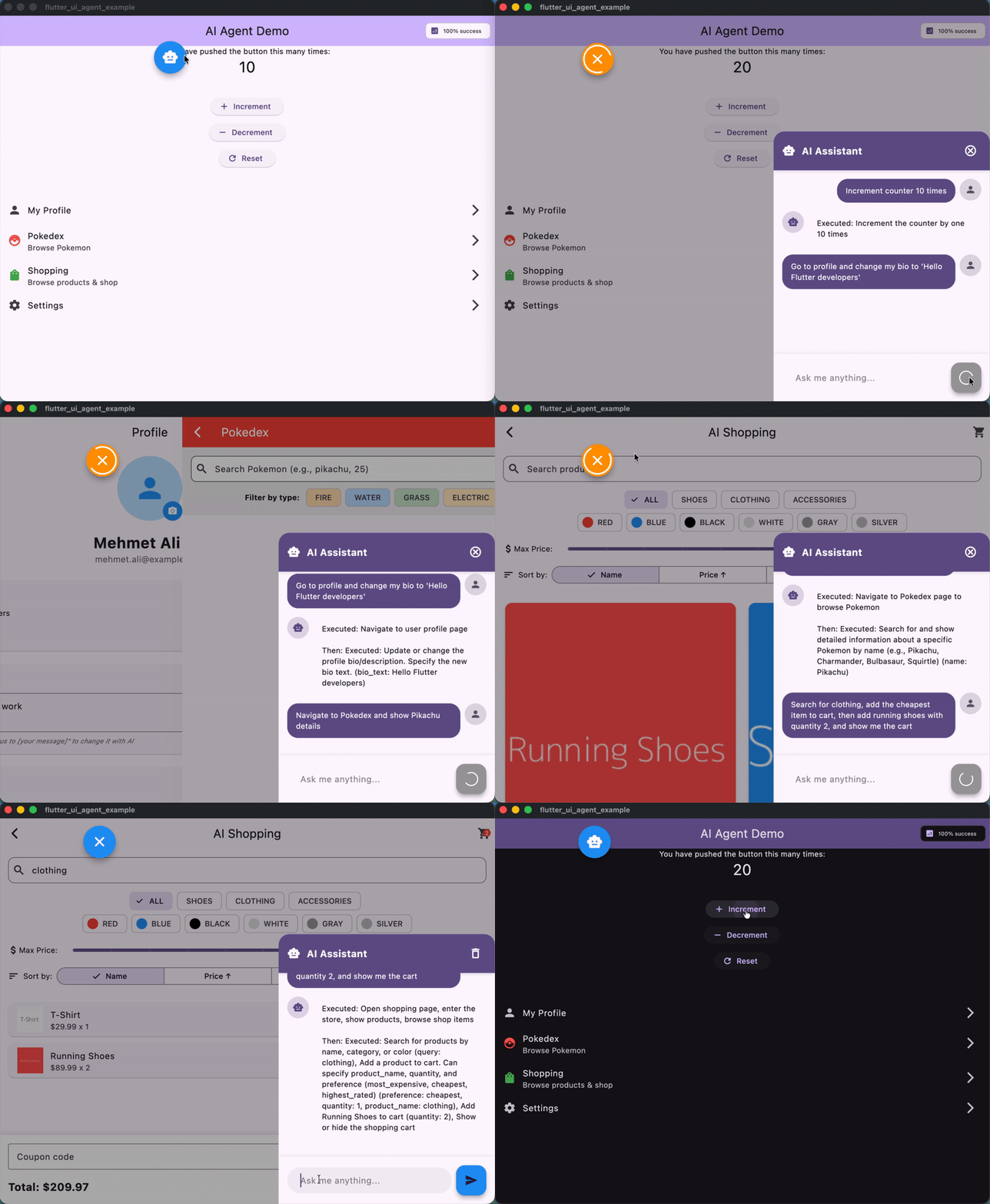
AI Agent controlling a Flutter app with natural language commands
✨ Features #
- 🧠 LLM-Agnostic - Works with Gemini, HuggingFace, OpenAI, Claude, or any LLM
- 🎯 Dynamic Actions - Wrap any widget to make it AI-controllable
- 🧭 Smart Navigation - Automatic page tracking with NavigatorObserver
- ⚡ Async Support - Handle navigation and async operations seamlessly
- 🔄 Multi-Step Commands - Execute complex action sequences
- 📊 Analytics - Track action usage and performance
- 🎨 Customizable - Flexible configuration and logging
🚀 Quick Start #
1. Installation #
dependencies:
  flutter_ui_agent: ^0.1.0-beta.1
2. Create an LLM Provider #
Implement the LlmProvider interface for your chosen LLM:
import 'package:flutter_ui_agent/flutter_ui_agent.dart';

class GeminiProvider implements LlmProvider {
  late String apiKey;
  late String modelName;

  @override
  Future<void> configure({required String apiKey, String? modelName}) async {
    this.apiKey = apiKey;
    this.modelName = modelName ?? 'gemini-2.0-flash-exp';
  }

  @override
  Future<LlmResponse> send({
    required String systemPrompt,
    required String userMessage,
    required List<Map<String, dynamic>> tools,
    required List<ConversationMessage> history,
  }) async {
    // Call your LLM API here with your chosen SDK
    // Return LlmResponse with functionCalls or text response
  }
}
3. Setup AgentService #
void main() async {
  final agentService = AgentService();
  final llmProvider = GeminiProvider();

  await llmProvider.configure(
    apiKey: 'YOUR_API_KEY',
    modelName: 'gemini-2.0-flash-exp',
  );

  agentService.setLlmProvider(
    llmProvider,
    config: const AgentConfig(
      logLevel: AgentLogLevel.info,
      enableAnalytics: true,
      debugMode: true,
    ),
  );

  runApp(
    AgentHost(
      agentService: agentService,
      child: MyApp(),
    ),
  );
}
4. Make Widgets AI-Controllable #
AiActionWidget(
  actionId: 'increment_counter',
  description: 'Increment the counter by 1',
  onExecute: () {
    setState(() => counter++);
  },
  child: ElevatedButton(
    onPressed: () => setState(() => counter++),
    child: Text('Increment'),
  ),
)
5. Add Navigation Tracking #
MaterialApp(
  navigatorObservers: [
    AgentNavigatorObserver(agentService),
  ],
  // ...
)
6. Process User Commands #
await agentService.processUserMessage('Increment the counter 5 times');
🎯 Example Prompts #
Try these natural language commands in your app:
Simple Actions:
- "Increment counter 5 times"
- "Set counter to 100"
- "Reset counter"
Navigation + Actions:
- "Go to settings and enable dark mode"
- "Navigate to profile and change my bio to 'Flutter Developer'"
- "Open shopping page and search for shoes"
Multi-Step:
- "Set counter to 50, increment 10 times, then go to profile"
- "Go to settings, enable dark mode, then go to shopping"
Natural Language:
- "Can you increase the counter by 7?"
- "I want to see my profile"
- "Turn off notifications and update my status"
See the example app for a complete demo with shopping, profile, and settings pages.
⚠️ Important: Safety & Limitations #
This package is experimental and should be used with caution in production environments.
Safety Guidelines #
🚫 DO NOT use for sensitive operations without user confirmation:
- Payment processing (NO automatic payments)
- Financial transactions
- Data deletion
- Security-critical actions
✅ SAFE use cases:
- Generate summaries for user review
- Create draft content for approval
- Assist with form filling (with confirmation)
- Navigate and display information
- Filter and search data
Best Practice: For sensitive operations, use AI to prepare the action (e.g., calculate total, create order summary), then require explicit user confirmation before execution.
Example - Safe Payment Flow:
// ✅ GOOD: AI prepares, user confirms
AiActionWidget(
  actionId: 'prepare_checkout',
  description: 'Prepare checkout summary for user review',
  onExecuteWithParams: (params) {
    // AI calculates total, applies discounts, etc.
    showCheckoutSummary(); // User must tap "Confirm Payment" button
  },
)

// ❌ BAD: Direct payment automation
AiActionWidget(
  actionId: 'process_payment',  // NEVER DO THIS
  description: 'Process payment immediately',
  onExecute: () => processPayment(), // Dangerous!
)
📖 Core Concepts #
AiActionWidget #
Wraps any widget to make it AI-controllable:
// Simple action
AiActionWidget(
  actionId: 'like_post',
  description: 'Like the post',
  onExecute: () => likePost(),
  child: IconButton(icon: Icon(Icons.favorite)),
)

// Action with parameters
AiActionWidget(
  actionId: 'update_bio',
  description: 'Update user bio text',
  parameters: {'bio_text': 'string'},
  onExecuteWithParams: (params) {
    final bio = params['bio_text'] as String;
    updateBio(bio);
  },
  child: TextField(),
)

// Async action
AiActionWidget(
  actionId: 'navigate_settings',
  description: 'Navigate to settings page',
  onExecuteAsync: () async {
    Navigator.pushNamed(context, '/settings');
    await Future.delayed(Duration(milliseconds: 100));
  },
  child: ListTile(title: Text('Settings')),
)
AgentService #
Central service managing AI actions:
// Process commands
await agentService.processUserMessage('your command');

// Cancel in-progress requests
agentService.cancelCurrentRequest();

// Access statistics
final stats = agentService.statistics;
print('API Calls: ${stats['apiCalls']}');
print('Success Rate: ${stats['successRate']}%');

// Get current page
print('Current page: ${agentService.currentPage}');

// Clear conversation history
agentService.clearHistory();
Navigation Tracking #
Track page changes automatically:
MaterialApp(
  navigatorObservers: [
    AgentNavigatorObserver(agentService),
  ],
  onGenerateRoute: (settings) {
    // Your routing logic
  },
)
⚙️ Configuration #
AgentConfig Options #
AgentConfig(
  // Logging
  logLevel: AgentLogLevel.info,  // none, error, warning, info, verbose, debug
  useEmojis: true,
  logPrefix: '[FlutterUIAgent]',

  // Behavior
  enableRetry: true,
  maxRetries: 3,
  retryBackoffStrategy: RetryBackoffStrategy.exponential,
  retryBaseDelayMs: 1000,

  // History & Analytics
  enableHistory: true,
  maxHistoryLength: 10,
  enableAnalytics: true,
  onActionExecuted: (actionId, duration) {
    print('$actionId took ${duration.inMilliseconds}ms');
  },

  // Development
  debugMode: true,
  fallbackToMock: false,
)
Log Levels #
| Level | Use Case | Output |
|---|---|---|
none |
Production (silent) | No logs |
error |
Production (errors only) | Errors only |
warning |
Production (important) | Errors + warnings |
info |
Default | Errors + warnings + info |
verbose |
Development | All above + verbose details |
debug |
Debugging | Everything including debug info |
🎯 Example App #
Check out the example/ folder for a complete demo featuring:
- Counter Page - Simple increment/decrement actions
- Profile Page - Bio and status updates
- Data Browser - Search and filtering
- Shopping Page - Product browsing and cart management
- Settings Page - Theme and configuration changes
- Floating Chat UI - Natural language command interface
Run the example:
cd example
cp lib/app/config/app_config.dart.example lib/app/config/app_config.dart
# Add your API key to app_config.dart
flutter run
Try these commands in the example:
"Increment counter 3 times"
"Change my bio to 'Flutter enthusiast'"
"Find red products"
"Navigate to settings and enable dark mode"
"Add running shoes to cart"
🤖 Tested AI Models #
These models have been tested and work well with Flutter UI Agent:
Gemini (Google) #
modelName: 'gemini-2.0-flash-exp' // Fast, reliable
HuggingFace #
modelName: 'Qwen/Qwen3-235B-A22B-Instruct-2507' // High quality, open-source
Bring Your Own #
Implement LlmProvider for any LLM with function calling support (OpenAI GPT-4, Claude, etc.)
🛠️ Advanced Usage #
Custom System Prompts #
agentService.setSystemPrompt('''
You are a helpful assistant for a shopping app.
Focus on helping users find and purchase products.
Be concise and action-oriented.
''');
Mock Mode (Testing) #
Test without API keys:
// Don't call setLlmProvider()
// AgentService will use keyword-based matching
await agentService.processUserMessage('increment counter');
Error Handling #
try {
  await agentService.processUserMessage('your command');
} catch (e) {
  print('Command failed: $e');
  // Handle error
}
Dynamic Action Registration #
// Actions are automatically registered when AiActionWidget builds
// Access all registered actions:
final actions = agentService.actions;
print('Available actions: ${actions.keys}');
📊 Analytics & Monitoring #
Track Performance #
AgentConfig(
  enableAnalytics: true,
  onActionExecuted: (actionId, duration) {
    analytics.logEvent(
      name: 'ai_action',
      parameters: {
        'action_id': actionId,
        'duration_ms': duration.inMilliseconds,
      },
    );
  },
)
View Statistics #
final stats = agentService.statistics;
print('Total API calls: ${stats['apiCalls']}');
print('Failed calls: ${stats['failures']}');
print('Success rate: ${stats['successRate']}%');
🔒 Security Best Practices #
1. Never Commit API Keys #
// ✅ Good: Use environment variables or secure storage
apiKey: Platform.environment['GEMINI_API_KEY']

// ❌ Bad: Hardcoded in source
apiKey: 'actual-api-key-here'
2. Use .gitignore #
**/app_config.dart
**/*.env
3. Validate AI Actions #
Always validate and sanitize parameters before executing actions:
AiActionWidget(
  actionId: 'update_profile',
  parameters: {'bio': 'string'},
  onExecuteWithParams: (params) {
    final bio = params['bio'] as String;

    // ✅ Validate input
    if (bio.length > 500) {
      throw Exception('Bio too long');
    }
    if (_containsProfanity(bio)) {
      throw Exception('Invalid content');
    }

    updateBio(bio);
  },
)
4. Require Confirmation for Sensitive Actions #
Never allow AI to directly execute:
- Payments or purchases
- Account deletion
- Password changes
- Data exports
- Sharing private information
Instead, use a confirmation flow:
// AI prepares the action
AiActionWidget(
  actionId: 'prepare_delete_account',
  description: 'Show account deletion confirmation dialog',
  onExecute: () {
    showDialog(
      context: context,
      builder: (context) => AlertDialog(
        title: Text('Delete Account?'),
        content: Text('This action cannot be undone.'),
        actions: [
          TextButton(
            onPressed: () => Navigator.pop(context),
            child: Text('Cancel'),
          ),
          TextButton(
            onPressed: () {
              _actuallyDeleteAccount(); // User explicitly confirmed
              Navigator.pop(context);
            },
            child: Text('Delete'),
          ),
        ],
      ),
    );
  },
)
5. Rate Limiting #
Implement rate limiting to prevent abuse:
// Limit AI requests per user/session
class RateLimiter {
  final _timestamps = <DateTime>[];
  final maxRequests = 10;
  final timeWindow = Duration(minutes: 1);

  bool allowRequest() {
    final now = DateTime.now();
    _timestamps.removeWhere(
      (t) => now.difference(t) > timeWindow,
    );

    if (_timestamps.length >= maxRequests) {
      return false; // Rate limit exceeded
    }

    _timestamps.add(now);
    return true;
  }
}
6. Log and Monitor #
Track all AI actions for security auditing:
AgentConfig(
  enableAnalytics: true,
  onActionExecuted: (actionId, duration) {
    securityLog.record(
      action: actionId,
      timestamp: DateTime.now(),
      userId: currentUser.id,
      duration: duration,
    );
  },
)
🤝 Contributing #
Contributions are welcome! Please feel free to submit a Pull Request.
- Fork the repository
- Create your feature branch (
git checkout -b feature/amazing-feature) - Commit your changes (
git commit -m 'Add amazing feature') - Push to the branch (
git push origin feature/amazing-feature) - Open a Pull Request
📄 License #
This project is licensed under the MIT License - see the LICENSE file for details.
🔗 Links #
💬 Support #
- Issues: GitHub Issues
- Discussions: GitHub Discussions
Made with ❤️ for the Flutter community
Metadata
Publisher
unverified uploader
Weekly Downloads
Metadata
Control your Flutter app with natural language. AI-powered widget interactions with LLM function calling and smart navigation.
Repository (GitHub)
View/report issues
License
 unknown (license)

