
flutter_sms_otp_pro 1.0.2  flutter_sms_otp_pro: ^1.0.2 copied to clipboard
 sitharaj.in
Enterprise-grade Flutter SMS OTP library with auto-read capabilities, beautiful UI components, and comprehensive platform support.
SMS OTP #


Enterprise-grade Flutter SMS OTP library with auto-read capabilities, beautiful UI components, and comprehensive platform support.
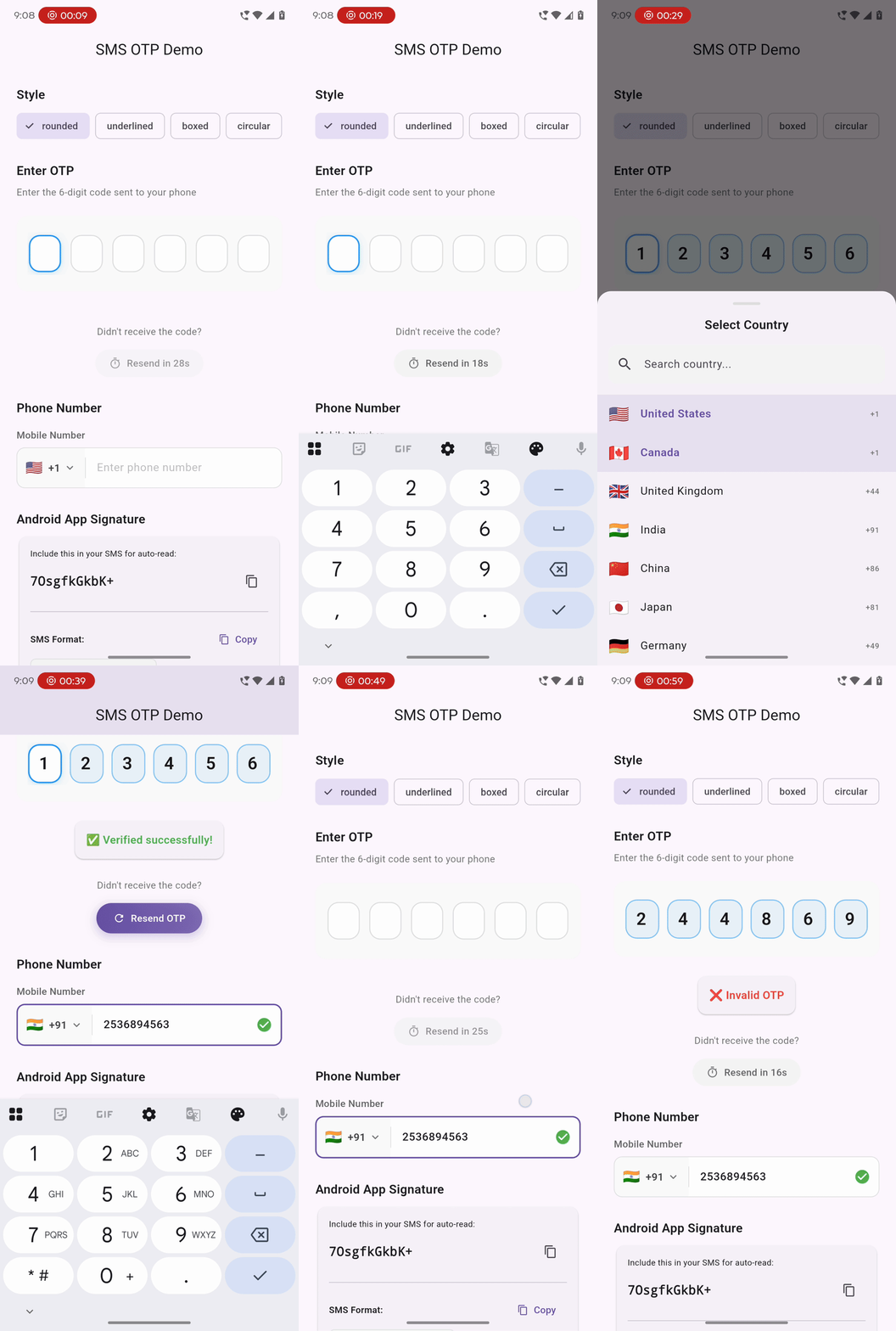
✨ Features #
- 🤖 Android SMS Auto-Read - Automatic OTP detection via SMS Retriever API (no SMS permissions needed!)
- 🍎 iOS Native Autofill - Seamless keyboard code suggestions
- 🎨 Beautiful OTP Input - 6 preset themes: rounded, underlined, boxed, circular, glassmorphism, dark
- 📱 Phone Number Input - International support with country picker and validation
- ⏱️ Countdown Timer - Animated resend timer with callbacks
- 🔄 Retry Logic - Built-in rate limiting with cooldown
- ♿ Accessible - Full accessibility support with semantics
- 🎯 Type-Safe - Dart 3 sealed classes for error handling
📦 Installation #
Add to your pubspec.yaml:
dependencies:
  flutter_sms_otp_pro: ^1.0.0
🚀 Quick Start #
Basic OTP Input #
import 'package:flutter_sms_otp_pro/flutter_sms_otp_pro.dart';

OtpField(
  length: 6,
  onCompleted: (otp) {
    print('OTP entered: $otp');
    verifyOtp(otp);
  },
)
With Custom Styling #
OtpField(
  length: 6,
  style: OtpFieldStyle.glassmorphism(),
  autoListen: true, // Auto-start SMS listener
  hapticFeedback: true,
  onCompleted: (otp) => verifyOtp(otp),
  onChanged: (value) => print('Current: $value'),
)
Available Style Presets #
OtpFieldStyle.rounded()       // Modern rounded boxes with shadows
OtpFieldStyle.underlined()    // Minimalist underline style
OtpFieldStyle.boxed()         // Corporate/enterprise look
OtpFieldStyle.circular()      // Playful circular fields
OtpFieldStyle.glassmorphism() // Frosted glass effect
OtpFieldStyle.dark()          // Dark theme
With Controller #
final controller = OtpController(
  config: SmsOtpConfig(
    otpLength: 6,
    timeout: Duration(minutes: 5),
    maxRetries: 3,
    retryCooldown: Duration(seconds: 30),
  ),
);

// Start listening for SMS
await controller.startListening();

// Get app signature for Android SMS
final signature = await controller.getAppSignature();
print('Include in SMS: $signature');

// Use in widget
OtpField(
  controller: controller,
  onCompleted: (otp) async {
    if (controller.validate()) {
      await verifyWithServer(otp);
    }
  },
)
Phone Number Input #
PhoneField(
  initialCountryCode: '+1',
  hintText: 'Phone number',
  labelText: 'Mobile Number',
  onValidated: (result) {
    if (result.isValid) {
      print('E.164: ${result.e164Format}');
      sendOtp(result.e164Format!);
    }
  },
)
Countdown Timer #
CountdownTimer(
  duration: Duration(seconds: 30),
  onResend: () {
    sendOtpRequest();
  },
  onComplete: () {
    print('Timer completed');
  },
)
📱 Platform Setup #
Android #
The library uses the SMS Retriever API which doesn't require SMS permissions!
- Get your app signature hash:
final controller = OtpController();
final signature = await controller.getAppSignature();
print('App Signature: $signature'); // e.g., "AbCdEfGhIjK"
- Include the signature in your SMS messages:
<#> Your verification code is 123456

AbCdEfGhIjK
SMS Format Requirements:
- Start with
<#> - Include the OTP code
- End with your 11-character app signature
- Keep under 140 bytes
iOS #
iOS handles OTP autofill natively. Just ensure your SMS follows these guidelines:
Your verification code is 123456
Tips:
- Use keywords like "code", "OTP", "verification"
- Place the code prominently
- Avoid special characters around the code
- The code suggestion appears for 3 minutes
🛠️ API Reference #
SmsOtpConfig #
SmsOtpConfig(
  otpLength: 6,              // OTP length (4-8)
  timeout: Duration(minutes: 5),
  maxRetries: 3,
  retryCooldown: Duration(seconds: 30),
  autoSubmit: true,
  senderFilter: '+1234567890', // Optional SMS sender filter
  hapticFeedback: true,
  obscureText: false,
)
OtpController #
| Method | Description |
|---|---|
startListening() |
Start SMS listener |
stopListening() |
Stop SMS listener |
getAppSignature() |
Get Android app signature |
setOtp(String) |
Set OTP manually |
clear() |
Clear current OTP |
validate() |
Validate current OTP |
reset() |
Reset to initial state |
OtpResult #
result.when(
  success: (otp) => print('Received: $otp'),
  timeout: (message) => print('Timeout: $message'),
  error: (exception) => print('Error: ${exception.message}'),
  cancelled: () => print('Cancelled'),
);
🎨 Customization #
Custom OTP Field Style #
OtpFieldStyle(
  activeDecoration: BoxDecoration(
    border: Border.all(color: Colors.blue, width: 2),
    borderRadius: BorderRadius.circular(12),
  ),
  inactiveDecoration: BoxDecoration(
    border: Border.all(color: Colors.grey),
    borderRadius: BorderRadius.circular(12),
  ),
  textStyle: TextStyle(
    fontSize: 24,
    fontWeight: FontWeight.bold,
  ),
  fieldWidth: 50,
  fieldHeight: 56,
  gap: 12,
  animationCurve: Curves.easeInOut,
  animationDuration: Duration(milliseconds: 200),
)
Modify Presets #
OtpFieldStyle.rounded(
  primaryColor: Colors.purple,
  backgroundColor: Colors.white,
  textColor: Colors.black,
  errorColor: Colors.red,
).copyWith(
  fieldWidth: 60,
  gap: 16,
)
📋 Example App #
See the example folder for a complete demo application.
cd example
flutter run
🧪 Testing #
The library includes a comprehensive test suite:
# Run unit and widget tests
flutter test

# Run integration tests (requires device/emulator)
flutter test integration_test/otp_flow_test.dart
📝 License #
MIT License - see LICENSE for details.
👨💻 Author #
Sitharaj Seenivasan

🤝 Contributing #
Contributions are welcome! Please read our Contributing Guide first.
📧 Support #
- 🐛 Report bugs
- 💡 Request features
- ⭐ Star the repo if you find it useful!
Metadata
Publisher
Metadata
Enterprise-grade Flutter SMS OTP library with auto-read capabilities, beautiful UI components, and comprehensive platform support.
Homepage
Repository (GitHub)
View/report issues
Contributing
Topics
#otp #sms #authentication #verification #phone
Documentation
License
 MIT (license)
Dependencies
flutter, plugin_platform_interface
More
Packages that depend on flutter_sms_otp_pro
Packages that implement flutter_sms_otp_pro

