
flutter_realistic_flipbook 0.1.2  flutter_realistic_flipbook: ^0.1.2 copied to clipboard
A realistic 3D page-turn flipbook widget for Flutter, inspired by flipbook-vue.
flutter_realistic_flipbook #
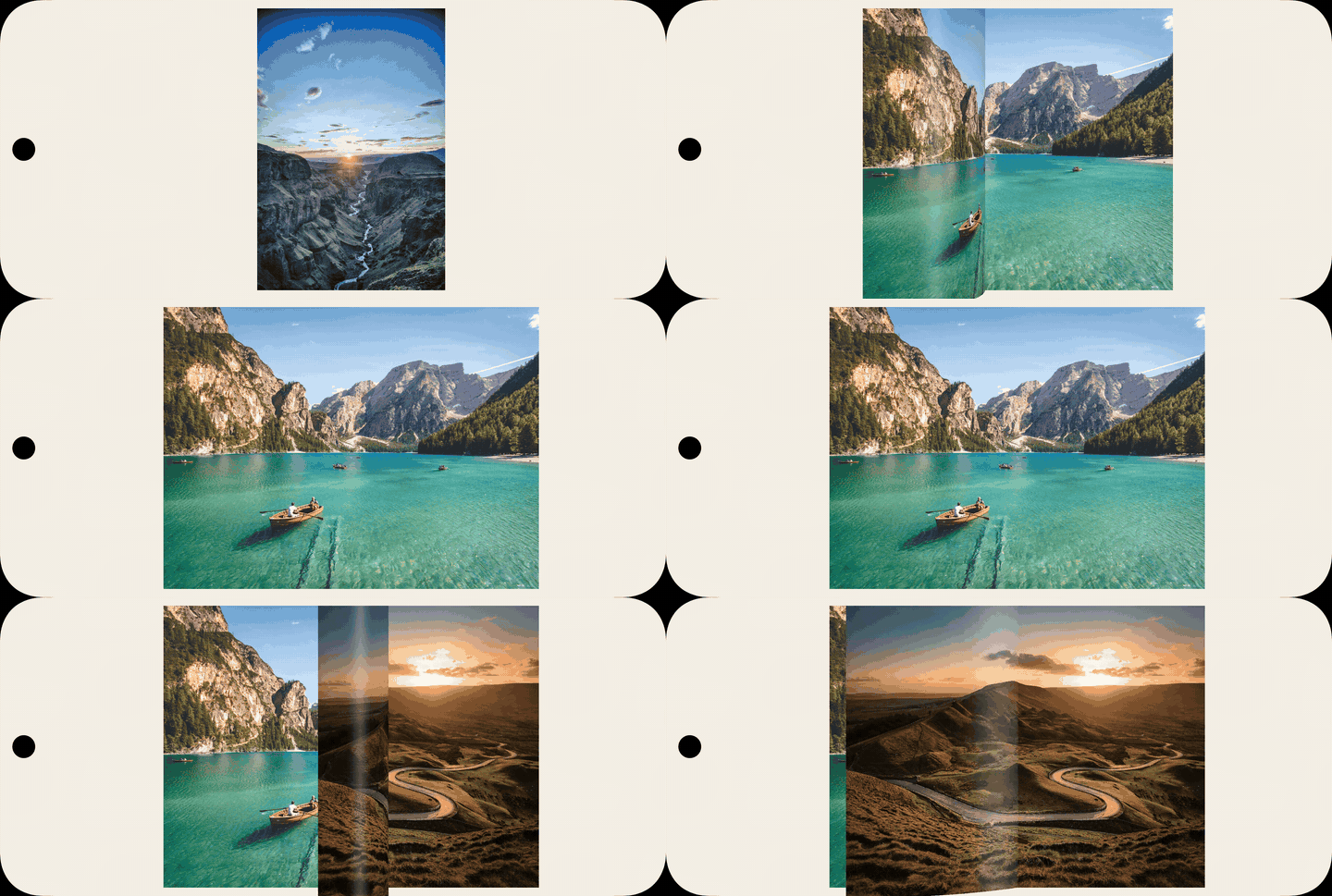
A realistic 3D page-turn widget for Flutter, inspired by flipbook-vue.
This package is built for reader-like experiences where a page should bend, light, and turn like a physical book, not slide like a flat carousel.
Preview #
What You Get #
- Real-time 3D page curvature using polygon strips (
nPolygons) - Perspective projection + diffuse/specular lighting
- Manual drag flip with velocity continuation
- Programmatic control with
FlipbookController - Single-page and double-page layouts
- Spread-aware single-page navigation (camera slide + page turn)
- Zoom support with animated transitions
- Optional page chrome (header/footer, border, paper style)
- Two page rendering modes:
imagemode (static page textures)widgetmode (live widget pages + GPU snapshot textures during flip)
Installation #
dependencies:
  flutter_realistic_flipbook: ^0.1.2
Then:
flutter pub get
Import #
import 'package:flutter_realistic_flipbook/flutter_realistic_flipbook.dart';
Quick Start #
final controller = FlipbookController();

RealisticFlipbook(
  controller: controller,
  pages: pages,
  nPolygons: 14,
  perspective: 2200,
  ambient: 0.72,
  gloss: 0.25,
  flipDuration: const Duration(milliseconds: 1300),
);
Page Modes #
1) Image Mode #
Use FlipbookPage(image: ...) when pages are static images.
final pages = <FlipbookPage?>[
  null,
  const FlipbookPage(image: AssetImage('assets/pages/1.jpg')),
  const FlipbookPage(image: AssetImage('assets/pages/2.jpg')),
  const FlipbookPage(image: AssetImage('assets/pages/3.jpg')),
];
2) Widget Mode #
Use FlipbookPage(widgetBuilder: ...) for dynamic Flutter pages.
final pages = <FlipbookPage?>[
  null,
  FlipbookPage(
    sizeHint: const Size(1000, 1414),
    widgetBuilder: (context) => Container(
      color: const Color(0xFFFFF8E8),
      padding: const EdgeInsets.all(24),
      child: const Text('Dynamic magazine page'),
    ),
  ),
  FlipbookPage(
    sizeHint: const Size(1000, 1414),
    widgetBuilder: (context) => Container(
      color: const Color(0xFFFFF8E8),
      child: const Center(child: Text('Another widget page')),
    ),
  ),
];
How widget mode works:
- Resting pages are rendered as live widgets.
- During 3D flip, the engine uses GPU snapshots (
ui.Image) rendered withRawImagefor strip texturing. - This avoids PNG encode/decode overhead and removes transient blank flashes at flip start.
Gesture Integration #
If your child widgets already handle tap/long-press/double-tap, enable pass-through mode:
RealisticFlipbook(
  pages: pages,
  allowPageWidgetGestures: true,
  tapToFlip: false,
  clickToZoom: false,
  dragToFlip: true,
)
Optional Book Chrome #
RealisticFlipbook(
  pages: pages,
  bookChrome: true,
  paperColor: const Color(0xFFFFFCF2),
  bookTopInsetRatio: 0.075,
  bookBottomInsetRatio: 0.085,
  bookSideInsetRatio: 0.045,
)
Per-page metadata:
FlipbookPage(
  image: const AssetImage('assets/pages/10.jpg'),
  headerText: 'Chapter 1',
  footerText: '10',
  headerAlignment: Alignment.topRight,
)
Core API #
RealisticFlipbook #
Main groups of parameters:
- Data:
pages,controller,startPage - Motion:
flipDuration,singlePageSlideDuration,nPolygons,perspective,ambient,gloss,swipeMin - Layout:
singlePage,forwardDirection,centering,clipToViewport,singlePageSpreadNavigation - Input:
allowPageWidgetGestures,tapToFlip,clickToZoom,dragToFlip,dragToScroll,wheel - Zoom:
zooms,zoomDuration - Styling:
paperColor,blankPageColor,bookChrome,book* - Callbacks:
onFlipLeftStart,onFlipLeftEnd,onFlipRightStart,onFlipRightEnd,onZoomStart,onZoomEnd
FlipbookPage #
image(ImageProvider?)widgetBuilder(WidgetBuilder?)sizeHint(Size?)hiResImage(ImageProvider?)headerText,footerText,headerAlignment
At least one of image or widgetBuilder is required.
FlipbookController #
- State:
canFlipLeft,canFlipRight,canZoomIn,canZoomOut,page,numPages - Actions:
flipLeft(),flipRight(),zoomIn(),zoomOut(),goToPage()
Behavior Notes #
- If
pages.first == null, indexing follows a cover-like behavior. - Double-page mode activates when width > height and
singlePage == false. - In spread-aware single-page mode, navigation can combine camera translation and page turn.
Performance Tips #
- Start with
nPolygonsbetween10and16on mobile. - Increase only if needed.
- Use sensible page dimensions and compressed assets.
- For widget-only books, provide
sizeHintto stabilize layout initialization.
Example App #
A runnable example is included in example/.
cd example
flutter run
License #
MIT. See LICENSE.
Metadata
Publisher
unverified uploader
Weekly Downloads
Metadata
A realistic 3D page-turn flipbook widget for Flutter, inspired by flipbook-vue.
Repository (GitHub)
View/report issues
Topics
#flipbook #page-turn #animation #three-d #reader
Documentation
License
 unknown (license)

