
flutter_neo_shield 1.10.0  flutter_neo_shield: ^1.10.0 copied to clipboard
Client-side PII protection toolkit for Flutter. Secures sensitive data from logs and clipboard, protects memory, and obfuscates strings in binaries.
flutter_neo_shield #


Protect sensitive data in your Flutter app — logs, clipboard, memory, and compiled binaries.
Works 100% offline. No backend. No API keys. No server calls.
What is PII? #
PII = Personally Identifiable Information. Things like:
- Email addresses (
john@gmail.com) - Phone numbers (
+1 555-123-4567) - Credit card numbers (
4532 0151 1283 0366) - Social Security Numbers (
123-45-6789) - Passwords, API keys, tokens, IP addresses, dates of birth
If any of this data leaks (through logs, clipboard, or memory), it's a security risk.
flutter_neo_shield has 6 modules to prevent this:
| Module | What it does (in one line) |
|---|---|
| Log Shield | You use shieldLog() instead of print() — it hides sensitive data before printing |
| Clipboard Shield | When users copy sensitive text, it auto-deletes from clipboard after X seconds |
| Memory Shield | Stores secrets as bytes and overwrites them with zeros when you're done |
| String Shield | Encrypts string literals at compile time so they can't be extracted from your binary with strings |
| RASP Shield | Detects Root, Jailbreak, Debugger, Native Debugger, Emulator, Frida, Developer Mode, Tampering, Signature Repackaging, and Proxy/VPN (MITM) at runtime — native on all 6 platforms |
| Screen Shield | Blocks screenshots, screen recording, and app-switcher thumbnails — native OS-level protection on all 6 platforms |
How Each Module Works (Simple Explanation) #
1. Log Shield — "Safe print()" #
The problem:
During development, you often print things to the debug console:
print('User logged in: john@gmail.com with token: Bearer sk-abc123');
This prints the real email and token to the console. If you forget to remove this print statement before releasing your app, the same data ends up in crash reporting services (Crashlytics, Sentry, etc.) — that's a data leak.
How Log Shield fixes it:
You replace print() with shieldLog(). It gives you structured, PII-safe logging:
- During development (
flutter run):shieldLog()shows all real values normally for debugging. - In release builds (
flutter build): The sameshieldLog()call automatically hides sensitive data — or stays completely silent.
You write the code once. It does the right thing in each mode automatically.
shieldLog('User logged in: john@gmail.com with token: Bearer sk-abc123');

// BY DEFAULT — PII is hidden in all modes (debug + release):
// → [INFO] User logged in: [EMAIL HIDDEN] with token: Bearer [TOKEN HIDDEN]
You don't need to change any code between dev and production. Just use
shieldLog() everywhere instead of print(), and it handles both modes.
Note: If you want to see real values during development (e.g., for local debugging), set
sanitizeInDebug: false:FlutterNeoShield.init( logConfig: LogShieldConfig(sanitizeInDebug: false), ); // Debug output: [INFO] User logged in: john@gmail.com (real value!)
What it auto-detects and hides (in release mode):
| Your input | What release console shows |
|---|---|
john@gmail.com |
[EMAIL HIDDEN] |
+1 555-123-4567 |
[PHONE HIDDEN] |
123-45-6789 |
[SSN HIDDEN] |
4532015112830366 |
[CARD HIDDEN] |
eyJhbGciOi... (JWT) |
[JWT HIDDEN] |
Bearer sk-abc123 |
Bearer [TOKEN HIDDEN] |
password=secret |
password=[HIDDEN] |
sk_live_abc123... |
[API_KEY HIDDEN] |
1985-03-15 |
[DOB HIDDEN] |
192.168.1.1 |
[IP HIDDEN] |
GB29 NWBK 6016 1331 9268 19 |
[IBAN HIDDEN] |
AB 12 34 56 C (UK NIN) |
[NI NUMBER HIDDEN] |
123-456-789 (Canadian SIN) |
[SIN HIDDEN] |
A12345678 (Passport) |
[PASSPORT HIDDEN] |
2. Clipboard Shield — "Auto-delete clipboard" #
The problem:
Imagine your app has a "Copy API Key" button. The user taps it, and the API key goes to the clipboard. Now that key stays on the clipboard forever — until the user copies something else. Any other app on the phone can read it.
How Clipboard Shield fixes it:
Instead of using Flutter's Clipboard.setData(), you use ClipboardShield().copy(). It copies the text normally, but starts a countdown timer. After the timer expires (e.g., 15 seconds), it automatically clears the clipboard.
// BEFORE (unsafe):
Clipboard.setData(ClipboardData(text: 'sk-my-secret-api-key'));
// The API key stays on clipboard FOREVER until user copies something else.

// AFTER (safe):
await ClipboardShield().copy('sk-my-secret-api-key', expireAfter: Duration(seconds: 15));
// The API key is copied to clipboard.
// After 15 seconds → clipboard is automatically cleared (emptied).
// Bonus: it also tells you "hey, that text contained an API key" (PII detection).
It also gives you ready-made widgets:
// A button that copies text securely when tapped:
SecureCopyButton(
  text: 'sk-my-secret-api-key',
  expireAfter: Duration(seconds: 15),
  child: ElevatedButton(onPressed: null, child: Text('Copy Key')),
)

// A text field that clears the clipboard after the user pastes into it:
SecurePasteField(
  decoration: InputDecoration(labelText: 'Paste password'),
  clearAfterPaste: true,  // clipboard is emptied right after paste
)
3. Memory Shield — "Shred the secret when done" #
The problem:
When you store a password or API key in a normal Dart String, it stays in your phone's RAM (memory) even after you stop using it. Dart's garbage collector eventually removes it, but it does NOT overwrite the bytes — the secret just sits there in memory until something else happens to write over that spot.
This is a risk because memory dump attacks or debugging tools can read old values from RAM.
How Memory Shield fixes it:
Instead of a normal String, you use SecureString. It stores the text as raw bytes. When you call .dispose(), it overwrites every byte with zero — the secret is actually destroyed, not just forgotten.
// BEFORE (unsafe):
String apiKey = 'sk-my-secret-key';
// ... use it ...
apiKey = '';  // You THINK it's gone, but the old bytes are still in RAM!

// AFTER (safe):
final apiKey = SecureString('sk-my-secret-key');
print(apiKey.value);  // Use it: 'sk-my-secret-key'
apiKey.dispose();     // Every byte overwritten with 0. Actually gone.
apiKey.value;         // Throws error — can't read disposed secret.
Extra features:
// Use a secret once, then it auto-destroys:
final result = SecureString('password123').useOnce((password) {
  return hashPassword(password);  // Use the password
});
// password123 is already wiped from memory here

// Auto-destroy after 5 minutes:
final temp = SecureString('session-token', maxAge: Duration(minutes: 5));

// Wipe ALL secrets at once (e.g., on logout):
MemoryShield().disposeAll();
4. String Shield — "Hide strings from reverse engineers" #
The problem:
Flutter's --obfuscate flag only obfuscates class and method names. String literals — API URLs, keys, config values — remain in plain text in the compiled binary. An attacker runs strings libapp.so and sees everything:
https://api.myapp.com/v2
sk_live_abc123xyz
my-secret-salt
How String Shield fixes it:
You annotate your secret strings with @Obfuscate(). At build time (via build_runner), the generator replaces each string with encrypted byte arrays. At runtime, they're transparently decrypted when accessed.
import 'package:flutter_neo_shield/string_shield.dart';

part 'secrets.g.dart';

@ObfuscateClass()
abstract class AppSecrets {
  @Obfuscate()
  static const String apiUrl = 'https://api.myapp.com/v2';

  @Obfuscate(strategy: ObfuscationStrategy.enhancedXor)
  static const String apiKey = 'sk_live_abc123xyz';
}

// Usage — transparent, just like accessing a normal field:
final url = $AppSecrets.apiUrl;  // decrypted at runtime
Run dart run build_runner build and the generator creates secrets.g.dart with encrypted data. Now strings libapp.so shows random bytes instead of your secrets.
Three obfuscation strategies:
| Strategy | How it works | Best for |
|---|---|---|
xor (default) |
XOR with random key | Most strings — fast, stops strings command |
enhancedXor |
XOR + reverse + junk bytes | High-value secrets — harder pattern analysis |
split |
Split into shuffled chunks | Strings that must never appear contiguously |
Setup for String Shield:
# pubspec.yaml
dev_dependencies:
  build_runner: ^2.4.0
Then run: dart run build_runner build
5. RASP Shield — "Runtime App Self Protection" #
The problem:
Attackers often install your app on a rooted device or emulator, attach a debugger, or inject tools like Frida to hook into your app's memory and steal API keys or bypass paywalls.
How RASP Shield fixes it:
It detects these hostile environments so you can restrict features, clear sensitive data, or crash the app.
Fail-closed by default: If native RASP plugins aren't registered (e.g., running on web/desktop), all checks report threats as detected. Use
RaspChannel.configure(failClosed: false)during development to change this.
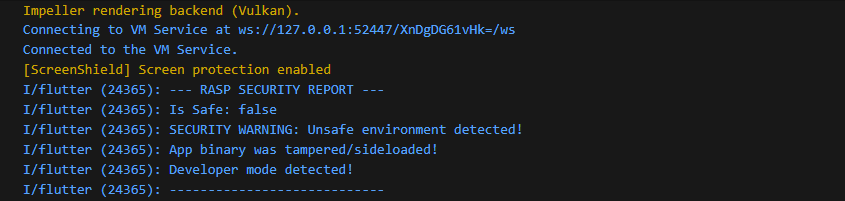
import 'package:flutter_neo_shield/rasp_shield.dart';

// Perform a full security scan on startup:
// In strict mode, throws SecurityException if any threat is detected.
final report = await RaspShield.fullSecurityScan(mode: SecurityMode.strict);

// Or use warn mode to log threats and continue:
final report = await RaspShield.fullSecurityScan(mode: SecurityMode.warn);

// Or silent mode with manual handling:
final report = await RaspShield.fullSecurityScan();
if (!report.isSafe) {
  print('SECURITY WARNING: Unsafe environment detected!');

  if (report.debuggerDetected) print('Debugger attached!');
  if (report.rootDetected) print('Device is rooted/jailbroken!');
  if (report.emulatorDetected) print('Running on emulator!');
  if (report.fridaDetected) print('Frida instrumentation detected!');
  if (report.hookDetected) print('Hooking framework (Substrate/Xposed) detected!');
  if (report.integrityTampered) print('App binary was tampered/sideloaded!');
  if (report.developerModeDetected) print('Developer Options / Developer Mode is enabled!');
  if (report.signatureTampered) print('APK/IPA re-signed with different certificate!');
  if (report.nativeDebugDetected) print('Native debugger (GDB/LLDB) attached from desktop!');
  if (report.networkThreatDetected) print('Proxy or VPN detected — possible MITM attack!');
}
    // Exit the app
    _terminateApp();
You can also run independent checks before sensitive actions (like processing a payment):
if ((await RaspShield.checkFrida()).isDetected) {
  throw Exception("Payment blocked: Security risk.");
}
Anti-Repackaging (Signature Verification)
The #1 attack on APKs: decompile with apktool/jadx, modify code, re-sign with a different key. Signature verification catches this:
// Check if someone re-signed your APK/IPA
if ((await RaspShield.checkSignature()).isDetected) {
  // APK was repackaged — kill the app or restrict features
}

// Get your signing certificate hash during development:
final hash = await RaspShield.getSignatureHash();
print('My signing cert SHA-256: $hash');
// Use this hash for strict verification in production
What it detects (Android): Debug certificates, multiple signers, certificate hash mismatch.
What it detects (iOS): Missing/corrupt CodeResources, get-task-allow entitlement, DYLD_INSERT_LIBRARIES injection.
What it detects (macOS): SecCodeCopySelf + SecStaticCodeCheckValidity, DYLD environment variables, get-task-allow entitlement, re-sign indicators.
What it detects (Windows): WinVerifyTrust Authenticode verification, PE image checksum validation, CryptQueryObject certificate chain and self-signed detection.
What it detects (Linux): ELF magic verification, LD_PRELOAD/LD_LIBRARY_PATH/LD_AUDIT injection detection.
What it detects (Web): Function.prototype.bind / Object.prototype.toString tampering (prototype monkey-patching).
Native Debugger Detection
Goes deeper than checkDebugger() — catches GDB, LLDB, strace attached from a desktop via USB/ADB:
if ((await RaspShield.checkNativeDebug()).isDetected) {
  // Native debugger attached from desktop!
}
Android: /proc/self/status TracerPid, /proc/self/wchan ptrace_stop, timing anomaly.
iOS: Mach exception port enumeration, timing anomaly, PT_DENY_ATTACH support.
macOS: ptrace(PT_DENY_ATTACH), sysctl P_TRACED, task_get_exception_ports, parent process check, timing anomaly.
Windows: NtQueryInformationProcess(ProcessDebugPort/ProcessDebugObjectHandle), DR0-DR3 hardware breakpoint registers, timing anomaly.
Linux: /proc/self/status TracerPid, PTRACE_TRACEME, /proc/self/wchan, timing anomaly.
Web: Computation timing anomaly detection (debugger stepping causes measurable delays).
Proxy & VPN Detection (Anti-MITM)
Detects Burp Suite, mitmproxy, Charles Proxy, and VPN tunnels — the tools attackers use to intercept your HTTPS traffic from their desktop:
if ((await RaspShield.checkNetworkThreats()).isDetected) {
  // Proxy or VPN active — possible MITM interception
}
Android: System proxy properties, ConnectivityManager, global proxy settings, VPN transport, tun/ppp interfaces.
iOS: CFNetwork proxy settings (HTTP/HTTPS/SOCKS), utun/ppp/ipsec network interfaces.
macOS: SCDynamicStoreCopyProxies (HTTP/HTTPS/SOCKS proxy), environment variables (http_proxy, etc.), getifaddrs VPN interfaces (utun/ppp/ipsec/tap/tun).
Windows: WinHttpGetIEProxyConfigForCurrentUser, GetAdaptersInfo VPN adapter detection, environment variables.
Linux: Proxy environment variables, getifaddrs VPN interfaces (tun/tap/ppp/wg).
Web: WebRTC availability check (VPN/privacy extensions block RTCPeerConnection).
6. Screen Shield — "Block screenshots & screen recording" #
The problem:
Your app shows sensitive data — bank balances, OTPs, medical records, credit card numbers. A malicious app (or even the user) can screenshot or screen-record this data. On Android, any app with MEDIA_PROJECTION permission can silently record your screen. On iOS, the built-in screen recorder or AirPlay mirroring can capture everything.
Even the app switcher (recent apps view) takes a snapshot of your screen — so when the user presses the home button, your sensitive data is visible as a thumbnail to anyone looking at the phone.
How Screen Shield fixes it:
It uses OS-level APIs to make your app's content invisible to all capture methods:
- Android: Sets
FLAG_SECUREon the Activity window. The OS itself renders a black screen for any capture — screenshots, screen recording, Chromecast,adb screencap, and the app switcher thumbnail. This works on all Android versions. - iOS: Uses a
UITextFieldwithisSecureTextEntry = trueas a rendering layer. The OS treats content in this layer as DRM-protected and blanks it during capture. This is the same technique used by banking apps. Additionally, a blur overlay is shown in the app switcher.
🎬 See Screen Shield in Action #
[Screen Shield Demo]
Simplest usage — protect the entire app:
void main() {
  WidgetsFlutterBinding.ensureInitialized();
  FlutterNeoShield.init(
    screenConfig: ScreenShieldConfig(
      blockScreenshots: true,    // Block screenshots
      blockRecording: true,      // Block screen recording
      guardAppSwitcher: true,    // Blur content in app switcher
    ),
  );
  runApp(MyApp());
}
// That's it. Every screen in your app is now protected.
Per-screen protection — only protect sensitive screens:
// Wrap only the screens that show sensitive data:
class PaymentScreen extends StatelessWidget {
  @override
  Widget build(BuildContext context) {
    return ScreenShieldScope(
      enableProtection: true,       // Block capture on this screen
      guardAppSwitcher: true,       // Blur in app switcher
      onScreenshot: () {            // Called when screenshot is taken (iOS only)
        ScaffoldMessenger.of(context).showSnackBar(
          SnackBar(content: Text('Screenshots are not allowed on this screen')),
        );
      },
      child: Scaffold(
        body: PaymentForm(),        // This content will be black in screenshots
      ),
    );
  }
}
// When the user navigates away from PaymentScreen, protection is auto-disabled.
Toggle protection dynamically — e.g., protect only during OTP display:
// Show OTP — enable protection
await FlutterNeoShield.screen.enableProtection();

// ... user enters OTP ...

// OTP consumed — disable protection
await FlutterNeoShield.screen.disableProtection();
Detect screen recording (iOS) — e.g., pause sensitive content:
FlutterNeoShield.screen.onRecordingStateChanged.listen((event) {
  if (event.isRecording) {
    // Someone started screen recording!
    // Navigate away, pause video, or show a warning
    Navigator.of(context).pushReplacement(
      MaterialPageRoute(builder: (_) => RecordingBlockedScreen()),
    );
  }
});
What each platform does when you enable protection:
| Action | Android | iOS | macOS | Windows | Linux | Web |
|---|---|---|---|---|---|---|
| User takes screenshot | Black screen | Blank content | Excluded from capture | Excluded from capture | Best-effort | CSS protection |
| User starts screen recording | Black screen | Blanked + event fires | Excluded | Excluded | Best-effort | CSS protection |
| User Chromecasts / AirPlays | Black screen | Blank on TV | N/A | N/A | N/A | N/A |
| App in recent apps / switcher | Black thumbnail | Blurred | N/A | N/A | N/A | N/A |
adb screencap / dev tools |
Black screen | N/A | N/A | N/A | N/A | N/A |
| Print (Ctrl+P) | N/A | N/A | N/A | N/A | N/A | Blocked |
Desktop screen protection mechanisms:
- macOS:
NSWindow.sharingType = .none— OS-level exclusion from all capture methods. - Windows:
SetWindowDisplayAffinity(WDA_EXCLUDEFROMCAPTURE)withWDA_MONITORfallback — prevents screenshots, recording, and remote desktop capture. - Linux: Best-effort (no universal screen capture prevention API on Linux).
- Web: CSS-based (
user-select: none, print media hiding, right-click/print shortcut blocking). Limited effectiveness against determined attackers.
Note: No software can prevent someone from pointing a camera at their phone screen. Screen Shield blocks all digital capture methods.
Installation #
Step 1: Add to pubspec.yaml:
dependencies:
  flutter_neo_shield: ^1.10.0
Step 2: Run:
flutter pub get
Step 3: Initialize in main.dart:
import 'package:flutter_neo_shield/flutter_neo_shield.dart';

void main() {
  WidgetsFlutterBinding.ensureInitialized();
  FlutterNeoShield.init();  // That's it!
  runApp(MyApp());
}
Step 4: Start using it anywhere in your app:
// Instead of print():
shieldLog('Debug: user email is john@test.com');

// Instead of Clipboard.setData():
await ClipboardShield().copy('sensitive-text', expireAfter: Duration(seconds: 15));

// Instead of String for secrets:
final secret = SecureString('my-api-key');

// Protect strings in compiled binary:
// (see String Shield section above for full setup)
final url = $AppSecrets.apiUrl;  // decrypted at runtime

// Check if device is safe (RASP):
final report = await RaspShield.fullSecurityScan();
if (!report.isSafe) {
  // exit or restrict user
}

// Block screenshots & recording:
await FlutterNeoShield.screen.enableProtection();

// Or wrap a single screen:
ScreenShieldScope(child: SensitiveScreen())
Real-World Example #
Here's a typical Flutter app scenario — a login screen:
// ============================================
// WITHOUT flutter_neo_shield (unsafe)
// ============================================
Future<void> login(String email, String password) async {
  print('Login attempt: $email');              // LEAKS email in debug AND release!
  final token = await api.login(email, password);
  print('Got token: $token');                  // LEAKS token in debug AND release!
  final savedToken = token;                    // Token stays in RAM forever
}

// ============================================
// WITH flutter_neo_shield (safe — zero extra effort)
// ============================================
Future<void> login(String email, String password) async {
  shieldLog('Login attempt: $email');
  // Debug console:   [INFO] Login attempt: john@gmail.com   ← you see it for debugging!
  // Release console: [INFO] Login attempt: [EMAIL HIDDEN]   ← hidden in production!

  final token = await api.login(email, password);
  shieldLog('Got token: $token');
  // Debug console:   [INFO] Got token: eyJhbGci...          ← you see it for debugging!
  // Release console: [INFO] Got token: [JWT HIDDEN]         ← hidden in production!

  // Token stored securely — wiped from RAM on dispose:
  final savedToken = SecureString(token);
  savedToken.dispose();  // Bytes overwritten with zeros
}
Notice: You write the exact same code for dev and production. shieldLog()
automatically knows which mode you're in and does the right thing.
FAQ for Beginners #
Q: Does Log Shield automatically hide all my print() statements?
A: No. You need to replace print() with shieldLog() in your code. It's a manual replacement — but it's just one word. Search your project for print( and replace with shieldLog(.
Q: But if shieldLog() hides data, how do I debug during development?
A: By default (v0.5.2+), shieldLog() hides PII in all modes for safety. To see real values during local development, set sanitizeInDebug: false in your LogShieldConfig. You write the code once, and it does the right thing in each mode.
Q: Do I need to use all 6 modules?
A: No. Use only what you need. You can import just one module:
import 'package:flutter_neo_shield/log_shield.dart';       // Only Log Shield
import 'package:flutter_neo_shield/clipboard_shield.dart';  // Only Clipboard Shield
import 'package:flutter_neo_shield/memory_shield.dart';     // Only Memory Shield
import 'package:flutter_neo_shield/string_shield.dart';     // Only String Shield
import 'package:flutter_neo_shield/rasp_shield.dart';       // Only RASP Shield
import 'package:flutter_neo_shield/flutter_neo_shield.dart'; // Screen Shield (included in main import)
Q: Does Screen Shield actually prevent screenshots?
A: Yes, on Android and iOS. On Android, FLAG_SECURE makes the OS render a black screen for all capture methods — this is enforced at the OS level and cannot be bypassed without root. On iOS, the secure text field trick blanks the content during capture. However, no software can prevent someone from pointing a physical camera at the screen.
Q: Can I protect only some screens and not others?
A: Yes. Use ScreenShieldScope widget to wrap only the screens that show sensitive data. When the user navigates away, protection is automatically disabled:
ScreenShieldScope(
  child: PaymentScreen(),   // Protected
)
// Other screens remain unprotected
Or toggle manually: await FlutterNeoShield.screen.enableProtection() / .disableProtection().
Q: Does Screen Shield work on web or desktop?
A: Yes (v1.9.0+). macOS uses NSWindow.sharingType = .none to exclude from all capture. Windows uses SetWindowDisplayAffinity(WDA_EXCLUDEFROMCAPTURE). Linux is best-effort (no universal API). Web uses CSS-based protection (user-select, print blocking, context menu blocking) — effective against casual capture but not against determined attackers.
Q: Does this send my data to any server?
A: No. Everything runs locally on the device. Zero network calls. Zero API keys. Zero backend.
Q: Does Clipboard Shield prevent the user from copying text?
A: No. The text is copied normally. The user can paste it right away. Clipboard Shield just starts a timer that clears the clipboard after the time expires (default 30 seconds). So if the user pastes within 30 seconds, everything works fine.
Q: What happens if I forget to call dispose() on a SecureString?
A: You can set maxAge to auto-dispose it, or call MemoryShield().disposeAll() on logout. You can also enable autoDisposeOnBackground: true to wipe all secrets when the app goes to the background.
Q: Can I add my own patterns to detect?
A: Yes! For example, if your company uses internal account numbers like ACCT-1234567890:
PIIDetector().addPattern(PIIPattern(
  type: PIIType.custom,
  regex: RegExp(r'ACCT-\d{10}'),
  replacement: '[ACCOUNT HIDDEN]',
  description: 'Internal account numbers',
));

shieldLog('Account: ACCT-1234567890');
// Output: Account: [ACCOUNT HIDDEN]
Q: Does the Dio interceptor change my actual HTTP requests?
A: No. It only sanitizes the log output. Your real requests and responses are untouched.
Configuration (Optional) #
The defaults work fine for most apps. But you can customize everything:
FlutterNeoShield.init(
  config: ShieldConfig(
    enabledTypes: {PIIType.email, PIIType.phone, PIIType.ssn}, // Only detect these (empty = all)
    enableReporting: true,                                      // Track how many detections
  ),
  logConfig: LogShieldConfig(
    silentInRelease: true,    // No logs at all in release builds
    showRedactionNotice: true, // Show "[2 items redacted]" at end of log
  ),
  clipboardConfig: ClipboardShieldConfig(
    defaultExpiry: Duration(seconds: 30),  // Auto-clear after 30s
    clearAfterPaste: true,                 // Also clear after user pastes
  ),
  memoryConfig: MemoryShieldConfig(
    autoDisposeOnBackground: true,  // Wipe all secrets when app goes to background
  ),
  stringShieldConfig: StringShieldConfig(
    enableCache: false,  // Set true to cache decrypted strings (faster but less secure)
    enableStats: false,  // Track deobfuscation counts (off by default)
  ),
  screenConfig: ScreenShieldConfig(
    blockScreenshots: true,         // Prevent screenshots from capturing app content
    blockRecording: true,           // Prevent screen recording
    guardAppSwitcher: true,         // Blur/hide content in recent apps
    detectScreenshots: true,        // Listen for screenshot events (iOS)
    detectRecording: true,          // Listen for recording state changes (iOS)
    enableOnInit: true,             // Auto-enable on init (default: true)
  ),
);
Log Functions Reference #
| Function | When to use |
|---|---|
shieldLog('message', level: 'ERROR', tag: 'auth') |
PII-sanitized logging with level and tag |
shieldLogJson('label', {...}) |
Log a JSON/Map with all values sanitized |
shieldLogError('message', error: e, stackTrace: s) |
Log an error with stack trace |
Dio Integration #
Available from GitHub only (not on pub.dev), to keep zero external dependencies.
If you use Dio for HTTP calls, add the interceptor to sanitize all HTTP logs:
final dio = Dio();
dio.interceptors.add(DioShieldInterceptor());
// Now all request/response logs have PII hidden automatically.
See the Dio integration file on GitHub.
Platform Support #
| Platform | Log Shield | Clipboard Shield | Memory Shield | String Shield | RASP Shield | Screen Shield |
|---|---|---|---|---|---|---|
| Android | Yes | Yes | Yes (native wipe) | Yes | Yes (native) | Yes (FLAG_SECURE) |
| iOS | Yes | Yes | Yes (native wipe) | Yes | Yes (native) | Yes (secure layer + detection) |
| macOS | Yes | Yes | Yes (native wipe) | Yes | Yes (native) | Yes (NSWindow.sharingType) |
| Windows | Yes | Yes | Yes (native wipe) | Yes | Yes (native) | Yes (SetWindowDisplayAffinity) |
| Linux | Yes | Yes | Yes (native wipe) | Yes | Yes (native) | Yes (best-effort) |
| Web | Yes | Yes | Yes (Dart wipe) | Yes | Yes (JS heuristic) | Yes (CSS-based) |
Desktop & Web RASP (v1.9.0): All 10 RASP checks now run in native code on every platform. Desktop uses platform-specific APIs (sysctl, ptrace, IOKit on macOS; NtQueryInformationProcess, WinVerifyTrust on Windows; /proc filesystem on Linux). Web uses browser JavaScript heuristics via
dart:js_interop+package:web— fully WASM-compatible.
Anti-Reverse-Engineering Hardening (v1.10.0) #
Starting from v1.10.0, the plugin includes multiple layers of protection against reverse engineering:
Plugin-Level Hardening (built-in, automatic) #
These protections are built into the plugin binary itself — no configuration needed:
| Layer | What it does | Platforms |
|---|---|---|
| XOR-Encoded Strings | All MethodChannel names, method names, and detection strings are XOR-encoded at rest and decoded only at runtime. strings libapp.so reveals nothing useful. |
All 6 platforms |
| ProGuard/R8 Obfuscation | Plugin ships with ProGuard rules that obfuscate all internal detector classes while keeping only the public API entry point. | Android |
| Symbol Stripping | Native binaries are compiled with optimization (-Os/-O2) and stripped of debug symbols and unused code. |
iOS, macOS, Windows, Linux |
| Self-Integrity Checks | Detects method swizzling, DYLD injection, classloader tampering, and hook framework presence on the plugin itself. | Android, iOS |
| Fail-Closed Design | All detector catch blocks return true (threat detected) instead of false. If an attacker causes an exception, the check fails safe. |
All 6 platforms |
| Cross-Detector Validation | If self-integrity check fails, individual detector results are overridden to "detected" — preventing selective hook bypasses. | Android, iOS |
App-Level Hardening (recommended for your app) #
For maximum protection, build your app with Dart obfuscation enabled:
# For Google Play (AAB):
flutter build appbundle --obfuscate --split-debug-info=build/debug-info

# For direct APK distribution:
flutter build apk --obfuscate --split-debug-info=build/debug-info

# For iOS:
flutter build ipa --obfuscate --split-debug-info=build/debug-info
Note:
--obfuscaterenames Dart classes, methods, and fields to meaningless names (e.g.,RaspShield.checkFrida()becomesaB.c()). It does NOT encrypt string literals — that's what the plugin's built-in XOR encoding and String Shield handle. The--split-debug-infoflag saves the symbol map so you can still read crash reports.
How to contribute #
Want to contribute to the project? We will be proud to highlight you as one of our collaborators. Here are some points where you can contribute and make flutter_neo_shield (and Flutter) even better.
- Helping to translate the readme into other languages.
- Adding documentation to the readme (a lot of flutter_neo_shield's functions haven't been documented yet).
- Write articles or make videos teaching how to use flutter_neo_shield (they will be inserted in the Readme and in the future in our Wiki).
- Offering PRs for code/tests.
- Including new functions.
Any contribution is welcome!
License #
MIT License. See LICENSE for details.
Copyright (c) 2024-2026 Neelakandan
Metadata
Publisher
unverified uploader
Weekly Downloads
Metadata
Client-side PII protection toolkit for Flutter. Secures sensitive data from logs and clipboard, protects memory, and obfuscates strings in binaries.
Repository (GitHub)
View/report issues
Topics
#security #privacy #pii #logging #obfuscation
License
 unknown (license)
Dependencies
analyzer, build, dio, flutter, flutter_web_plugins, meta, plugin_platform_interface, source_gen, web
More
Packages that depend on flutter_neo_shield
Packages that implement flutter_neo_shield

