
fcheck 0.8.0  fcheck: ^0.8.0 copied to clipboard
 vteam.com
A CLI tool for analyzing Flutter and Dart code quality, checking project metrics, comment ratios, class organization, hardcoded strings, and source sorting validation.
fcheck #
A command-line tool for analyzing the quality of Flutter and Dart projects. Get instant insights into your codebase with comprehensive metrics and quality checks.
🚀 Quick Start #
# Install
dart pub global activate fcheck

# Analyze your project & Generate beautiful dependency diagrams
fcheck /path/to/your/project --svg
✨ What fcheck Does #
fcheck analyzes your Flutter/Dart project and provides:
- ⚡ High Performance: 67%+ faster analysis with unified file traversal
- ⚠️ No Duplication: Unlike Flutter LINT or Dart compiler, fcheck focuses on unique architectural and structural analysis
- 📊 Project Overview: Files, folders, lines of code, comment ratios
- ✅ Code Quality: One class per file compliance, member sorting
- 🔍 Issue Detection: Hardcoded strings, magic numbers, layer violations, secrets
- 🌐 Visualizations: SVG, Mermaid, and PlantUML dependency graphs
📈 Example Output #
↓ -------- fCheck v0.8.0 -------- ↓
Project          : my_app (version: 1.0.0)
Folders          : 15
Files            : 89
Dart Files       : 23
Lines of Code    : 2,456
Comment Lines    : 312
Comment Ratio    : 12.70%
Hardcoded Strings: 6
Magic Numbers    : 2
Secrets          : 0
Layers           : 5
Dependencies     : 12

✅ All files comply with the "one class per file" rule.
⚠️ 6 potential hardcoded strings detected
🔧 2 Flutter classes have unsorted members
✅ No secrets detected in your codebase.
✅ All layers architecture complies with standards.
↑ ----------------------- ↑
⚡ Performance Optimization #
fcheck now features unified file traversal that dramatically improves analysis speed:
How It Works #
- Single File Discovery: One directory scan instead of 6+ separate traversals
- Shared AST Parsing: Each file parsed once, results shared across all analyzers
- Cached File Context: Eliminates redundant I/O operations
- Parallel Delegation: Multiple analyzers work on the same file context
Performance Gains #
- 67-72% faster analysis on typical projects
- Scales better with larger codebases
- Same results with better performance
Usage #
The performance optimization is automatic - just use fcheck normally:
# Uses optimized unified traversal automatically
fcheck /path/to/project

# All existing features work with the optimization
fcheck --svg --fix
🛠️ Installation #
Option 1: Global Installation (Recommended) #
dart pub global activate fcheck
Option 2: DevDependencies #
dart pub add fcheck -d
dart run fcheck
📋 Usage #
Basic Commands #
# Analyze current directory
fcheck

# Analyze specific project
fcheck /path/to/project

# Show help
fcheck --help

# Show version
fcheck --version

# Generate SVG dependency graph
fcheck --svg

# Generate folder-based visualization
fcheck --svgfolder

# Output as JSON
fcheck --json

# Auto-fix sorting issues
fcheck --fix
🎯 Quality Checks #
One Class Per File Rule #
- ✅ Compliant: 1 public class per file (or 2 for StatefulWidget)
- ❌ Violation: Too many public classes in one file
Opt-out: Add // ignore: fcheck_one_class_per_file at the top of the file
Magic Numbers #
- 🔍 Detects: Numeric literals (except 0, 1, -1) used directly in code
- ✅ Allows: Constants, annotation values, common numbers
Opt-out: Add // ignore: fcheck_magic_numbers at the top of the file
Hardcoded Strings #
- ⚠️ Caution: Potential user-facing strings (project not localized)
- ❌ Error: Hardcoded strings when localization is enabled
Opt-out: Add // ignore: fcheck_hardcoded_strings at the top of the file
Secrets Detection #
- 🔒 Security: Detects API keys, tokens, private keys, and other sensitive information
- 🚨 Critical: AWS keys, GitHub PATs, Stripe keys, emails
- 📊 Advanced: High entropy string detection for unknown secret patterns
Opt-out: Add // ignore: fcheck_secrets at the top of the file
Member Sorting #
- 🔧 Auto-fix: Reorganizes Flutter class members automatically
- ✅ Validates: Proper order of constructors, fields, methods, lifecycle methods
🌐 Visualizations #
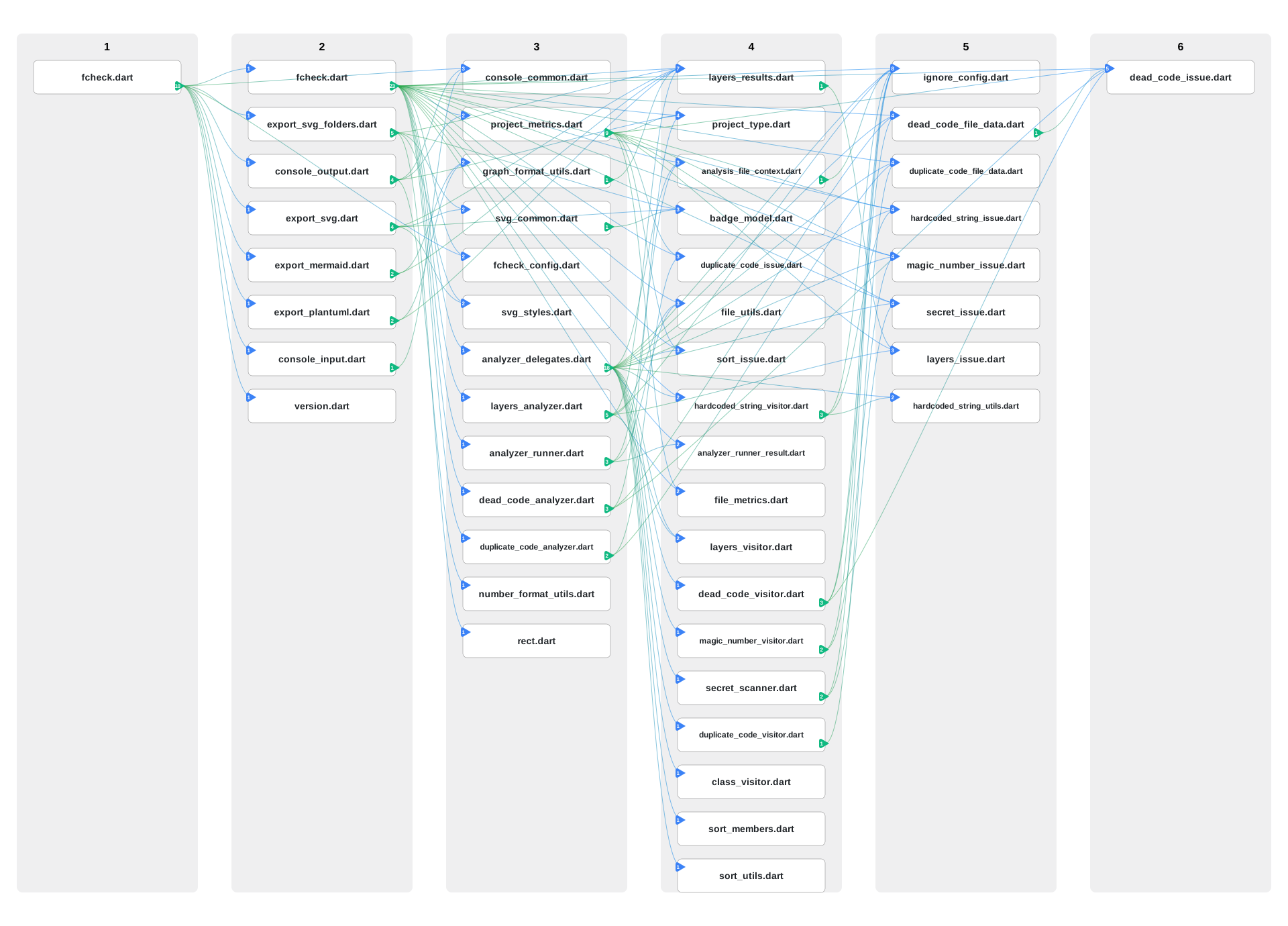
SVG Dependency Graph #
fcheck --svg
Generates layers.svg showing:
- Layered architecture (Layer 1 = entry points)
- File dependencies with directional edges
- Interactive tooltips
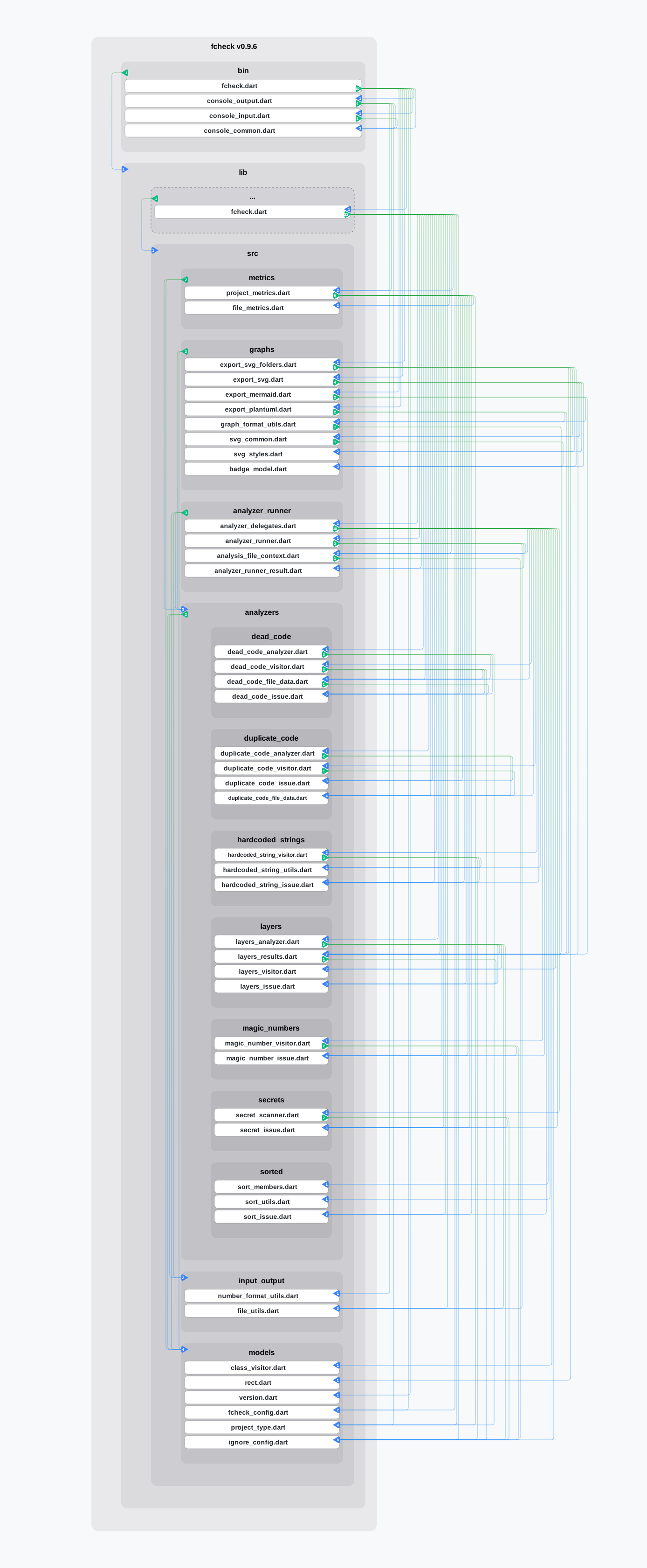
Folder-Based Visualization #
fcheck --svgfolder
- Shows files grouped by folders with dependencies.
Mermaid & PlantUML #
fcheck --mermaid    # Generates layers.mmd
fcheck --plantuml   # Generates layers.puml
📊 Understanding the Output #
Project Statistics #
- Folders: Number of directories
- Files: Total files in project
- Dart Files:
.dartfiles analyzed - Lines of Code: Total lines in Dart files
- Comment Ratio: Documentation percentage
Quality Indicators #
- ✅ All good: No issues found
- ⚠️ Caution: Potential issues (non-blocking)
- ❌ Error: Violations that need attention
- 🔧 Fixable: Issues that can be auto-fixed
🛡️ Default Exclusions #
By default, fcheck excludes common non-project directories:
example/, test/, tool/, .dart_tool/, build/, .git/, ios/, android/, web/, macos/, windows/, linux/.
Localization Filtering #
To reduce noise and avoid cyclic dependency displays from generated code, fcheck automatically filters out generated localization files:
- 🙈 Excluded:
app_localizations_*.dartandapp_localization_*.dart(generated locale-specific files) - ✅ Included:
app_localizations.dart(the main entry point)
🔧 Configuration #
Global Ignore (.fcheck file) #
Create a .fcheck file in your project root:
ignores:
  magic_numbers: true
  hardcoded_strings: true
  layers: true
Per-File Ignore #
Add at the top of any Dart file:
// ignore: fcheck_one_class_per_file
// ignore: fcheck_magic_numbers
// ignore: fcheck_hardcoded_strings
// ignore: fcheck_secrets
// ignore: fcheck_layers
🤝 Contributing #
- Fork the repository
- Create a feature branch:
git checkout -b feature-name - Make your changes
- Run
./tool/check.shto ensure quality - Submit a pull request
📋 Requirements #
- Dart SDK >= 3.0.0
- Works with any Flutter/Dart project
📄 License #
MIT License - see LICENSE file for details.
Metadata
Publisher
Weekly Downloads
Metadata
A CLI tool for analyzing Flutter and Dart code quality, checking project metrics, comment ratios, class organization, hardcoded strings, and source sorting validation.
Repository (GitHub)
View/report issues
License
 unknown (license)
Dependencies
analyzer, args, glob, path, yaml

