
dual_tone_text_codespark 0.0.5  dual_tone_text_codespark: ^0.0.5 copied to clipboard
 ksaikiran.tech
A Flutter package to render text with sharp dual-tone color splits—vertical, horizontal, or radial. Great for stylish titles and headers.

🖌️ dual_tone_text #


Render sharp dual-colored text in Flutter — vertically, horizontally, or radially split with solid cutoff (not gradient). Perfect for high-impact UIs, headers, or artistic effects.
✨ Fully null-safe and supports international text.
🚀 Features #
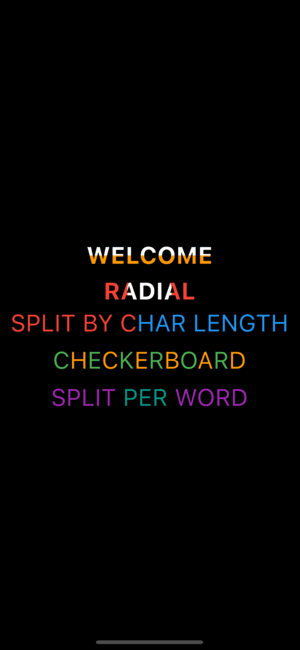
✅ Sharp vertical split (top/bottom) ✅ Solid horizontal split (left/right) ✅ Powerful radial center-out split ✅ Per-character split (change color after n characters) ✅ Checkerboard style (alternating color blocks) ✅ Per-word dual tone (each word switches color) ✅ No blending — hard color switch ✅ Custom percentage-based control ✅ Works with any Text widget ✅ Designed for performance
🔧 Installation #
Add to your pubspec.yaml:
dependencies:
  dual_tone_text: ^0.0.5
Then run:
flutter pub get
🧪 Usage #
🔽 Vertical Split (Top–Bottom) #
DualToneText(
  text: Text(
    'WELCOME',
    style: TextStyle(fontSize: 60, fontWeight: FontWeight.bold, color: Colors.black),
  ),
  bottomColor: Colors.orange,
  splitPercentage: 0.5, // Half black, half orange
  splitType: SplitType.vertical,
)
➡ Horizontal Split (Left–Right) #
DualToneText(
  text: Text(
    'WELCOME',
    style: TextStyle(fontSize: 60, fontWeight: FontWeight.bold, color: Colors.blue),
  ),
  bottomColor: Colors.green,
  splitPercentage: 0.6, // 60% blue (left), 40% green (right)
  splitType: SplitType.horizontal,
)
🌀 Radial Split (Center Out) #
RadialSplitText(
  text: Text(
    'WELCOME',
    style: TextStyle(fontSize: 60, fontWeight: FontWeight.bold, color: Colors.white),
  ),
  outerColor: Colors.red,
  radiusCutoff: 0.4, // Inner 40% white, outer 60% red
)
🌐 Per-Character Dual Tone #
DualToneTextByChar(
  text: "Hello World",
  style: TextStyle(fontSize: 24),
  topColor: Colors.red,
  bottomColor: Colors.blue,
  splitAt: 8,
)
🔳 Checkerboard Pattern #
DualToneCheckerboardText(
  text: "Checkerboard",
  style: TextStyle(fontSize: 24),
  color1: Colors.green,
  color2: Colors.orange,
)
🪄 Split Per Word #
DualToneWordSplitText(
  text: "Split Per Word",
  style: TextStyle(fontSize: 24),
  color1: Colors.purple,
  color2: Colors.teal,
)
📷 Preview #



💡 Roadmap #
- ✅ Vertical Split
- ✅ Horizontal Split
- ✅ Radial Split
- ✅ Checker Text
- ✅ Character-based Split
- ✅ Word-based Split
- ❌ Diagonal Split (↘ / ↖)
- ❌ Text Stroke or Border Split
- ❌ N-Color Sectional Split
- ❌ Animation support for transitions
- ❌ Emoji-safe, RTL and multi-line support
- ❌ Canvas-based rendering for custom shapes
🌍 Internationalization #
✅ Supports Unicode and multilingual characters. 🎌 Text like Arabic, Chinese, and Hindi is supported.
📁 Example #
Clone or open the example/ folder and run:
flutter run
👨💻 Maintainer #
Developed with 💙 by Katayath Sai Kiran 📬 Feel free to contribute or suggest improvements!
Metadata


Publisher
Weekly Downloads
Metadata
A Flutter package to render text with sharp dual-tone color splits—vertical, horizontal, or radial. Great for stylish titles and headers.
Repository (GitHub)
View/report issues
Topics
#text #shader #custom-text #typography #dual-tone
Documentation
License
 MIT (license)

