
currency_formatter_tools 0.0.7  currency_formatter_tools: ^0.0.7 copied to clipboard
A Flutter package for advanced currency formatting and localization.
Currency Formatter Tools #
A Flutter package for advanced currency formatting and localization.
Features #
- Format numeric values as text with customizable decimal places.
- Format values with currency symbols, separators, and various customization options.
- Retrieve currency symbols from a list or map of currency data.
Installation #
Add the following to your pubspec.yaml file:
dependencies:
  currency_formatter_tools: ^0.0.5
Run flutter pub get to fetch the dependencies.
Usage #
Import the Package #
import 'package:currency_formatter_tools/currency_formatter_tools.dart';
Formatting Numeric Values as Text #
Use the formatAsText method to format a numeric value as a Text widget with specified decimal places and an optional label.
Widget formattedText = CurrencyFormatterTools.formatAsText(
  value: 1234.56,
  decimalPlaces: 2,
  label: 'Amount',
  textStyle: TextStyle(fontSize: 16, color: Colors.black),
);
Formatting Values with Currency Symbols #
Use the formatWithCurrency method to format a value with a currency symbol, separators, and various customization options.
Widget formattedCurrency = CurrencyFormatterTools.formatWithCurrency(
  value: 1234.56,
  locale: 'en_US',
  currencySymbol: '\$',
  useLocaleFormatting: true,
  symbolOnRight: false,
  decimalPlaces: 2,
  label: 'Price',
  textStyle: TextStyle(fontSize: 16, color: Colors.black),
);
Retrieving Currency Symbols #
Use the getCurrencySymbol method to retrieve the currency symbol for a given currency ID from a list or map of currency data.
String currencySymbol = CurrencyFormatterTools.getCurrencySymbol(
  currencyData: [
    {'crID': 0, 'crTitle': 'Euro', 'crSymbol': '€'},
    {'crID': 1, 'crTitle': 'US Dollar', 'crSymbol': '\$'},
  ],
  currencyID: '0', // Use the ID as a string
);
Example #
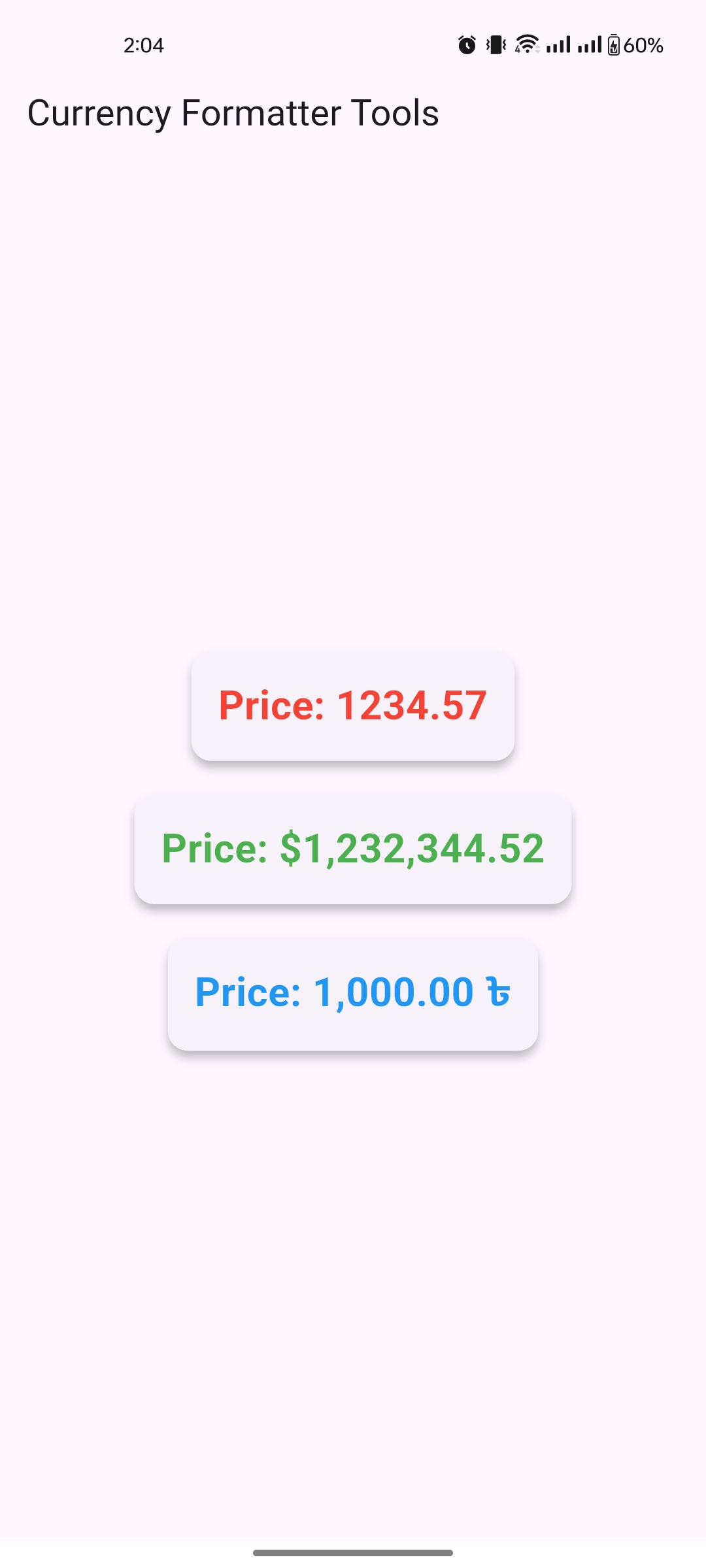
Here is a complete example of how to use the currency_formatter_tools package in a Flutter application:
import 'package:flutter/material.dart';
import 'package:currency_formatter_tools/currency_formatter_tools.dart';

void main() {
  runApp(const MyApp());
}

class MyApp extends StatelessWidget {
  const MyApp({super.key});
  @override
  Widget build(BuildContext context) {
    final List<Map<String, dynamic>> currencies = [
      {
        "crID": 0,
        "crTitle": "Euro",
        "crSymbol": "\u20ac",
      },
      {
        "crID": 1,
        "crTitle": "US Dollar",
        "crSymbol": "\u0024",
      },
      {
        "crID": 3,
        "crTitle": "TK",
        "crSymbol": "\u09F3",
      }
    ];
    return MaterialApp(
      debugShowCheckedModeBanner: false,
      home: Scaffold(
        appBar: AppBar(title: const Text('Currency Formatter Tools')),
        body: Center(
          child: Column(
            mainAxisAlignment: MainAxisAlignment.center,
            children: [
              // Displaying a formatted text value
              CurrencyFormatterTools.formatAsText(
                value: 1234.56789,
                label: 'Price',
                textStyle: const TextStyle(fontSize: 24),
              ),
              // Displaying a formatted value with a currency symbol
              CurrencyFormatterTools.formatWithCurrency(
                value: 1232344.5212,
                decimalPlaces: 3,
                currencySymbol: '\$',
                label: 'Price',
                textStyle: const TextStyle(fontSize: 24),
              ),
              // Displaying the currency symbol for the given currency ID
              CurrencyFormatterTools.formatWithCurrency(
                value: 1000,
                currencySymbol: CurrencyFormatterTools.getCurrencySymbol(currencyData: currencies, currencyID: '3'),
                label: 'Price',
                symbolOnRight: true,
                textStyle: const TextStyle(fontSize: 24),
              ),

            ],
          ),
        ),
      ),
    );
  }
}
Metadata
Publisher
unverified uploader
Weekly Downloads
Metadata
A Flutter package for advanced currency formatting and localization.
Repository (GitHub)
View/report issues
Documentation
License
 MIT (license)

