
asystant_ai 0.3.0  asystant_ai: ^0.3.0 copied to clipboard
 jhonacode.com
An embeddable Flutter assistant with local tools and reactive_notifier.
asystant_ai #
An embeddable Flutter assistant with local application tools, explicit permissions, genUI cards and reactive_notifier state. Use the same chat in a section, bottom sheet, end drawer or full screen on mobile, web and desktop.
Install #
flutter pub add asystant_ai
Create your assistant #
import 'package:asystant_ai/asystant_ai.dart';

class WorkspaceAssistant extends AsystantAI {
  WorkspaceAssistant() : super(name: 'Workspace assistant');

  @override
  List<AsystantTool> get tools => const [];

  @override
  List<AsystantSystemPrompt> get systemPrompts => const [
    AsystantSystemPrompt(
      id: 'workspace',
      content: 'Help inside this workspace. Use local tools for actions.',
    ),
  ];
}
After your host services and login are ready, call assistant.init with a GatewayTransport. Its SessionSource obtains signed tickets from your backend; provider API keys never belong in Flutter. Pass models: [] to accept the server-assigned model and add optional factory tools through builtInTools.
assistant.init(
  transport: GatewayTransport(
    baseUri: gatewayUri,
    sessionSource: hostSession,
  ),
  models: [],
  builtInTools: const [
    PresentationTool(kind: AssistantCardKind.summary),
    PresentationTool(kind: AssistantCardKind.selection),
  ],
);
gatewayUri and hostSession are supplied by your app. See the integration guide for the authentication contract.
Embed the chat #
AsystantButton(assistant: assistant); // Opens a bottom sheet.

AsystantChat(
  assistant: assistant,
  strings: const AsystantStrings(spanish: false),
); // Mount inside a bounded section, drawer or full-screen Scaffold.
The host owns the assistant instance: closing the panel preserves the conversation. Call assistant.dispose() when its owner ends. Changing the login invalidates pending permissions and clears the conversation; initialize again for the new session.
Tools and permissions #
Implement AsystantTool or TypedAsystantTool<T>. Return a ToolDefinition, a read-only preview and an execution result. Tools execute inside the host app, never on the gateway. Confirmation is required by default; read-only tools can explicitly opt out. Use requiresSelection for user choices and isAvailable to control registration.
ToolContext exposes cancellation, selected values and an idempotency key. Your repository must still enforce authorization and protect asynchronous writes against duplicate effects. The SDK does not claim to reverse completed actions.
Cards support summary, entity, selection, permission and result presentations. The chat shows ordered tool steps, progress and error icons, and an action that changes from Send to Stop. Theme colors follow the host; use AsystantTheme for metrics and subclass AsystantStrings for custom wording or languages. English and Spanish are included.
Backend and models #
You can deploy the reference Rust API, or use its OpenAPI contract as a guide for your own backend. It handles short-lived credentials, revocation, durable budgets and model policies per product, customer and user. See deployment and security.
The package does not include a hosted API, provider credentials or inference credits. OpenRouter is the initial integration; the server also contains OpenAI, Gemini, Anthropic and OpenCode adapters. Messages/Responses adapters currently deliver complete responses rather than incremental text. Provider availability and usage terms must be checked before enabling a model.
Example #
example/lib/main.dart runs without credentials using an explicitly simulated assistant response and a real local read-only tool. The repository also includes a complete host app demonstrating draft confirmation in sheets, drawers and full screens.
License #
MIT. See LICENSE.
Deferred startup #
init() only stores configuration. It does not evaluate application tool getters,
create a session, or contact the gateway. AsystantChat starts setup after its first
frame, only when mounted; a launcher button alone does not initialize the assistant.
Do not await assistant readiness before runApp() or host authentication.
For a custom chat UI, call ensureInitialized() when that UI opens. Concurrent calls
share initialization. Network failures remain inside the assistant UI and do not
prevent the host app from starting.
Network I/O uses asynchronous Dart APIs. An isolate is unnecessary for this work and would not support application tools holding UI or service references. Keep tool registration cheap; move any genuinely CPU-intensive application computation to an isolate inside that tool. Startup has no dependency on the assistant's network latency; this is not a claim of literally zero CPU cost.
Migration from 0.1.0: remove await before init(). Only headless clients and tests
that immediately send messages should explicitly await ensureInitialized().
Reports and prompt customization #
Application personality is supplied through AsystantAI.systemPrompts; scoped
context can be added with additionalSystemPrompts during init(). The SDK and
Rust gateway apply baseline safety guidance independently. See the
integration guide.
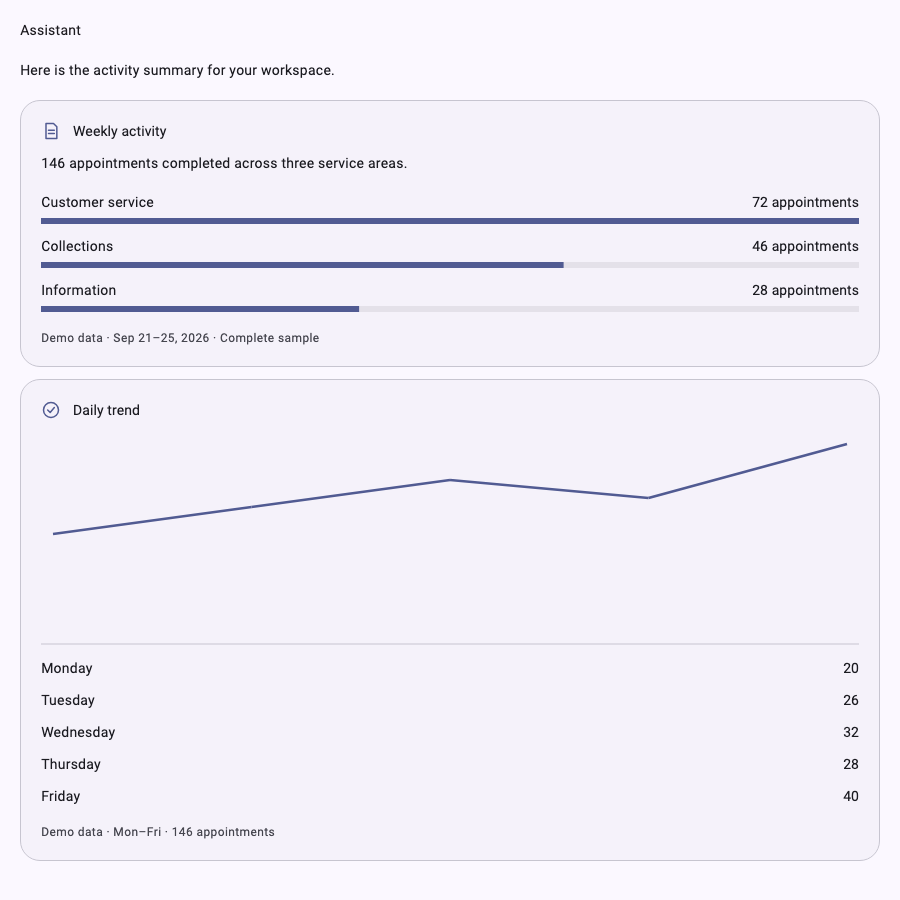
Cards now support typed bar and line charts, with accessible labels, units and source notes. These are English Flutter golden renders using example data:

See model experience and verification for owner-reported GPT-OSS 20B/120B results and the boundary of automated testing.
Links and copying #
Completed messages and card bodies support named Markdown links and bare HTTP(S) URLs. Tap a link to open it, drag to select and copy on desktop, or long press and choose Copy on mobile. Card and chart text participates in the same selection; automatic scrolling pauses while text is selected. Streamed text stays lightweight until the message completes.
Use onOpenLink on AsystantChat or AsystantButton to provide a host navigation
callback returning FutureOr<bool>. Return true when handled or false for
localized feedback inside the chat. Both default and custom navigation accept
credential-free HTTP(S) URLs only. Model-supplied images render alternative text
without automatically loading external resources. See the
link integration guide.
Metadata
Documentation
Publisher
Weekly Downloads
Metadata
An embeddable Flutter assistant with local tools and reactive_notifier.
Homepage
Repository (GitHub)
View/report issues
Topics
#ai #assistant #tools #openrouter
License
 unknown (license)
Dependencies
asystant_core, collection, flutter, flutter_markdown_plus, reactive_notifier, url_launcher