
advance_cart_stepper 2.0.0  advance_cart_stepper: ^2.0.0 copied to clipboard
A customizable expandable cart quantity stepper widget for Flutter with async support, loading indicators, and theming.
Cart Stepper #
A highly customizable, animated cart quantity stepper widget for Flutter with async support, loading indicators, and theming.


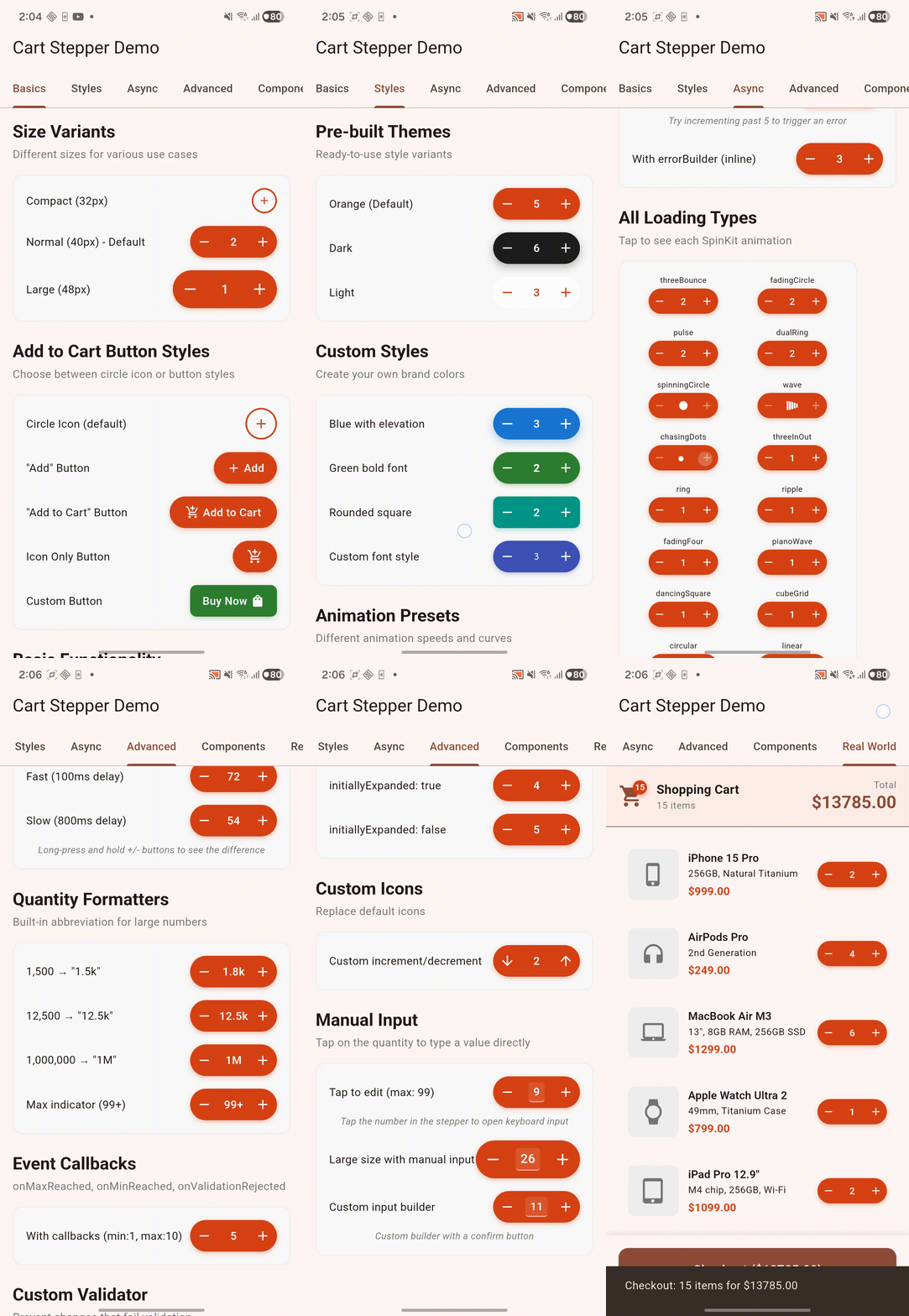
Table of Contents #
- Features
- Installation
- Which Widget to Use?
- Quick Start
- Customization
- AsyncCartStepper Features
- Loading Indicators
- Optimistic Updates
- Debounce Mode
- Error Handling
- Custom Icons
- Long Press Configuration
- Manual Input
- Auto-Collapse with Badge
- Validation with Feedback
- Quantity Formatting
- Async Behavior Configuration
- Reactive Streams
- Undo After Delete
- Async Validator
- Custom Expanded Builder
- Custom Transition Builder
- Controller
- Theming
- Composite Widgets
- Extracted Widgets
- Error Types
- Migration Guide
- Example App
- Contributing
- License
Features #
- Smooth Animations -- Elegant expand/collapse transitions between add button and stepper
- Two Widget Variants -- Simple
CartStepperfor sync usage,AsyncCartStepperfor full async support - Generic Quantity Type -- Supports
int,double, or anynumsubtype viaCartStepper<T> - Async Support -- Built-in loading indicators for API operations with error handling
- Optimistic Updates -- Instant UI feedback with automatic revert on errors
- Debounce Mode -- Batch rapid changes into a single API call
- Operation Management -- Throttling, cancellation, and pending operation tracking
- Sync & Async Validation -- Custom validators with rejection callbacks for user feedback
- Multiple Loading Indicators -- 15+ SpinKit animations plus Flutter's built-in indicators
- Customizable Styling -- Full control over colors, borders, shadows, and typography
- Size Variants -- Compact, normal, and large presets for different use cases
- Theming -- Apply consistent styles across multiple steppers with
CartStepperTheme - Long Press -- Hold to rapidly increment/decrement with configurable delays
- Manual Input -- Tap to type quantities directly via keyboard
- Auto-Collapse -- Optionally collapse to badge view after inactivity
- Quantity Formatters -- Built-in abbreviation for large numbers (1.5k, 2M)
- RTL Support -- Full right-to-left directionality support
- Vertical Layout -- Horizontal or vertical stepper layout direction
- Controller Integration -- External state management with
CartStepperController - Reactive Streams -- Drive quantity from a
Stream<T>for reactive architectures - Undo Support -- Configurable undo-after-delete with custom UI
- Detailed Callbacks --
onDetailedQuantityChangedwith old value, new value, and change type - Expand/Collapse Callbacks --
onExpanded/onCollapsedlifecycle hooks - Custom Builders --
expandedBuilderandtransitionBuilderfor fully custom UI - Selection Modes -- Single or multiple selection in
CartStepperGroup - Typed Error Hierarchy -- Sealed
CartStepperErrorclasses for precise error handling - Extracted Widgets -- Reusable
StepperButtonandAnimatedCounterfor custom implementations - State-Agnostic -- Works with any state management (Provider, Riverpod, Bloc, etc.)
- Accessibility -- Full semantic support for screen readers
Installation #
Add to your pubspec.yaml:
dependencies:
  advance_cart_stepper: ^2.0.0
Then run:
flutter pub get
Which Widget to Use? #
| Feature | CartStepper |
AsyncCartStepper |
|---|---|---|
| Sync callbacks | Yes | Yes |
Generic T extends num |
Yes | Yes |
| Controller integration | Yes | Yes |
| Reactive streams | Yes | Yes |
| RTL / directionality | Yes | Yes |
| Vertical layout | Yes | Yes |
| Expand/collapse callbacks | Yes | Yes |
| Detailed quantity changed | Yes | Yes |
| Async callbacks with loading | -- | Yes |
| Optimistic updates / debounce | -- | Yes |
| Custom icons | -- | Yes (via iconConfig) |
| Long press configuration | -- | Yes (via longPressConfig) |
| Manual input | -- | Yes (via manualInputConfig) |
| Auto-collapse / badge mode | -- | Yes (via collapseConfig) |
| Async validators | -- | Yes |
| Undo after delete | -- | Yes (via undoConfig) |
| Expanded builder | -- | Yes |
| Transition builder | -- | Yes (via animation) |
| Quantity formatters | -- | Yes |
| Error handling | -- | Yes |
Rule of thumb: Use CartStepper for simple add/remove/adjust flows. Use AsyncCartStepper when you need API calls, advanced customization, or any feature beyond the basics.
Quick Start #
Basic Usage (CartStepper) #
import 'package:advance_cart_stepper/advance_cart_stepper.dart';

CartStepper(
  quantity: quantity,
  onQuantityChanged: (qty) => setState(() => quantity = qty),
  onRemove: () => setState(() => quantity = 0),
)
Async with Loading Indicator (AsyncCartStepper) #
AsyncCartStepper(
  quantity: quantity,
  onQuantityChangedAsync: (qty) async {
    await api.updateCart(itemId, qty);
    setState(() => quantity = qty);
  },
  onRemoveAsync: () async {
    await api.removeFromCart(itemId);
    setState(() => quantity = 0);
  },
  onError: (error, stackTrace) {
    ScaffoldMessenger.of(context).showSnackBar(
      SnackBar(content: Text('Error: $error')),
    );
  },
)
Customization #
Size Variants #
// Compact -- for dense lists (32px height)
CartStepper(quantity: quantity, size: CartStepperSize.compact, onQuantityChanged: (qty) {})

// Normal -- default size (40px height)
CartStepper(quantity: quantity, size: CartStepperSize.normal, onQuantityChanged: (qty) {})

// Large -- for accessibility or prominent CTAs (48px height)
CartStepper(quantity: quantity, size: CartStepperSize.large, onQuantityChanged: (qty) {})
Style Presets #
CartStepper(quantity: quantity, style: CartStepperStyle.defaultOrange, onQuantityChanged: (qty) {})
CartStepper(quantity: quantity, style: CartStepperStyle.dark, onQuantityChanged: (qty) {})
CartStepper(quantity: quantity, style: CartStepperStyle.light, onQuantityChanged: (qty) {})
Custom Styling #
CartStepper(
  quantity: quantity,
  style: CartStepperStyle(
    backgroundColor: Colors.blue,
    foregroundColor: Colors.white,
    borderColor: Colors.blue,
    borderWidth: 2.0,
    elevation: 4.0,
    borderRadius: BorderRadius.circular(8),
    fontWeight: FontWeight.bold,
    iconScale: 1.2,
    textStyle: TextStyle(fontSize: 16, letterSpacing: 1.2),
  ),
  onQuantityChanged: (qty) {},
)
Style from ColorScheme #
Automatically match your app's theme:
CartStepper(
  quantity: quantity,
  style: CartStepperStyle.fromColorScheme(Theme.of(context).colorScheme),
  onQuantityChanged: (qty) {},
)
Add Button Styles #
CartStepper(quantity: 0, addToCartConfig: AddToCartButtonConfig.circleIcon, onQuantityChanged: (qty) {})
CartStepper(quantity: 0, addToCartConfig: AddToCartButtonConfig.addButton, onQuantityChanged: (qty) {})
CartStepper(quantity: 0, addToCartConfig: AddToCartButtonConfig.addToCartButton, onQuantityChanged: (qty) {})
CartStepper(quantity: 0, addToCartConfig: AddToCartButtonConfig.iconOnlyButton, onQuantityChanged: (qty) {})

// Custom button
CartStepper(
  quantity: 0,
  addToCartConfig: AddToCartButtonConfig(
    style: AddToCartButtonStyle.button,
    buttonText: 'Buy Now',
    icon: Icons.shopping_bag,
    iconLeading: false,
    buttonWidth: 100,
  ),
  onQuantityChanged: (qty) {},
)
Animation Configuration #
CartStepper(quantity: quantity, animation: CartStepperAnimation.fast, onQuantityChanged: (qty) {})
CartStepper(quantity: quantity, animation: CartStepperAnimation.smooth, onQuantityChanged: (qty) {})

// Custom
CartStepper(
  quantity: quantity,
  animation: CartStepperAnimation(
    expandDuration: Duration(milliseconds: 300),
    countChangeDuration: Duration(milliseconds: 150),
    expandCurve: Curves.easeOutBack,
    collapseCurve: Curves.easeInCubic,
    countChangeCurve: Curves.easeInOut,
    enableHaptics: true,
  ),
  onQuantityChanged: (qty) {},
)
Generic Quantity Type #
Use double or any num subtype for fractional quantities:
// Double quantities (e.g., weight in kg)
CartStepper<double>(
  quantity: 1.5,
  minQuantity: 0.0,
  maxQuantity: 10.0,
  step: 0.5,
  onQuantityChanged: (qty) => setState(() => weight = qty),
)

// Default is int -- no type parameter needed
CartStepper(
  quantity: 3,
  onQuantityChanged: (qty) => setState(() => count = qty),
)
Vertical Layout #
Stack controls vertically:
CartStepper(
  quantity: quantity,
  direction: CartStepperDirection.vertical,
  onQuantityChanged: (qty) => setState(() => quantity = qty),
)
RTL / Directionality #
Explicit text direction for RTL languages:
CartStepper(
  quantity: quantity,
  textDirection: TextDirection.rtl,
  onQuantityChanged: (qty) {},
)
Detailed Quantity Changed Callback #
Get old value, new value, and change type:
CartStepper(
  quantity: quantity,
  onDetailedQuantityChanged: (newQty, oldQty, changeType) {
    print('Changed from $oldQty to $newQty via $changeType');
    // changeType: increment, decrement, add, remove, longPressIncrement,
    //             longPressDecrement, manualInput, programmatic, stream
  },
  onQuantityChanged: (qty) => setState(() => quantity = qty),
)
Expand / Collapse Callbacks #
React to stepper expand/collapse transitions:
CartStepper(
  quantity: quantity,
  onExpanded: () => print('Stepper expanded'),
  onCollapsed: () => print('Stepper collapsed'),
  onQuantityChanged: (qty) => setState(() => quantity = qty),
)
AsyncCartStepper Features #
All of the following features require AsyncCartStepper.
Loading Indicators #
// SpinKit animations
AsyncCartStepper(
  quantity: quantity,
  loadingConfig: CartStepperLoadingConfig(
    type: CartStepperLoadingType.fadingCircle,
    minimumDuration: Duration(milliseconds: 500),
    sizeMultiplier: 0.8,
    showDelay: Duration.zero,
    disableButtonsDuringLoading: true,
  ),
  onQuantityChangedAsync: (qty) async {
    await api.updateCart(qty);
  },
)

// Built-in Flutter indicator (no SpinKit dependency)
AsyncCartStepper(
  quantity: quantity,
  loadingConfig: CartStepperLoadingConfig.builtIn,
  onQuantityChangedAsync: (qty) async { await api.updateCart(qty); },
)
Loading config presets:
| Preset | Type | Min Duration | Size |
|---|---|---|---|
CartStepperLoadingConfig() |
threeBounce |
300ms | 0.8x |
CartStepperLoadingConfig.fast |
pulse |
150ms | 0.7x |
CartStepperLoadingConfig.subtle |
fadingFour |
200ms | 0.6x |
CartStepperLoadingConfig.builtIn |
circular |
200ms | 0.7x |
Available loading types:
threeBounce (default), fadingCircle, pulse, dualRing, spinningCircle, wave, chasingDots, threeInOut, ring, ripple, fadingFour, pianoWave, dancingSquare, cubeGrid, circular (Flutter built-in), linear (Flutter built-in)
Optimistic Updates #
Update the UI immediately while the API call happens in background:
AsyncCartStepper(
  quantity: quantity,
  asyncBehavior: CartStepperAsyncBehavior(
    optimisticUpdate: true,
    revertOnError: true,
  ),
  onQuantityChangedAsync: (qty) async {
    await api.updateCart(itemId, qty);
    setState(() => quantity = qty);
  },
  onError: (error, stack) {
    showErrorSnackBar(error.toString());
  },
)
Debounce Mode #
Batch rapid changes into a single API call:
AsyncCartStepper(
  quantity: quantity,
  asyncBehavior: CartStepperAsyncBehavior(
    debounceDelay: Duration(milliseconds: 500),
  ),
  onQuantityChangedAsync: (qty) async {
    // Only called after user stops interacting for 500ms
    await api.updateCart(itemId, qty);
    setState(() => quantity = qty);
  },
)
With debounce:
- User sees immediate UI feedback
- User can rapidly adjust quantity without waiting
- Only one API call is made after user stops interacting
- Long press works smoothly without blocking
Error Handling #
Error Callback
AsyncCartStepper(
  quantity: quantity,
  onQuantityChangedAsync: (qty) async {
    await api.updateCart(itemId, qty);
    setState(() => quantity = qty);
  },
  onError: (error, stackTrace) {
    ScaffoldMessenger.of(context).showSnackBar(
      SnackBar(content: Text('Failed: $error')),
    );
  },
)
Error Builder
Display inline error UI with retry functionality:
AsyncCartStepper(
  quantity: quantity,
  onQuantityChangedAsync: (qty) async {
    await api.updateCart(itemId, qty);
    setState(() => quantity = qty);
  },
  errorBuilder: (context, error, retry) {
    return Row(
      mainAxisSize: MainAxisSize.min,
      children: [
        Text('Failed to update', style: TextStyle(color: Colors.red, fontSize: 12)),
        TextButton(onPressed: retry, child: Text('Retry')),
      ],
    );
  },
)
Custom Icons (CartStepperIconConfig) #
AsyncCartStepper(
  quantity: quantity,
  iconConfig: CartStepperIconConfig(
    addIcon: Icons.add_circle,
    incrementIcon: Icons.arrow_upward,
    decrementIcon: Icons.arrow_downward,
    deleteIcon: Icons.cancel,
    collapsedBadgeIcon: Icons.shopping_cart,
  ),
  onQuantityChanged: (qty) {},
)
Long Press Configuration (CartStepperLongPressConfig) #
// Fast repeat
AsyncCartStepper(
  quantity: quantity,
  longPressConfig: CartStepperLongPressConfig.fast,
  onQuantityChanged: (qty) {},
)

// Slow repeat
AsyncCartStepper(
  quantity: quantity,
  longPressConfig: CartStepperLongPressConfig.slow,
  onQuantityChanged: (qty) {},
)

// Disabled
AsyncCartStepper(
  quantity: quantity,
  longPressConfig: CartStepperLongPressConfig.disabled,
  onQuantityChanged: (qty) {},
)

// Custom
AsyncCartStepper(
  quantity: quantity,
  longPressConfig: CartStepperLongPressConfig(
    enabled: true,
    interval: Duration(milliseconds: 50),
    initialDelay: Duration(milliseconds: 200),
  ),
  onQuantityChanged: (qty) {},
)
Long press presets:
| Preset | Interval | Initial Delay |
|---|---|---|
CartStepperLongPressConfig() |
100ms | 400ms |
CartStepperLongPressConfig.fast |
50ms | 200ms |
CartStepperLongPressConfig.slow |
200ms | 600ms |
CartStepperLongPressConfig.disabled |
-- | -- |
Manual Input (CartStepperManualInputConfig) #
Allow users to type quantities directly:
AsyncCartStepper(
  quantity: quantity,
  manualInputConfig: CartStepperManualInputConfig(
    enabled: true,
    onSubmitted: (value) => print('User entered: $value'),
  ),
  onQuantityChanged: (qty) => setState(() => quantity = qty),
)
Custom input builder:
AsyncCartStepper(
  quantity: quantity,
  manualInputConfig: CartStepperManualInputConfig(
    enabled: true,
    builder: (context, currentValue, onSubmit, onCancel) {
      return MyCustomNumberPicker(
        value: currentValue,
        onConfirm: (value) => onSubmit(value.toString()),
        onCancel: onCancel,
      );
    },
  ),
  onQuantityChanged: (qty) => setState(() => quantity = qty),
)
Auto-Collapse with Badge (CartStepperCollapseConfig) #
AsyncCartStepper(
  quantity: quantity,
  collapseConfig: CartStepperCollapseConfig(
    autoCollapseDelay: Duration(seconds: 3),
    initiallyExpanded: false,
  ),
  iconConfig: CartStepperIconConfig(
    collapsedBadgeIcon: Icons.shopping_cart,
  ),
  onQuantityChanged: (qty) => setState(() => quantity = qty),
)

// Or use the badge() preset
AsyncCartStepper(
  quantity: quantity,
  collapseConfig: CartStepperCollapseConfig.badge(
    delay: Duration(seconds: 3),
  ),
  onQuantityChanged: (qty) => setState(() => quantity = qty),
)
Custom collapsed button:
AsyncCartStepper(
  quantity: quantity,
  collapseConfig: CartStepperCollapseConfig(
    collapsedWidth: 110,
    collapsedHeight: 36,
    collapsedBuilder: (context, qty, isLoading, onTap) {
      return GestureDetector(
        onTap: onTap,
        child: Container(
          padding: const EdgeInsets.all(8),
          child: isLoading
              ? const CircularProgressIndicator(strokeWidth: 2)
              : const Text('Add to Cart'),
        ),
      );
    },
  ),
  onQuantityChanged: (qty) => setState(() => quantity = qty),
)
Validation with Feedback #
AsyncCartStepper(
  quantity: quantity,
  maxQuantity: 100,
  validator: (current, newQty) => newQty <= availableStock,
  onValidationRejected: (current, attempted) {
    showSnackBar('Only $availableStock items in stock');
  },
  onMaxReached: () => showSnackBar('Maximum quantity reached'),
  onMinReached: () => showSnackBar('Minimum quantity reached'),
  onQuantityChanged: (qty) => setState(() => quantity = qty),
)
Quantity Formatting #
// Abbreviate large numbers (1500 -> "1.5k")
AsyncCartStepper(
  quantity: 1500,
  maxQuantity: 9999999,
  quantityFormatter: QuantityFormatters.abbreviated,
  onQuantityChanged: (qty) {},
)

// Show max indicator (99 -> "99+")
AsyncCartStepper(
  quantity: 99,
  quantityFormatter: QuantityFormatters.abbreviatedWithMax(99),
  onQuantityChanged: (qty) {},
)

// Simple display (integers without decimal point)
AsyncCartStepper(
  quantity: 5,
  quantityFormatter: QuantityFormatters.simple,
  onQuantityChanged: (qty) {},
)
Async Behavior Configuration (CartStepperAsyncBehavior) #
AsyncCartStepper(
  quantity: quantity,
  asyncBehavior: CartStepperAsyncBehavior(
    optimisticUpdate: true,       // Show new value immediately
    revertOnError: true,          // Revert if operation fails
    allowLongPressForAsync: false, // Disable rapid fire for async
    throttleInterval: Duration(milliseconds: 100),
    debounceDelay: Duration(milliseconds: 500),
  ),
  onQuantityChangedAsync: (qty) async {
    await api.updateCart(itemId, qty);
  },
)
Async behavior presets:
| Preset | Description |
|---|---|
CartStepperAsyncBehavior() |
Default -- no optimistic updates, 80ms throttle |
CartStepperAsyncBehavior.optimistic |
Optimistic updates with revert on error |
CartStepperAsyncBehavior.debounced() |
Debounced with configurable delay (default 500ms) |
Reactive Streams #
Drive quantity from a Stream:
AsyncCartStepper(
  quantity: quantity,
  quantityStream: myQuantityStream,
  onQuantityChanged: (qty) => setState(() => quantity = qty),
)
Undo After Delete #
Allow users to undo item removal:
AsyncCartStepper(
  quantity: quantity,
  undoConfig: const CartStepperUndoConfig(
    enabled: true,
    duration: Duration(seconds: 3),
  ),
  onQuantityChangedAsync: (qty) async {
    await api.updateCart(itemId, qty);
    setState(() => quantity = qty);
  },
  onRemoveAsync: () async {
    await api.removeFromCart(itemId);
    setState(() => quantity = 0);
  },
)
Custom undo UI:
AsyncCartStepper(
  quantity: quantity,
  undoConfig: CartStepperUndoConfig(
    enabled: true,
    duration: Duration(seconds: 5),
    builder: (context, undo) => TextButton(
      onPressed: undo,
      child: Text('Undo'),
    ),
  ),
  onQuantityChangedAsync: (qty) async { await api.updateCart(itemId, qty); },
)
Async Validator #
Validate quantity changes asynchronously (e.g., check stock):
AsyncCartStepper(
  quantity: quantity,
  asyncValidator: (current, next) async {
    final available = await api.checkStock(itemId, next);
    return available;
  },
  onQuantityChangedAsync: (qty) async {
    await api.updateCart(itemId, qty);
    setState(() => quantity = qty);
  },
)
Custom Expanded Builder #
Replace the default expanded controls with a custom builder:
AsyncCartStepper(
  quantity: quantity,
  expandedBuilder: (context, qty, increment, decrement, isLoading) {
    return Row(
      mainAxisSize: MainAxisSize.min,
      children: [
        IconButton(onPressed: decrement, icon: Icon(Icons.remove)),
        Text('$qty'),
        IconButton(onPressed: increment, icon: Icon(Icons.add)),
      ],
    );
  },
  onQuantityChanged: (qty) => setState(() => quantity = qty),
)
Custom Transition Builder #
Customize the expand/collapse animation:
CartStepper(
  quantity: quantity,
  animation: CartStepperAnimation(
    transitionBuilder: (context, animation, child) {
      return ScaleTransition(scale: animation, child: child);
    },
  ),
  onQuantityChanged: (qty) => setState(() => quantity = qty),
)
Controller #
For external state management with CartStepperController:
class _MyWidgetState extends State<MyWidget> {
  late final CartStepperController controller;

  @override
  void initState() {
    super.initState();
    controller = CartStepperController(
      initialQuantity: 0,
      minQuantity: 0,
      maxQuantity: 10,
      step: 1,
      onMaxReached: () => print('Max reached'),
      onMinReached: () => print('Min reached'),
    );
    controller.addListener(() => setState(() {}));
  }

  @override
  void dispose() {
    controller.dispose();
    super.dispose();
  }

  @override
  Widget build(BuildContext context) {
    return Column(
      children: [
        // Manual wiring
        CartStepper(
          quantity: controller.quantity,
          maxQuantity: controller.maxQuantity,
          onQuantityChanged: controller.setQuantity,
          onRemove: controller.reset,
        ),

        // Or pass controller directly for auto-wiring
        CartStepper(
          quantity: 0, // ignored when controller is provided
          controller: controller,
        ),

        // Async with controller
        AsyncCartStepper(
          quantity: controller.quantity,
          isLoading: controller.isLoading,
          onQuantityChangedAsync: (qty) => controller.setQuantityAsync(
            qty, () => api.updateCart(itemId, qty),
          ),
        ),
      ],
    );
  }
}
Controller API #
The controller exposes a rich API for programmatic control:
final controller = CartStepperController<int>(initialQuantity: 0);

// Properties
controller.quantity;          // Current quantity
controller.displayQuantity;  // Effective quantity (pending or actual)
controller.isExpanded;       // Whether stepper is expanded
controller.isLoading;        // Whether async operation is in progress
controller.canIncrement;     // Whether increment is possible
controller.canDecrement;     // Whether decrement is possible
controller.isAtMin;          // Whether quantity is at minimum
controller.isAtMax;          // Whether quantity is at maximum
controller.hasPendingOperation; // Whether there's a pending operation

// Sync methods
controller.setQuantity(5);
controller.increment();
controller.decrement();
controller.reset();
controller.expand();
controller.collapse();
controller.setToMax();
controller.setToMin();
controller.cancelOperation();

// Async methods
await controller.setQuantityAsync(5, () => api.updateCart(5), optimistic: true);
await controller.incrementAsync((newQty) => api.updateCart(newQty));
await controller.decrementAsync((newQty) => api.updateCart(newQty));
await controller.resetAsync(() => api.removeFromCart());

// Serialization
final json = controller.toJson();
final restored = json.toCartStepperController();
Controller with State Management #
// With Provider
ChangeNotifierProvider(
  create: (_) => CartStepperController(initialQuantity: 0),
)

// With Riverpod
final cartItemProvider = ChangeNotifierProvider(
  (ref) => CartStepperController(initialQuantity: 0),
);
Theming #
Apply consistent styling across multiple steppers:
CartStepperTheme(
  data: CartStepperThemeData(
    style: CartStepperStyle(
      backgroundColor: Colors.purple,
      foregroundColor: Colors.white,
    ),
    size: CartStepperSize.normal,
    animation: CartStepperAnimation.smooth,
    addToCartConfig: AddToCartButtonConfig.addButton,
    longPressConfig: CartStepperLongPressConfig(enabled: true),
    collapseConfig: CartStepperCollapseConfig(
      autoCollapseDelay: Duration(seconds: 5),
    ),
    iconConfig: CartStepperIconConfig(
      collapsedBadgeIcon: Icons.shopping_cart,
    ),
    manualInputConfig: CartStepperManualInputConfig(enabled: true),
    loadingConfig: CartStepperLoadingConfig.fast,
  ),
  child: Column(
    children: [
      ThemedCartStepper(quantity: 1, onQuantityChanged: (qty) {}),
      ThemedCartStepper(quantity: 2, onQuantityChanged: (qty) {}),
      ThemedCartStepper(
        quantity: 3,
        size: CartStepperSize.compact, // Override theme size
        onQuantityChanged: (qty) {},
      ),
    ],
  ),
)
ThemedCartStepper supports both sync and async callbacks. It looks up the nearest CartStepperTheme and applies its settings, with local overrides taking precedence.
Composite Widgets #
CartProductTile #
A complete product tile with integrated stepper:
CartProductTile(
  leading: Image.network(product.imageUrl),
  title: product.name,
  subtitle: 'In stock',
  price: '\$${product.price}',
  quantity: quantity,
  onQuantityChanged: (qty) => updateCart(product.id, qty),
  onRemove: () => removeFromCart(product.id),
  stepperSize: CartStepperSize.compact,
  stepperStyle: CartStepperStyle.defaultOrange,
  onTap: () => navigateToProduct(product.id),
  borderRadius: 12,
)
CartStepperGroup #
For variant selection (sizes, colors):
CartStepperGroup(
  items: [
    CartStepperGroupItem(id: 'small', quantity: 0, label: 'S'),
    CartStepperGroupItem(id: 'medium', quantity: 1, label: 'M'),
    CartStepperGroupItem(id: 'large', quantity: 0, label: 'L'),
  ],
  onQuantityChanged: (index, qty) {
    setState(() => sizes[index] = qty);
  },
  maxTotalQuantity: 10,
  onTotalChanged: (total) => print('Total: $total'),
)
Selection modes:
// Single selection (radio-style: only one item can have quantity > 0)
CartStepperGroup(
  items: colorVariants,
  selectionMode: CartStepperSelectionMode.single,
  onQuantityChanged: (index, qty) { ... },
  onSelectionChanged: (selectedIndices) { ... },
)

// Async group with loading indicators
CartStepperGroup(
  items: variants,
  onQuantityChangedAsync: (index, qty) async {
    await api.updateVariant(index, qty);
  },
  onError: (error, stack) => showError(error),
)

// Themed group (picks up CartStepperTheme from context)
CartStepperGroup(
  items: variants,
  themed: true,
  onQuantityChanged: (index, qty) { ... },
)
Group items support typed associated data:
CartStepperGroupItem<ProductVariant>(
  id: 'red-m',
  quantity: 0,
  label: 'Red - M',
  data: ProductVariant(color: 'red', size: 'm'),
  minQuantity: 0,
  maxQuantity: 10,
)
CartBadge #
Display cart count on icons with animated transitions:
CartBadge(
  count: totalItems,
  child: Icon(Icons.shopping_cart),
)
With customization:
CartBadge(
  count: totalItems,
  badgeColor: Colors.red,
  textColor: Colors.white,
  size: 20,
  maxCount: 99,          // Shows "99+" for higher counts
  showZero: false,       // Hide badge when count is 0
  alignment: Alignment.topRight,
  offset: EdgeInsets.only(top: -4, right: -4),
  child: Icon(Icons.shopping_cart, size: 28),
)
Extracted Widgets #
These standalone widgets are exported for use in custom implementations.
StepperButton #
A reusable button with the same styling used internally by the stepper:
StepperButton(
  icon: Icons.add,
  onPressed: () => handleAdd(),
)
AnimatedCounter #
An animated number display with slide transitions, used by the stepper for quantity changes:
AnimatedCounter(
  count: currentCount,
)
Error Types #
The package provides a sealed error hierarchy for precise error handling in async operations:
| Error Class | When Thrown |
|---|---|
CartStepperValidationError |
Quantity validation fails |
CartStepperOperationError |
Async operation (API call) fails |
CartStepperTimeoutError |
Async operation times out |
CartStepperCancellationError |
Operation cancelled (new operation started or widget disposed) |
CartStepperBusyError |
Operation attempted while another is in progress |
All error types extend the sealed CartStepperError base class, enabling exhaustive switch expressions:
AsyncCartStepper(
  quantity: quantity,
  errorBuilder: (context, error, retry) {
    return switch (error) {
      CartStepperValidationError(:final attemptedQuantity) =>
        Text('Cannot set to $attemptedQuantity'),
      CartStepperOperationError(:final operationType) =>
        TextButton(onPressed: retry, child: Text('Retry $operationType')),
      CartStepperTimeoutError() =>
        Text('Request timed out'),
      CartStepperCancellationError() =>
        SizedBox.shrink(),
      CartStepperBusyError() =>
        Text('Please wait...'),
    };
  },
  onQuantityChangedAsync: (qty) async { ... },
)
Helper types for operation results:
// OperationResult is a sealed type with two subtypes:
// - OperationSuccess
// - OperationFailure
Migration Guide #
See MIGRATION.md for a detailed guide on migrating from v1.x to v2.0.0, including the new widget split, config objects, generic type support, and all new features.
Example App #
See the example folder for a complete demo showcasing all features.
cd example
flutter create .
flutter run
Contributing #
Contributions are welcome! Here's how to get started:
- Fork the repository on GitHub
- Clone your fork locally:
git clone https://github.com/your-username/advance_cart_stepper.git
cd advance_cart_stepper
- Install dependencies:
flutter pub get
- Create a branch for your change:
git checkout -b feature/my-feature
- Make your changes and ensure everything passes:
dart analyze lib/ example/
dart format lib/ example/ --set-exit-if-changed
flutter test
- Run the example app to verify your changes visually:
cd example
flutter create .
flutter run
- Commit your changes with a clear message:
git commit -m "feat: add my new feature"
- Push to your fork and open a Pull Request against the
mainbranch
Guidelines #
- Follow the existing code style and conventions
- Add documentation comments for any new public API
- Update the example app if adding new features
- Update
README.mdandMIGRATION.mdif the change affects the public API - Keep PRs focused -- one feature or fix per PR
License #
This project is licensed under the MIT License - see the LICENSE file for details.
Metadata
Publisher
unverified uploader
Weekly Downloads
Metadata
A customizable expandable cart quantity stepper widget for Flutter with async support, loading indicators, and theming.
Repository (GitHub)
View/report issues
Topics
#cart #stepper #quantity #e-commerce #widget
License
 unknown (license)

