
TransLocale Flutter runtime
Deliver approved translation updates to your Flutter app without rebuilding it. Keep using AppLocalizations.of(context) with typed placeholders, plurals, and bundled translations for offline fallback.
Setup guide · API reference · Changelog
- Show bundled translations on the first frame, then refresh wording when a compatible release arrives.
- Keep validated translations across restarts with native storage or browser caching.
- Let the generated wrapper handle updates, app lifecycle, and cleanup.
Quick start · Configuration · Troubleshooting
Choose a package
| Package | Use it for |
|---|---|
translocale_flutter_runtime |
Flutter app integration, app-version detection, and persistent caching |
translocale_flutter |
Development commands and typed adapter generation; install as a dev dependency |
translocale_delivery |
Lower-level delivery when you supply version, cache, and lifecycle behavior |
OTA means over-the-air wording updates. It does not install Dart code or add new localization methods to an existing app build. Keep bundled translations in every app release.
Platform support
| Android | iOS | macOS | Windows | Linux | Web |
|---|---|---|---|---|---|
| Native cache | Native cache | Native cache | Native cache | Native cache | Browser cache |
Requires Dart 3.12+, Flutter 3.38.1+, and the platform requirements of package_info_plus and path_provider. Current mobile minimums are Android SDK 24+ and iOS 13+; macOS requires 10.15+ and Windows requires Windows 10+. The setup tooling runs on macOS or Linux. See platform setup before shipping.
Quick start
Before you start
Use Dart 3.12 or later, Flutter with gen-l10n configured, and Node.js 22.16 or later for the setup CLI. Run commands from the Flutter app directory. The examples assume AppLocalizations is generated in lib/l10n/app_localizations.dart; adjust imports and the generated wrapper name if your l10n.yaml uses different paths or class names.
You also need a TransLocale project with matching languages and catalog identity. app.arb below is the catalog's name in TransLocale, not necessarily the local source filename. Each target language needs a bundled ARB file.
Live updates require an approved release published to your channel and a read-only delivery credential. Installation and adapter generation run locally and do not start paid translation jobs.
Starting without ARB files? Use this minimal Flutter setup.
Add Flutter's localization dependency:
flutter pub add flutter_localizations --sdk=flutter
Enable generation in your existing pubspec.yaml:
flutter:
  generate: true
Create l10n.yaml in the app root:
arb-dir: lib/l10n
template-arb-file: app_en.arb
output-localization-file: app_localizations.dart
output-class: AppLocalizations
Create lib/l10n/app_en.arb:
{
  "@@locale": "en",
  "welcome": "Hello, {name}!",
  "@welcome": {
    "description": "Greeting on the home screen",
    "placeholders": { "name": { "type": "String" } }
  }
}
Create lib/l10n/app_fr.arb:
{ "@@locale": "fr", "welcome": "Bonjour, {name} !" }
Create lib/l10n/app_ar.arb:
{ "@@locale": "ar", "welcome": "مرحبًا، {name}!" }
The steps below generate the Dart classes. Use the same source, catalog identity, and languages in your TransLocale project. For a larger app, follow Flutter's localization guide.
1. Install
flutter pub add translocale_flutter_runtime:^0.1.2 translocale_delivery:^0.1.2
flutter pub add --dev translocale_flutter:^0.2.2
npm install --save-dev @translocale/cli@^0.5.0
Declare translocale_delivery directly because the generated adapter imports it. The CLI is a development tool and is not included in your Flutter app.
2. Generate the adapter
npx translocale flutter-init --catalog app.arb --targets fr,ar
npx translocale flutter-setup --file release-schema.json --catalog app.arb
Replace fr,ar with the target languages in your project. Initialization writes release-schema.json, a list of source files and languages. Setup runs flutter gen-l10n and writes translocale_localizations.dart beside Flutter's generated base class. It includes translocaleSchemaHash, which identifies the catalog shape this app can use.
Both commands run locally and preserve an existing TransLocale manifest or adapter. After changing source inputs, remove only the previous generated TransLocale adapter, run setup again, and review the result. For strict escaping, keep your original service ARB separately and pass it with flutter-init --source; see the Flutter setup guide.
3. Connect a release
In the dashboard, create a release snapshot from approved translations that match this app's catalog schema. Publish it to preview for testing. Sign in as the project owner and create a delivery credential:
npx translocale login --api https://translocale.io --project PROJECT_UUID --scope write
npx translocale flutter-connect --api https://translocale.io --project PROJECT_UUID \
  --channel preview --name "Flutter preview" --file release-schema.json \
  --out translocale.delivery.json
Replace PROJECT_UUID with the cloud project's ID. The command creates a read-only tld_ credential for this project, schema and channel, then writes DELIVERY_PROJECT, DELIVERY_CHANNEL, DELIVERY_TOKEN, and DELIVERY_ORIGIN into the settings file. It does not publish wording or start translation.
Add these patterns to .gitignore before connecting:
translocale.delivery*.json
.translocale-delivery-*.tmp
The read-only token is included in the app build and can be extracted from it. It grants delivery access only. Authoring credentials must stay in development tooling or CI.
4. Wire the app
Use this in lib/main.dart with the starter ARB files above. For an existing app, keep your routes and theme, adjust the generated imports, and replace welcome with one of your localization methods.
import 'package:flutter/material.dart';
import 'package:translocale_flutter_runtime/translocale_flutter_runtime.dart';
import 'l10n/app_localizations.dart';
import 'l10n/translocale_localizations.dart';

void main() {
  WidgetsFlutterBinding.ensureInitialized();
  runApp(const TranslationApp());
}

class TranslationApp extends StatefulWidget {
  const TranslationApp({super.key});

  @override
  State<TranslationApp> createState() => _TranslationAppState();
}

class _TranslationAppState extends State<TranslationApp> {
  late final delivery = FlutterDelivery(
    projectId: const String.fromEnvironment('DELIVERY_PROJECT'),
    schemaHash: translocaleSchemaHash,
    token: const String.fromEnvironment('DELIVERY_TOKEN'),
    channel: const String.fromEnvironment('DELIVERY_CHANNEL'),
    apiBaseUrl: const String.fromEnvironment('DELIVERY_ORIGIN'),
  );

  @override
  Widget build(BuildContext context) {
    return TransLocaleAppLocalizationsBuilder(
      delivery: delivery,
      builder: (context, delegates) => MaterialApp(
        localizationsDelegates: delegates,
        supportedLocales: AppLocalizations.supportedLocales,
        home: const HomePage(),
      ),
    );
  }
}

class HomePage extends StatelessWidget {
  const HomePage({super.key});

  @override
  Widget build(BuildContext context) {
    final l10n = AppLocalizations.of(context)!;
    return Scaffold(
      body: Center(child: Text(l10n.welcome('Sam'))),
    );
  }
}
Create one runtime per wrapper, outside build. The generated wrapper starts it after the first frame, listens for changes, and disposes it when removed or replaced. Do not dispose the same runtime a second time or share it between wrappers.
Delivered wording uses the same generated methods as bundled translations. If a message cannot be used, the adapter falls back to its bundled implementation.
5. Run and verify
flutter run --dart-define-from-file=translocale.delivery.json
The example follows the device language. To try French, temporarily add locale: const Locale('fr') to MaterialApp; use Locale('ar') to check Arabic and right-to-left layout.
- Confirm the bundled greeting appears before delivery finishes.
- Approve a wording change for the same
welcomekey and publish a compatible release topreview. - Resume the app or call
await delivery.check(). The greeting should update without an app rebuild. - Restart offline to check the saved translation on each platform you ship.
Inspect delivery.state.source, delivery.state.status, and delivery.state.error when diagnosing delivery. A failed update retains the last valid wording.
For production, publish a compatible release to the production channel and run flutter-connect with --channel production and a new output filename. Build with that file using the same --dart-define-from-file flag. A preview token cannot fetch the production channel.
Example app
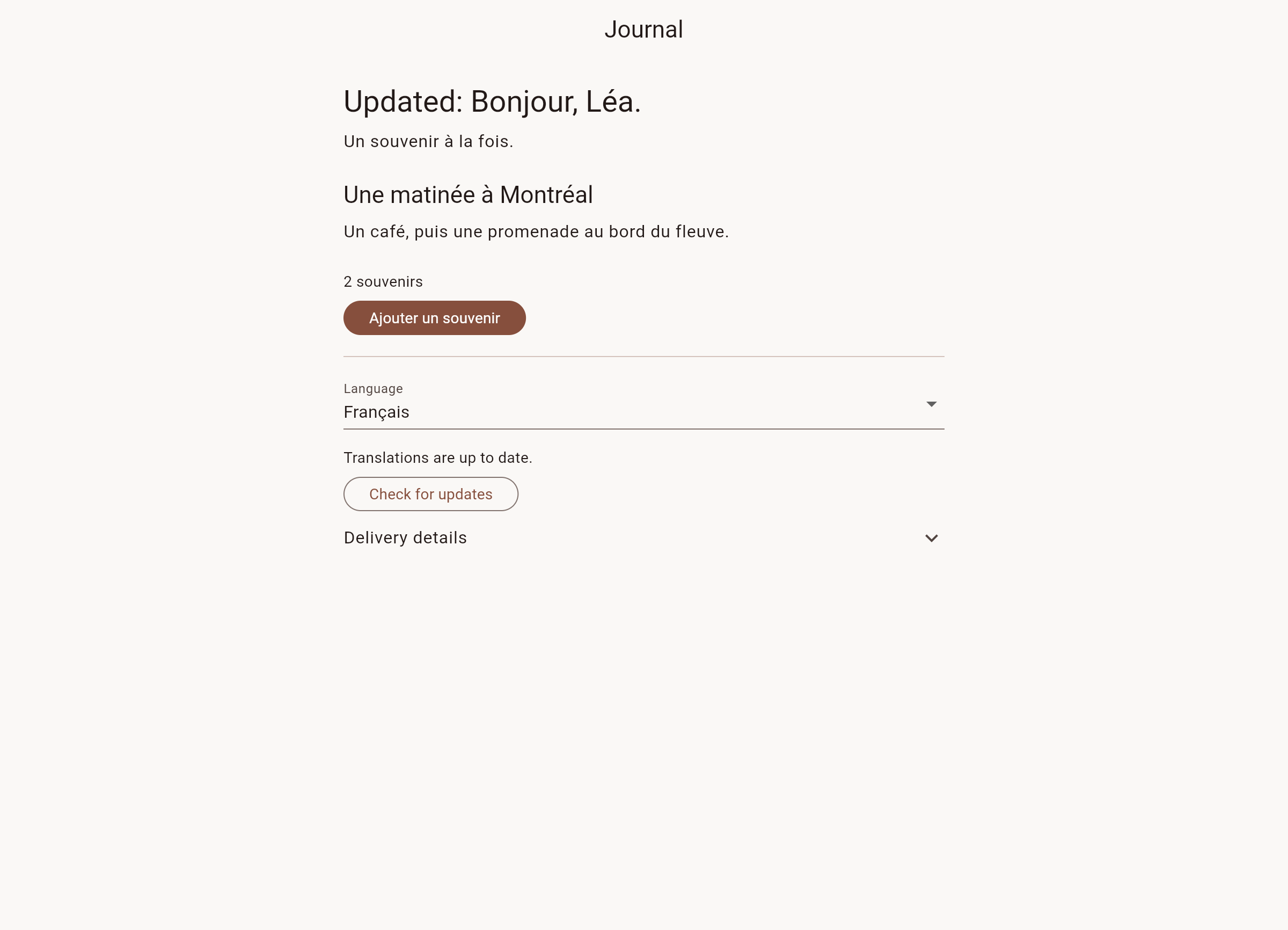
The journal demo shows delivered French wording and Arabic right-to-left layout. These captures use a local delivery service.


View the Flutter web screenshot.
Configuration reference
| Setting | Default or requirement |
|---|---|
projectId |
Required cloud project UUID |
schemaHash |
Required generated translocaleSchemaHash |
token |
Required scoped tld_ delivery credential |
channel |
production; must match the credential |
apiBaseUrl |
https://translocale.io |
appVersion |
Detected from the installed app; override with a three-part version such as 1.2.3 |
appVersionProvider |
Optional custom asynchronous version lookup; an explicit appVersion wins |
persistentCache |
true; an explicit cache takes precedence |
cache |
Optional DeliveryCache implementation |
pollInterval |
Five minutes; allowed range is 30 seconds to one hour |
Wrapper automaticUpdates |
true; set to false and call delivery.check() for manual refresh |
Caching, refresh, and fallback
- Startup begins after the wrapper's first frame. Version lookup, cache reads and network requests do not delay bundled translations.
- The installed app version comes from
package_info_plus. Detection has a three-second deadline. SupplyappVersion: '1.2.3'to override it;appVersionProvidersupports tests and custom version sources. Versions must have three numeric components. Build numbers are not part of the release compatibility check. - Native platforms use private application-support storage through
path_provider. Cache entries are validated, written atomically, and contain no credentials. Storage failure permits network delivery; offline fallback uses valid cached or bundled wording. - Flutter web uses browser
localStorage, scoped by service origin, project, channel and schema. It validates cached releases before use and stores no credentials. Blocked or full storage keeps delivery working with network or bundled wording; a failed write preserves the previous entry. - Pass
cacheto use anotherDeliveryCache, orpersistentCache: falseto disable the default cache. An explicit cache takes precedence. - The wrapper pauses polling while inactive and refreshes on resume. Set
automaticUpdates: falseon the wrapper for manual-only checks throughdelivery.check(). - Setup errors use
state.errorvaluesapp_versionorconfiguration, retain bundled wording and permit a manual retry. Disposal cancels waiting for version detection; a late result cannot start delivery.
FlutterDelivery and the lower-level DeliveryClient implement DeliveryRuntime, so either works with the generated adapter. The underlying client retains its integrity checks, cache validation, server cooldowns, version bounds and compatible rollback behavior. See delivery behavior and formatting limits.
For offline web reloads, the app itself must be available offline and its version must resolve. package_info_plus reads version.json on web; make that file available offline or provide the current build's appVersion. Translation caching does not cache app assets or version metadata. Browser settings can clear stored translations; bundled wording remains the fallback.
Platform setup
For Android release builds, grant Internet access in android/app/src/main/AndroidManifest.xml:
<uses-permission android:name="android.permission.INTERNET" />
Production delivery uses HTTPS. Network entitlements, plugin setup and deployment targets remain the app's responsibility. The plugin dependencies currently require Flutter 3.38.1 or later, Dart 3.12 for this package, iOS 13+, macOS 10.15+, and Android SDK 24+. Check their linked requirements for Android build-tool versions.
Updating the integration and CI
Run these after changing localizations:
npx translocale flutter-setup --file release-schema.json --catalog app.arb --check
flutter analyze
flutter test
--check validates the existing adapter without generating files or making cloud requests. If it reports stale inputs, regenerate locally and review the changes before committing. Schema changes require a matching release and delivery credential for the new app build; keep older releases available for older builds.
Troubleshooting
| Symptom | What to check |
|---|---|
| Only bundled wording appears | Verify build settings, enabled delivery, published channel, exact locale/catalog name, schema and app-version range. |
state.error is configuration |
Check all four build settings and use a scoped delivery token. |
state.error is app_version |
Supply a valid appVersion or make platform version metadata available. |
| A new key does not appear | New generated methods require a new app build. OTA updates compatible wording. |
| Offline web reload fails | Cache the app assets and version metadata too; translation caching covers only translation data. |
| Setup refuses to overwrite | Inspect the existing manifest; remove only an adapter you intend to regenerate. |
| Credential creation was interrupted | Retry the same flutter-connect output path. If the one-time token was lost, revoke the reported credential ID and connect with a new output filename. |
| Updates stop after revocation or expiry | Distribute a replacement credential. Previously cached wording can remain usable. |
Cache validation rejects corrupt or incompatible updates and retains valid wording. Revoking access stops future fetches; it does not erase wording already downloaded to a device.
License
MIT. The hosted service remains proprietary.
Libraries
- translocale_flutter_runtime
- Flutter defaults for read-only translation delivery.