
wallpaper_setter
wallpaper_setter is a Flutter plugin that allows you to set wallpapers from a URL or asset on Android devices.
It uses the default Android system wallpaper picker UI to set wallpapers for:
- Home screen
- Lock screen
- Or both
Demo
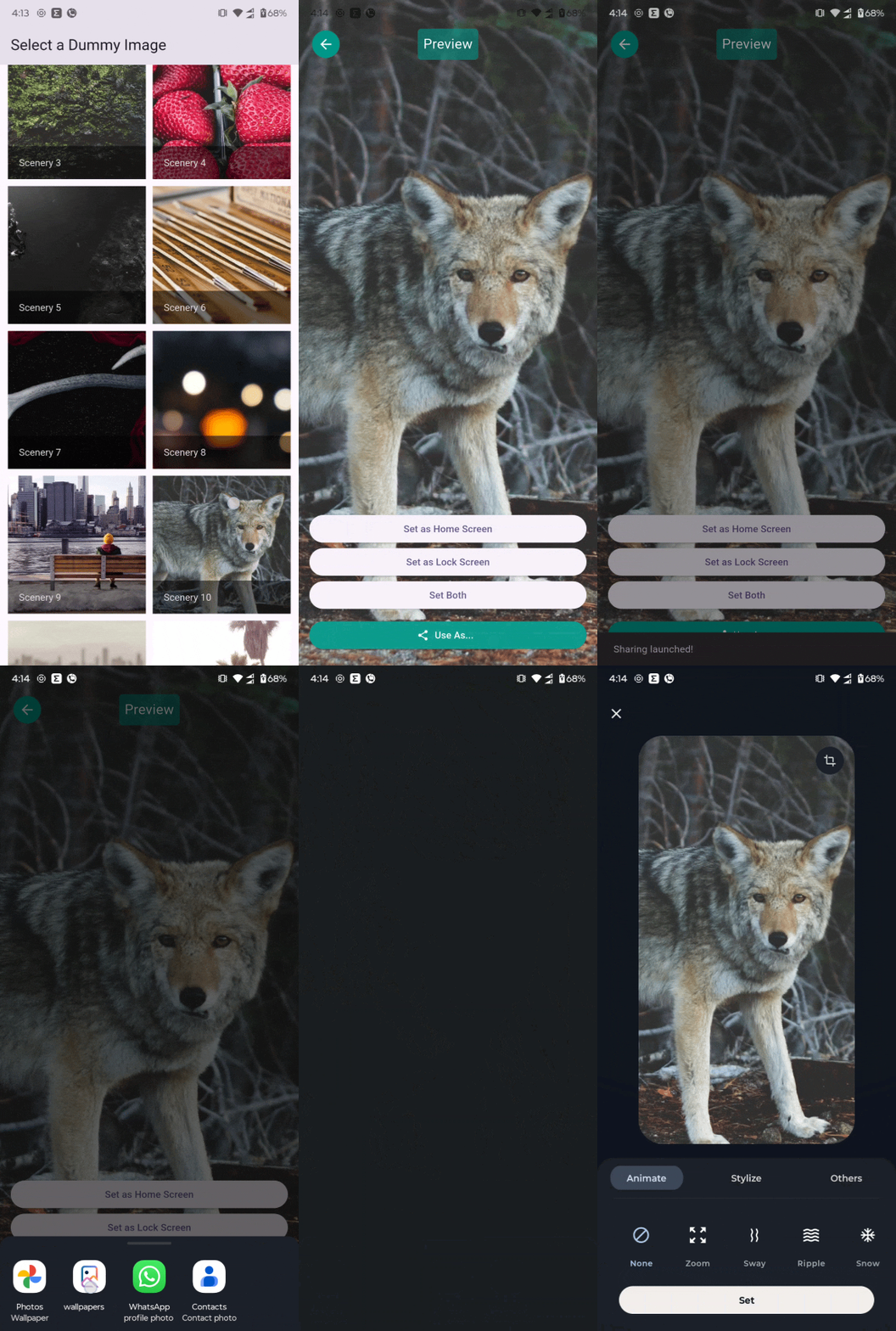
🚀 Getting Started
- For using System Wallpaper you will need to add file_paths.xml in xml folder android\app\src\main\res\xml\file_paths.xml where downloaded image will be stored. and Code is Here...
   <?xml version="1.0" encoding="utf-8"?>
<paths xmlns:android="http://schemas.android.com/apk/res/android">
    <cache-path
        name="cache"
        path="." />
    <external-path
        name="external_files"
        path="." />
    <external-files-path
        name="external_files"
        path="." />
    <files-path
        name="files"
        path="." />
</paths>
- include this permission in your manifest
  <uses-permission android:name="android.permission.SET_WALLPAPER"/>
  <uses-permission android:name="android.permission.READ_EXTERNAL_STORAGE"/>
  <uses-permission android:name="android.permission.READ_MEDIA_IMAGES" />
-
Inside of Android
<application ...old code <provider android:name="androidx.core.content.FileProvider" android:authorities="${applicationId}.fileprovider" android:exported="false" android:grantUriPermissions="true"> <meta-data android:name="android.support.FILE_PROVIDER_PATHS" android:resource="@xml/file_paths" /> </provider> ...old code -
also make sure you have internet connection on device.
Example
import 'dart:io';
import 'package:flutter/material.dart';
import 'package:walpaper_demo/home_screen.dart';
import 'package:walpaper_demo/preview_screen.dart';
import 'package:photo_view/photo_view.dart';
import 'package:wallpaper_setter/wallpaper_setter.dart';

void main() {
  runApp(const MyApp());
}

class MyApp extends StatelessWidget {
  const MyApp({super.key});

  @override
  Widget build(BuildContext context) {
    return MaterialApp(
      title: 'Wallpaper App',
      theme: ThemeData(useMaterial3: true, colorSchemeSeed: Colors.deepPurple),
      home: const HomeScreen(),
      debugShowCheckedModeBanner: false,
    );
  }
}


class HomeScreen extends StatelessWidget {
  const HomeScreen({super.key});

  final List<Map<String, String>> dummyImageList = const [
    {
      "id": "1",
      "title": "Nature",
      "url": "https://picsum.photos/seed/1/600/800",
    },
    {"id": "2",
    "title": "City",
    "url": "https://picsum.photos/seed/2/600/800",
    },
    {
      "id": "3",
      "title": "Mountains",
      "url": "https://picsum.photos/seed/3/600/800",
    },
  ];

  @override
  Widget build(BuildContext context) {
    return Scaffold(
      appBar: AppBar(title: const Text("Select a Dummy Image")),
      body: GridView.builder(
        padding: const EdgeInsets.all(12),
        gridDelegate: const SliverGridDelegateWithFixedCrossAxisCount(
          crossAxisCount: 2, // Show 2 images per row
          crossAxisSpacing: 10,
          mainAxisSpacing: 10,
        ),
        itemCount: dummyImageList.length,
        itemBuilder: (context, index) {
          final item = dummyImageList[index];
          return GestureDetector(
            onTap: () {
              Navigator.push(
                context,
                MaterialPageRoute(
                  builder: (_) => PreviewScreen(imagePath: item['url']!),
                ),
              );
            },
            child: GridTile(
              footer: GridTileBar(
                backgroundColor: Colors.black54,
                title: Text(item['title']!),
              ),
              child: Image.network(item['url']!, fit: BoxFit.cover),
            ),
          );
        },
      ),
    );
  }
}

class PreviewScreen extends StatefulWidget {
  final String imagePath;

  const PreviewScreen({super.key, required this.imagePath});

  @override
  State<PreviewScreen> createState() => _PreviewScreenState();
}

class _PreviewScreenState extends State<PreviewScreen> {
  final GlobalKey previewContainer = GlobalKey();

  Future<void> _handleSetWallpaper(String target) async {
    final success = await WallpaperPlugin.setWallpaperFromRepaintBoundary(
      previewContainer,
      target,
    );
    _showSnack(success ? 'Wallpaper set!' : 'Failed to set wallpaper');
  }

  Future<void> _handleUseAs() async {
    final success = await WallpaperPlugin.useAsImageFromRepaintBoundary(
      previewContainer,
    );
    _showSnack(success ? 'Sharing launched!' : 'Use As failed');
  }

  void _showSnack(String message) {
    ScaffoldMessenger.of(
      context,
    ).showSnackBar(SnackBar(content: Text(message)));
  }

  @override
  Widget build(BuildContext context) {
    return Scaffold(
      appBar: AppBar(title: const Text("Preview")),
      body: Stack(
        children: [
          RepaintBoundary(
            key: previewContainer,
            child: PhotoView(
              imageProvider:
                  widget.imagePath.startsWith("http")
                      ? NetworkImage(widget.imagePath)
                      : FileImage(File(widget.imagePath)),
              backgroundDecoration: const BoxDecoration(color: Colors.black),
            ),
          ),
          Positioned(
            bottom: 20,
            left: 16,
            right: 16,
            child: Column(
              crossAxisAlignment: CrossAxisAlignment.stretch,
              children: [
                ElevatedButton(
                  onPressed: () => _handleSetWallpaper("home"),
                  child: const Text("Set as Home Screen"),
                ),
                ElevatedButton(
                  onPressed: () => _handleSetWallpaper("lock"),
                  child: const Text("Set as Lock Screen"),
                ),
                ElevatedButton(
                  onPressed: () => _handleSetWallpaper("both"),
                  child: const Text("Set Both"),
                ),
                const SizedBox(height: 10),
                ElevatedButton.icon(
                  onPressed: () => _handleUseAs(),
                  icon: const Icon(Icons.share),
                  label: const Text("Use As..."),
                  style: ElevatedButton.styleFrom(
                    backgroundColor: Colors.teal,
                    foregroundColor: Colors.white,
                  ),
                ),
              ],
            ),
          ),
        ],
      ),
    );
  }
}
Getting Started
This project is a starting point for a Flutter plug-in package, a specialized package that includes platform-specific implementation code for Android.
For help getting started with Flutter, view our online documentation, which offers tutorials, samples, guidance on mobile development, and a full API reference.