
TransLocale for Flutter
Translate your Flutter ARB files with TransLocale and compile them with flutter gen-l10n. Review the estimated usage, submit a capped translation job, and download the revision you want to ship.
Flutter guide · API reference · Changelog
- Keep Flutter's generated localization classes and typed placeholders.
- Preview merges before updating existing catalogs.
- Generate an adapter for optional over-the-air (OTA) updates.
Quick start · Sync existing catalogs · Troubleshooting
MIT-licensed developer tooling for the hosted TransLocale service. Upgrading from 0.0.1 requires replacing the old OTA runtime; see the migration notes.
Which Flutter package do I need?
| Goal | Package |
|---|---|
| Translate ARB files, download reviewed wording, and generate Dart localizations | translocale_flutter (this package, a dev dependency) |
| Update wording in an installed Flutter app | translocale_flutter_runtime, plus this package for generation |
| Supply your own app version, storage, and lifecycle integration | translocale_delivery |
Installing this developer tool alone does not add over-the-air (OTA) updates to your app. Your generated ARB translations ship with the next app build.
Create your cloud project
Open Projects, choose New project, and select the source and target languages used by your app. Find the project UUID under Project settings → Credentials; use it wherever the commands below say YOUR_PROJECT_UUID. The UUID identifies the project and is not an access token.
The illustrated first-project guide walks through account setup, catalog imports, adding keys, translation review, and releases. Use the message format for your framework when importing files. Source and target files must share the same catalog identity. You can write or import translations yourself; hosted AI translation is optional and requires an explicit character cap.
Use Flutter ARB for dashboard imports and keep one catalog identity, such as app.arb, across source and target languages. The local ARB filenames can still be app_en.arb, app_fr.arb, and app_ar.arb.
For CI, open Project settings → Credentials, enter a name, choose the required access and an expiry, then select Create credential. Copy the token while it is shown and save it as TRANSLOCALE_TOKEN in your CI secret store. Read access is enough for inspection; editing and translation need their corresponding permissions. Keep this authoring token out of app bundles and public environment variables.

The Dart login command below opens browser consent and avoids copying a token for local work. Bundled translations and local checks do not need cloud access.
Quick start
1. Install and prepare Flutter
Add the tooling to your Flutter app:
flutter pub add --dev translocale_flutter:^0.3.1
Requires Dart 3.12+ and a macOS or Linux development/CI host with the POSIX link utility on PATH. macOS is the verified tooling platform; Windows file publication and credential storage are not supported. This host requirement does not limit the platforms your Flutter app can target. Keep credentials in developer tooling or CI.
The commands read your existing pubspec.yaml and l10n.yaml. Configure Flutter localization first, including flutter_localizations, flutter: generate: true, and a source ARB file. The runtime README includes a minimal English/French/Arabic starter. Run the commands below from your Flutter app directory.
Only translate submits a paid translation job, and it requires an explicit character cap. Discovery, initialization, planning, and local checks do not start translation jobs.
2. Connect a project
From the Flutter application directory:
dart run translocale_flutter:translocale discover
dart run translocale_flutter:translocale init \
  --api https://translocale.io \
  --project YOUR_PROJECT_UUID \
  --locales en,fr,ar
Create a project at translocale.io first. Replace YOUR_PROJECT_UUID with its project ID. In later commands, replace JOB_UUID with the returned translation job ID and revision 1 with the saved revision for that language. Use your actual cloud origin and project ID. Include the source language in --locales. The cloud project's source and target languages must match. init derives the source file and target filename pattern, then creates translocale.flutter.json. Existing configuration and catalogs are preserved. Use --source when the source ARB has neither @@locale nor an unambiguous locale suffix. Regional filenames use underscores, such as app_fr_CA.arb; configuration accepts fr-CA.
Connect the configured project from Dart:
dart run translocale_flutter:translocale login --scope translate
The command opens a browser for project consent and waits up to five minutes for its loopback callback. Use --no-browser to open the printed URL yourself. Permission defaults to read; choose translate for translation jobs or write for editing. The exchange uses a one-time code bound to this command's PKCE verifier. No credential is printed.
CI can supply TRANSLOCALE_TOKEN through its secret store. A nonempty environment token takes precedence for cloud commands. You can also use a connection created by the main CLI.
Add this line to the consuming app's .gitignore:
.translocale/flutter-requests/
Saved requests include source wording and the approved spending cap. They contain no credential. Keep them until uncertain submissions have been resolved; retain them longer only if your workflow needs that history.
3. Plan and translate
dart run translocale_flutter:translocale plan
dart run translocale_flutter:translocale translate --max-characters 2000 --wait
dart run translocale_flutter:translocale status --job JOB_UUID
dart run translocale_flutter:translocale usage
Review the plan before translating. Character usage counts source characters per target language. The cloud service enforces available allowance and the cap. --base-job JOB_UUID --reuse-approved enables approved reuse; --allow-removed-keys explicitly acknowledges removed source keys.
4. Download and compile
dart run translocale_flutter:translocale pull \
  --job JOB_UUID --locale fr --revision 1
dart run translocale_flutter:translocale pull \
  --job JOB_UUID --locale ar --revision 1
dart run translocale_flutter:translocale check
pull downloads exactly the requested revision. Revision 0 is the original job output and is the default. Choose a reviewed revision explicitly to ship it. The command compares the job's source with your local ARB, checks locale and metadata, and verifies that the export matches its pinned review. Publication fails if the output already exists.
For an existing catalog, use --out review/app_fr.arb to download a candidate, review its diff, and merge it yourself, or use the sync workflow below. Source and configured targets must live in the ARB directory used by l10n.yaml.
check compares message keys and metadata locally, then runs your installed flutter gen-l10n. It writes the generator's Dart output and makes no TransLocale cloud request. Every declared placeholder must have an explicit String, int, double, num, or DateTime type. The check also rejects generated Object, dynamic, or nullable parameters, including placeholders missing from the source metadata. Structural validation is not a complete ICU parser; the cloud plan and Flutter compiler provide their respective syntax checks. Run your app's tests after generation.
5. Use the translations in your app
Keep Flutter's localization delegates and supported languages on MaterialApp:
MaterialApp(
  localizationsDelegates: AppLocalizations.localizationsDelegates,
  supportedLocales: AppLocalizations.supportedLocales,
  home: const HomePage(),
)
Import AppLocalizations from the output path in your l10n.yaml. In a widget below MaterialApp, read your generated messages as usual:
// For an ARB key named welcome with a String placeholder named name.
Text(AppLocalizations.of(context)!.welcome('Sam'))
Run flutter run and select one of your bundled languages on the device. You can also set locale: const Locale('fr') on MaterialApp to try French. Downloaded ARB changes take effect after generating localizations and rebuilding the app.
Retry or cancel a translation job
Before submitting, translate saves the exact request and prints its path to stderr. If the connection is interrupted, retry that file:
dart run translocale_flutter:translocale translate \
  --request .translocale/flutter-requests/REQUEST_UUID.json --wait
A saved retry retains the original source, cap, project version, reuse settings, and idempotency key. It does not use later local edits. Do not edit the saved request. New translate invocations without --request create new requests. Waiting stops after two minutes without cancelling the job; use status to follow it. Failed or cancelled translation results exit with status 1.
To cancel explicitly:
dart run translocale_flutter:translocale cancel --job JOB_UUID
Sync existing catalogs
Use sync --job JOB_UUID --revision 1 --locale fr. It previews a three-way merge; repeat the options with --apply PLAN_HASH to apply the reviewed result. Use --keep-local ID or --take-incoming ID for conflicts, then preview again. Unresolved previews exit with status 2.
Configured pulls record a baseline for future syncs. Existing catalogs can use --base-job PREVIOUS_JOB --base-revision 1; candidate downloads preserve the baseline. Sync sends the source and proposed target to the configured service for ICU validation, without starting translation. It rejects stale previews and retains recovery copies under .translocale/sync-backups/. A crash may require restoring both catalogs and their baseline before removing .translocale/sync.lock.
Sync is available from version 0.2.0.
Compatibility and limits
- One source ARB file per project, with no fixed target-language count limit; 1 to 200 messages and at most 100,000 UTF-8 bytes per catalog.
- Metadata, placeholder declarations, plurals, selects, dates, numbers, and RTL are exercised by the Flutter consumer fixture.
use-escaping: trueimports are currently rejected. The main CLI's separateflutter-exportconversion supports strict-mode output; keep the original service ARB when using that workflow.- Catalog paths must stay within the project and cannot follow symlinks. This tool assumes a trusted developer checkout; it is not a filesystem sandbox against concurrent hostile processes.
- Custom localization libraries, source-code extraction, and Windows file publication and credential storage remain to implement.
Use --help after a command to list its options. Successful commands print JSON, except help. Errors print JSON to stderr and exit with status 1. The usage command returns an object whose usage field is null when no usage period is active.
CI and troubleshooting
Run the same local compiler check in CI:
dart run translocale_flutter:translocale check
flutter analyze
flutter test
Commit translocale.flutter.json and your source/target catalogs. Follow your app's policy for generated Dart files. Keep TRANSLOCALE_TOKEN in a secret store, and keep request recovery files until uncertain submissions are resolved.
| Problem | What to do |
|---|---|
init cannot locate the template |
Check l10n.yaml, the ARB directory, and the template filename. Use discover to inspect what was found. |
| A language is missing | Include the source in --locales, match cloud targets, and pull each target before running check. |
pull refuses to write |
The destination exists or source changed. Download a candidate or preview sync; do not delete local corrections just to retry. |
translate --wait times out |
Check status --job JOB_UUID. Waiting does not cancel a job. |
| A submission was interrupted | Retry the saved --request file; starting a new request can create another job. |
sync exits with status 2 |
Resolve conflicts with --keep-local or --take-incoming, then request a new preview hash. |
| Strict escaping is rejected | Keep original service ARB sources and use the main CLI's flutter-export conversion for Flutter build inputs. |
| Windows file or credential operations fail | These operations currently support macOS/Linux; use a supported development or CI host. |
Credential storage and recovery
To revoke this project's saved connection:
dart run translocale_flutter:translocale logout
Logout uses the saved credential, ignoring CI overrides, and preserves other project connections. Failed revocation keeps the local record for retry. A newer connection saved during revocation is retained. Both auth commands accept --api ORIGIN --project UUID to work outside an initialized app. They do not require the Node CLI. If local storage fails after a successful exchange, login attempts to revoke the newly issued credential and reports the outcome.
The Dart commands share $HOME/.config/translocale/credentials.json with the other TransLocale tools, or use TRANSLOCALE_CONFIG_DIR. Only the exact origin and project entry is selected. The credential file has mode 0600 inside a 0700 directory. Current Dart and JavaScript builds coordinate writes using .credentials.lock. A busy store fails without replacing another connection; after an interrupted writer, verify it has stopped before removing a stale lock.
Generate an OTA adapter
For combined generation and an embedded schema hash, use Flutter OTA setup. Existing users can follow the OTA migration guide. The lower-level command below generates the adapter alone.
ota-adapter generates typed overrides from Flutter's existing gen-l10n output. It preserves method signatures and number/date formatting, uses translocale_delivery for updates, and falls back to generated wording. It runs offline and never starts translations.
flutter gen-l10n
dart run translocale_flutter:translocale ota-adapter --catalog app.arb
The command reads l10n.yaml for the generated paths and class name. It takes the source language from the template ARB's @@locale or filename and writes translocale_localizations.dart beside the generated base. --catalog must match the cloud catalog identity.
Use --base, --reference, --out, and --class to override discovery; fully explicit paths still work without Flutter project configuration. --source supplies a missing source language. Regional sources select the matching subclass in their language file, including inherited methods. When supplying an explicit reference file, add --source en-GB or --reference-class AppLocalizationsEnGb to select a regional class. Add --check to verify an existing adapter without writing. Generation refuses to overwrite output.
This generates the adapter only; schema and delivery configuration remain separate. See Flutter runtime integration for native cache/version defaults and the generated wrapper, or the Dart delivery client for manual integration and formatting limits.
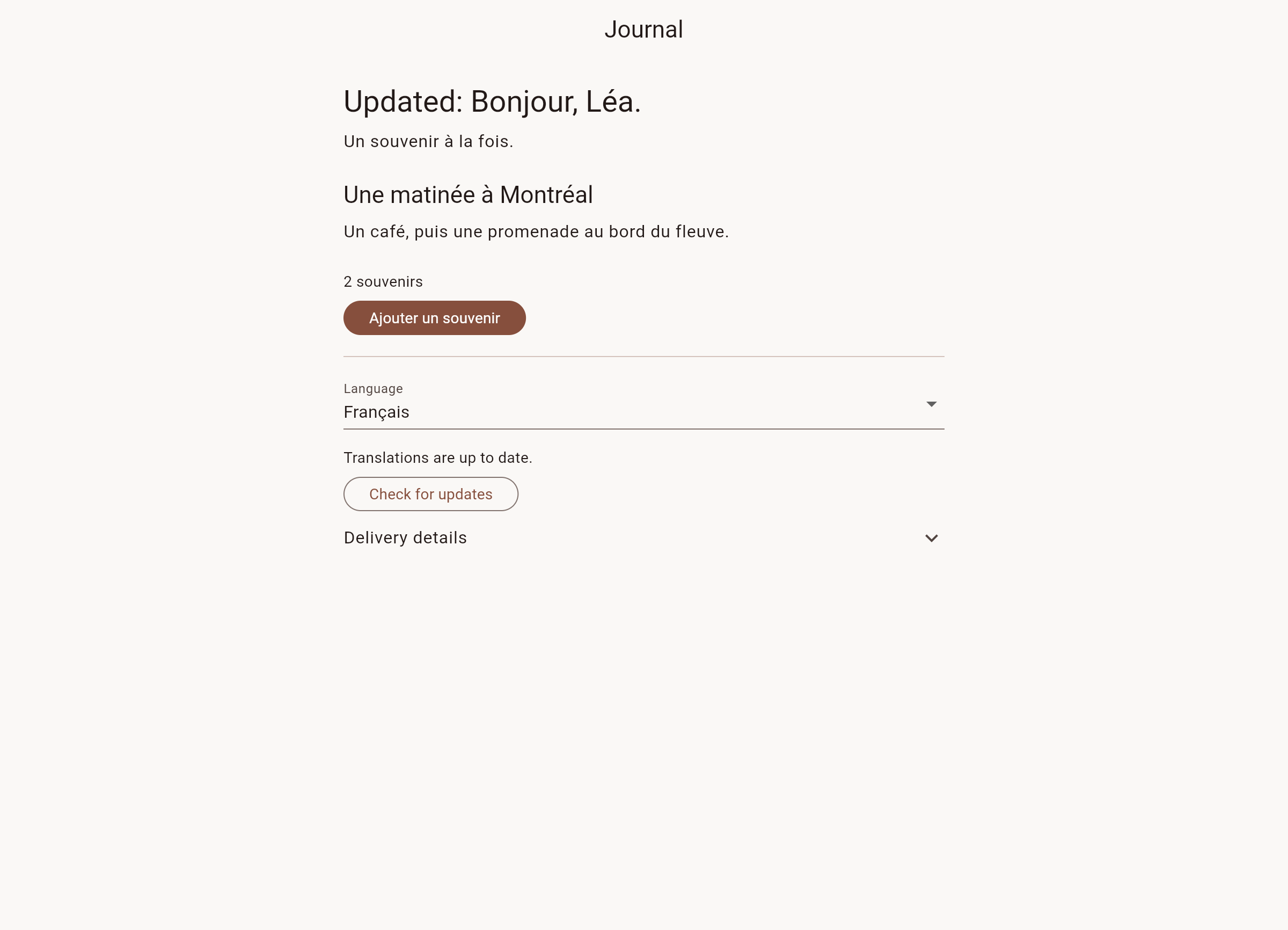
See the Flutter demo
The journal demo uses the runtime packages to show delivered French wording and Arabic right-to-left layout. These captures use a local delivery service.


View the Flutter web screenshot.
Contributing and verification
From the TransLocale repository, run npm run test:flutter:package with the local service running on port 5173 and Flutter on PATH. The verifier archives the package, installs the extracted copy in an isolated consumer, and tests against actual local D1, R2, and Workflows. It exercises native Dart login through the consent endpoint and loopback exchange, denied consent, shared credentials, project-specific logout, and revocation by the Node CLI. The harness uses --no-browser and drives the local consent endpoint; it does not test the operating system's browser launcher.
It also seeds fixture catalogs, approves revisions, and submits a job whose wording is fully reused, so no AI inference is needed. Generation, widget behavior, and a release web build follow. Archive hashes, SDK versions, and results are recorded under .wrangler/flutter-package/.
This verification covers local cloud bindings and the installed package. Hosted browser authorization and production delivery have separate checks; a passing local test does not establish either.
License
MIT. The license covers this package. Cloud access requires a TransLocale account and follows the service terms.
Typed calls with OTA
Keep using AppLocalizations getters and methods. The generated OTA adapter preserves their signatures and formatting. Declare precise source ARB types before running check or OTA setup; weak or unsupported generated parameter types fail before an adapter is written.
For new projects, use-named-parameters: true in l10n.yaml makes argument names visible at call sites. Regenerating an existing project with this setting changes its method signatures, so update callers together. Both positional and required named parameters are supported by the OTA adapter.