
Image class
A widget that displays an image.
Several constructors are provided for the various ways that an image can be specified:
- Image.new, for obtaining an image from an ImageProvider.
- Image.asset, for obtaining an image from an
AssetBundleusing a key. - Image.network, for obtaining an image from a URL.
- Image.file, for obtaining an image from a File.
- Image.memory, for obtaining an image from a Uint8List.
The following image formats are supported:
To automatically perform pixel-density-aware asset resolution, specify the
image using an AssetImage and make sure that a MaterialApp, WidgetsApp,
or MediaQuery widget exists above the Image widget in the widget tree.
The image is painted using paintImage, which describes the meanings of the
various fields on this class in more detail.
{@tool snippet} The default constructor can be used with any ImageProvider, such as a NetworkImage, to display an image from the internet.
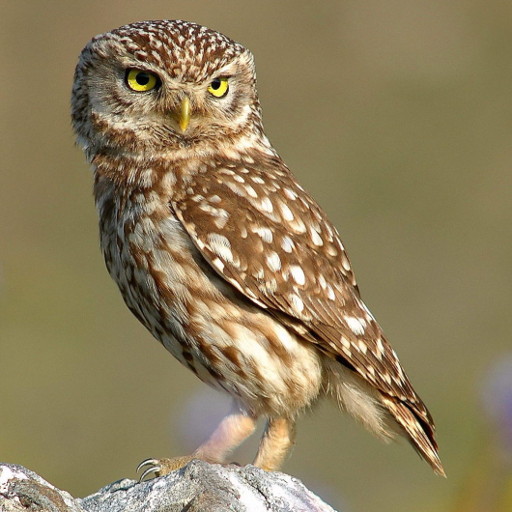
const Image(
  image: NetworkImage('https://flutter.github.io/assets-for-api-docs/assets/widgets/owl.jpg'),
)
{@end-tool}
{@tool snippet} The Image Widget also provides several constructors to display different types of images for convenience. In this example, use the Image.network constructor to display an image from the internet.
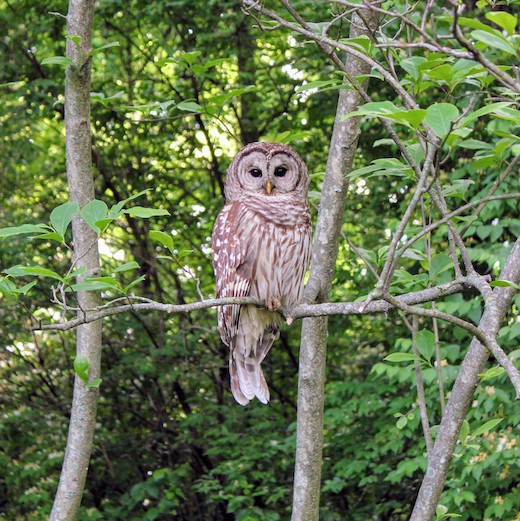
Image.network('https://flutter.github.io/assets-for-api-docs/assets/widgets/owl-2.jpg')
{@end-tool}
Memory usage
The image is stored in memory in uncompressed form (so that it can be rendered). Large images will use a lot of memory: a 4K image (3840×2160) will use over 30MB of RAM (assuming 32 bits per pixel).
This problem is exacerbated by the images being cached in the ImageCache,
so large images can use memory for even longer than they are displayed.
The Image.asset, Image.network, Image.file, and Image.memory
constructors allow a custom decode size to be specified through cacheWidth
and cacheHeight parameters. The engine will then decode and store the
image at the specified size, instead of the image's natural size.
This can significantly reduce the memory usage. For example, a 4K image that
will be rendered at only 384×216 pixels (one-tenth the horizontal and
vertical dimensions) would only use 330KB if those dimensions are specified
using the cacheWidth and cacheHeight parameters, a 100-fold reduction in
memory usage.
Web considerations
In the case where a network image is used on the Web platform, the
cacheWidth and cacheHeight parameters are only supported when the
application is running with the CanvasKit renderer. When the application is
using the HTML renderer, the web engine delegates image decoding of network
images to the Web, which does not support custom decode sizes.
Custom image providers
{@tool dartpad}
In this example, a variant of NetworkImage is created that passes all the
ImageConfiguration information (locale, platform, size, etc) to the server
using query arguments in the image URL.
** See code in examples/api/lib/painting/image_provider/image_provider.0.dart ** {@end-tool}
See also:
- Icon, which shows an image from a font.
Ink.image, which is the preferred way to show an image in a material application (especially if the image is in aMaterialand will have anInkWellon top of it).- Image, the class in the
dart:uilibrary. - Cookbook: Display images from the internet
- Cookbook: Work with cached images
- Cookbook: Fade in images with a placeholder
Constructors
- Image({Key? key, required ImageProvider image, String? semanticLabel, bool excludeFromSemantics = false, double? width, double? height, Color? color, BlendMode? colorBlendMode, BoxFit? fit, AlignmentGeometry alignment = Alignment.center, ImageRepeat repeat = ImageRepeat.noRepeat, Rect? centerSlice, bool matchTextDirection = false, bool gaplessPlayback = false, bool isAntiAlias = false, FilterQuality filterQuality = FilterQuality.low})
-
Creates a widget that displays an image.
const
- Image.asset(String name, {Key? key, String? semanticLabel, bool excludeFromSemantics = false, double? scale, double? width, double? height, Color? color, BlendMode? colorBlendMode, BoxFit? fit, AlignmentGeometry alignment = Alignment.center, ImageRepeat repeat = ImageRepeat.noRepeat, Rect? centerSlice, bool matchTextDirection = false, bool gaplessPlayback = false, bool isAntiAlias = false, String? package, FilterQuality filterQuality = FilterQuality.low, int? cacheWidth, int? cacheHeight})
-
Creates a widget that displays an
ImageStreamobtained from an asset bundle. The key for the image is given by thenameargument. - Image.file(String file, {Key? key, double scale = 1.0, String? semanticLabel, bool excludeFromSemantics = false, double? width, double? height, Color? color, BlendMode? colorBlendMode, BoxFit? fit, AlignmentGeometry alignment = Alignment.center, ImageRepeat repeat = ImageRepeat.noRepeat, Rect? centerSlice, bool matchTextDirection = false, bool gaplessPlayback = false, bool isAntiAlias = false, FilterQuality filterQuality = FilterQuality.low, int? cacheWidth, int? cacheHeight})
-
Creates a widget that displays an
ImageStreamobtained from a File. - Image.memory(Uint8List bytes, {Key? key, double scale = 1.0, String? semanticLabel, bool excludeFromSemantics = false, double? width, double? height, Color? color, BlendMode? colorBlendMode, BoxFit? fit, AlignmentGeometry alignment = Alignment.center, ImageRepeat repeat = ImageRepeat.noRepeat, Rect? centerSlice, bool matchTextDirection = false, bool gaplessPlayback = false, bool isAntiAlias = false, FilterQuality filterQuality = FilterQuality.low, int? cacheWidth, int? cacheHeight})
-
Creates a widget that displays an
ImageStreamobtained from a Uint8List. -
Image.network(String src, {Key? key, double scale = 1.0, String? semanticLabel, bool excludeFromSemantics = false, double? width, double? height, Color? color, BlendMode? colorBlendMode, BoxFit? fit, AlignmentGeometry alignment = Alignment.center, ImageRepeat repeat = ImageRepeat.noRepeat, Rect? centerSlice, bool matchTextDirection = false, bool gaplessPlayback = false, FilterQuality filterQuality = FilterQuality.low, bool isAntiAlias = false, Map<
String, String> ? headers, int? cacheWidth, int? cacheHeight}) -
Creates a widget that displays an
ImageStreamobtained from the network.
Properties
- alignment → AlignmentGeometry
-
How to align the image within its bounds.
final
- centerSlice → Rect?
-
The center slice for a nine-patch image.
final
- color → Color?
-
If non-null, this color is blended with each image pixel using colorBlendMode.
final
- colorBlendMode → BlendMode?
-
Used to combine color with this image.
final
- excludeFromSemantics → bool
-
Whether to exclude this image from semantics.
final
- filterQuality → FilterQuality
-
The rendering quality of the image.
final
- fit → BoxFit?
-
How to inscribe the image into the space allocated during layout.
final
- gaplessPlayback → bool
-
Whether to continue showing the old image (true), or briefly show nothing
(false), when the image provider changes. The default value is false.
final
- hashCode → int
-
The hash code for this object.
no setterinherited
- height → double?
-
If non-null, require the image to have this height (in logical pixels).
final
- image → ImageProvider
-
The image to display.
final
- isAntiAlias → bool
-
Whether to paint the image with anti-aliasing.
final
- key → Key?
-
finalinherited
- matchTextDirection → bool
-
Whether to paint the image in the direction of the TextDirection.
final
- repeat → ImageRepeat
-
How to paint any portions of the layout bounds not covered by the image.
final
- runtimeType → Type
-
A representation of the runtime type of the object.
no setterinherited
- semanticLabel → String?
-
A Semantic description of the image.
final
- width → double?
-
If non-null, require the image to have this width (in logical pixels).
final
Methods
-
createRenderObject(
) → RenderObject< Widget> -
override
-
noSuchMethod(
Invocation invocation) → dynamic -
Invoked when a nonexistent method or property is accessed.
inherited
-
toString(
) → String -
A string representation of this object.
inherited
Operators
-
operator ==(
Object other) → bool -
The equality operator.
inherited