

Description
Mange the number, type, how, and where touch pointers should interact with your widgets.
How can things go wrong?!
Suppose you have this setup where the number in between may refer to some non-negative quantity you need.
class MyApp extends StatefulWidget {
  const MyApp({super.key});

  @override
  State<MyApp> createState() => _MyAppState();
}

class _MyAppState extends State<MyApp> {
  int _n = 0;

  @override
  Widget build(BuildContext context) => Row(
    mainAxisAlignment: MainAxisAlignment.center,
    children: [
      ElevatedButton(
        onPressed: _n <= 1 ? null : () => setState(() => _n = _n - 2),
        child: const Text("-2"),
      ),
      ElevatedButton(
        onPressed: _n <= 0 ? null : () => setState(() => --_n),
        child: const Text("-1"),
      ),
      Text(_n.toString()),
      ElevatedButton(
        onPressed: () => setState(() => ++_n),
        child: const Text("+1"),
      ),
    ],
  );
}
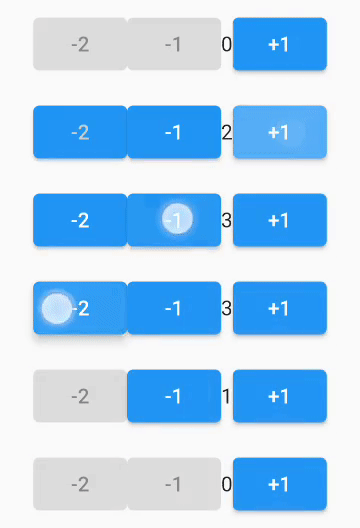
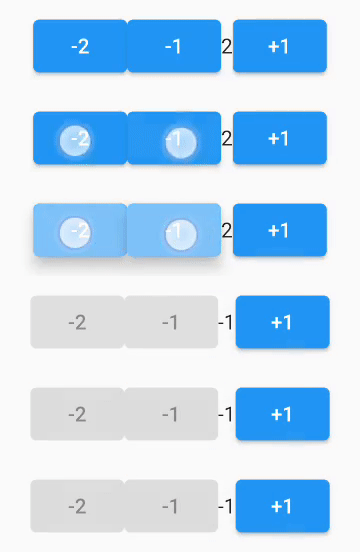
Then the user do THIS:
-
This leaves you with unwanted negative value!!
-
Obviously, you can solve this situation with checking before altering the value, but this example to show you a use case.
The solution
The easiest solution is to use this package.
- just wrap your two buttons with
PointerMangerWidget.withAlland addPointerGroupHandleras a parent to theRow.
class MyApp extends StatefulWidget {
  const MyApp({super.key});

  @override
  State<MyApp> createState() => _MyAppState();
}

class _MyAppState extends State<MyApp> {
  int _n = 0;

  @override
  Widget build(BuildContext context) => PointerGroupHandler( // here
    groupTag: "no-negative", // this is a single group
    child: Row(
      mainAxisAlignment: MainAxisAlignment.center,
      children: [
        PointerMangerWidget.withAll( // here
          // groupTag: "no-negative", // you can specify the parent group tag.
          child: ElevatedButton(
            onPressed: _n <= 1 ? null : () => setState(() => _n = _n - 2),
            child: const Text("-2"),
          ),
        ),
        PointerMangerWidget.withAll( // here
          child: ElevatedButton(
            onPressed: _n <= 0 ? null : () => setState(() => --_n),
            child: const Text("-"),
          ),
        ),
        Text(_n.toString()),
        ElevatedButton(
          onPressed: () => setState(() => ++_n),
          child: const Text("+"),
        ),
      ],
    ),
  );
}
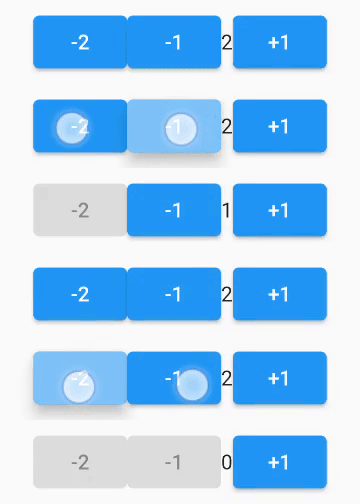
- Then, this is the result:
Additional information
-
You can use multiple groups.
-
You can use
PointerMangerWidget.thisOnlyto mange pointers on specific widget only regardless of any other widget. -
You can also specify the number of touch pointer allowed on specific widget with the
maxNumOfPointersparameter inPointerMangerWidget.withAllorPointerMangerWidget.thisOnlyconstructors. -
You can use
replaceCurrentWithNextparameter to choose what to do withoverflow pointers(This parameter is documented in the package). -
For a more detailed example you can see
/example/main.dart.