
hollow
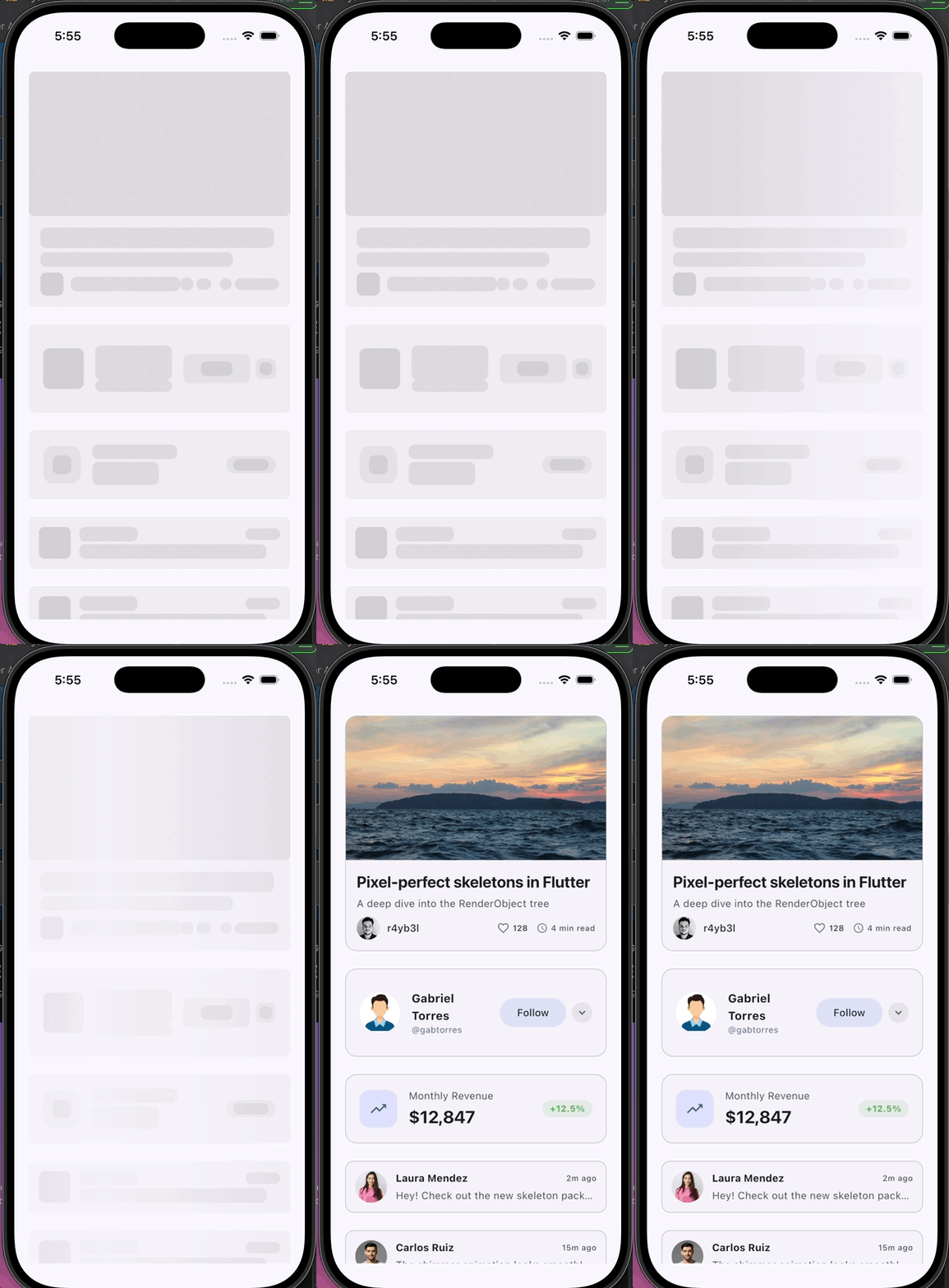
Pixel-perfect skeleton loading screens for Flutter — extracted from your real widget tree, no manual measurement required.
Features
- Pixel-perfect skeletons from your real
RenderObjecttree — no manual measurement - Globally synchronized shimmer animation
- One-command CLI:
dart run hollow:build - Dark mode support out of the box
- Adaptive bone widths (percentage-based) for different screen sizes
// main.dart
void main() {
  HollowRunner.run(
    app: MyApp(),
    setup: registerAllBones,
    fixtures: () => [
      Skeleton(name: 'blog-card', fixture: BlogCard(data: mockData), loading: false, child: SizedBox.shrink()),
    ],
  );
}
dart run hollow:build -d iPhone
Done. Every Skeleton shows a shimmer placeholder that matches your real layout exactly.
How it works
- Wrap your widget with
Skeletonand give it aname - Run
dart run hollow:build— hollow launches your app in capture mode, walks theRenderObjecttree of eachSkeleton, and snapshots every visible element's exact position and size - Import the generated registry once in
main()— everySkeletonauto-resolves its bones
hollow reads getBoundingRect() equivalents directly from Flutter's render tree — no layout simulation, no heuristics, just what the framework already computed.
Install
dependencies:
  hollow: ^0.1.0
flutter pub add hollow
Setup
1. Replace runApp with HollowRunner.run
HollowRunner.run is the single entry point for hollow. It runs your real app normally, and switches to a capture screen only when dart run hollow:build is active.
The fixtures list is where you declare every skeleton you want to capture — all screens, all widgets, in one place. hollow mounts them all simultaneously so the CLI captures everything in a single pass with no navigation required.
import 'package:hollow/hollow.dart';
// add this import after the first build:
import 'bones/bones_registry.dart';

void main() {
  HollowRunner.run(
    app: MyApp(),
    setup: registerAllBones,   // optional until bones_registry.dart exists
    fixtures: () => [
      Skeleton(
        name: 'blog-card',
        fixture: BlogCard(data: BlogPost.mock()),
        loading: false,
        child: SizedBox.shrink(),
      ),
      Skeleton(
        name: 'user-profile',
        fixture: ProfileCard(data: User.mock()),
        loading: false,
        child: SizedBox.shrink(),
      ),
    ],
  );
}
Then wrap each widget where you want the skeleton shown at runtime:
Skeleton(
  name: 'blog-card',
  loading: isLoading,
  child: BlogCard(data: post),
)
2. Run the CLI
flutter devices                       # find your device id
dart run hollow:build -d iPhone       # capture all fixtures
hollow launches your app in capture mode, mounts all fixtures at once, and writes bone files to lib/bones/.
  💀 hollow build
  ──────────────────────────────────────────────────
  output  lib/bones

  ✓  blog-card               18 bones
  ✓  user-profile            11 bones
  ✓  product-card            9 bones

  ──────────────────────────────────────────────────
  Writing files

  → blog-card.bones.json
  → user-profile.bones.json
  → product-card.bones.json
  → bones_registry.dart  (3 skeletons)

  💀 3 skeletons captured.
That's it. Every Skeleton(name: '...') automatically resolves its bones from the registry.
Props
| Prop | Type | Default | Description |
|---|---|---|---|
loading |
bool |
required | Show skeleton or real content |
child |
Widget |
required | Your real widget |
name |
String? |
— | Name for registry lookup and CLI capture |
fixture |
Widget? |
— | Mock content shown during CLI capture |
color |
Color? |
theme-aware | Base bone color |
highlightColor |
Color? |
theme-aware | Shimmer highlight color |
animate |
bool |
true |
Enable shimmer animation |
fallback |
Widget? |
— | Shown when loading but no bones available |
snapshotConfig |
SnapshotConfig? |
— | Control which render objects are captured |
CLI
flutter devices                                # list available devices
dart run hollow:build -d <device-id>           # capture (device required)
dart run hollow:build -d iPhone --out lib/bones        # custom output dir
dart run hollow:build -d emulator-5554 --timeout 8000  # longer idle wait
How bones are captured
hollow walks Flutter's RenderObject tree starting from the root of each Skeleton:
RenderParagraph→ text leaf → captured as a single boneRenderImage→ image leaf → captured as a single boneRenderDecoratedBoxwith a non-transparent background → container bone (rendered lighter so child bones stand out)RenderClipRRect,RenderPhysicalModel→ border radius extracted and applied to the bone
Bone positions use percentage widths (x, w as % of container) and absolute logical pixel heights (y, h), so skeletons adapt gracefully to different screen widths.
Shimmer
The shimmer gradient runs across all bones simultaneously in perfect sync — the same effect used by LinkedIn, Facebook, and most modern apps.
Dark mode is handled automatically via the active ThemeData.brightness.
Advanced
SnapshotConfig
Skeleton(
  name: 'nav-bar',
  loading: isLoading,
  snapshotConfig: SnapshotConfig(
    excludeTypes: [MyIconWidget],
  ),
  child: NavBar(),
)
Manual registration
You can register bones programmatically without the CLI — useful for testing or custom build pipelines:
HollowRegistry.register({
  'my-card': SkeletonResult(
    name: 'my-card',
    width: 375,
    height: 200,
    bones: [
      Bone(x: 0, y: 0, w: 100, h: 200, r: 12, isContainer: true),
      Bone(x: 4, y: 16, w: 92, h: 14, r: 4),
      Bone(x: 4, y: 38, w: 60, h: 12, r: 4),
    ],
  ),
});
Limitations
- Widgets painted via
CustomPaint/ rawCanvascalls are captured as their bounding box only — internal draw calls can't be introspected - Platform views are not supported
- One breakpoint captured per build run (responsive support planned)
License
MIT